

Stimuler AI: English Fluency
- 247.00
- 4.7
- Installs
- 10.00M
- Price
- Free

Screenshots

Analysis by Reviewed
I find English Speaking App - Stimuler most useful when I want a low-pressure way to practise speaking, rather than another lesson that stays on the page. It is an education app from Stimuler, built around AI-supported speaking practice and feedback. That focus makes it appealing if you understand English reasonably well but hesitate when it is time to form an answer aloud. It is free to install, though some content or features may involve optional purchases, so I would check what is available to me before treating it as a completely free course.
What the free starting point is worth
I would approach the cost in two separate steps: installing the app costs nothing, while in-app purchases range from $0.99 to $79.99 per item. That is a broad spread, so the practical question is not simply whether Stimuler is free, but whether the free access gives you enough of the speaking routine to decide if it suits you. I would start there, explore the parts I can use without paying, and only consider a purchase if I know what it adds and expect to use it.
That approach is especially sensible for a speaking app because fit matters more than a long list of lessons. Some learners enjoy answering prompts aloud; others find they learn more from a live teacher or a carefully ordered textbook course. I would not pay just because I want to feel committed. First, I would test whether I can practise comfortably, understand the feedback, and return to the app without needing a burst of motivation each time.
Make each practice round count
A useful way to get value from short sessions is to focus on one improvement rather than trying to fix every part of an answer at once. If I stumble over a word, I can make clearer pronunciation the next attempt’s goal. If the words are understandable but the answer wanders, I can try giving the main point first. That small change turns AI-supported practice into a more deliberate exercise rather than a string of recordings that I complete and immediately forget.
I would also vary the same topic across attempts. For example, I might first answer naturally, then try again with a shorter response, and finally explain the same idea using different words. This is a practical way to check whether I can retrieve language flexibly rather than repeat one memorised version. It is particularly useful before a familiar situation such as introducing myself or explaining what I do, where sounding clear matters more than delivering a perfect speech.
Getting Acquainted with Stimuler
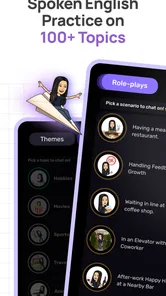
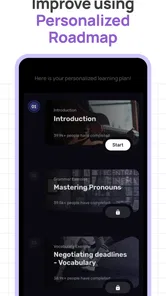
The first thing you'll notice about Stimuler is its user-friendly interface. It's intuitive, clean, and doesn't overwhelm you with too many options. As soon as you open the app, you're greeted with a variety of learning modules. Whether you're a beginner or someone looking to polish their English skills, there's something here for everyone.
Learning Modules Galore
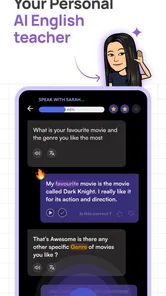
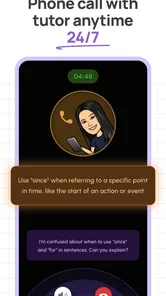
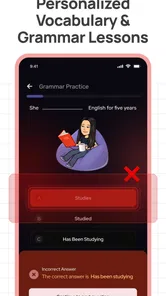
The app offers diverse modules including vocabulary building, conversation practice, and grammar exercises. The vocabulary section is a personal favorite. It uses flashcards that are not only effective but also visually appealing. I found myself spending more time flipping through the cards than I initially planned. The conversation practice is another standout feature. It's almost like having a real-life conversation partner who never gets tired of talking to you!
More From Our News Desk

 Instagram
Instagram’s Power Comes From Its Place in Your Phone
A close look at how Instagram turns Meta’s reach, recommendation systems and everyday camera habits into durable platform power—and what that costs users.

 Gmail
GmailGmail in a Busy Inbox: Who Benefits Most?
From first account to crowded workday, Gmail earns its place through dependable search and flexible sorting—but its best fit depends on how much inbox maintenance you can tolerate.

 Prime Video
Switching to Prime Video: What Changes in Your Viewing Routine
Prime Video can make a compelling second home for streaming, but switching means learning a different catalog, rental layer, and route from browsing to playback.

 Universal TV Remote Control
Universal TV Remote Control Works Best as a Reliable Backup
A phone remote earns its place through quick setup and reliable habits. Here is how to get more from Universal TV Remote Control—and where its limits show.

 Weather - By Xiaomi
Weather by Xiaomi Review: Clear at a Glance, Less Clear Up Close
Xiaomi’s weather app makes everyday forecasts quick to scan, but its calm surface can leave useful details and recovery paths harder to find than they should be.

 X
XX Under Pressure: Can It Recover When Posting Goes Wrong?
A resilience-focused review of X, examining setup, mistaken posts, interruptions, weak connections, and the gaps that matter when recovery needs to be dependable.
Latest News



For speaking practice, the key benefit is having room to try an answer without the social pressure of getting every word right in front of another person. I would use a prompt as a short warm-up, then repeat my answer with one clear goal in mind: make the main point easier to understand, or pronounce a difficult word more carefully. That is more useful than rushing through many prompts and treating completion as the same thing as improvement.
Engaging and Interactive Experience
What sets Stimuler apart from other language learning apps is its interactive approach. The app includes games and quizzes that are designed to test your knowledge and improve your skills. I particularly enjoyed the pronunciation challenges. They were a bit tricky at first, but with persistence, they became an enjoyable part of my daily routine.
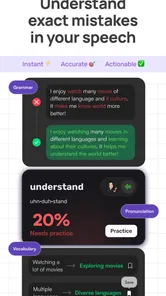
AI feedback can help me notice where to focus, but I would treat it as practice guidance, not as a complete substitute for a teacher or a conversation with a fluent speaker. Speaking well involves more than pronunciation: choosing the right tone, understanding a quick reply, and keeping a conversation moving all matter too. If your main aim is to prepare for a meeting or interview, I would practise answers to realistic questions and then say them again in my own words, rather than memorising a polished script.
Progress Tracking
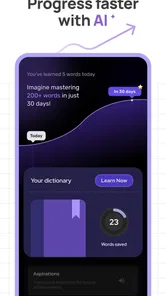
One of the features that I found incredibly useful is the progress tracker. It shows you how far you've come and what areas you need to work on. It's motivating to see your progress chart move upwards, and it gives you a sense of accomplishment every time you complete a module. Plus, the app sends you reminders to keep you on track, which is a nice touch.
A practical routine is to attach a brief speaking session to something you already do, such as a quiet moment before work or a commute when speaking aloud is comfortable. I would choose one topic, finish a response, and note a single point to revisit next time. This makes progress information actionable instead of merely encouraging: the next session has a specific focus, but the routine stays small enough to maintain.
A realistic daily use case
Imagine having ten quiet minutes before a video call with colleagues. I would use a conversation prompt to warm up, answer without writing a script first, then listen to the feedback and choose one thing to improve. After that, I would try the answer again in a more natural form. The value is not that this guarantees a flawless meeting; it is that I arrive having already moved my mouth, searched for the words, and noticed where I tend to hesitate.
For someone preparing for a job interview, the same routine can help rehearse common themes without turning answers into recited paragraphs. I would practise explaining a past project, describing a strength, or asking a question, then change the wording on a second attempt. If the app’s feedback draws attention to a pronunciation issue, I can work on that; if my answer sounds unclear because the ideas are out of order, I can reorganize it. The aim is usable speech, not a memorized performance.
How It Fits Alongside Other Ways to Learn
Compared with flashcard-only study, Stimuler gives speaking a more active role; compared with a human tutor, it offers a less socially demanding place to practise. Those approaches solve different problems. Flashcards can be better when I need to memorise vocabulary, while a tutor or language exchange is stronger for spontaneous back-and-forth and nuanced corrections. I would use Stimuler as a bridge between studying words and using them aloud, not as a replacement for every kind of learning.
There is also a useful difference between speaking to an app and speaking to a person. Practising alone can make it easier to repeat an answer and work through a difficult sound without embarrassment. But an app cannot reproduce every conversational surprise: another person may interrupt, misunderstand, speak quickly, or respond in an unexpected way. I would pair app practice with occasional real conversation if my goal involves social confidence, workplace discussion, or handling follow-up questions.
Against a conventional English course, Stimuler’s appeal is its speaking-first feel rather than a guarantee of a complete, orderly curriculum. A course may be a better starting point if I need grammar concepts explained step by step or want a planned progression from basic vocabulary. A pronunciation-only resource may be more focused if my vocabulary and conversational skills are already strong and I have one specific sound to refine. Stimuler makes most sense when the missing link is getting myself to speak regularly.
Where the practice can fall short
Speaking aloud is also the main practical constraint. It may be awkward in a shared room, a busy household, or a quiet public place where I would rather not talk to my phone. A private corner or a time when I am alone makes the routine easier. If I cannot speak comfortably in my usual setting, I may open the app less often, and a learning tool I do not use has little value regardless of its exercises.
Another limitation is that feedback needs interpretation. I would not assume every automated suggestion captures the full meaning of what I intended, and I would avoid chasing a perfect score or accent if the real goal is to communicate clearly. When a correction seems unhelpful, I would compare it with the actual sentence I meant to say and try a simpler version. For subtle questions about tone, idiom, or professional phrasing, a knowledgeable person can give context that a practice session may not.
It is also worth separating confidence from competence. Repeating short answers can make speaking feel less intimidating, but it does not automatically prepare me for listening to different accents or sustaining a long discussion. I would treat Stimuler as one part of a learning routine: use it to practise producing language, and use real conversations, listening material, or a structured course for the other skills that matter to my goals.
Who is likely to get the most from it?
I would recommend trying Stimuler if you can understand everyday English but freeze when someone asks you a question, or if you want a private place to practise before speaking with coworkers, classmates, or customers. It can also suit someone who already studies vocabulary and grammar but needs to turn that knowledge into spoken answers. The ability to practise without arranging a lesson is particularly handy when your schedule is irregular and you need an option you can pick up in a short spare moment.
I would be more cautious if you are a complete beginner who needs every concept introduced in sequence, if you mainly want help writing essays, or if you need a human to correct subtle conversational choices. It is also not my first pick for someone who learns best by listening quietly and never wants to speak aloud. In those cases, a structured beginner course, writing-focused tool, or tutor may be a better primary resource; Stimuler could still be a supplement if speaking becomes a goal later.
For families considering it, the Everyone age rating is a useful basic indication of the intended content rating, but I would still decide based on the learner’s actual needs and comfort with speaking practice. The app is free to install, and it has an average rating of 4.8 from around 63,000 ratings, with over 5 million installs. Those figures suggest a sizeable audience, but they do not tell me whether a particular learner will enjoy speaking into a device or find the feedback useful.
Free Access and the Purchase Trade-Off
The app is free, with in-app purchases priced from $0.99 to $79.99 per item. That range is wide, so I would not assume every useful feature is included at no cost or that a purchase is necessary. Try the free experience first and decide whether the speaking workflow suits you before spending. The listed average rating is 4.8 from around 63,000 ratings, and it has over 5 million installs, but popularity alone cannot tell you whether its practice style matches your needs.
Stimuler is rated for Everyone, was released on January 12, 2022, and its current version is 2.3.233, with Android 8.0 as the minimum operating system. Those details make it straightforward to check basic compatibility before installing. The more important question is whether you will actually speak into the app regularly: if you prefer quiet reading or are uncomfortable practising aloud where you live, its central approach may feel less convenient.
My buy-or-skip judgment
I would start with the free installation and give the speaking routine a fair, low-stakes trial before considering any in-app purchase. If I found myself returning to it, using feedback to improve a response, and feeling more ready for conversations outside the app, I could see a paid option being worth considering for my own use. The price range alone does not establish what any item unlocks or whether it is good value for a particular learner, so I would check the purchase details in the app before deciding.
If you want a quiet, repeatable way to turn English knowledge into spoken practice, Stimuler is worth a try. If you need a teacher, a fully sequenced beginner course, or lively conversation with unpredictable human replies, I would choose one of those as the main resource instead. My recommendation is conditional but clear: use the free access to see whether speaking practice fits your routine, and spend only if the app solves a problem you actually have.
In conclusion, if you're looking for a comprehensive and engaging way to learn English, the English Speaking App - Stimuler is definitely worth a try. It's not just an app; it's a complete learning experience that makes mastering English a fun journey. So, why not give it a shot and see for yourself how much you can improve?
Stimuler AI: English Fluency Frequently Asked Questions
Can I use Stimuler for short speaking practice sessions during a busy day?
Stimuler is centered on active English-speaking practice, AI support, and real-time feedback, so it may suit learners who want to fit speaking into their regular routine. You can use it to focus on expressing yourself rather than only reading about English. Whether you prefer brief or longer sessions, the app’s speaking-focused approach gives you a practical way to work on confidence.
Who develops English Speaking App - Stimuler, and is it intended for a general audience?
English Speaking App - Stimuler is an education app developed by Stimuler. It is intended for a general audience, making it an option for people interested in improving their spoken English. Its focus on practice and feedback can appeal to learners with different goals, whether they want to feel more comfortable speaking or work on fluency as part of their ongoing English learning.
What does Stimuler offer for practicing English before I download it?
Stimuler is an education app focused on improving English-speaking fluency and confidence through AI practice and real-time feedback. It is designed around active speaking practice rather than only reading about English, making it a useful option for learners who want to build confidence expressing themselves. The app is free to download, with optional in-app purchases.
Is English Speaking App - Stimuler free, and what might require payment?
The app is free to download and use, while some premium content or features may require an in-app purchase. Purchases are listed at different price points, from under a dollar to just under eighty dollars per item. It is worth checking the purchase details in the app before paying, so you can decide whether the available options suit your learning needs and budget.
What is the main purpose of the English Speaking App - Stimuler?
The English Speaking App - Stimuler is designed to enhance your English-speaking skills through interactive lessons and real-life conversation simulations. It aims to provide a comprehensive learning experience by combining listening, speaking, and comprehension exercises, making it suitable for learners at various proficiency levels.
Pros
- User-friendly interface for easy navigation
- Diverse exercises for all skill levels
- Tracks progress with detailed reports
- Supports offline learning sessions
- Engaging interactive features
Cons
- Limited free content availability
- Occasional app crashes reported
- Subscription required for full access
- Slow loading times in some areas
- Lacks live tutor support











