Homebase: Employee Scheduling
- 7.12K
- 4.2
- Installs
- 1.00M
- Price
- Free

Screenshots


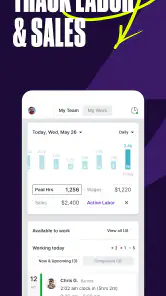

Analysis by Reviewed
I see Homebase: Employee Scheduling as a practical way to bring shift planning and hour tracking together, especially for teams whose schedules change from week to week. Its appeal is less about replacing every workplace system and more about reducing the everyday back-and-forth that makes staffing harder than it needs to be. I’d consider it for a small business that wants a shared place to organize shifts, while being careful to check that its paid options suit the team’s needs.
When the schedule keeps changing
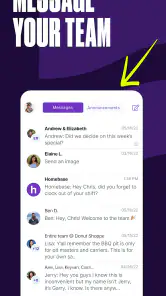
Homebase is most compelling when shift changes are ordinary rather than exceptional. A café that adjusts coverage around lunch and evening rushes, for instance, has a different scheduling problem from an office where everyone works the same hours. In the café, employees need to know which version of the rota is current, and the manager needs a dependable way to communicate changes. Keeping that work in one shared system can be more useful than adding another spreadsheet tab or trying to reconstruct decisions from a busy group chat.
The trade-off is that a shared schedule only helps if the team treats it as authoritative. Before moving over, I’d agree on a simple rule: staff check the app for their shifts, and managers make schedule changes there instead of relying on a message alone. That small agreement prevents the familiar confusion of one employee following an old screenshot while another has seen a newer update.
A realistic week of use
Imagine a manager at a neighborhood café building next week’s rota on a quiet afternoon. They can think through coverage by shift, share the schedule, and then use the same general workflow to keep track of hours as the week unfolds. When a team member asks to swap a shift, the important operational question is not merely whether the change is possible; it is whether the manager approves it and whether the published schedule reflects the decision. A consistent process matters as much as the software.
At the end of the week, the manager should compare planned shifts with recorded hours before relying on those records for payroll tasks. A late arrival, missed clock action, or approved change can create a difference that needs human review. Treating the app as a place to organize and inspect those details is sensible; assuming that a scheduled shift and a final payroll record will always match without checking is not.
Where a shared schedule helps
A schedule is only useful if employees can find the latest version and managers can spot gaps before a shift begins. A mobile-first workflow can make that easier than circulating spreadsheet updates or relying on a group chat, where a changed shift can quickly get buried. The useful habit is to treat the app as the single place to check the schedule, then make changes there rather than sending conflicting versions through several channels.
For example, a café manager preparing the week’s rota could plan coverage around busy periods, then review hours before publishing the schedule. If someone later needs a shift change, the manager can handle the request in the same workflow instead of piecing together messages. That does not remove the need for clear workplace rules: staff still need to know who approves changes and when a schedule is considered final.
More From Our News Desk

Clash of Clans Is Won Between the Battles

Android Auto Makes the Case for Quieter Car Software

MobiOffice: Transforming Mobile Productivity with Seamless Integration

EA SPORTS FC™ Mobile Soccer: Redefining Mobile Sports Gaming

How Microsoft OneDrive Became a Mobile Productivity Giant

How Google Translate Breaks Language Barriers Effortlessly
Worth knowing before you commit
Homebase is a business app from Homebase Team Management, and its focus is employee scheduling, timekeeping and payroll-related tools. It is free to download, but it also offers in-app purchases ranging from around $30 to $650 per item, so I would check the current plan details before making it central to payroll or day-to-day operations. A free starting point is useful for trying the workflow, but it should not be mistaken for a promise that every tool a growing business needs will remain free.
The app has a 4.2 average from around 24,000 ratings, with over 1 million installs. It is rated for everyone, and version 4.80 requires iOS 12 or later. Those figures suggest a well-established option, but they cannot tell you whether its setup matches your team’s pay rules or approval process. I’d test a real scheduling cycle before asking everyone to depend on it.
Getting Started with Ease
From the moment I downloaded the Employee Schedule & Time Clock, I was impressed by its user-friendly interface. Setting it up was a breeze. The app walks you through the process, ensuring you’ve got everything covered to start managing those schedules effectively. You know that feeling when something just clicks? Yep, that’s this app.
Features That Stand Out
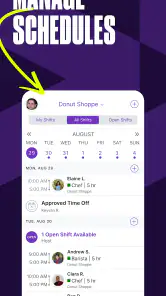
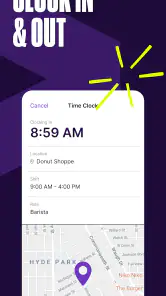
One of the first things that caught my eye was the seamless integration of time tracking and scheduling. I mean, who wouldn’t appreciate a one-stop shop for managing employee hours and shifts? This app does it all. From creating schedules to tracking time and even managing leave requests, it’s all there at your fingertips.
Another cool feature is the real-time notifications. Let’s say an employee swaps a shift or requests time off – you get an instant update. It’s like having a personal assistant whispering updates into your ear. Plus, the app supports multiple locations and departments, which is a game changer for businesses with several branches.
Efficiency Meets Flexibility
The customizability of this app is another aspect worth mentioning. You can tailor it to fit your business needs, whether you’re running a small café or a large retail chain. I found the ability to set specific rules for overtime and breaks incredibly useful. It allows for a level of flexibility that ensures both the business and employees are satisfied.
And let’s not forget about the reporting feature. With a few taps, you can generate detailed reports on employee hours and attendance. It’s perfect for those end-of-month evaluations or when you need to settle disputes about hours worked.
Putting the tools to work
One useful way to judge the reporting tools is to look for patterns, not just totals. If the same shift repeatedly runs over its planned hours, that may point to a coverage issue or a task that takes longer than expected. Reports can help a manager ask better questions, but they do not explain the reason behind every number. I’d use them as a starting point for a conversation with staff rather than treating a report as a complete account of what happened.
There is also a practical distinction between recording time and deciding what to do with it. A time entry can make hours easier to review, but managers still need to resolve exceptions and apply their workplace’s pay rules correctly. If your business has unusual pay arrangements, complex approvals, or a large number of bespoke policies, test those cases early. A smooth basic rota is not enough evidence that every edge case will fit.
Making the workflow stick
For a smoother rollout, I’d start with one team or location, check that job roles and shift expectations are clear, and compare the first time record with the schedule before using it as the basis for payroll. That small review catches a common source of confusion: a planned shift and the hours actually worked are related, but they are not automatically the same thing. Managers should also agree on how staff report missed punches or last-minute changes, so the app does not become another place where exceptions go unnoticed.
Compared with a spreadsheet, this kind of shared tool can keep schedule edits and time records closer together; compared with a full payroll or workforce platform, it may be a simpler fit for businesses that mainly need shift organization. I would skip it if you need a highly customized enterprise system, or if your team already has a dependable scheduling process and does not want another app to maintain. It is most useful when managers and staff will actually check the same schedule rather than keep parallel records.
Who will get the most from it
I’d put Homebase on the shortlist for a small, shift-based business where a manager currently spends too much time collecting availability, revising rotas, and answering the same “when am I working?” question. It can also make sense for a team with more than one location if managers need a shared view of schedules and hours. The key is not the size of the company by itself; it is whether shift coordination is a recurring task that the people involved are willing to handle in one place.
It is less attractive for a solo operator, a team with fixed hours and little schedule variation, or a workplace that already has a well-integrated system everyone uses. In those situations, the effort of onboarding employees and maintaining another workflow may outweigh the convenience. Businesses with strict internal approval chains or highly specialized workforce requirements should compare it with a dedicated workforce platform rather than assuming a general small-business tool will cover every process.
Choosing between the usual alternatives
A spreadsheet is flexible, familiar, and easy to adapt, but it can become awkward when several people need to see changes quickly or when managers want schedule and time information together. A group chat is fast for a one-off question, yet it is a poor place to preserve a definitive rota because messages and screenshots can conflict. Homebase’s advantage is bringing those recurring tasks into a shared workflow; its cost is that the team must learn and consistently use that workflow.
A dedicated payroll or workforce system may be a better choice when payroll complexity, company-wide reporting, or specialized rules are the main concern. I would not pick a scheduling app as a substitute for checking that a payroll process meets the business’s needs. For a smaller employer whose main pain is shift organization and keeping track of hours, though, a focused app can be a more manageable starting point than a large platform with functions the team may never use.
Questions to settle before rollout
Before inviting the whole staff, I’d ask who can publish a schedule, who can approve changes, and how employees should report a correction to a time record. Those decisions prevent disagreements from being blamed on the app when the real issue is that no one knows which person has authority. I’d also choose a clear point in the week for reviewing the next rota and checking unresolved exceptions, so schedule maintenance does not become an unpredictable stream of interruptions.
Another practical question is whether the paid tools fit the way the business operates. The app is free to download, while in-app purchases range from about $30 to $650 per item; I would check which functions are included in the plan being considered and whether the expense still makes sense as the team grows. For a cautious trial, use a representative schedule and include a real change or timekeeping correction. That reveals more than setting up a perfect example that never tests the messy parts of a normal week.
Why It’s a Game Changer
In the end, what makes the Employee Schedule & Time Clock app stand out is its ability to streamline workforce management while saving time. I’ve been in situations where managing schedules felt like a full-time job in itself, but this app takes a lot of that pressure off. It’s reliable, efficient, and surprisingly easy to use.
So, if you're on the lookout for a tool that simplifies employee scheduling and time tracking, give this app a go. It might just transform the way you handle your work schedules.
My verdict is that it is worth trying when shift planning and attendance are recurring headaches, especially for a small team that can agree on one shared process. I would not choose it solely on the promise of convenience: check which paid tools your business needs, test a complete schedule-and-timesheet cycle, and make sure employees understand how to flag exceptions. If those basics fit, it can be a sensible step up from scattered messages without forcing a business to adopt a more complex system than it needs.
Homebase: Employee Scheduling Frequently Asked Questions
What kind of app is Homebase: Employee Scheduling?
Homebase: Employee Scheduling is a business app for employee management, bringing together scheduling, time tracking, and payroll tools. Its focus is on helping teams organize work hours and manage day-to-day staffing through a mobile app. It may be worth considering if you want a single place for core scheduling and time-clock tasks rather than relying entirely on manual processes.
Is Homebase: Employee Scheduling free to download?
Homebase: Employee Scheduling is free to download, making it possible to try its employee-management tools without an upfront purchase. The app also offers in-app purchases, so some options may involve an additional cost. If you are considering paid features, review the available purchase details in the app store before choosing a plan.
Who develops Homebase: Employee Scheduling, and is it available for my device?
The app is developed by Homebase Team Management and is available for Android and iOS users whose devices meet the stated minimum operating-system requirement. Its content rating is Everyone, so it is presented as suitable for a broad audience. Checking compatibility on your specific device before downloading is a sensible first step.
What is Employee Schedule & Time Clock app used for?
Employee Schedule & Time Clock is designed to help businesses manage employee schedules and track work hours efficiently. The app allows managers to create and share work schedules, track attendance, and manage time-off requests seamlessly. It's particularly useful for companies looking to streamline their scheduling process and improve workforce management.
Is Employee Schedule & Time Clock app suitable for small businesses?
Yes, the Employee Schedule & Time Clock app is highly suitable for small businesses. It offers an intuitive interface and robust features that cater to the needs of small to medium-sized enterprises. By using this app, small businesses can save time on scheduling and reduce errors associated with manual timesheet management.
Pros
- User-friendly interface for easy navigation.
- Seamlessly integrates with payroll systems.
- Customizable schedules to fit any business.
- Real-time updates and notifications.
- Supports multiple languages for global teams.
Cons
- Limited offline functionality.
- Occasional sync issues with servers.
- Requires internet for full features.
- May have a learning curve for new users.
- Limited customer support on weekends.
- Category
- Business
- Version
- 4.80











