

Emoji Up genmoji sticker maker
- 944.00
- 4.2
- Installs
- 1.00M
- Price
- Free

Screenshots
Analysis by Reviewed
On a shared phone or tablet, a tiny sticker can become an unexpected family in-joke: one person makes it, another uses it in a chat, and soon everyone recognizes it. That playful side is what drew me to Emoji Up genmoji sticker maker. It is a free personalization app from Mobile entertainment s.r.l, built around custom emoji, stickers, fonts, themes, and keyboard options. I’d treat it as a creative extra for messaging rather than a replacement for the emoji keyboard already on your device.
Making a small creative space on a shared device
The app has a 4.2 average from around 17,000 ratings and over 1 million installs, so it has clearly found an audience among people who enjoy customizing messages. In my experience, the appeal is less about making every conversation elaborate and more about having a few personal designs ready for the right moment. A custom reaction can feel warmer than a standard emoji, especially in a family or friend group that shares recurring jokes.
Picture a household coordinating dinner plans: someone creates a playful food-themed sticker, then uses it to lighten a practical chat about what to pick up. That is a realistic use for a tool like this. The benefit is immediate and social, but it depends on whether the people receiving the sticker can view it comfortably in their messaging app. I’d test a design in a low-stakes conversation before relying on it for something important.
One device, different tastes
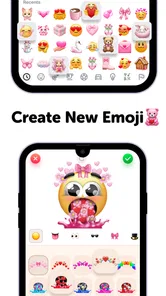
The app is like a digital playground for emoji enthusiasts. Once you dive into it, you’ll find that creating personalized emojis and stickers is not only easy but also incredibly fun. The app provides a range of tools that allow you to customize every tiny detail of your emoji. From adjusting the facial expressions to altering the colors, the possibilities are endless. It’s like having a mini art studio right in your pocket!
On a device used by more than one person, I’d keep expectations modest: a personalization app can serve different tastes, but that doesn’t automatically make it a shared workspace. Before anyone starts changing keyboard or theme choices, agree on who is using the device and whether those changes suit everyone. If one person wants a bright, novelty-heavy setup and another prefers a plain keyboard, leaving the standard keyboard in place and opening the app only when making stickers may be the less frustrating arrangement.
What the creative tools are good for
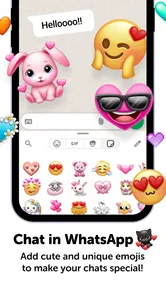
So, what makes this app a must-have? For starters, the user interface is super intuitive. You don’t need to be a tech whiz to figure out how to navigate through the options. One feature that I absolutely love is the layering tool. It lets you add different elements on top of each other, giving your emojis a 3D effect. Another great feature is the sharing option. Once you’ve crafted your masterpiece, you can easily share it with friends across different messaging platforms. Talk about spreading the emoji love!
Layering is most useful when you want a design to read clearly at a glance, not just look busy on a large screen. I’d build the main expression first, then add only the details that make the character recognizable; too many stacked elements can lose their impact when the sticker appears small in a chat. That simple order also helps if you’re creating a set of reactions for a group, since a consistent visual style makes each one easier to identify.
More From Our News Desk

 Gmail
GmailGmail in a Busy Inbox: Who Benefits Most?
From first account to crowded workday, Gmail earns its place through dependable search and flexible sorting—but its best fit depends on how much inbox maintenance you can tolerate.

 Prime Video
Switching to Prime Video: What Changes in Your Viewing Routine
Prime Video can make a compelling second home for streaming, but switching means learning a different catalog, rental layer, and route from browsing to playback.

 Universal TV Remote Control
Universal TV Remote Control Works Best as a Reliable Backup
A phone remote earns its place through quick setup and reliable habits. Here is how to get more from Universal TV Remote Control—and where its limits show.

 Weather - By Xiaomi
Weather by Xiaomi Review: Clear at a Glance, Less Clear Up Close
Xiaomi’s weather app makes everyday forecasts quick to scan, but its calm surface can leave useful details and recovery paths harder to find than they should be.

 X
XX Under Pressure: Can It Recover When Posting Goes Wrong?
A resilience-focused review of X, examining setup, mistaken posts, interruptions, weak connections, and the gaps that matter when recovery needs to be dependable.

 Clash of Clans
Clash of Clans Is Won Between the Battles
Its raids are quick; its community is a long-term project of coordination, teaching, rivalry, and shared responsibility—with all the friction that entails.
Latest News



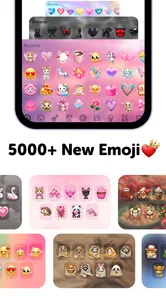
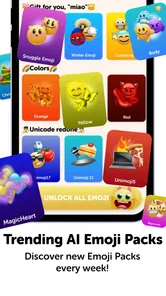
And let's not forget about the sticker packs. The app offers a variety of pre-made sticker packs that you can download and use. Whether you’re feeling quirky or romantic, there’s something for every mood. Plus, they’re constantly updating the library, so you’ll never run out of fresh content.
Sharing without turning it into a chore
For occasional use, the practical question is whether you want to make something yourself or just pick a ready-made sticker. The packs are the quicker route when you need a reaction immediately; custom designs make more sense when you have a specific person, joke, or occasion in mind. I’d save my creative effort for a small collection of useful expressions rather than making a new sticker for every message. That keeps the fun from becoming another task.
Compared with a standard emoji keyboard, this app leans toward personalization and visual variety instead of speed and familiarity. A built-in keyboard is usually the easier choice for fast everyday replies, while a general sticker collection can be simpler if you only want ready-made art. This app makes more sense when you actually enjoy shaping a design and want your messages to feel more personal. If you rarely send stickers, the usual keyboard is probably enough.
A useful way to decide is to try one small project before making it part of your routine. Create a reaction for a group chat, share it, and see whether people actually use it. If it gets a laugh or becomes a shorthand response, you have a reason to make a few more. If it sits unused, you have learned that the novelty is more appealing than the ongoing habit, and you can leave the app as an occasional creative diversion.
Who should use it, and who may prefer something simpler
One of the things I appreciate most about this app is how it encourages creativity. It’s not just about creating emojis; it’s about expressing yourself in a unique way. It’s a fantastic tool for anyone who loves personalizing their messages. Plus, it’s a great way to impress your friends with your custom-made emojis. Imagine their surprise when they see a sticker that looks exactly like them!
I’d recommend it to people who already trade stickers in chats, enjoy visual customization, or want a light creative activity to share with someone nearby. It is less compelling for anyone who wants a completely plain messaging setup, needs a keyboard purely for efficient typing, or dislikes spending time choosing decorative options. It is free to start, but in-app purchases range from $0.99 to $35.99 per item, so I’d check purchase prompts carefully if a child or another family member uses the device. There’s no need to buy anything just to decide whether the creative approach suits you.
It also suits people who like making a small themed set rather than one-off decorations. For example, a household could create a few recognizable reactions for “on my way,” “dinner is ready,” or “that made me laugh,” then share them in the chats where they make sense. The trade-off is that everyone needs to understand what the image means; a private joke may be charming to its creators but confusing to relatives or friends who were not part of it. I’d keep practical messages readable in words and treat stickers as an extra, not the only signal.
Age, trust, and boundaries
The app is rated for Everyone, and its appeal is easy to understand for both younger users and adults. Still, an age rating is not a substitute for a household conversation about purchases and shared-device habits. If a child is exploring the app, I’d agree in advance that paid items need an adult’s approval and that keyboard or theme changes should not surprise other people who use the device. That is practical coordination, not a claim that the app has family controls.
It runs on Android 7.0 and later, and its current version is 3.9.3. If you are deciding whether to keep it on an older device, check that the phone meets that minimum before planning around it. For shared use, I’d also make sure everyone knows how to return to the familiar keyboard if they find a customization inconvenient. Small boundaries like these prevent a fun personalization experiment from becoming a daily annoyance.
On a shared device, I would keep account and communication expectations clear without assuming that the app manages separate household profiles. Agree on whose chats a sticker is intended for, and avoid treating a design made by one person as something everyone else must use. If the device changes hands often, making stickers in a planned session is less disruptive than changing the keyboard in the middle of someone else’s messaging. This approach preserves the creative part while respecting the person who needs the phone for ordinary tasks.
Another practical point is that a sticker can travel beyond the conversation where it began. Before sharing a design that resembles a family member or refers to a private joke, I’d ask whether the person is comfortable with it being forwarded. That is ordinary digital courtesy, but it matters more when children and adults share a device or a group chat. A playful custom image is best when its audience is understood, rather than assumed.
A household verdict
Additionally, the app is perfect for all ages. Whether you’re a kid wanting to create fun characters or an adult looking to add some flair to your texts, Emoji Up has got you covered. It’s user-friendly and doesn’t bombard you with ads, which is always a plus in my book.
In conclusion, if you’re someone who loves to stand out and add a personal touch to your digital communications, this app is definitely worth a try. It provides a creative outlet and an opportunity to make your messages truly yours. With its easy-to-use interface and a plethora of customization options, the app is a delightful addition to anyone’s app collection. Give it a go, and you might just find yourself addicted to emoji-making!
My household recommendation is to try it as an optional creative tool, not as the one keyboard everyone must use. Keep purchases deliberate, let shared-device users agree on any setup changes, and use the ready-made packs when speed matters more than customization. If making and sharing personal stickers sounds like a pleasure rather than a distraction, it is a friendly app to explore; if your priority is a consistent, no-fuss keyboard, sticking with the default option will likely feel better.
For a shared tablet used during a quiet afternoon, I’d set a simple limit: make a few designs, show them to the people who might receive them, and leave the device’s regular typing setup alone unless everyone agrees otherwise. That gives younger users room to experiment without turning ordinary messages into a hunt for the right decorative option. It also makes it easier for an adult to see whether the creative activity is holding everyone’s interest before deciding whether it belongs in the household’s regular routine.
The developer, Mobile entertainment s.r.l, positions this as a personalization app, and that framing fits my experience of its appeal: the value comes from changing how messages look, not from replacing the messaging service itself. The app has been available since July 16, 2020, and its current version is 3.9.3. I’d think of it as a companion to the chats a household already uses, with the actual conversation still happening in the chosen messaging app.
There is also a difference between sharing a sticker and sharing the app’s whole setup. A friend may enjoy receiving a custom image without wanting to install another keyboard or alter a theme. I’d send a sample first and ask whether it displays well on the other person’s device; if it does not, a familiar emoji or plain text is kinder and clearer. That small check avoids making a creative feature feel like an obligation for everyone in the conversation.
Ultimately, I’d choose this for a household that enjoys making things together and can keep purchases and device changes straightforward. I’d skip it for a family that values a uniform, distraction-free keyboard above all, or for anyone who wants instant replies with no time spent choosing a look. Used in its lane—as an optional place to make personal stickers and playful reactions—it can add a little character to everyday chats without needing to take over the device.
Emoji Up genmoji sticker maker Frequently Asked Questions
Is Emoji Up genmoji sticker maker suitable for children?
Emoji Up genmoji sticker maker has an Everyone content rating, which makes it suitable for a broad audience. It is a personalization app focused on emoji, stickers, and other creative content, so families may want to consider whether those features suit a child’s interests. The app also offers in-app purchases, so it can be sensible for parents to review purchase settings on the device before a child uses it.
Does Emoji Up genmoji sticker maker include more than emoji and stickers?
Yes. Emoji and sticker creation are central to the app, but its store summary also highlights Genmoji, cat mystery games, GIFs, fonts, themes, and a keyboard. That broader mix may appeal if you like experimenting with different ways to customize your digital communication, rather than downloading an app for sticker design alone. The features make Emoji Up a varied personalization app.
Who develops Emoji Up genmoji sticker maker, and what kind of app is it?
Emoji Up genmoji sticker maker is a personalization app developed by Mobile entertainment s.r.l. Its focus is creative expression through emoji and sticker customization, with the store summary also highlighting Genmoji, cat mystery games, GIFs, fonts, themes, and a keyboard. If you want an app centered on personalizing the way you communicate, those tools give you several kinds of content to explore.
What is Emoji Up genmoji sticker maker?
Emoji Up genmoji sticker maker is a creative app that allows users to design and customize their own emojis and stickers. The app provides a wide range of tools and features to create personalized emoji designs that can be shared across various messaging platforms, making conversations more fun and expressive.
Is Emoji Up genmoji sticker maker free to use?
Emoji Up genmoji sticker maker offers a free version with basic features. However, for users seeking more advanced design tools and a wider selection of design elements, there are in-app purchases available, ranging from $0.99 to $35.99 per item. This gives users the option to explore purchases for additional customization, while the app remains free to download.
Pros
- Intuitive and user-friendly interface.
- Wide variety of emoji customization options.
- Fast and responsive performance.
- High-quality sticker outputs.
- Regular updates with new features.
Cons
- Limited free version functionalities.
- Occasional ads in free version.
- Some features require in-app purchases.
- Not all emojis are universally supported.
- Can be data-heavy for limited storage.











