

Emoji Keyboard: Fonts & Themes
- 97.00
- 4.1
- Installs
- 1.00M
- Price
- Free
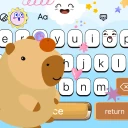
Screenshots
Analysis by Reviewed
Ever found yourself wishing your texting game was a little more extra? Well, let me introduce you to Emoji Keyboard: Fonts & Themes, your new best friend for all things texting. This app is like a party for your keyboard, bringing a splash of color, flair, and personality to every message you send. Honestly, it’s a game-changer for those who love to express themselves in style.
The first-week appeal
My first impression of Emoji Keyboard: Fonts & Themes is that it makes the keyboard feel like a small, personal part of the phone rather than a background utility. The appeal is immediate: a new look can make ordinary chats feel more playful, and changing the style gives you something to explore without having to learn a complicated editing tool. It is a free personalization app from Alphalogy, and its Everyone age rating makes it accessible to a broad audience. Its current version is 1.1.8, with Android 8.0 as the minimum requirement.
That quick first-week payoff is also where I’d keep my expectations sensible. A fresh keyboard can make routine messages feel different, but the enjoyment comes from how the app changes an activity you already do, not from adding a whole new reason to use your phone. I’d spend the first few sessions trying a small number of styles rather than cycling through every option. That makes it easier to notice whether the keyboard remains comfortable once the initial excitement of browsing wears off.
A Splash of Color and Creativity
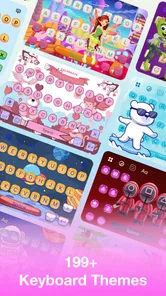
The first thing you’ll notice when you fire up the app is the sheer variety of options at your fingertips. We’re talking thousands of emojis, a plethora of fonts, and themes that range from cute to downright dazzling. Whether you’re feeling funky or just want something simple, there’s a theme to match your mood. I mean, who knew typing could be this much fun?
Customization Galore
What sets this app apart is its extraordinary level of customization. You can tweak almost every aspect of your keyboard. Want to change the font for every app you use? Go for it! Feel like creating a custom theme with your favorite colors? You got it! The app’s user-friendly interface makes it super easy to navigate through all these features, so even if you’re not tech-savvy, you’ll find your way around in no time.
For a useful everyday routine, I’d treat the keyboard as a visual accessory rather than assume every decorative option will suit every task. Pick a comfortable theme first, then keep a plainer choice in mind for situations where contrast and legibility matter more than personality. If you often switch between work chats and casual messages, a restrained look can help the keyboard stay readable without giving up the option to personalize it later. That small bit of restraint is a better test of lasting value than changing the design every time you open the app.
Choosing a style that lasts
One practical way to avoid endless tweaking is to judge a theme during the kinds of typing you actually do: a quick search, a one-line reply, and a longer message. A design may look striking while browsing but feel tiring when you are trying to find punctuation or type without looking down. I’d favor a theme that makes the keys easy to distinguish, even if a more elaborate option looks more impressive in a preview. The best choice is the one you stop noticing while still enjoying it.
More From Our News Desk

 Gmail
GmailGmail in a Busy Inbox: Who Benefits Most?
From first account to crowded workday, Gmail earns its place through dependable search and flexible sorting—but its best fit depends on how much inbox maintenance you can tolerate.

 Prime Video
Switching to Prime Video: What Changes in Your Viewing Routine
Prime Video can make a compelling second home for streaming, but switching means learning a different catalog, rental layer, and route from browsing to playback.

 Universal TV Remote Control
Universal TV Remote Control Works Best as a Reliable Backup
A phone remote earns its place through quick setup and reliable habits. Here is how to get more from Universal TV Remote Control—and where its limits show.

 Weather - By Xiaomi
Weather by Xiaomi Review: Clear at a Glance, Less Clear Up Close
Xiaomi’s weather app makes everyday forecasts quick to scan, but its calm surface can leave useful details and recovery paths harder to find than they should be.

 X
XX Under Pressure: Can It Recover When Posting Goes Wrong?
A resilience-focused review of X, examining setup, mistaken posts, interruptions, weak connections, and the gaps that matter when recovery needs to be dependable.

 Clash of Clans
Clash of Clans Is Won Between the Battles
Its raids are quick; its community is a long-term project of coordination, teaching, rivalry, and shared responsibility—with all the friction that entails.
Latest News



Express Yourself with Emojis
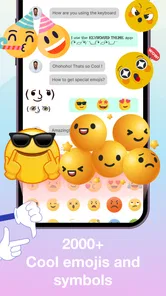
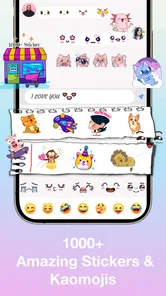
Let’s talk emojis. This app has an emoji for every occasion, whether you’re feeling happy, sad, or somewhere in between. The emojis are updated regularly, so you’re always in the loop with the latest trends. Plus, there’s even a feature that suggests emojis based on the context of your text. It’s like having a little emoji assistant right in your phone!
Making it fit a daily routine
A realistic use case is answering a friend while waiting for a bus: you want to tap out a quick reply, add one expressive symbol, and move on. Emoji suggestions can make that kind of message feel more lively, but I’d still choose carefully rather than accept every prompt. Suggestions are conveniences, not a substitute for tone; an emoji that feels right in a private chat can look odd in a work conversation. I’d also check how the keyboard feels during ordinary typing before settling on a theme, because a design is only useful if it does not distract from the words.
The same judgment applies when sending a message to a group. An emoji can soften a short reply or make a joke easier to read, but too many symbols can bury the point, especially when several people are following a practical conversation. I’d use suggestions as a prompt to consider tone, not as an instruction to decorate every sentence. That leaves the feature helpful without making your messages feel automated or overly busy.
Fonts and More Fonts
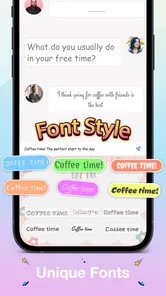
If fonts are your thing, then get ready to be blown away. With a wide range of styles from quirky to elegant, you can switch up your text style to suit any conversation. Whether you want to make a statement or just keep it casual, there’s a font for you. And let’s be real, who doesn’t love a good font change now and then?
Where the novelty can wear off
Decorative fonts are most valuable when used sparingly. They can add character to a short greeting or social caption, but I would not make them the default for every message. Some stylized characters may be harder to read, and their appearance can depend on the app or device receiving them. When clarity matters—such as sharing an address, instructions, or a longer note—I’d switch back to plain text. Compared with keeping a phone’s standard keyboard, this app gives you more ways to personalize your typing; compared with a keyboard chosen mainly for speed or familiar layout, customization may not be enough to justify changing a habit.
That trade-off is especially worth considering if you use your phone for school or work as well as casual chatting. A decorative font might suit a short social caption, while a clear, ordinary style is a safer choice for a schedule, a name, or directions someone needs to follow accurately. I would not treat one keyboard style as the right answer for every setting. If switching styles becomes a nuisance, the standard keyboard’s consistency may be more valuable than having extra ways to decorate text.
Keeping the keyboard useful over time
After the first burst of experimentation, the practical question is whether the keyboard still earns its place. I’d settle on one theme that remains easy to read, use fonts for occasional emphasis, and let emoji suggestions help only when they fit the conversation. That approach limits visual fatigue and avoids turning every text into a design decision. If your priority is fast, predictable typing, the familiar default keyboard may be the better choice; if you enjoy making chats feel more like you, a few thoughtful settings can provide recurring value without constant tinkering.
For month-to-month value, I’d look for a small routine rather than a reason to keep customizing: use a comfortable theme as your everyday setting, then revisit the options only when the current look genuinely stops appealing. That keeps personalization from becoming another chore. A useful test is whether you still choose the app after the novelty has passed, because you like how it looks and types, not simply because you have not yet explored every menu.
How it compares with familiar alternatives
The usual alternative is the keyboard already built into the phone: it is familiar, and it may be the more sensible choice if you care most about predictable typing. A general-purpose third-party keyboard can also be a better fit when your priority is a layout or typing workflow you already know you want. This app’s clearer reason to switch is its focus on visual customization, emojis, and stylized text. I’d choose it for personal expression, not on the assumption that decorative options automatically make typing faster.
It is also worth separating keyboard appearance from how a message looks after it leaves your phone. Themes change the typing surface, while stylized characters may not look identical across apps or devices. If a particular message has to be unambiguous, plain text is the safer option. That simple distinction helps answer a common practical question: you can enjoy a more personal keyboard without making every message depend on how someone else’s screen renders it.
The app has a 4.1 average from around 5,700 ratings, and more than a million installs, which suggests plenty of people have tried it. For me, its appeal is strongest when I want a bit of creative control over everyday chats, not when I need a keyboard to do serious work. The main trade-off is simple: customization is fun, but readability and typing comfort should win whenever they conflict.
Who is likely to enjoy it
I’d recommend trying it if you like changing your phone’s appearance, use emojis naturally, and enjoy adding occasional flair to messages. It is less compelling for someone who rarely changes settings, prefers a familiar keyboard, or needs every message to remain plain and highly legible. Before making it your everyday choice, try a short stretch of ordinary typing—searches, quick replies, and longer notes—rather than judging it only by the first attractive theme. That gives you a better sense of whether the novelty turns into a habit you actually want to keep.
I’d particularly consider it if the keyboard is part of how you make your phone feel personal and you send plenty of casual messages where visual flair is welcome. I’d skip it if you dislike changing established habits, mostly type formal or information-heavy messages, or simply want the most familiar experience with the least adjustment. The useful question is not whether the app offers enough choices to explore; it is whether one or two of those choices make daily typing more enjoyable for you.
My long-term take
Overall, Emoji Keyboard: Fonts & Themes is a delightful app that makes texting a whole lot more interesting. It's perfect for those who love to add a bit of creativity to their daily chats. Whether you’re personalizing your keyboard with unique themes or spicing up your messages with fun fonts and emojis, this app has got you covered. So why not give it a try? You might just find yourself wondering how you ever lived without it!
My more measured recommendation is to try it as a personalization choice, then decide based on a week of real typing rather than the first browse through its styles. If you keep reaching for the keyboard because the look suits you, it can earn a steady place without demanding constant attention. If you find yourself reverting to the default for clarity or comfort, that is a useful result too. For me, its long-term appeal rests on whether the visual variety stays enjoyable while the everyday task—getting a message typed clearly—remains easy.
Emoji Keyboard: Fonts & Themes Frequently Asked Questions
Is Emoji Keyboard: Fonts & Themes free to download?
Yes. Emoji Keyboard: Fonts & Themes is free to download, so you can try it without paying upfront. It is a personalization app from Alphalogy, intended to help make typing feel more distinctive through keyboard customization. Before installing, keep in mind that a free download does not necessarily mean every feature or option within an app is free to use.
What features does the Emoji Keyboard: Fonts & Themes app offer?
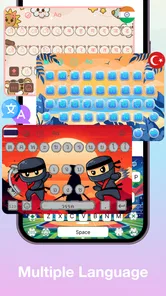
The Emoji Keyboard: Fonts & Themes app offers a wide range of features, including a vast collection of emojis, unique fonts, and customizable themes. Users can personalize their keyboard with different styles and colors, and access a variety of stickers and GIFs to enhance their messaging experience. Additionally, it supports multiple languages, making it versatile for users worldwide.
Is Emoji Keyboard: Fonts & Themes compatible with all devices?
Emoji Keyboard: Fonts & Themes is designed to be compatible with a wide range of Android and iOS devices. However, it's important to check the app's requirements on the Google Play Store or Apple App Store to ensure compatibility with your specific device model and operating system version, as older versions may not support all features. On Android, the app requires version 8.0 or later, so check your phone’s software before downloading.
How does Emoji Keyboard: Fonts & Themes affect device performance?
While Emoji Keyboard: Fonts & Themes is optimized for performance, like any app, it may affect device performance if your phone has limited resources. It's advisable to ensure your device has adequate storage and processing power to run the app smoothly. Regular updates from the developers also help enhance performance and fix bugs.
Are there in-app purchases or subscriptions involved?
Yes, Emoji Keyboard: Fonts & Themes includes in-app purchases and subscription options. While the app provides a variety of free features, additional premium content such as exclusive themes, fonts, and removal of ads can be accessed through one-time purchases or a subscription plan. Users should review these options within the app for a tailored experience.
Pros
- Wide variety of emojis and fonts.
- Customizable keyboard themes.
- Easy to use interface.
- Supports multiple languages.
- Frequent updates with new features.
Cons
- Contains ads in the free version.
- Some features require in-app purchases.
- May slow down older devices.
- Occasional glitches with certain apps.
- Limited free themes.











