

Emoji Battery Icon Customize
- 303.00
- 4.6
- Installs
- 10.00M
- Price
- Free

Screenshots
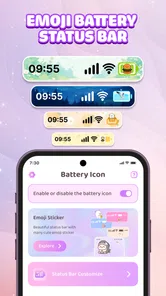

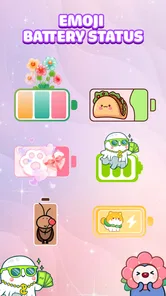
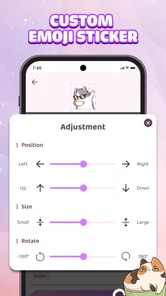
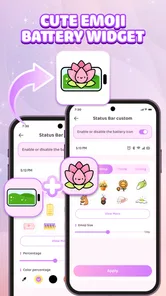
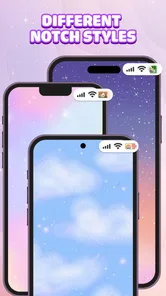
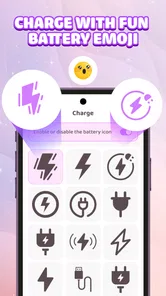
Analysis by Reviewed
I tend to notice my battery most when I am away from a charger, but the usual indicator is easy to ignore once it blends into the status bar. Emoji Battery Icon Customize takes a more playful approach: it puts a battery-themed emoji widget on the home screen, turning a practical glance into a small bit of personalization. I found the idea appealing if you like your phone to feel less generic, though it is worth being clear about the trade-off: this is mainly a visual companion to your normal battery indicator, not a replacement for careful power management.
A small change for a real daily habit
The best reason to try this app is not that it changes how a phone battery works; it is that it gives an ordinary check a more visible place in your routine. I can see it suiting someone who unlocks the phone repeatedly throughout the day and would rather spot a playful battery display than hunt for a tiny symbol. That is a modest benefit, but a useful one when it matches the way you already use your screen.
For example, if I am getting ready to leave, I might glance at the home screen while checking messages and notice the widget before I pick up my bag. That nudge can remind me to check the actual charge or connect a charger while I still have time. It is not a reliable substitute for planning a long day away from power, but it can make the reminder harder to miss.
Making a battery glance feel more personal
As a free personalization app from New Widget Co., Emoji Battery Icon Customize is built around one simple purpose: dressing up the way you see battery status. The focus is not on deep device maintenance or complicated system tools. Instead, it gives a familiar piece of phone information a friendlier, more expressive presence through an emoji-style widget and battery icon.
That distinction matters when deciding whether it fits your routine. If you enjoy arranging a home screen to match your wallpaper, favorite colors, or general mood, a battery widget can contribute to the overall look without taking over the whole layout. If you only want the most compact and unobtrusive battery percentage possible, your phone’s built-in indicator may already do the job better.
The app has an average rating of 4.6 from around 71,000 ratings, with more than 10 million installs. Those figures suggest that the basic idea has broad appeal, but they do not tell you whether a particular visual style will suit your own home screen. I would treat it as a small customization choice rather than a must-have utility.
Start with the home screen you already use
Before adding any widget, I recommend looking at where you actually check your phone. A widget is most useful when it sits somewhere your eyes naturally pass while unlocking the device. Placing it on a page you rarely visit may look tidy in a setup screenshot, but it will not make battery checks any more convenient in everyday use.
More From Our News Desk

 Gmail
GmailGmail in a Busy Inbox: Who Benefits Most?
From first account to crowded workday, Gmail earns its place through dependable search and flexible sorting—but its best fit depends on how much inbox maintenance you can tolerate.

 Prime Video
Switching to Prime Video: What Changes in Your Viewing Routine
Prime Video can make a compelling second home for streaming, but switching means learning a different catalog, rental layer, and route from browsing to playback.

 Universal TV Remote Control
Universal TV Remote Control Works Best as a Reliable Backup
A phone remote earns its place through quick setup and reliable habits. Here is how to get more from Universal TV Remote Control—and where its limits show.

 Weather - By Xiaomi
Weather by Xiaomi Review: Clear at a Glance, Less Clear Up Close
Xiaomi’s weather app makes everyday forecasts quick to scan, but its calm surface can leave useful details and recovery paths harder to find than they should be.

 X
XX Under Pressure: Can It Recover When Posting Goes Wrong?
A resilience-focused review of X, examining setup, mistaken posts, interruptions, weak connections, and the gaps that matter when recovery needs to be dependable.

 Clash of Clans
Clash of Clans Is Won Between the Battles
Its raids are quick; its community is a long-term project of coordination, teaching, rivalry, and shared responsibility—with all the friction that entails.
Latest News



Think about the space available, too. A battery display should be readable at a glance, but it also competes with app icons and other widgets. I would first decide whether I want it near frequently used apps or on a separate page reserved for a more coordinated layout. That small choice helps prevent a playful addition from making the home screen feel crowded.
Then consider what you expect the emoji treatment to do. It can make the battery easier to notice, or simply make the screen feel more like yours. It should not be mistaken for a promise of more accurate battery information or longer battery life. The practical gain is mainly in presentation and visibility.
From installation to a useful placement
The app is listed as suitable for Everyone and is free to install, so there is little commitment in trying the basic concept. It is currently at version 1.4.1 and supports Android 8.0 or later. If your device meets that requirement, the sensible next step is to install it and see whether the widget works with the way you already organize your home screen.
After opening a widget-focused app, the key part of the process is usually adding its widget through the phone’s home-screen controls. The exact gestures and menus can differ by Android device and launcher, so I would follow the options shown on your own phone rather than expect every screen to look identical. The useful workflow is simple: make room, add the battery widget, place it where you will see it, and check whether its appearance sits comfortably beside your existing icons.
One practical tip is to test the placement during an ordinary day instead of judging it only while setting up. Check whether the display catches your eye when you unlock the phone, whether it stays legible against your wallpaper, and whether you still find yourself relying on the system battery indicator. If the widget is decorative but easy to overlook, moving it to a more prominent spot may be better than changing the rest of your layout.
A second tip is to treat the first arrangement as a trial rather than a permanent design. Keep your usual charging habits and home-screen layout for a while, then decide whether the extra visual cue genuinely helps. That avoids the common trap of spending time perfecting a widget that you stop noticing after a day.
Where the widget meets the rest of Android
A home-screen widget has a handoff built into its role: the app provides the presentation, while Android and the launcher determine where that presentation appears. This means the experience is not only about the app itself. A launcher with flexible widget placement can make it easier to fit the battery display into a carefully planned screen; a more restrictive layout may leave fewer good spots.
The widget also sits alongside the phone’s own battery indicator rather than replacing the rest of the system’s battery tools. For a quick glance, the home screen can be convenient. When you need to investigate battery use, charging behavior, or which apps are consuming power, the device’s settings remain the more appropriate place to look. I would keep both roles distinct: the emoji widget is for a visible, personalized glance, while system settings handle troubleshooting.
That separation is useful in a real routine. Imagine leaving home in a hurry: you unlock your phone to check a message, notice the battery widget, and realize you should top up before heading out. The widget may prompt that check earlier, but it cannot decide whether your remaining charge is enough for your plans. If you are navigating, using mobile data, or away from a charger for hours, checking the actual percentage and your expected use is still the safer call.
There is another handoff to keep in mind when arranging a home screen: the widget needs to fit with the visual choices already in place. A bright emoji-style element may add personality to a plain setup, but it may clash with a tightly controlled minimalist theme. I would prioritize readability over matching every color. A charming battery graphic is not helpful if it disappears into a busy wallpaper.
What you gain, and what you do not
The strongest result is a battery display that feels more noticeable and less like a tiny system symbol. That can be enough if you enjoy themed home screens or want an everyday utility to carry a little personality. In contrast with a standard battery indicator, the app’s appeal is visual expression; in contrast with broad customization suites, its focus is narrow and easy to understand.
That narrow focus is both a strength and a limit. You do not need to approach it as a full home-screen overhaul, and the idea is easy to evaluate: does this style make checking the battery more pleasant or convenient for you? But if you want extensive control over every part of your interface, a larger customization tool may be a better match. If you want power-saving guidance or detailed usage analysis, a battery-monitoring app or your phone’s built-in settings would be more relevant.
The app includes optional in-app purchases priced from $1.99 to $9.99 per item. I would start by trying the free experience and only consider a purchase if you have already decided the widget belongs in your routine. A paid option is not automatically worthwhile just because you like the general concept; the value depends on whether the available customization meets a specific need you have.
One non-obvious trade-off is that adding a widget can make battery information more visible while also taking up home-screen space. On a compact layout, that space may be more useful for an app shortcut you open repeatedly. Another is that a decorative cue can encourage more frequent checking without giving you any extra context about why the battery is draining. If you find yourself wanting explanations rather than a glance, the visual approach has reached its limit.
When the experience may feel like friction
The setup can be less satisfying if your launcher does not make widget placement straightforward or if the available space on your preferred home-screen page is already spoken for. That is not a reason to rearrange an entire phone automatically. Try a less-used page first, or decide that the status-bar indicator is already the better fit for your habits.
Another possible friction point is expectation. A cute battery icon sounds like a small feature, and it is a small feature: it does not turn the phone into a better battery, eliminate charging, or replace system-level information. If you install it hoping for a detailed battery dashboard, the narrow purpose may disappoint. If you approach it as a home-screen accent that also helps you notice battery status, the scope makes more sense.
Version 1.4.1 is the current release, but I would still judge the experience on your own device and launcher. A widget’s usefulness depends heavily on whether it remains visible and readable in your particular layout. Give it a little time in the place you intend to use it, rather than deciding from the installation screen alone.
Who should try it
I would recommend giving it a try if you already enjoy changing icons and widgets, like expressive emoji styling, and want battery information to have a more prominent place on your home screen. It is especially suited to someone who checks the phone often and wants a visual reminder without turning battery tracking into a project.
I would skip it if you prefer an uncluttered screen, rarely use widgets, or mainly want technical insight into battery health and power consumption. In those cases, the built-in indicator or system settings are likely to be simpler. A dedicated battery tool is the better alternative when the goal is diagnosis rather than appearance.
My overall impression is that Emoji Battery Icon Customize makes sense as a focused personalization app, not as an essential battery utility. Its free starting point makes it easy to test, and the emoji-led display can add a welcome bit of character to a routine glance. The best way to decide is to place it where you naturally check your phone and see whether it earns that space. If it makes the battery easier to notice without cluttering your layout, keep it; if it becomes decoration you ignore, removing it costs you very little.
A quick way to decide if it earns its spot
When I test a home-screen addition, I look for a practical payoff rather than judging it only by how it looks immediately after setup. Here, the useful question is whether the widget changes a real habit: do you notice your charge sooner, or does it simply occupy space? If the answer is unclear, try it on a page you naturally visit for a day or two before deciding whether it belongs beside your most-used apps.
It is also worth separating “easy to glance at” from “enough information to act on.” The emoji presentation can serve as a prompt, but if your day depends on a long trip, navigation, or extended time away from a charger, make the decision using the phone’s actual battery reading and your plans. That makes the widget a convenient reminder rather than a source of false confidence.
For someone who enjoys small visual tweaks, that is a fair bargain: a little home-screen space in exchange for a more personal battery check. For someone who values a sparse layout or needs detailed diagnostics, the trade-off points the other way. I would try it only if its visual style adds something you will genuinely notice, then keep the system tools close at hand for the decisions the widget cannot make.
Emoji Battery Icon Customize Frequently Asked Questions
What does Emoji Battery Icon Customize do?
Emoji Battery Icon Customize is intended to make your device’s battery display more expressive by replacing or decorating the usual battery indicator with emoji-style designs. Depending on the app version and your phone, it may also offer choices of icons, colors, or visual themes. Check the screenshots and feature description on the download page to confirm which customization options are included before installing.
How do I set up an emoji battery icon?
After installing the app, open it and review the available designs and setup instructions. Battery indicators can be controlled differently across Android versions and device manufacturers, so the app may ask you to enable permissions, add a widget, or follow steps in system settings. If the icon does not appear immediately, check the app’s guidance and your device’s battery or display settings rather than assuming the installation failed.
Does Emoji Battery Icon Customize work on iPhone and Android?
Compatibility depends on the version offered in the store and on the operating system’s limits. Android generally permits more home-screen and status-bar customization, while iOS restricts changes to system interface elements; an iPhone app may therefore offer widgets or other visual features instead of replacing the native status-bar battery icon. Confirm the supported platform, minimum OS version, and feature list on the relevant store page.
Does the app drain battery or affect device performance?
A decorative battery display may need to refresh periodically or remain active as a widget or background service, which can use some battery and system resources. The actual impact depends on the app’s implementation, your device, and how often its display updates. After setup, monitor battery usage in your phone’s settings; if consumption is unexpectedly high, disable background activity or remove the widget.
Is Emoji Battery Icon Customize free, and what permissions should I check?
The app’s price, advertisements, and any in-app purchases can vary by store listing and version, so check those details before downloading. Review requested permissions as well: access should make sense for the customization features you intend to use. Avoid granting unrelated permissions, and consult the developer’s privacy information to understand what data may be collected, processed, or shared.
Pros
- Adds a playful emoji to the battery indicator for quick visual flair.
- Offers a simple way to personalize your device’s status bar.
- Useful for spotting battery status at a glance when supported.
- Lightweight customization can provide a fresh look without changing your wallpaper.
- A fun option for users who enjoy expressive
- emoji-themed interfaces.
Cons
- Emoji battery display may not work on every device or Android version.
- Some designs may be difficult to read at smaller status-bar sizes.
- Customization options may be limited compared with full theme apps.
- Battery indicators can update with a delay depending on device settings.
- May require permissions or background access to keep the indicator active.











