

Elektra Go: Money Transfer
- 139.00
- 4.6
- Installs
- 100.00K
- Price
- Free

Screenshots
Analysis by Reviewed
I approached Elektra Go: Money Transfer as a practical finance app rather than something I would open for entertainment. Its purpose is straightforward: help people move money with less friction than a traditional in-person visit. That makes speed, stability, device compatibility, and confidence during a transfer more important than visual extras. After spending time with it, my impression is that it is best understood as a focused option for people who already want to use Elektra USA for sending money and prefer handling the process from a phone.
The app is free to install, carries an Everyone age rating, and belongs to the finance category. Elektra USA is the developer, and the listing presents it as Elektra Go rather than as a broad banking replacement. That distinction matters. I would not approach it expecting a complete personal-finance dashboard, budgeting suite, or everyday banking account. Its value is narrower and more practical: it puts money-transfer activity into a mobile workflow that can be easier to reach when a physical location is inconvenient.
How Elektra Go feels when speed matters
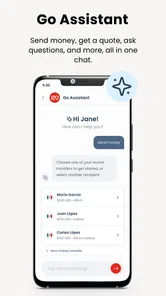
The first thing I look for in a transfer app is whether the path from opening the app to starting a transaction feels direct. Elektra Go benefits from having a clear purpose. There are fewer reasons to wander through unrelated tools, so the experience feels more task-oriented than a full-service financial app. If I already know that I need to send money, that focused design is useful because it reduces the temptation to search through menus that have nothing to do with the job.
Still, “fast” should not be confused with instant completion. A money transfer involves details that deserve a careful check, including the recipient information and the final transaction choices. I would rather spend an extra moment reviewing those items than rush through a screen and create a correction problem later. The app can make the process feel quicker, but the responsible part of the workflow remains the same: prepare the information before opening it, read each confirmation screen, and keep the transaction details available afterward.
A realistic example is a family member who needs money while I am away from an Elektra location. Instead of waiting until I can make a separate trip, I can use the phone as the starting point for the transfer. The real advantage is not just the number of taps. It is the change in timing: I can begin the task when the need appears, provided I have the recipient’s information ready and a dependable connection.
That preparation makes a bigger difference than many people expect. Before opening the app, I would check the spelling of the recipient’s name, confirm the amount, and make sure I am using the intended phone. This is one of the more useful habits for any financial app, but it is especially valuable here because a focused transfer tool encourages action quickly. Fast money movement is only helpful when the information is correct before the final step.
What affects the feeling of speed
Perceived speed comes from several parts of the experience, not only from how quickly screens appear. A short route to the transfer function, readable instructions, and clear confirmation language all help. On the other hand, hesitation rises when I need to stop and reconstruct missing details or wonder whether a previous tap registered. For that reason, I judge Elektra Go less by raw loading time and more by whether it keeps the next action obvious.
More From Our News Desk

 Instagram
Instagram’s Power Comes From Its Place in Your Phone
A close look at how Instagram turns Meta’s reach, recommendation systems and everyday camera habits into durable platform power—and what that costs users.

 Gmail
GmailGmail in a Busy Inbox: Who Benefits Most?
From first account to crowded workday, Gmail earns its place through dependable search and flexible sorting—but its best fit depends on how much inbox maintenance you can tolerate.

 Prime Video
Switching to Prime Video: What Changes in Your Viewing Routine
Prime Video can make a compelling second home for streaming, but switching means learning a different catalog, rental layer, and route from browsing to playback.

 Universal TV Remote Control
Universal TV Remote Control Works Best as a Reliable Backup
A phone remote earns its place through quick setup and reliable habits. Here is how to get more from Universal TV Remote Control—and where its limits show.

 Weather - By Xiaomi
Weather by Xiaomi Review: Clear at a Glance, Less Clear Up Close
Xiaomi’s weather app makes everyday forecasts quick to scan, but its calm surface can leave useful details and recovery paths harder to find than they should be.

 X
XX Under Pressure: Can It Recover When Posting Goes Wrong?
A resilience-focused review of X, examining setup, mistaken posts, interruptions, weak connections, and the gaps that matter when recovery needs to be dependable.
Latest News



The app’s public listing describes it as a fast and secure money-transfer tool, but I would still treat the word “fast” as a practical expectation rather than a promise that every transaction will finish immediately. Network quality, account information, recipient details, and any required checks can affect the overall experience. If a transfer is urgent, I would start early enough to handle a pause or verification request instead of waiting until the last possible minute.
There is also a human factor. A person who uses the app only occasionally may move more slowly than someone who sends money regularly, simply because they need to recheck the process. That is not necessarily a flaw. In finance, a little deliberate friction can be preferable to an overly aggressive interface that makes a serious action feel casual. My advice is to value clarity over speed when the amount is important or the recipient is unfamiliar.
Heavy-use moments and everyday practicality
Elektra Go makes the most sense during short, purposeful sessions. I would open it to arrange a transfer, review the information, and leave once the task is complete. That is different from a banking app designed for frequent balance checks, bill payments, card management, spending analysis, and account history. If I were trying to manage several areas of my finances throughout the day, I would probably want a broader service beside it rather than expecting this app to cover everything.
Heavy use can mean different things in this category. For one person, it may be sending money to several relatives in a single afternoon. For another, it may mean returning to the app repeatedly because a transfer requires more attention than expected. In either case, I would avoid tapping through the same action repeatedly when a screen seems slow. The safer approach is to pause, check whether the request was accepted, and look for a confirmation or transaction record before trying again. Repeating a financial action out of impatience can create confusion about whether it was submitted once or more than once.
This is an important recovery habit that generic app advice often overlooks. When a transfer appears to stall, I would first note the amount, recipient, and approximate time. Then I would close only after checking whether the app shows a completed or pending state. If the connection is unstable, I would switch to a more reliable network before attempting anything again. The goal is to preserve a clear trail, not simply to make the loading screen disappear.
For families who use the service regularly, consistency in personal routines can reduce mistakes. I would keep a private note of the recipient details I commonly need, without storing sensitive information in an exposed place, and I would review the amount every time rather than relying on memory. I would also avoid starting a transfer while distracted, such as during a crowded commute or a conversation. The app may be convenient, but the financial decision still deserves attention.
Where the focused design helps, and where it does not
The focused nature of Elektra Go is an advantage when the only job is sending money. It avoids the clutter I associate with apps that try to combine transfers, investments, credit products, shopping, rewards, and budgeting in one crowded home screen. Someone who wants a simple route to a transfer may appreciate that narrower purpose.
The trade-off is that users looking for a complete financial command center may find the experience limited. I would not choose it as my only finance app if I needed detailed spending categories, extensive account aggregation, or a large set of everyday banking tools. A conventional bank app may be better for those needs, while a dedicated remittance service may be preferable for someone who prioritizes a different transfer network or a more specialized international workflow. Elektra Go is more convincing when the Elektra connection is already relevant to the user.
Another practical point is session planning. If I need to send money while traveling, I would not wait until I am in a place with weak reception. I would prepare the recipient information beforehand and use a stable connection for the actual transaction. This is not glamorous advice, but it is the kind that prevents a rushed transfer from becoming a support problem later.
Reliability, confidence, and recovering from interruptions
Reliability in a finance app is not only about whether it opens. I also want the app to make the state of an action understandable. After starting a transfer, I need confidence that I know whether it is still being processed, completed, or interrupted. A clear result is more valuable than a decorative interface, especially when the user may be coordinating with someone waiting for the money.
My experience with Elektra Go suggests a service that should be used deliberately rather than treated like a casual messaging app. I would keep the app open long enough to reach a clear confirmation and would avoid switching rapidly between applications during the most important step. If the phone loses connectivity, the safest response is to verify the transaction state once service returns instead of immediately submitting another request.
That recovery approach also applies after an unexpected app closure. I would reopen the app, look for the transfer history or status information available in the current session, and compare it with the notes I made before retrying. If the app cannot make the result clear, I would seek help through the appropriate Elektra USA support route rather than guessing. A transfer app earns trust by helping users understand what happened, but users also need a disciplined response when technology behaves unpredictably.
The app’s rating gives it a generally positive public impression, with an average of 4.5 from around 500 ratings. That is encouraging, but I would not treat a rating as a substitute for checking whether the workflow fits my situation. Ratings tend to combine many different phones, networks, user habits, and transfer circumstances. They are useful as a signal that people are finding value, not as a guarantee that every session will feel identical.
Security habits I would keep in place
The store summary emphasizes secure transfers, but no finance app should replace basic personal caution. I would install it only from the official app marketplace, keep my phone protected, avoid entering financial details on an unfamiliar public network, and review the recipient before confirming. I would also be careful with messages or calls that pressure me to send money immediately. Convenience can shorten the process, but it should never remove the pause needed to recognize a scam or a mistaken request.
I would be especially careful when a relative asks for an urgent transfer through a new number or an unfamiliar message. Before using the app, I would verify the request through a separate trusted channel. This is not a criticism of Elektra Go; it is a reminder that the app can execute a legitimate instruction just as efficiently as a bad one. The strongest security routine combines the app’s intended workflow with independent verification of the person receiving the money.
For shared or borrowed phones, I would be much more cautious. A transfer app belongs on a device that I control, with a screen lock and current system protections. I would not leave a session open for someone else to use, and I would avoid saving sensitive details where another person can access them. These steps are simple, but they matter more than shaving a few seconds from the process.
Device constraints and day-to-day resource demands
Elektra Go supports devices running Android 8.0 or later, which gives it a fairly broad reach among Android users. That does not mean every compatible phone will deliver the same experience. Older hardware may open finance apps more slowly, especially when storage is nearly full or many other applications are active. I would keep reasonable free space available, close unnecessary apps if the phone is struggling, and install system updates when they are offered.
Resource demands are particularly important for people using entry-level phones. A transfer app does not need to be visually elaborate to become frustrating if the device has limited memory or an unreliable connection. If screens reload after switching away, I would avoid multitasking during the transaction and keep the process in one uninterrupted session. That reduces the chance of losing context or having to repeat an earlier step.
Battery condition can matter as well. Someone sending money during a long day should not begin with a nearly empty phone, especially if they may need to verify the result or contact the recipient afterward. I would charge the device first when possible and avoid using aggressive battery-saving settings that interfere with normal app activity. The point is not that Elektra Go is unusually demanding; it is that financial tasks are poor candidates for a phone that is already close to shutting down.
Screen size and accessibility also affect practical use. On a smaller display, I would zoom in mentally rather than rushing through compact text, and I would check the full recipient details before confirming. For anyone who finds mobile forms difficult to read, a larger phone or a more comfortable setting may be preferable. A transfer is not the place to rely on guessing what a truncated line says.
Because the app is rated for Everyone, it is presented as suitable for a broad audience, but suitability still depends on the person handling the transaction. Younger users may need an adult’s guidance with financial decisions, and anyone unfamiliar with digital transfers should take time to understand the confirmation steps. An age rating describes audience suitability; it does not turn a financial action into a risk-free one.
Keeping an older phone dependable
If I were using Elektra Go on an older Android device, I would take a few practical precautions. I would restart the phone before an important transfer if it had been running for a long time, confirm that the date and time are correct, and use a stable connection. I would also avoid installing the app on a device modified in ways that could interfere with normal security protections. These are sensible maintenance steps for any finance tool, but they are especially worthwhile when reliability matters more than convenience.
I would not judge the app solely by how it performs on a very old phone with limited storage. At the same time, users with such devices should be realistic: if other apps are already freezing, a transfer app may not feel smooth either. In that situation, a newer phone, a trusted physical location, or another established method may be a better choice for an urgent transaction.
Who should use it and who should choose something else
I would recommend Elektra Go to someone who wants a mobile route for money transfers, already recognizes Elektra USA as relevant to their needs, and prefers a direct task over a crowded financial platform. It is also a sensible option for people who regularly coordinate money with family and want to begin the process without planning a separate visit first. The free price removes an obvious barrier to trying it, while the broad Android compatibility makes it accessible to many users.
I would be less enthusiastic for someone searching for a full digital bank. If the main goal is tracking spending, paying bills, managing cards, or viewing a wide range of financial products, a traditional banking app may offer a more complete home base. Likewise, a person who transfers money only through a particular alternative service may gain more from staying with the network they and their recipient already understand. Switching tools is not automatically an improvement if it creates unfamiliar steps or new recipient confusion.
There is also a difference between occasional and high-stakes use. For a modest, familiar transfer, the mobile convenience may be exactly what I want. For a large or unusually urgent transaction, I would slow down, verify every detail, and make sure I can obtain help if the status becomes unclear. The app can support the action, but it should not be the only part of the plan.
My performance verdict after using it
My overall view is positive but specific. Elektra Go works best as a focused money-transfer companion, not as an all-purpose finance platform. Its strongest quality is the practical idea behind it: give users a mobile way to handle a transfer when opening a phone is easier than reaching a physical location. The experience feels most efficient when I prepare the recipient details first, use a reliable connection, and treat confirmation as an essential part of the process.
On performance, I would describe it as suitable for short, purposeful sessions rather than constant heavy multitasking. The Android 8.0 minimum makes it usable on a wide range of devices, although older phones may still introduce their own delays. I would not promise instant results in every situation, because network conditions and transaction checks can affect the complete workflow. What matters more is keeping the process controlled and knowing how to recover if the app closes, stalls, or leaves the result unclear.
The app has reached over 100 thousand installs, and its public response is strong enough to make it worth considering for the right user. Its current version is 9.8.3, and the product comes from Elektra USA, which gives the experience a clear identity rather than making it feel like a generic transfer utility. I would still update it through the official marketplace and review each transaction carefully, as I would with any financial service.
In the end, I would recommend trying Elektra Go when the need is simple: send money through a phone, avoid unnecessary travel, and keep the workflow focused. I would skip it as my primary finance app if I need broad banking features or a different transfer network. For the intended use, though, it offers a convenient balance of accessibility and purpose. My final advice is to use its speed as a convenience, not as pressure: prepare first, verify the recipient, wait for a clear result, and keep a record before moving on.
Elektra Go: Money Transfer Frequently Asked Questions
Is Elektra Go: Money Transfer free to download, and which devices can run it?
Elektra Go: Money Transfer is free to download, so you can install it without an upfront app purchase. It is a finance app from Elektra USA, and its age rating is Everyone. On Android, the listed minimum operating-system requirement is version 8.0, so check your device settings before installing. Availability and compatibility can differ between app stores and devices.
Is Elektra Go: Money Transfer a well-established app?
The app has an average rating of 4.5 from 534 ratings, alongside 139 written reviews and more than 100,000 installs. Those figures can offer a general sense of its visibility and user feedback, but individual experiences may vary depending on location and transfer needs. Read recent reviews in your app store and consider whether the features suit the countries and services you plan to use.
What is Elektra Go: Money Transfer used for?
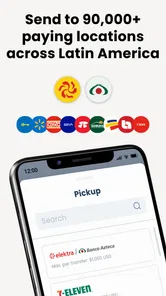
Elektra Go: Money Transfer is designed to help users send money through Elektra’s remittance and financial services. Depending on your country and the version available in your app store, it may let you start an international transfer, check exchange rates, review fees, locate participating Elektra locations, and monitor transaction progress. Available features can vary by region, so check the service details before sending funds.
Do I need an account or identification to use Elektra Go?
You may need to create an account and provide personal information before completing a transfer. Financial regulations commonly require identity verification, which can include your full name, address, phone number, date of birth, and an official identification document. The recipient may also need valid identification to collect the money. Requirements differ by country, transfer amount, and payment method.
How much does a transfer cost, and what exchange rate will I receive?
The total cost can include a transfer fee, currency-exchange margin, and possible charges from a card, bank, or payout partner. The exact amount depends on the sending country, destination, payment method, delivery option, and transfer value. Before confirming a transaction, carefully review the displayed fee, exchange rate, recipient amount, and final total rather than relying on an advertised starting price.
Pros
- Fast transfers between supported countries and recipients.
- Simple interface makes sending money easy for first-time users.
- Transfer status updates help track payments from the app.
- Useful for users already connected to Elektra services.
- Recipient details can be saved for future transactions.
Cons
- Availability and features may vary by country or region.
- Exchange rates and transfer fees can affect the final amount.
- Identity verification may be required before sending money.
- Some transfers may take longer during weekends or holidays.
- Customer support response times may vary when resolving issues.











