eHub
- 6.71K
- 3.9
- Installs
- 1.00M
- Price
- Free

Screenshots
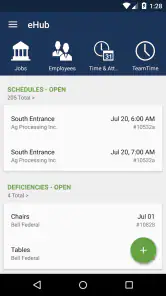
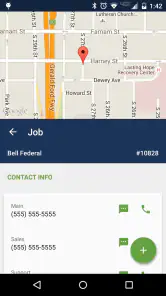
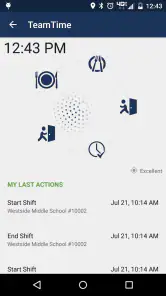
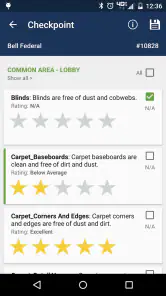
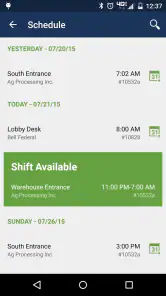
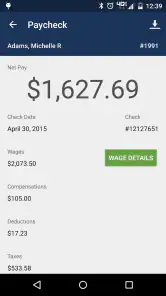
Analysis by Reviewed
For a cleaner assessment of eHub, it helps to start with the kind of work it serves: this is a business app from TEAM Software for employees and customers of building service contractors and security contractors. That focus matters more than the familiar promise of general productivity. I would approach it as a work-facing place to handle company-related self-service, not as a personal organizer for groceries, projects, and social plans.
Where a connection matters during the workday
A contractor’s work can involve changing locations, short breaks between duties, and questions that come up away from a desk. In that setting, the point of a self-service app is to make a work interaction more convenient on a phone. The practical trade-off is that mobile access is only useful when the app can reach the service it depends on. I would avoid treating it as a guaranteed substitute for a call or a conversation with a supervisor when a time-sensitive issue needs attention.
For example, an employee finishing a shift might open the app while waiting for a ride to check a work-related item or complete a self-service task, rather than waiting until they are back at a computer. That is the kind of small, situational convenience I value in a contractor-focused app. Before relying on it for a particular task, though, I would confirm that the employer has enabled the relevant service and that my account is set up correctly.
Designed for mobile moments, not every kind of planning
Because eHub is built around contractor self-service, its best fit is someone who needs a mobile route into work-related services. Employees who already manage their day through a company process may find it useful as a companion to that process. Customers may also find it relevant when their contractor provides access through the app. It is less suited to someone looking for a broad task manager, a personal calendar, or a shared household planner.
That distinction also helps when comparing it with the usual alternatives. A general productivity app is better for organizing personal projects across different parts of life, while a company portal opened in a mobile browser may be enough for someone who only checks in occasionally. eHub makes more sense when a contractor’s own self-service setup is the reason for using a phone app in the first place. Its usefulness therefore depends on the organization’s workflow, rather than on how many unrelated planning tools it can replace.
When access fails, keep the workflow simple
If a page or action does not load, I would first check whether the phone has a working connection and try again before assuming the account itself is at fault. If access still fails, a sensible next step is to confirm login details and ask the employer or contractor’s designated contact whether the service is available for that account. For an urgent work matter, use the usual direct contact route instead of repeatedly refreshing the app and hoping it will resolve itself.
This is a useful distinction for shift-based work: an app can reduce routine back-and-forth, but it should not become the only path to information that affects an immediate decision. I would also avoid making a change or submitting something twice just because the screen seems slow; first check whether the original action completed. That cautious habit can prevent confusion when a connection is unreliable or a response takes longer than expected.
More From Our News Desk

Clash of Clans Is Won Between the Battles

Android Auto Makes the Case for Quieter Car Software

MobiOffice: Transforming Mobile Productivity with Seamless Integration

EA SPORTS FC™ Mobile Soccer: Redefining Mobile Sports Gaming

How Microsoft OneDrive Became a Mobile Productivity Giant

How Google Translate Breaks Language Barriers Effortlessly
Be thoughtful about data and shared devices
Using a work self-service app on mobile data can be convenient when Wi-Fi is unavailable, but I would reserve it for tasks that actually need doing rather than leaving the app open out of habit. Anyone using a shared or borrowed phone should be especially careful to sign out when finished and avoid leaving work information visible on the screen. Those are practical safeguards for a work account, not a claim about any particular data policy.
eHub is free, rated for Everyone, and has been available since Oct 24, 2011. Its current version is 4.62.0-1-g40d586d, and it requires Android 7.0 or later. The app has a 3.9 average from around 20,000 ratings, with about 6,700 written reviews and over 1 million installs. Those figures suggest that it has an established audience, but they do not tell me whether a particular employer’s setup will cover the task a reader needs. I would check that with the organization before making the app part of a routine.
Getting Started with eHub
First things first, downloading eHub is a breeze. Available for both Android and iOS, it’s just a quick search away in your respective app store. Once installed, the app greets you with a sleek and intuitive interface that’s easy on the eyes. No overwhelming menus or unnecessary clutter—just a neat dashboard with everything you need right at your fingertips.
Features That Stand Out
One of the standout features of eHub is its task management system. It allows you to create tasks and categorize them based on priority. Need to remember to send that all-important email or buy groceries? Just jot it down, set a reminder, and let eHub do the rest. The app even lets you organize tasks into different projects, which is a lifesaver if you’re managing multiple aspects of your life.
Another cool feature is the calendar integration. It syncs seamlessly with your existing calendars, so all your appointments and events are in one place. No more switching between apps or missing meetings. Plus, the app sends you reminders, ensuring that you’re always on top of your schedule.
Personalization and Usability
What I really love about eHub is its level of personalization. You can customize the app’s theme to match your mood or style, which is a small but delightful touch. Additionally, the app’s widgets allow you to keep track of your tasks and calendar events right from your home screen, a feature that adds a layer of convenience and efficiency.
Usability is where eHub shines. The developers have clearly put a lot of thought into the user experience. The app is responsive and runs smoothly without any hiccups. Even if you’re not tech-savvy, you’ll find it easy to navigate through the app.
Is eHub for You?
If you’re someone who thrives on organization and efficiency, then eHub is definitely worth a try. It’s designed to streamline your workflow and help you stay on top of your game. Whether you’re a student, a professional, or just someone who wants to keep their life organized, this app has something to offer.
In conclusion, eHub is more than just another productivity app. It’s a tool that adapts to your needs and helps you make the most out of every day. Give it a shot and see how it transforms your daily routine. Trust me, you won’t be disappointed!
Check access before building a routine
The key question before installing is not whether the app can replace every work conversation; it is whether your contractor has connected your role to services you actually need. I would ask a supervisor or company contact how employees are expected to sign in, which tasks are handled through the app, and what to do if an item is missing. That short check can save the frustration of downloading an app only to find that an account is not ready or a particular service is not available to you.
This also helps set realistic expectations for customers. If a building-service or security contractor directs customers to eHub, it may provide a convenient route for the services that contractor has configured. It is not a universal directory for contractors, and installing it alone does not create a relationship with a company. In practical terms, the organization’s invitation and setup determine whether the app has a meaningful role for you.
A useful handoff between shifts and office systems
For an employee who spends most of a shift on site, a phone can be the most accessible place to handle a quick administrative task. Imagine finishing work in one location and heading to another: a self-service check during a break may prevent a small question from turning into a trip back to a desk. I would keep the interaction focused, then use the employer’s normal channel if the app does not show what I need. That division of labor is more dependable than expecting a mobile portal to answer every operational question.
There is a practical trade-off here. Mobile access can make routine steps easier to fit into the day, but using a phone in the middle of a busy duty can be distracting or inappropriate. I would choose a safe break or a quiet moment, especially in security work or when a task requires attention to the surroundings. The benefit is convenience, not a reason to interrupt work that needs immediate focus.
What to do when a task is unclear
A self-service screen can present an action without explaining how a company wants it handled in every situation. If the wording is unclear, I would pause rather than guess, particularly before submitting a change that might affect a work record or customer request. Ask the relevant company contact what the intended process is, then use the app for that process once it is clear. This small habit is more valuable than tapping through quickly and having to explain a mistaken submission later.
Readers may also wonder whether the app is suitable for occasional use. It can be, if the contractor has enabled the account and the task is something you need to access from a phone. If you only need a rare one-off interaction, a company’s existing website or a direct call may be simpler. The right choice depends less on how often you use apps and more on whether the app is the route your organization expects you to use.
Choosing between an app and a browser
Compared with a mobile browser portal, a dedicated app is most worthwhile when you expect to return to the contractor’s self-service tools and want a direct place to start. A browser can be the lighter option for an infrequent check, or for someone who prefers not to add a work app to a personal device. Neither approach is automatically better: the browser may reduce app clutter, while a dedicated app can make a recurring work routine feel more direct. I would follow the employer’s preferred process if it has one, because that is what makes the account and service useful.
It is also worth separating work administration from personal organization. The earlier impression of eHub as a general planner—with personal task lists, calendar syncing, themes, and widgets—is not a sound basis for choosing this contractor-focused service. I would not install it expecting those tools. Its specific value is access to employer- or contractor-linked self-service, so people seeking a flexible planner should choose a product built for that purpose instead.
Keeping work access practical and private
On a personal phone, I would make the app part of a deliberate routine: open it when there is a real work task, finish what is needed, and close or sign out when appropriate. On a shared device, I would be stricter about ending the session and keeping the screen out of view. This is especially sensible if a phone may be passed to another person or left unattended. It is a straightforward way to avoid exposing work-related information without assuming anything about the app’s data-handling rules.
Connectivity deserves the same practical planning. If you know you will be somewhere with an unreliable signal, do not leave a time-sensitive task until the last moment or assume that a screen will remain usable without a connection. Handle routine checks when access is steady, and keep the usual contact method available for urgent matters. That approach does not require guessing about offline behavior; it simply treats a connected self-service tool as one route among the others a workplace provides.
Who will get the most from it
I would recommend considering eHub if your employer or contractor already uses it and you want work-related self-service on a phone, particularly when you move between sites or rarely sit at a desk. It is less compelling for someone whose organization handles everything through a supervisor, paper process, or a browser portal they use only once in a while. It is also the wrong pick for people searching for a personal productivity suite. The best reason to use it is a concrete work need supported by your organization—not the hope that any business app will automatically simplify a busy life.
My final view is measured: eHub’s value is tied closely to the contractor’s setup, your account, and the reliability of your connection at the moment you need it. When those pieces line up, having work self-service within reach can be a useful convenience. When they do not, a direct company contact or the established browser route may be the better fallback. I would treat it as a practical companion to a workplace process, not as a replacement for that process or a general-purpose organizer.
eHub Frequently Asked Questions
Do I need to work with a company that uses eHub before downloading it?
Yes. eHub is an employee and customer self-service app for building service contractors (BSCs) and security contractors, so it is most useful when your employer or service provider uses the platform. Downloading it alone does not replace that organizational connection; check whether your company uses eHub and whether you are expected to access its services through the app.
Is eHub free to download, and what should I know about access?
eHub is free to download, which means you can install it without paying an upfront price. The app is intended as a self-service tool for employees and customers of BSCs and security contractors. Your ability to use its services depends on the organization using eHub, so check with your employer or provider about how it is made available to you.
What age group is eHub rated for, and who publishes it?
eHub is rated for Everyone and is developed by TEAM Software. Although that age rating indicates broad suitability, the app is designed for business-related self-service rather than general entertainment. Its intended audience is people connected with building service contractors and security contractors, so its usefulness depends on whether your employer or service provider uses eHub.
Who is eHub intended for?
eHub is an employee and customer self-service app for building service contractors (BSCs) and security contractors. It is designed for people connected with those organizations who need to use the services and information made available through eHub. It is a business app rather than a general project-management tool, so its usefulness depends on whether your employer or service provider uses it.
What is eHub and what can I use it for?
eHub is a versatile app designed to streamline project management and team collaboration. It offers a suite of tools that include task management, file sharing, and real-time communication features. Whether you're managing a large team or working on personal projects, eHub provides an integrated platform to enhance productivity and keep everyone aligned with project goals.
Pros
- User-friendly interface for easy navigation.
- Comprehensive features for project management.
- Real-time collaboration with team members.
- Customizable notifications for updates.
- Integrates seamlessly with other tools.
Cons
- Occasional lag in the mobile app version.
- Limited offline functionality.
- Complex setup for first-time users.
- Some features require premium subscription.
- Lack of detailed user guides or tutorials.

- Category
- Business
- Version
- 4.62.0-1-g40d586d











