EdApp: Mobile LMS
- 260.00
- 4.3
- Installs
- 500.00K
- Price
- Free

Screenshots

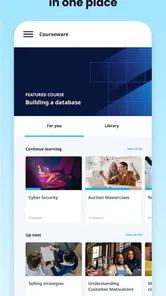
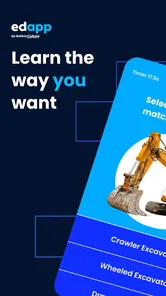

Analysis by Reviewed
I approached EdApp: Mobile LMS as a practical learning tool rather than another app to open once and forget. Its purpose is to put short workplace lessons on a phone, making it easier for employees to complete training between normal tasks. In my experience, that focus is both its biggest strength and its main limitation: it can make learning feel manageable, but it is not a replacement for a full classroom, a detailed course platform, or a well-organized training plan.
EdApp is a free business app from SafetyCulture, with an Everyone age rating. It has built a solid audience on mobile, with over 500 thousand installs and an average rating of 4.3 from around 9 thousand ratings. Those figures suggest that it is not an obscure experiment, but they do not remove the need to judge whether its short-lesson approach fits your team.
What EdApp feels like in everyday use
The first thing I noticed is that the experience is designed around small learning sessions. Instead of asking me to reserve a long block of time, it encourages a lesson-by-lesson rhythm that suits a phone. That makes sense for staff who move between locations, work shifts, or have only a few spare minutes during the day.
A realistic example would be a new employee preparing for a busy shift. Rather than sitting through a long presentation before starting work, the person can use a short lesson to review a procedure, answer its questions, and return to the job. The approach is especially useful when training needs to be repeated regularly, because brief refreshers are easier to fit into a working day than a large course.
That convenience should not be confused with simplicity in every situation. A short lesson can explain a rule or reinforce a process, but it may not provide enough room for complicated judgment calls. If employees need to study long reference material, compare several documents, or practice a hands-on skill under supervision, EdApp works better as one part of the training plan than as the entire plan.
The app sits in the business category, so its value depends heavily on how an organization prepares and assigns learning. A learner may find the mobile interface straightforward, yet still feel blocked if the course has not been assigned correctly, the account details are wrong, or the organization has not explained where to begin. That distinction matters when troubleshooting: a problem that appears to be an app failure can actually come from the training setup.
Where people commonly get stuck
The most likely point of friction is the first login or course-access step. When a user expects to see training immediately but finds an empty or incomplete screen, it is tempting to reinstall the app. I would first check whether the correct account was used and whether the learner was invited or assigned the expected material. Reinstalling does not fix an assignment that was never connected to the right account.
More From Our News Desk

Weather by Xiaomi Review: Clear at a Glance, Less Clear Up Close

X Under Pressure: Can It Recover When Posting Goes Wrong?

Clash of Clans Is Won Between the Battles

Android Auto Makes the Case for Quieter Car Software

MobiOffice: Transforming Mobile Productivity with Seamless Integration

EA SPORTS FC™ Mobile Soccer: Redefining Mobile Sports Gaming
Another common source of confusion is treating the app like a general library of courses. A workplace learning app often reflects the structure created by the organization. In practice, what appears on screen can depend on the learner’s role, enrollment, or the way the administrator arranged the content. If a colleague can see a lesson that you cannot, that difference does not automatically mean your installation is broken.
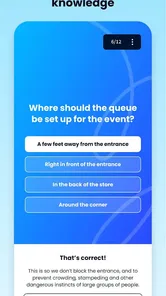
Short lessons can also create an expectation that every screen will behave like a simple article. Interactive questions, progress steps, or required responses may mean that tapping quickly does not move the lesson forward. My practical advice is to read the instruction on each screen carefully, complete the requested interaction, and allow the page a moment to respond before tapping repeatedly.
Notification-related expectations can cause another misunderstanding. A learner may assume that a missing reminder means the course is unavailable, while the real issue may be the device’s notification settings or the organization’s communication process. I would treat reminders as a convenience, not as the only way to know what training is due. If a deadline matters, confirm it through the workplace channel used by the training administrator.
Checks I would make before starting training
Before blaming EdApp, I would run through a short setup check. First, I would confirm that the device meets the app’s minimum operating-system requirement, which is version 7.1. I would then make sure the app is updated to the current version, 2.180.0, because older builds can behave differently from the version the organization expects learners to use.
Next, I would verify the basics: the device has a stable internet connection, the date and time are set normally, and there is enough free storage for ordinary app operation. These are simple checks, but they often explain failed sign-ins, stalled loading, or progress that appears not to refresh. I would also close other demanding apps and reopen EdApp before attempting the lesson again.
Account details deserve special attention. I would use the exact email address or sign-in method connected with the workplace invitation rather than creating a second account out of frustration. A duplicate account can make the situation more confusing because the learner may successfully log in but see no assigned content. If the organization uses a particular sign-in instruction, following that instruction is more useful than guessing.
I would also check the app’s presentation settings on the phone. Text scaling, display zoom, and accessibility settings can change how much content fits on a screen. These settings are valuable, but an unusually large display scale may make navigation feel cramped. Adjusting the device temporarily can help determine whether the problem is layout-related rather than a broken lesson.
For a team, the best preparation is slightly different. I would ask one administrator and one ordinary learner to test the same course before assigning it widely. That small pilot can reveal unclear instructions, missing access, awkward questions, or a lesson that assumes knowledge employees do not yet have. It is much easier to correct a training workflow with two people than to troubleshoot dozens of identical complaints later.
Recovering a lesson when progress seems wrong
When a lesson appears stuck, I would avoid repeatedly pressing buttons or switching rapidly between screens. First, I would note the exact point of failure: login, course loading, a question, completion, or the return to the course list. That detail is more useful than saying only that “the app does not work,” especially when an administrator needs to investigate the account or content.
My next step would be to leave the lesson normally if the interface allows it, close the app, and open it again. I would then check whether the progress updated after the restart. If the device briefly lost connection, the lesson may simply need time to synchronize. I would not assume that repeating every answer is necessary until I have checked the course status.
If the same screen fails again, I would test one controlled change at a time. For example, I might move from a weak mobile connection to a more reliable network, or try the lesson at a different time if the issue appears temporary. Changing several settings at once makes it difficult to identify the cause. A simple note containing the lesson name, screen, device, operating-system version, and what happened can save considerable back-and-forth.
Reinstalling should be a later step, not the first response. It can clear local problems, but it may also remove convenient local state and force another sign-in. Before doing it, I would make sure I know the correct account credentials and that the organization can confirm the learner’s assignment. Otherwise, the reinstall may turn a temporary loading issue into an avoidable access delay.
For administrators, recovery should include checking the learner’s record and assignment rather than focusing only on the phone. If several people report the same lesson problem, that points toward the content or configuration. If one person is affected while others complete the lesson normally, the account, device, connection, or local settings become more likely explanations.
When EdApp is not the real cause
It is easy to blame the app because it is the visible part of the process. In reality, workplace learning depends on several connected pieces: the learner’s account, the assigned course, the phone, the internet connection, and the administrator’s instructions. A failure in any one of these can look like an application problem.
For example, a learner who sees no course may have been invited with a different email address. Someone who cannot complete a lesson may be skipping a required interaction. A lesson that loads slowly for one employee may work normally for another because the first device has a weak connection or aggressive battery restrictions. None of these possibilities should be treated as certain without checking, but they are sensible places to look before escalating.
The content itself can also be the weak link. If a question is ambiguous, a button is difficult to understand, or the lesson assumes an earlier module that employees never received, users may report technical trouble when the real issue is instructional design. In that situation, an administrator should review the lesson wording and sequence instead of telling everyone to reinstall the app.
This is where EdApp differs from a conventional document repository. A folder of PDFs may be less polished, but the user can often open a file directly and search its contents. EdApp’s structured, mobile learning approach is better for guided progression and quick reinforcement, while a document system may be better when staff need to locate one exact policy paragraph. A full learning-management platform can offer broader administration and deeper course structures, but it may feel heavier for a team that only needs concise recurring lessons.
I would therefore choose EdApp when the goal is regular, focused learning on phones and when someone is prepared to organize the experience. I would look elsewhere, or combine it with another tool, when the priority is extensive document search, live instruction, complex assessments, or detailed practical evaluation. The right comparison is not simply “which app has more features?” but “what kind of learning problem needs solving?”
Small workflow choices that make a difference
One useful habit is to treat each lesson as a prompt for action rather than the final proof of competence. After completing a lesson about a workplace procedure, the manager can ask the employee to demonstrate the procedure in the real environment. This keeps mobile learning in its proper role: it can prepare and refresh knowledge, while observation confirms whether the knowledge is being applied correctly.
A second useful habit is to schedule learning around natural pauses instead of expecting employees to multitask during safety-sensitive work. A short lesson is still a distraction if someone is operating equipment, serving a customer, or handling a time-critical task. The mobile format makes training more accessible, but it does not remove the need for sensible timing.
I also recommend separating access problems from content complaints. If a learner cannot open a course, record that as an access issue. If the learner can open it but finds an explanation unclear, record it as a content issue. Keeping those reports distinct helps the right person respond: the administrator can investigate enrollment, while the course owner can improve wording or sequencing.
For teams, a short onboarding note can prevent many avoidable questions. It should tell employees which account to use, where assigned lessons appear, whom to contact if access is missing, and when training should be completed. That information is not glamorous, but it often determines whether a mobile learning app feels effortless or frustrating.
Another trade-off is speed versus reflection. EdApp’s short-session design makes it easy to complete a lesson, yet quick completion can encourage people to tap through without absorbing the material. I would use follow-up questions in team meetings or a brief real-world check for important topics. That adds a human layer without undermining the convenience of the app.
Who should use it and who should skip it
I think EdApp is a good fit for businesses that want employees to learn in small portions, especially when staff are mobile, distributed, or working varied schedules. It is also appealing when training needs frequent refreshers rather than one large annual event. The free price makes it easy for an individual to try, although the usefulness of the overall setup depends on how the organization manages learning.
It may suit a small team that needs a more deliberate training routine without asking everyone to sit at a desktop. It can also help a manager turn recurring reminders into a consistent learning habit. The strongest results are likely when lessons are concise, instructions are clear, and someone owns the process of checking access and following up on completion.
I would be cautious if your main need is a searchable knowledge base, long technical manuals, or a sophisticated academic course. I would also avoid presenting it as the sole answer for training that requires supervised practice or nuanced professional judgment. In those cases, a document tool, live workshop, specialist system, or blended approach may serve the learner better.
The age rating of Everyone is appropriate for a general business learning app, but that does not mean every workplace course will feel equally suitable for every employee. The organization still needs to review its own material for clarity, relevance, language, and accessibility. The rating describes the app’s broad audience, not the quality of each lesson created or assigned within it.
My practical verdict
After looking at EdApp as both a learner and a troubleshooting problem, I see a focused tool with a clear purpose. It makes the most sense when a business wants short mobile lessons that employees can complete without building their day around training. The experience is more useful when the organization treats setup, assignment, and follow-up as part of the product rather than leaving the learner to guess.
SafetyCulture has kept the app in the business-learning space since its release on December 15, 2015, and the current version shows that it remains actively maintained as a mobile product. I would still judge it by the quality of the workflow around it. A modern version cannot compensate for an incorrect account, unclear instructions, or poorly designed training content.
My recommendation is straightforward: try EdApp if your priority is bite-sized workplace learning and your team can provide basic administrative support. Before a broad rollout, test one course with a real learner, confirm the sign-in path, and decide how completion will connect to practical work. If the pilot exposes only minor setup friction, the app can become a convenient part of the routine.
The key trade-off is convenience versus depth. EdApp is strongest when learning must be brief, regular, and phone-friendly. It is less convincing when users need extensive reference material, long-form study, or hands-on assessment. For the right business workflow, I would recommend giving it a careful trial; for the wrong one, choosing a more document-focused or comprehensive learning system will save frustration.
EdApp: Mobile LMS Frequently Asked Questions
Who can create or assign courses in EdApp: Mobile LMS?
EdApp is intended for learning managed by organizations, instructors, or course providers. An administrator or course creator can set up learning materials and make them available to learners, while individual users typically access the courses connected to their account. This setup makes the app a better fit for people joining an existing training program than for someone looking for a fixed, universal library of courses.
What is EdApp: Mobile LMS used for?
EdApp: Mobile LMS is a mobile learning platform designed for employee training, professional development, and short educational courses. It lets learners access lessons from a smartphone or tablet, complete quizzes, receive reminders, and track progress. It is mainly useful for organizations, schools, and teams that want to deliver structured training in small, convenient lessons rather than through lengthy classroom sessions.
Is EdApp: Mobile LMS free to download and use?
The app is free to download, but access to its content depends on how the platform is configured by the organization or course provider. Some courses may be available at no cost, while businesses using EdApp’s authoring, administration, analytics, or premium features may require a subscription. Check the current App Store or Google Play listing and your organization’s instructions for the most accurate pricing information.
Can I use EdApp courses offline?
EdApp is designed primarily for mobile learning and may allow certain lessons to be downloaded for offline study, depending on the course settings and the version of the app. Offline availability is not necessarily guaranteed for every piece of content, and progress may need an internet connection before it synchronizes with the platform. It is best to open the required lessons online first and confirm their availability before traveling or losing connectivity.
What types of training and learning content are available in EdApp?
The content available in EdApp depends on the organization, instructor, or course creator managing the account. Users may find workplace compliance training, onboarding materials, product education, safety lessons, customer service courses, quizzes, surveys, and other short learning modules. The platform supports interactive, bite-sized lessons, but the quality, subject coverage, language options, and difficulty level can vary significantly between course libraries.
Pros
- Bite-sized lessons make training easier to fit into busy schedules.
- Supports quizzes
- polls
- and other interactive learning activities.
- Progress tracking helps learners monitor completed courses and results.
- Works well for onboarding
- compliance
- and workplace training programs.
- Cloud-based content can be accessed across multiple mobile devices.
Cons
- Some advanced features may require a paid business subscription.
- Course quality depends heavily on how well administrators create the content.
- Frequent notifications may feel distracting for users with many assignments.
- Offline access and functionality can vary between courses and account settings.
- The interface may feel more work-focused than engaging for casual learners.











