

Easy Piano Keyboard - Piano88
- 640.00
- 4.7
- Installs
- 10.00M
- Price
- Free
Screenshots
Analysis by Reviewed
I judge a pocket piano less by whether it imitates a real instrument and more by whether it makes it easy to start playing. Easy Piano Keyboard - Piano88 is a music app from Banix Studio for trying notes and melodies on a phone, without setting up a keyboard. I find that convenience appealing when I have a spare moment, though the small touch surface naturally shapes what feels comfortable and what does not.
A quick fit for everyday playing
I find a phone piano most useful when the goal is a short, low-pressure session rather than formal practice. A few minutes of tapping out a melody while waiting for coffee, for example, can be an enjoyable way to explore rhythm without setting up an instrument. This app is a better match for that kind of casual use than for someone who needs the feel, range, and feedback of a full keyboard.
For a beginner, the appeal is that trying a few notes does not require buying an instrument first. I would treat it as a starting point for curiosity, not a substitute for lessons or a promise of quick progress. Someone who already practices regularly may still enjoy having a piano sound close at hand, but serious technique work is easier on keys with a stable playing surface and a familiar physical response.
Unleashing the Musician Within
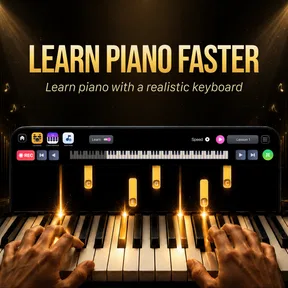
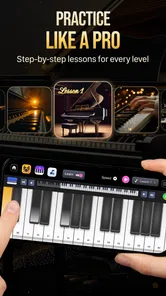
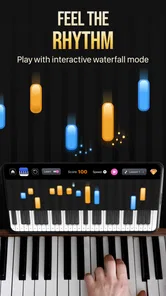
The first time I opened the app, I was greeted with a sleek and intuitive interface. The developers clearly understand the importance of a user-friendly design. The keys are well-spaced and responsive, making it feel almost like you're touching the real thing. I spent a good hour just playing around with the different sounds and settings. It's perfect for beginners and seasoned pianists alike.
Readability, navigation, and playing comfort
On a phone, a keyboard has to balance visible keys against the space available for everything else. I recommend turning the device to the orientation that gives your hands the most room, then trying a few simple scales before settling into a longer session. That small check helps reveal whether the on-screen layout suits your device and your fingers; it is more useful than assuming a compact screen will feel the same to everyone.
Touch playing also changes the experience depending on how you use your hands. If precise finger placement is difficult, a slower melody with one finger at a time can be a more comfortable way to explore than attempting quick chords. Conversely, players who rely on two-handed patterns may find the phone layout cramped. I would test the actual playing area before treating it as a practice instrument, especially if hand movement or screen visibility is a concern.
For easier navigation, I would start by locating the keyboard and testing one or two sounds before exploring every setting. That gives a beginner a simple first task and makes it easier to tell whether the main playing area is comfortable. If small on-screen controls are hard to distinguish, avoid changing settings while trying to play; pause, adjust the phone’s position, and return to the keys when the screen is steady.
More From Our News Desk

 Weather - By Xiaomi
Weather by Xiaomi Review: Clear at a Glance, Less Clear Up Close
Xiaomi’s weather app makes everyday forecasts quick to scan, but its calm surface can leave useful details and recovery paths harder to find than they should be.

 X
XX Under Pressure: Can It Recover When Posting Goes Wrong?
A resilience-focused review of X, examining setup, mistaken posts, interruptions, weak connections, and the gaps that matter when recovery needs to be dependable.

 Clash of Clans
Clash of Clans Is Won Between the Battles
Its raids are quick; its community is a long-term project of coordination, teaching, rivalry, and shared responsibility—with all the friction that entails.

 Android Auto
Android Auto Makes the Case for Quieter Car Software
The car interface is no longer judged by how much it can do, but by how quietly it helps. Android Auto shows what drivers now expect—and what still gets in the way.

 MobiOffice: Word, Sheets, PDF
MobiOffice: Transforming Mobile Productivity with Seamless Integration
MobiOffice: Word, Sheets, PDF is redefining mobile productivity with a surprising blend of functionality and innovation.

 EA SPORTS FC Soccer Mobile 26
EA SPORTS FC™ Mobile Soccer: Redefining Mobile Sports Gaming
Dive into EA SPORTS FC™ Mobile Soccer, where immersive gameplay and strategic depth transform mobile sports gaming.
Latest News



Features That Hit the Right Notes
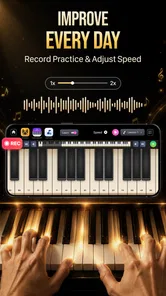
One of the things I love about Easy Piano Keyboard - Piano88 is the variety of sounds it offers. From classic grand piano to jazzy electric pianos, there's something for every music taste. The app also includes a built-in metronome, which is a godsend for anyone trying to improve their timing. And let's not forget the recording feature—I was able to capture my sessions and listen back to track my progress.
Recording can be useful even when you're only experimenting: I like the idea of saving a short phrase, then listening for where the rhythm feels uneven instead of trying to remember it afterward. A metronome can make that practice more deliberate, but it may feel distracting when the aim is simply to improvise. I would use these tools selectively rather than turning every casual session into a lesson.
A practical way to use the recording tool is to capture a short idea rather than a long, unplanned session. Then I can listen back with a specific question in mind: did the ending land where I expected, or did I speed up? This turns a playful trial into a small, manageable exercise. If I am only relaxing, I would leave the metronome off and avoid judging every note.
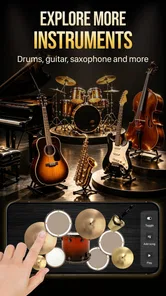
Switching sounds can also help a player decide what kind of musical idea they are trying to make. A phrase that feels plain with one tone may invite a different rhythm with another. I would make one change at a time and replay the same few notes, rather than changing several settings together; that keeps the comparison clear and reduces fiddling when the real aim is to play.
Another standout feature is the app's ability to connect with other devices. With MIDI support, it's possible to hook up your digital keyboard and use the app as a sound module. This feature is a game-changer for those who take their music production seriously.
When a phone is enough—and when it isn't
That MIDI option changes who may find the app useful. If you already own a compatible digital keyboard, using the phone as part of a setup can be more practical than tapping every note on glass. It is also a different proposition from a standard piano-learning app: the attraction here is playing and exploring sounds, while a structured course is usually the better choice if you want guided lessons and a planned route through music theory.
For a realistic routine, I would use the touch keyboard for a quick idea on a break, record a phrase if I want to revisit it, and move to a physical keyboard later if I decide to develop it. That workflow keeps the app convenient without expecting a small screen to do a full instrument’s job. If your priority is ensemble practice, dependable performance technique, or a wide physical range, a real keyboard is the more sensible alternative.
Compared with a conventional piano-learning app, this one is better suited to unstructured playing than a sequence of lessons. A course can provide clear milestones and explain what to practise next, which is valuable if you are starting from scratch and want direction. A physical keyboard, meanwhile, is the stronger choice for building finger control. I would choose this app when instant access matters, not when I need a curriculum or instrument-like mechanics.
It may also work as a low-commitment way to check whether making music on a screen appeals to you. Try a familiar tune, experiment with a different sound, and see whether the small keys invite you to continue or make you want a larger instrument. That is a useful decision point before spending time on a more involved setup. The app can spark curiosity, but it cannot tell you whether you will enjoy regular piano practice.
Why You'll Love It
What really sets Easy Piano Keyboard - Piano88 apart is its accessibility. I found myself using it during my morning commute, in between meetings, and even while waiting for my coffee to brew. It's like having a portable piano in your pocket. The app is free to download and doesn't bombard you with ads, which is always a plus.
Situational access still depends on where and how you play. On a quiet break at home, a short session can fit easily into the day; on a noisy commute, listening closely may be harder, and playing while moving can make accurate tapping less comfortable. I would save focused practice for a stable seat and use travel time only when I can give the screen and my hands proper attention.
For example, if I have ten quiet minutes before leaving home, I can sit down, play a simple melody, and record it if I want to remember the idea. If I am standing on a crowded train, the same activity is less appealing: movement makes accurate tapping harder, and surrounding noise can make listening less useful. Convenience is real, but it depends on having a moment when the phone is safe to hold and attention is available.
People who benefit from larger visual targets or a more spacious playing surface should try the layout before making it part of a routine. A tablet may offer more room for touch playing than a phone, while an external keyboard connected through MIDI may suit someone who prefers physical keys. Those options change the setup and are not necessary for casual experimentation, but they matter if cramped controls become a recurring obstacle.
The app is made by Banix Studio and is free to download, with optional in-app purchases ranging from $1.49 to $19.99 per item. It is rated for Everyone, and its current version is 5.8. Those details make it approachable to try, but I would still check purchase prompts carefully if I were setting it up for a child or sharing the device. The free starting point is useful; it does not mean every available item is included at no cost.
If a child is exploring it, I would make the first session about trying a few keys and sounds together rather than leaving them to navigate purchase choices. The Everyone age rating makes the app broadly approachable, but it does not replace a grown-up’s judgement about device use or spending. For an adult, the same check is worthwhile: I would decide whether optional purchases matter to me before treating the free download as the whole experience.
Whether you're a budding musician or someone who just wants to tinkle the ivories for fun, this app provides a platform to explore your musicality without any pressure. Plus, with regular updates and new features being added, it feels like a gift that keeps on giving.
Who should choose another route
I would skip a phone keyboard if I needed a dependable replacement for piano lessons, nuanced key response, or comfortable practice over long sessions. A dedicated keyboard offers a more natural layout, while a lesson-focused app is better for step-by-step instruction. Easy Piano Keyboard - Piano88 makes most sense when convenience and a quick chance to play matter more than depth, and that distinction helps set realistic expectations.
It is also not the best fit if your main goal is silent practice in a place where you cannot listen, or if you need detailed feedback on posture and technique. Recording lets me hear a phrase again, but listening back is not the same as instruction from a teacher or a course that identifies what to work on. I would use the app to explore ideas and choose a more guided option when structured improvement becomes the priority.
Its reach is substantial for a casual music app, with over five million installs and an average rating of 4.2 from around eleven thousand ratings. I take that as a sign that many people have found a reason to try it, not as proof that it will suit every hand, screen, or musical goal. For me, the practical test is simple: can I open it, find a comfortable way to play, and enjoy a few minutes without needing more than a phone?
A more inclusive way to judge the fit
Ease of use is personal: what feels straightforward to one player may be tiring or difficult for another. I would judge the app by a few practical checks rather than by its broad appeal. Can I see the keys clearly in my usual lighting? Can I reach the notes I want without awkward hand movement? Can I hear enough to enjoy the sound in the place where I plan to use it? If one answer is no, changing the setting or choosing a larger instrument may be more helpful than pushing through.
Players with limited dexterity may find a slow, one-finger melody more manageable than fast patterns, but that does not guarantee the on-screen keys will suit every movement style. Someone sensitive to sound may prefer brief sessions at a comfortable volume and a quieter setting. These are sensible ways to test personal comfort, not a promise that the interface removes access barriers. I value the app most when it lets me try music on my own terms, while recognizing when another format is kinder to my hands or attention.
Final Thoughts
In a world where apps are a dime a dozen, Easy Piano Keyboard - Piano88 stands out as a beacon for music enthusiasts. It's more than just an app; it's a gateway to creativity, relaxation, and everything in between. So, if you haven't tried it yet, I highly recommend giving it a go. Who knows? You might just find your new favorite hobby.
My recommendation is modest but clear: try it if you want an immediate, low-pressure place to play a few notes, test musical ideas, or see whether a piano sound catches your interest. Give yourself a quiet moment, check that the keys feel workable on your screen, and explore the recording or metronome only if they serve what you are doing. If you want formal teaching, sustained technique practice, or a more accommodating physical layout, choose a course or a keyboard instead. For casual creativity in a pocket-sized format, it is a pleasant place to begin.
Easy Piano Keyboard - Piano88 Frequently Asked Questions
Is Easy Piano Keyboard - Piano88 free to download and use?
Easy Piano Keyboard - Piano88 is free to download, so you can try its piano-playing experience without paying upfront. The app also offers in-app purchases, with individual items priced from $1.49 to $19.99. You can decide whether any paid content suits your needs; the free download is a straightforward way to explore the app before considering a purchase.
What features does Easy Piano Keyboard - Piano88 offer?
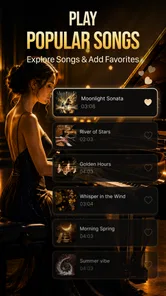
Easy Piano Keyboard - Piano88 offers a comprehensive set of features for both beginners and experienced players. It includes a full 88-key keyboard layout, various sound effects, and the ability to record and playback your sessions. Additionally, users can learn from a library of popular songs and utilize interactive lessons to improve their skills.
Is Easy Piano Keyboard - Piano88 suitable for beginners?
Yes, Easy Piano Keyboard - Piano88 is highly suitable for beginners. It provides interactive tutorials and lessons designed to help newcomers learn the basics of piano playing. The app's user-friendly interface and step-by-step guidance make it easy for beginners to follow along and gradually improve their skills at their own pace.
Does Easy Piano Keyboard - Piano88 require an internet connection?
No, Easy Piano Keyboard - Piano88 does not require a constant internet connection to function. However, some features like downloading new songs or accessing online tutorials may need internet access. Users can enjoy the core functionalities and practice offline without any interruptions.
Can I use Easy Piano Keyboard - Piano88 on both Android and iOS devices?
Yes, Easy Piano Keyboard - Piano88 is available for both Android and iOS devices. The app is designed to offer a seamless experience across different platforms, ensuring that users can enjoy its features regardless of their device preference. It's available for download on both the Google Play Store and the Apple App Store.
Pros
- User-friendly interface for beginners.
- Wide range of piano sounds available.
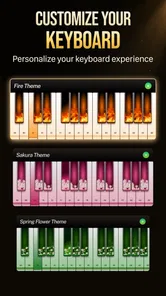
- Customizable keyboard layout.
- Offline mode for practice anywhere.
- Supports MIDI devices for versatility.
Cons
- Limited advanced features for experts.
- Ads can be intrusive at times.
- In-app purchases for premium content.
- Requires frequent updates for stability.
- Some sound samples lack realism.













