Easy Invoice & Estimates Maker
- 105.00
- 4.2
- Installs
- 50.00K
- Price
- Free

Screenshots
Analysis by Reviewed
When I need to prepare a clean invoice without opening a full accounting suite, Easy Invoice & Estimates Maker feels aimed at exactly that moment. It is a free business app from Lefage, LLC, built around creating professional PDF invoices and sending them quickly. I see it as a practical tool for freelancers, small service providers, and anyone who occasionally needs to bill a customer without turning invoicing into a separate project.
My overall impression is positive, but not blindly enthusiastic. The app is most convincing when speed and straightforward documents matter more than complete bookkeeping. It can help you move from a verbal agreement to a presentable invoice while the details are still fresh. At the same time, I would not treat it as a replacement for a full accounting system, especially if your work involves complex taxes, inventory, payroll, or detailed financial reporting.
What using Easy Invoice feels like in everyday work
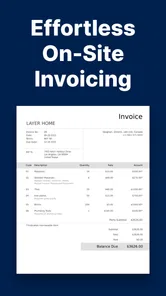
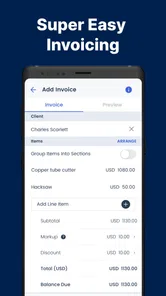
The first thing I appreciate is the narrow focus. Instead of making me navigate a large business dashboard, the app centers the task around invoices, estimates, templates, and PDF output. That makes sense for a person who has just finished a repair, design job, consultation, or home-service visit and wants to send a document before moving on to the next task.
A realistic example is a freelance photographer who finishes a small event and needs to bill the client that evening. With a reusable template, the photographer can enter the service description, adjust the amount, review the document, and send a PDF rather than composing an invoice manually in a word processor. The value is not accounting sophistication; it is reducing the number of small decisions between completing the work and requesting payment.
I also find the estimate-to-invoice idea useful for jobs where the final amount is not known at the first conversation. A cleaner workflow is to prepare an estimate before the work begins, keep the scope visible, and then create the invoice after confirming what was actually delivered. That separation can prevent a common mistake: sending a document that still looks like a quotation when the customer is ready to pay.
The app belongs to the Business category, but it is better understood as a focused document-making tool than as a complete business manager. That distinction matters. Someone who only needs polished billing paperwork may find the limited scope refreshing. Someone looking for bank reconciliation, expense categorization, or year-end reports will probably feel restricted.
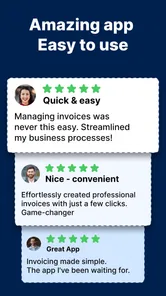
The developer is Lefage, LLC, and the app has built a reasonably visible user base, with over 50 thousand installs. Its average rating is 4.2 from around 975 ratings, alongside 105 written reviews. Those figures suggest that many people find the basic workflow useful, while the written feedback is still worth reading carefully for clues about the experience on different devices and in different work routines.
More From Our News Desk

Weather by Xiaomi Review: Clear at a Glance, Less Clear Up Close

X Under Pressure: Can It Recover When Posting Goes Wrong?

Clash of Clans Is Won Between the Battles

Android Auto Makes the Case for Quieter Car Software

MobiOffice: Transforming Mobile Productivity with Seamless Integration

EA SPORTS FC™ Mobile Soccer: Redefining Mobile Sports Gaming
Where the free model fits
Easy Invoice is free to install, which makes it easy to test with a real invoice before committing to a new billing routine. That is important for a business app because the best-looking feature list does not tell me whether entering my own services and customer details feels comfortable. I would start with a low-risk document, inspect the PDF closely, and only then decide whether it deserves a permanent place in my workflow.
There are in-app purchases ranging from $5.49 to $499.99 per item. That wide range is a reason to slow down before confirming any purchase. I would check the exact option, billing terms, and what is unlocked at the moment an upgrade is offered rather than assuming every paid choice has the same scope. The free entry point is useful, but it should not be confused with unlimited access to every possible capability.
For a person who sends only a few invoices each month, the free starting point may be enough. For someone who depends on invoices every day, the purchase screen deserves more attention. A paid feature can be worthwhile if it removes a real bottleneck, but it is not automatically better than a dedicated accounting service whose subscription includes broader records and reporting.
Trust begins with visible choices
Because invoices contain names, addresses, service descriptions, and money details, I pay attention to control rather than just appearance. The useful question is not whether an invoice looks professional; it is whether I can review what I am about to send, correct mistakes, and decide when a document leaves the app.
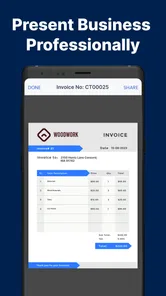
In my experience, a sensible habit is to treat the final PDF as a checkpoint. I would read the customer information, line items, totals, dates, and payment instructions before sharing it. A template can make a document look finished while an old customer name or outdated amount remains hidden in plain sight. The app can speed up preparation, but it cannot replace that final human review.
I also prefer keeping the app’s role clear: it prepares a business document, while I remain responsible for deciding what information belongs on it. Avoid adding unnecessary personal details simply because a template has room for them. A shorter invoice containing the information the customer needs is often easier to review and less likely to expose something irrelevant.
The age rating is Everyone, and the minimum operating-system requirement is Android 7.0. That makes the app accessible to people using older Android phones, although compatibility alone does not guarantee that every screen will feel equally comfortable on every device. If invoicing is part of your daily work, I would test the complete path on the phone you actually carry, including editing, previewing, saving, and sharing the PDF.
Templates save time, but they also create habits
The strongest practical benefit is the use of invoice templates. A good template turns repeated typing into a review task. After setting up the information that stays consistent, I can focus on the customer, the work performed, and the amount due rather than rebuilding the same layout every time.
There is a less obvious trade-off here. Reusing a template can preserve an error just as efficiently as it preserves a logo or business detail. I recommend opening a previous invoice as a checklist, not as an unquestioned copy. Confirm the recipient, service date, description, quantity, amount, and payment wording each time. This takes little effort and avoids the embarrassing situation of sending a document addressed to the wrong person.
Templates are also helpful when a business offers different kinds of work. A cleaner approach is to keep separate patterns for, say, hourly consulting, fixed-price projects, and physical services, provided the app’s available template controls suit that arrangement. The advantage is consistency without forcing every job into an unsuitable line-item structure.
PDF output is another meaningful choice. A PDF usually preserves the appearance of the document better than an editable file, so the customer sees the invoice as intended. It also gives me a stable version to inspect before sending. The limitation is that a PDF is not the same thing as a payment system or a financial ledger. It documents a request for payment; it does not by itself prove that payment has been received or keep a complete history of the business.
How I would use it without losing control
My preferred workflow would be deliberately short. I would first create or select the appropriate template, then enter the customer and job details, and finally inspect the PDF before sharing it. I would keep a separate record of which invoice was sent and whether it was paid, because a document-making app should not be assumed to provide the same oversight as accounting software.
For estimates, I would write the scope in plain language rather than relying only on a total. A customer is less likely to misunderstand a quote when the included work is visible. Once the job changes, I would update the document before converting the idea into an invoice. This is one of the more useful ways to avoid disputes: the estimate becomes a shared reference, not just a number sent at the beginning.
For recurring customers, I would be especially careful with saved information and old documents. Convenience can encourage people to retain more customer detail than they need. Before keeping a record on a phone used by other people, I would consider whether the device itself is protected and whether old invoices should remain readily accessible. Those are user-side controls, but they matter as much as the app’s interface.
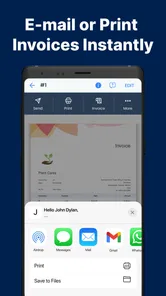
When sending a PDF, I would verify the recipient in the sharing screen instead of tapping the first suggested contact. This is a small but important privacy habit. An accurate invoice sent to the wrong person is still a serious mistake. I would also avoid sending a draft that has not passed the final preview, particularly when working quickly from a mobile connection or in a busy environment.
Situations where the app is a good match
I think Easy Invoice is a good fit for independent workers who need professional-looking invoices but do not want to learn a large financial platform. It is also suitable for a small operation that already handles bookkeeping elsewhere and only needs a convenient way to produce estimates and PDFs during the day.
It can be particularly handy for mobile work. A contractor finishing a job away from the office may value the ability to prepare a document immediately instead of waiting until returning to a computer. The same applies to tutors, cleaners, consultants, repair workers, designers, and occasional sellers of services. The common thread is a need for clear documents, not a need for a full enterprise system.
I would also recommend trying it to someone who currently creates invoices in a text editor. The main improvement is not necessarily a dramatic new business capability; it is a more repeatable process. A dedicated invoice template reduces formatting work and makes it easier to produce documents that look consistent from one customer to the next.
When another option is the better choice
I would look elsewhere if your business needs strong financial controls rather than document creation. A full accounting platform is a better choice when you need income and expense tracking, tax preparation support, inventory, payroll, bank connections, or detailed reports. Those needs quickly move beyond the app’s central purpose.
I would also be cautious if several employees need to work from a shared customer and invoice database. A single mobile-focused workflow may not be the right foundation for team permissions, approval processes, or centralized records. In that situation, a cloud accounting product or business-management system may offer more appropriate oversight, even if it takes longer to learn.
Businesses with complicated billing structures should test the templates carefully before switching. If you regularly bill retainers, deposits, multiple tax rates, reimbursable expenses, milestones, or changing quantities, a simple invoice maker may require too much manual checking. It can still produce a document, but the more exceptions your work contains, the more valuable specialized accounting controls become.
Version, maturity, and the final decision
The current version is 9.4.1, and the app was released on October 21, 2020. That history gives it more context than a brand-new utility: it has had time to establish its basic identity as an invoice and estimate maker. Still, version numbers do not tell me whether the app will match every individual workflow, so I would judge it through a real test document rather than through age alone.
My cautious verdict is that Easy Invoice earns consideration because it solves a specific problem cleanly: preparing and sending business invoices as PDFs without requiring a large accounting setup. I like the combination of a free starting point, reusable templates, estimate support, and a workflow that can fit naturally into mobile work.
My recommendation comes with a boundary. Use it as a focused billing companion, keep your own review and record-keeping habits, and pay attention to every purchase choice. Do not rely on it as the sole financial system if your business needs deep accounting, shared administration, or complex compliance support. For a freelancer who wants to turn completed work into a clear invoice quickly, however, the best reason to try it is control over a simple task without unnecessary ceremony.
After using it, I would keep the app if my invoices remain straightforward and I value speed more than extensive reporting. I would move to a broader alternative when the business grows beyond documents and starts needing connected financial records. That is where Easy Invoice makes the most sense to me: not as an all-purpose answer, but as a practical tool for the moment between finishing a job and sending a professional request for payment.
Easy Invoice & Estimates Maker Frequently Asked Questions
Who is Easy Invoice & Estimates Maker best suited for?
Easy Invoice & Estimates Maker is aimed at people who need to prepare business paperwork from a phone, particularly freelancers, contractors, and small-business owners. Its focus is practical rather than accounting-heavy: it helps create professional PDF invoices using templates, which can be useful when you need to send a document while away from your desk. It is a Business app from Lefage, LLC.
What is Easy Invoice & Estimates Maker used for?
Easy Invoice & Estimates Maker is designed to help freelancers, contractors, small businesses, and independent professionals create estimates, invoices, receipts, and related business documents from a mobile device. After reviewing its workflow, the main advantage is convenience: you can prepare professional-looking documents while away from your office, keep customer and item details organized, and send paperwork without relying on desktop accounting software.
Can I customize invoices and estimates in Easy Invoice & Estimates Maker?
The app generally provides customization options for business information, customer details, products or services, prices, taxes, discounts, payment terms, and notes. Depending on the version and device, you may also be able to add branding elements such as a company name or logo and adjust the document appearance. Before downloading, check which templates and branding features are included for free, since some advanced customization tools may require payment.
Can I send invoices directly to customers from the app?
Yes, the app is intended to make sharing completed estimates and invoices straightforward. Once a document is created, users can typically preview it and send or export it through email, messaging applications, cloud storage, or another sharing option available on their phone. You should still review the final document carefully before sending, particularly tax calculations, customer contact information, due dates, and payment instructions.
Does Easy Invoice & Estimates Maker support taxes, discounts, and payment tracking?
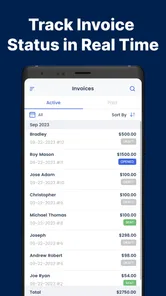
The app is built around common invoicing requirements, including adding line items, calculating totals, applying discounts, and including taxes or other charges. It may also let you mark documents as paid, unpaid, or overdue and keep a basic record of invoice status. However, businesses with complex tax rules, multiple currencies, recurring billing, inventory management, or formal accounting requirements should confirm the app’s exact capabilities before replacing dedicated accounting software.
Pros
- Create professional invoices and estimates directly from your phone.
- Quickly reuse saved client and product details for new documents.
- Useful for freelancers and small businesses managing work on the go.
- Supports organized record-keeping for invoices
- estimates
- and payments.
- Simple interface makes basic billing tasks easy for non-accountants.
Cons
- Advanced accounting and inventory features may be limited.
- Some useful tools may require a paid plan or in-app purchase.
- Custom branding and layout options can feel somewhat restricted.
- Manual data entry may become tedious for businesses with many transactions.
- Tax and currency settings may need careful checking for local requirements.











