Easy Fax - Send Fax from Phone
- 8.63K
- 4.3
- Installs
- 1.00M
- Price
- Free
Screenshots
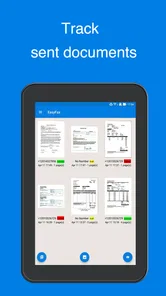
Analysis by Reviewed
Faxing is one of those chores that can turn a simple task into an unnecessary afternoon project. You may have the document ready on your phone, but the recipient still expects a fax, which usually means finding a machine, printing the pages, locating a working line, and hoping the transmission goes through. I tried Easy Fax - Send Fax from Phone with that problem in mind, and its main value is straightforward: it lets you prepare a fax from a mobile device instead of treating a physical fax machine as the starting point.
This is a free business app from Cool Mobile Solution, aimed at sending documents, photos, and receipts from a phone. It is available for users on Android 7.0 or later, carries an Everyone age rating, and has reached over a million installs. Its average rating sits at 4.3 from around 21 thousand ratings, which suggests that the basic idea works well for many people while still leaving room for the occasional frustrating experience.
I would not describe it as a complete replacement for every office fax workflow. It is better understood as an emergency tool and a convenient mobile option for people who fax occasionally. When the alternative is driving somewhere just to send one page, that distinction matters. When you need a carefully managed, high-volume business process, the convenience of a phone app may not be enough on its own.
Turning a phone into a practical fax starting point
I use this section to focus on the decision that matters before any fax is sent: whether a phone-based workflow is a sensible fit for the document and the recipient. A useful habit is to identify the recipient’s exact requirement first, since faxing is only an advantage when it matches how that office accepts paperwork. From there, I look at the practical safeguards and choices that help keep a rushed send under the user’s control.
The first setup is about removing hesitation
The useful test for an app like this is not whether it can send a fax in ideal conditions. The real question is whether I can open it when a deadline is close, select the right material, and understand what to do without learning a complicated office system. Easy Fax presents itself as a focused business utility rather than a broad document suite, and that narrow purpose is one of its strengths.
My advice is to install it before the urgent moment arrives. That gives you time to become familiar with the document-selection process and to check how your phone handles the files or images you expect to use. A fax request often comes from an insurance office, clinic, landlord, school, employer, or government department, and those requests rarely arrive when you are sitting beside a printer.
The app’s free entry point makes that preparation easy. You can keep it available without committing to a traditional fax service first. In-app purchases range from $2.49 to $49.99 per item, so I would treat the free download as a way to evaluate the workflow rather than assuming every possible sending need is covered without cost. Before sending an important document, look carefully at the purchase prompt and make sure you understand what you are selecting.
More From Our News Desk

Weather by Xiaomi Review: Clear at a Glance, Less Clear Up Close

X Under Pressure: Can It Recover When Posting Goes Wrong?

Clash of Clans Is Won Between the Battles

Android Auto Makes the Case for Quieter Car Software

MobiOffice: Transforming Mobile Productivity with Seamless Integration

EA SPORTS FC™ Mobile Soccer: Redefining Mobile Sports Gaming
That payment awareness is especially important for occasional users. Someone who faxes once every few months may see a mobile option as cheaper and simpler than maintaining a dedicated service. Someone who sends documents every day should compare the cumulative cost and the included sending capacity with a conventional business fax provider. The app saves time at the point of sending, but convenience and overall value are not always the same thing.
Preparing the document makes a bigger difference than expected
The quality of the source matters. A clean PDF or a sharply captured page is a safer starting point than a dim photograph taken at an angle. If I were sending a receipt, I would place it on a flat surface, make sure all edges are visible, and check that small text is readable before choosing it. A fax recipient cannot improve a blurry original after transmission.
For multi-page material, I would organize the pages before opening the send flow. Give the files sensible names, remove unrelated images from the same folder, and check that the pages are in order. This sounds basic, but mobile file pickers can make a rushed selection surprisingly easy to get wrong. The app reduces the need for a fax machine; it does not remove the need to inspect what is being sent.
Photos are useful when speed matters, but they are also where mistakes are most likely. Shadows, folded corners, glare, and a page that is slightly rotated can make a document look acceptable on a phone while becoming difficult to read after transmission. For a medical form, signed contract, or identity document, I would spend an extra minute reviewing the image rather than relying on the fact that the page is technically visible.
A realistic everyday use case
Imagine receiving a request from a clinic for a signed form while you are away from home. The form is already in an email or saved as a document on your phone. With a physical fax machine, you might need to return home, print the form, sign it, and find a machine. With this app, the practical workflow is to open the form, sign it using whatever method you normally use on your phone, check the completed pages, and prepare them for faxing.
That does not guarantee that the recipient will process it instantly, and it does not replace confirming the destination details. What it does is remove the trip to a printer and fax machine from the critical path. In my view, this is where the app earns its place: not as something I would necessarily use for every document, but as a way to handle an inconvenient requirement when the usual equipment is unavailable.
Where the app fits into daily work
Small businesses can use a mobile fax tool when an employee is visiting a customer, attending a trade event, or working from a location without office equipment. A salesperson might need to send a signed order form, while a property manager may need to forward a receipt or repair document from the field. The phone is already present, and the app keeps the transmission step close to the moment the document is created.
It can also suit freelancers who deal with organizations that still insist on faxing. Many independent workers do not need an office fax machine, and buying one for a few occasional requests makes little sense. A focused app is less bulky and avoids the physical maintenance associated with paper, toner, and a dedicated line.
There is a useful distinction between sending something from the field and building an archive. Easy Fax is oriented toward the act of sending. I would still keep the original document in a clearly labeled folder or cloud location, especially if the fax relates to taxes, healthcare, legal work, or a customer dispute. A successful transmission is not the same as a complete record-keeping system.
What friction it removes
The biggest improvement is logistical. I no longer have to think first about where the nearest fax machine is. That is valuable because the machine itself is often the least predictable part of the process: it may be busy, out of paper, unavailable outside office hours, or located in a store that charges for every page. A phone-based workflow turns the task into a software action that can begin wherever I happen to be.
The app is also more natural for documents that already live on a phone. Receipts photographed during a purchase, forms downloaded from email, and images captured during a site visit do not need to make an unnecessary trip through a computer before they can be sent. That shorter path is the reason I would recommend it to a friend who only needs faxing from time to time.
It helps to think of the app as a bridge between modern document habits and older recipient requirements. I can create, receive, or photograph a document on a smartphone, while the other side can continue using a fax-based office process. That bridge is useful precisely because faxing has not disappeared everywhere, even though most personal document work has moved to email and cloud storage.
Compared with email, faxing may still be necessary when the recipient explicitly requires it or when their internal workflow is built around fax numbers. Email is usually easier for informal sharing, and cloud links are often better for collaboration. I would not choose Easy Fax simply because faxing feels more professional. I would choose it when fax is the actual requirement and the phone is the most convenient source of the document.
Compared with scanning at a copy shop, the app is faster when the page is already in your possession and you have a usable phone camera. A shop may still be the better choice for a large stack, unusually delicate originals, or documents that need careful physical handling. Easy Fax reduces travel and setup, but it cannot make a phone camera behave like a high-end office scanner in every situation.
Small workflow habits that improve the result
First, I would separate preparation from transmission. Gather the pages, inspect them, and confirm the destination before entering the final sending step. This avoids the common mistake of discovering that the wrong image or an incomplete document has been selected only after the process is underway.
Second, I would avoid sending a critical document while the phone is nearly out of battery or connected through an unreliable network. A mobile fax workflow depends on the phone being available at the moment of sending. If the document is time-sensitive, use a stable connection when possible and keep the app open until you are satisfied that the process has finished.
Third, I would keep a simple note of what was sent and when. This is especially helpful for applications, claims, and business paperwork. The app can make sending convenient, but your own record helps when a recipient says a page was missing or asks you to resend the material later.
Finally, I would review the purchase screen every time the app presents one, particularly if I am sending several documents in a hurry. The available in-app items cost between $2.49 and $49.99 each, and the right choice depends on how often you use the service. A quick tap made under pressure can lead to a less suitable purchase than a deliberate choice.
Limits that should shape your decision
The first limitation is that mobile convenience does not guarantee perfect transmission conditions. The app may simplify the sending side, but the recipient’s fax line, office equipment, or handling process can still create delays. If a document is important, I would contact the recipient through another channel when possible and confirm that the fax arrived and was readable.
The second limitation is document quality. A phone photo is not automatically a good fax original. Receipts with pale ink, pages with handwritten notes, and forms photographed under indoor lighting deserve extra attention. If the recipient needs a crisp copy, a proper scanner or office service may produce a more dependable result.
The third is suitability for volume. Occasional personal or small-business use is where the app makes the most sense. Sending a long packet every day, managing several staff members, or needing centralized records calls for a more structured fax service. In those situations, a dedicated provider may offer stronger administration and a clearer cost model, even if it is less convenient for one-off tasks.
Privacy also deserves common sense. Before selecting a document, I would check that the phone is not displaying unrelated personal material and that the intended recipient’s fax number is correct. Healthcare, financial, and legal documents should be handled with particular care. The app makes the action mobile; it does not remove the responsibility to send sensitive information to the right destination.
People who only exchange documents by email should probably skip it. If every organization you deal with accepts email attachments, there is no reason to add a fax step. I would also hesitate to recommend it to someone who expects a full document-management platform, automatic business archiving, or a replacement for a multi-user office system. Its appeal comes from focus, not from trying to do everything.
Who should install it
I think Easy Fax is a strong practical choice for students, freelancers, travelers, caregivers, property owners, and small-business workers who occasionally face a fax-only requirement. It is particularly useful for people who keep most documents on their phone and do not want to buy or maintain a physical machine.
The app is also a sensible backup to keep installed even if you normally use email. You may never open it for weeks, then suddenly need to send a signed form before an office closes. Having the tool ready can save more time than its occasional use suggests, provided you have already checked the basic workflow and know where your documents are stored.
Cool Mobile Solution has kept the product focused through version 2.4.9 rather than turning it into a general office suite. That focus is welcome, but it also means I would judge it by one standard: can it help me send the right document with less hassle than finding a physical fax machine? For occasional use, the answer is generally yes.
My final view
Easy Fax - Send Fax from Phone solves a narrow but still very real problem. It saves time by moving fax preparation to the device most people already carry, and it is especially handy when a document is already stored as a photo or file on that phone. The free app and Everyone rating make it approachable, while its broad adoption shows that the use case is not limited to a tiny group of office specialists.
I would recommend it to a friend who needs an occasional fax and wants to avoid a trip to a copy shop or office. I would tell that friend to inspect every page, verify the recipient, watch the in-app purchase choice, and keep their own sending record. Those habits matter because the app removes physical friction, not every possible source of error.
For high-volume faxing, strict administrative control, or documents that demand the best possible scan quality, a dedicated office service remains the better option. For the awkward one-page request that arrives when no fax machine is nearby, however, this app is a practical answer. The real benefit is not faxing more often; it is making an unwanted fax task take less of your day.
Easy Fax - Send Fax from Phone Frequently Asked Questions
Can Easy Fax send documents from my phone without a fax machine?
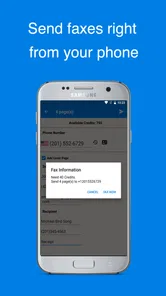
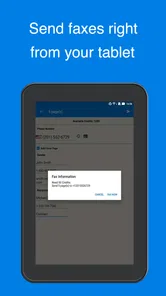
Yes. Easy Fax - Send Fax from Phone is designed to send documents, photos, and receipts from a phone, without requiring a traditional fax machine. You can bring a file into the app, prepare it for sending, and address it to a fax number. This makes it useful when you need to send paperwork while away from an office, though you should review the document and recipient details before submitting it.
Is Easy Fax free to download, and what should I know about the cost of sending?
Easy Fax is free to install, but sending a fax may involve a purchase. In-app purchases range from $2.49 to $49.99 per item, so check the purchase options shown in the app before confirming a send. This distinction is worth keeping in mind: downloading and opening the app does not necessarily mean every fax transmission is free. Review the amount and terms displayed at checkout so the cost is clear before you proceed.
Can I use Easy Fax - Send Fax from Phone on my device?
Easy Fax - Send Fax from Phone is available for Android and iOS devices, making it a practical option if you want to handle faxing from a phone rather than a traditional fax machine. On Android, the listed minimum operating system is version 7.0, so check your device’s software before downloading. The app is free to install and is rated for Everyone.
What is Easy Fax - Send Fax from Phone, and how does it work?
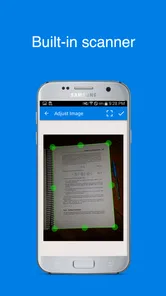
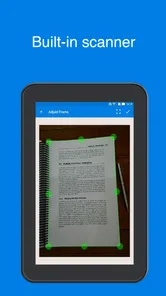
Easy Fax - Send Fax from Phone is a mobile faxing app designed to let you send documents directly from an Android or iOS device without using a traditional fax machine. After opening the app, you can import a file, scan pages with the camera, adjust the document, enter the recipient’s fax number, and submit the fax. The app generally handles transmission digitally and may provide a status or confirmation after sending.
Which documents and file formats can I send with Easy Fax?
The app is intended for common business and personal documents, including PDFs, images, scanned pages, forms, receipts, and signed paperwork. Depending on the version and device, files may be selected from local storage, cloud services, photo galleries, or captured using the phone’s camera. Before sending, review the document carefully to ensure every page is readable, correctly ordered, and included in the final fax.
Pros
- Send faxes directly from a smartphone without a physical fax machine.
- Supports common document formats
- including photos and PDF files.
- Useful for occasional faxing while traveling or working remotely.
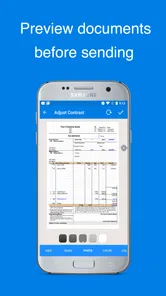
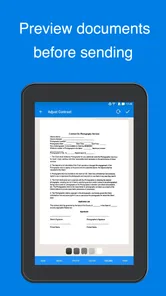
- Lets you preview documents before sending them.
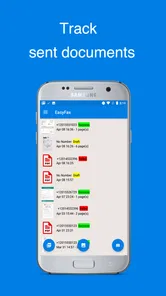
- Provides delivery status updates for sent faxes.
Cons
- Fax credits or subscriptions may become expensive for frequent users.
- A stable internet connection is required to send documents.
- Scanned photos may need cropping or adjustment for better readability.
- Sensitive documents require careful review of the app’s privacy practices.
- Recipient numbers must be entered accurately to avoid failed deliveries.











