

e-Sword: Bible Study to Go
- 693.00
- 4.7
- Installs
- 100.00K
- Price
- $2.99

Screenshots

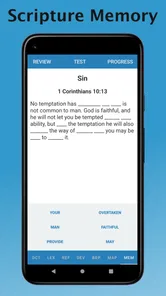
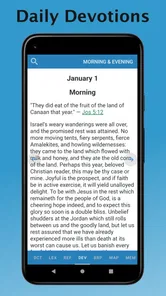
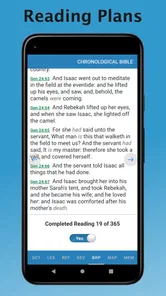
Analysis by Reviewed
I came to e-Sword: Bible Study to Go expecting a practical way to read and explore the Bible on a phone, and that is the best way to think about it: a study workspace rather than just a digital book. It is a paid Books & Reference app from developer Rick Meyers, priced at $2.99, with an Everyone age rating. Its 4.6 average from around 2,100 ratings and more than 100,000 installs suggest it has found an audience among readers who want study material close at hand. The current version is 7.0.1, and it was released on January 13, 2022.
Diving into the Features
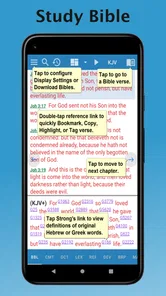
So, what makes e-Sword: Bible Study to Go stand out from the crowd? First off, this app is loaded with a plethora of features that cater to both casual readers and hardcore theologians. You’ve got access to multiple translations, so whether you fancy the poetic flow of the King James Version or prefer something a bit more contemporary, you’re covered.
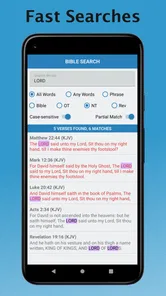
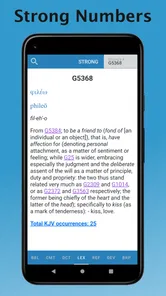
But wait, there’s more! The app offers a comprehensive set of study tools including dictionaries, commentaries, and even maps. Imagine having a scholar’s toolkit right at your fingertips! The search function is pretty intuitive too – finding specific verses or topics is a breeze, saving you loads of time flipping through pages.
What to Expect from a Study Workspace
The main difference I notice between this and a basic reading app is the way it invites me to follow a question rather than simply turn pages. I can start with a verse, look at its wording in another translation, and then consult a reference tool without changing the kind of task I am doing. That makes it useful when I have a specific point to investigate, but it can feel like more than I need when I only want to read a chapter before bed.
I would not approach the collection as a promise that every resource will settle a difficult interpretation. A dictionary can clarify a term, a map can help orient a place, and a commentary can offer an argument, but those are different kinds of help. I get the most from the app when I use each tool for its proper job and return to the passage itself instead of treating one reference as the final answer.
User Experience
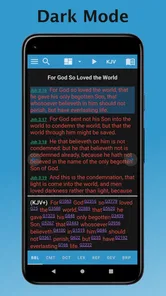
The user interface is clean and straightforward, which is a big plus. It’s super easy to navigate, even if you’re not tech-savvy. Customization is another highlight – you can tweak the font size, choose between day and night modes, and even bookmark your favorite passages for quick access.
One feature that I particularly love is the ability to take notes and highlight text. It’s like having a digital notebook where you can jot down your reflections or highlight those aha moments during your study. Plus, syncing your notes across devices ensures you’ve got everything at hand wherever you go.
More From Our News Desk

 Gmail
GmailGmail in a Busy Inbox: Who Benefits Most?
From first account to crowded workday, Gmail earns its place through dependable search and flexible sorting—but its best fit depends on how much inbox maintenance you can tolerate.

 Prime Video
Switching to Prime Video: What Changes in Your Viewing Routine
Prime Video can make a compelling second home for streaming, but switching means learning a different catalog, rental layer, and route from browsing to playback.

 Universal TV Remote Control
Universal TV Remote Control Works Best as a Reliable Backup
A phone remote earns its place through quick setup and reliable habits. Here is how to get more from Universal TV Remote Control—and where its limits show.

 Weather - By Xiaomi
Weather by Xiaomi Review: Clear at a Glance, Less Clear Up Close
Xiaomi’s weather app makes everyday forecasts quick to scan, but its calm surface can leave useful details and recovery paths harder to find than they should be.

 X
XX Under Pressure: Can It Recover When Posting Goes Wrong?
A resilience-focused review of X, examining setup, mistaken posts, interruptions, weak connections, and the gaps that matter when recovery needs to be dependable.

 Clash of Clans
Clash of Clans Is Won Between the Battles
Its raids are quick; its community is a long-term project of coordination, teaching, rivalry, and shared responsibility—with all the friction that entails.
Latest News



Getting Set Up Without Overthinking It
For a first-time user, I would begin with one familiar passage instead of trying to understand every tool at once. Open it, make the text comfortable to read, and decide whether a bookmark or a note would help you return to it. That simple setup creates a personal starting point without requiring a complicated study system.
When you are deciding what to look up, phrase the question narrowly. “What does this word mean here?” is easier to pursue than “What does the whole passage mean?” A focused search gives you a better chance of using the dictionaries and commentaries deliberately, rather than opening several resources and losing track of the reason you started. I also find it useful to note the verse beside a question, so later I can remember what prompted the thought.
Making Your First Study Session Count
For a first visit, I’d keep the goal small: open a passage you already know, compare its wording across translations, then use a dictionary or commentary to investigate one phrase that catches your attention. That gives you a useful first result without turning setup into a project. If the screen feels crowded, increase the text size and switch to the reading mode that suits your surroundings; a quick bookmark makes it easier to return later.
The app is most appealing if you like to move between reading and reference material without leaving your study. Compared with a basic Bible reader, it offers a more research-oriented toolkit; compared with a shelf of printed commentaries, it keeps several kinds of resources within reach. That convenience is not the same as having every interpretation settled for you, though. I treat commentary as a perspective to weigh alongside the passage, not as a substitute for reading it myself.
Common Points of Confusion
One thing I would keep clear from the start is the difference between a feature and a resource. Having a tool for consulting commentaries or translations does not mean every reader will find every specific edition or reference they personally want. If your study depends on a particular text, check that it is available before you make the app your only reference. This is especially worth doing for students following a course or a group using a named translation.
It is also easy to mistake a busy study session for a productive one. Opening translations, maps, and commentaries in succession can feel thorough, but it helps to ask what each item contributes. I prefer to write one clear question, consult one relevant resource, and then decide whether another source would genuinely add something. That keeps the app from becoming a collection of open tabs in my head.
Who It Suits—and Where to Be Cautious
I’d recommend it to readers who enjoy looking up unfamiliar terms, comparing translations, or keeping notes as they work through a book of the Bible. It can also suit someone preparing a discussion and wanting to collect passages and thoughts in one place. If you mainly want a distraction-free reading plan, a simpler Bible app may feel lighter. Likewise, readers who depend on a particular translation or specialist reference should check that the resources they need are available before building a routine around the app.
A realistic use for me would be a short evening study: I pick a passage, search a repeated word, compare how translations handle it, and save one question in my notes to revisit. That is more manageable than trying to explore every tool at once. One useful habit is to keep notes focused on the passage and the question you are investigating; otherwise, a growing notebook can become harder to search than the printed margin notes it replaces.
Making the Most of Notes and Comparisons
For a longer reading project, I would use notes to capture observations rather than copy whole sections of reference material. A brief note such as “compare this repeated phrase later” gives me a clear next action and keeps my own thinking distinct from what a commentary says. If I am preparing to talk with a group, I can use a bookmark to return to the passage and a note to remember the question I want to raise, instead of relying on memory after closing the app.
Translation comparison works best when I look for a specific difference, not merely a different-looking sentence. I might notice that one version chooses a more familiar expression and another stays closer to a formal phrasing; then I can use a dictionary or commentary to investigate why that choice matters. This method is slower than accepting the first wording I read, but it makes the references feel purposeful and helps me avoid confusing a translation choice with a settled conclusion.
Why You’ll Love It
Aside from its robust features, what truly sets e-Sword apart is its community. There’s a thriving user base that shares resources, insights, and tips, making your study more enriching. And if you ever hit a snag, the app’s support team is pretty responsive, which is always a bonus.
Oh, and did I mention the app is free? Yep, you heard that right! Though there are in-app purchases available for additional resources, the free version itself is packed with value. It’s perfect for anyone looking to deepen their understanding of the Bible without breaking the bank.
In conclusion, if you’re serious about Bible study or just curious to explore, e-Sword: Bible Study to Go is a fantastic companion. It’s user-friendly, resource-rich, and doesn’t cost a dime to get started. Give it a whirl and see how it can transform your study sessions into meaningful journeys.
My Recommendation for a First-Time Reader
I would choose this app if I expect to do more than read straight through a passage. Its combination of translations and reference tools makes it a good fit for a curious reader who likes to pause, compare, and follow a question. The one-time purchase price of $2.99 is modest for someone who will return to those tools regularly, but even a low price is not a reason to buy an app whose approach does not match your habits. If you prefer a simple reading plan, a minimal reader may be a better everyday choice.
My practical starting routine is deliberately small: pick a passage, make the text easy to read, compare one verse, and save a single note or bookmark. If that feels helpful, add a dictionary or commentary to answer a question that arose naturally. If instead you find yourself spending more time navigating reference material than reading, scale back and use the app only when a passage calls for closer study. That is a better test of fit than trying to explore everything on the first day.
For readers who are comfortable exploring the Bible with references close at hand, I think e-Sword can become a useful companion rather than just another icon on a phone. Its strength is having several study paths available in one place; its limitation is that those paths still require judgment and a little organization from the reader. Go in with one real question, keep your notes concise, and let the tools support your reading instead of taking it over.
e-Sword: Bible Study to Go Frequently Asked Questions
Is e-Sword: Bible Study to Go suitable for children and families?
e-Sword is rated for Everyone, making its age classification suitable for a general audience. It is a Bible study app rather than a game, and its resources are intended to support reading and study. Families can explore the app together, while parents can decide how its reference materials fit their children’s needs.
What does e-Sword cost, and what should I know before downloading it?
e-Sword: Bible Study to Go is a paid app priced at $2.99. It belongs to the Books & Reference category and is developed by Rick Meyers. If you are comparing Bible study tools, consider whether you want an app focused on reading and reference materials before making the purchase. Its store summary describes it as “A seminary library for the price of a cup of coffee!”
What is e-Sword: Bible Study to Go?
e-Sword: Bible Study to Go is a comprehensive Bible study application available for both Android and iOS devices. It offers a wide range of features such as various Bible translations, commentaries, dictionaries, and a plethora of study tools designed to enhance your understanding and study of the Bible. The app is user-friendly and suitable for both beginners and advanced users.
Is e-Sword free to download and use?
Yes, e-Sword: Bible Study to Go is free to download and use. While the core app provides a rich set of features at no cost, there are optional in-app purchases available. These purchases can include additional Bible versions, commentaries, or other resources that can further enhance your Bible study experience.
Can I use e-Sword offline?
Yes, one of the key features of e-Sword: Bible Study to Go is its offline functionality. Once you download the app and the necessary resources, you can access your Bible, commentaries, and other study tools without the need for an internet connection. This makes it convenient for users who wish to study the Bible while on the go or in areas with limited connectivity.
Pros
- Extensive Bible study resources available.
- User-friendly interface for all ages.
- Offline access to scriptures
- notes
- etc.
- Customizable reading plans and notes.
- Frequent updates with new features.
Cons
- Limited language options for non-English users.
- Occasional bugs in the mobile version.
- Some features require in-app purchases.
- Interface might feel outdated to some.
- Limited customer support availability.











