E-PASS Toll App
- 678.00
- 4.6
- Installs
- 500.00K
- Price
- Free

Screenshots
Analysis by Reviewed
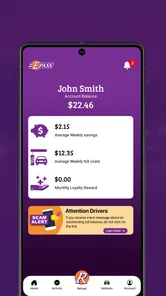
I think about E-PASS Toll App as a small but useful part of a driving routine, not something that plans the drive for me. Its value starts before I turn the key: if I use E-PASS, I can check the account, see toll activity and balance, and reload when needed. That can make a toll-road commute feel more predictable, especially when several people or vehicles draw on the same account.
That narrow purpose is also the first thing I’d want a new user to understand. This is a business app from the Central Florida Expressway Authority, built around E-PASS account tasks rather than general navigation or every toll system. I’d choose it when I already manage an E-PASS account and want a convenient way to keep an eye on it. If I only need directions, or my trip uses a different payment arrangement, a maps app or that route’s own payment option is the better starting point.
From account check to a more prepared drive
Before I set off, I find it useful to treat an account check as a small planning step rather than an emergency fix. A quick look can tell me whether I should pause and sort out the account while I’m safely at home, and it also gives me a clearer starting point for reviewing activity later. From there, the next question is how to make that check part of a dependable driving routine.
Set things up before the trip
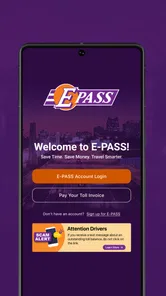
So, let’s dive into how this app works. First of all, downloading and setting it up is a total breeze. Available on both Android and iOS, the E-PASS Toll App doesn’t weigh a ton, so it won’t hog your phone’s memory. Once installed, you’ll need to set up an account. No biggie, just the usual name, email, and vehicle details. I found the whole process super user-friendly and it took me less than five minutes to get everything sorted.
The practical first step is to make sure the account and vehicle information you use are the ones you actually need to manage. I’d do that before a busy driving day rather than while parked at a rest stop, then check the balance before leaving. That simple habit turns the phone into a preparation tool: you can spot a balance that needs attention at home, when there’s time to reload, instead of discovering an account issue mid-trip. The app is free, and its Everyone age rating makes it suitable for a broad audience, though account management is naturally most useful to the person responsible for the toll account.
There’s a useful distinction between setting up the app and being ready for a particular journey. Installing it does not, by itself, answer whether your account is arranged for the vehicle and roads you plan to use. I’d confirm those details with whoever manages the account before relying on it, particularly if you are borrowing a car or taking a route you do not usually drive. That small handoff can prevent a last-minute scramble to work out whether the account you can see is the one that applies to your trip.
Check the account, then decide what to do
Now, let’s talk features. The app allows you to manage your toll payments effortlessly. Whether you’re topping up your balance or checking your travel history, it’s all right there at your fingertips. One thing I particularly love is the real-time traffic updates—perfect for avoiding those pesky traffic jams. Plus, it sends you notifications when your balance is low, so you're never caught off guard.
More From Our News Desk

Weather by Xiaomi Review: Clear at a Glance, Less Clear Up Close

X Under Pressure: Can It Recover When Posting Goes Wrong?

Clash of Clans Is Won Between the Battles

Android Auto Makes the Case for Quieter Car Software

MobiOffice: Transforming Mobile Productivity with Seamless Integration

EA SPORTS FC™ Mobile Soccer: Redefining Mobile Sports Gaming
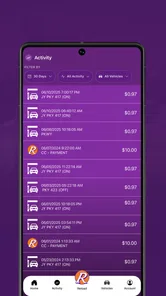
For me, the most useful workflow is to check activity after a drive, not just glance at the balance before one. Looking back at toll activity gives you a way to connect a trip with account changes and notice anything you want to investigate while the route is still fresh in your mind. A balance check answers “how much is available?”; the activity view helps answer “what changed after I drove?” Those are different questions, and both are worth checking if you use toll roads often.
A good practical habit is to use the balance and activity views for separate jobs rather than expecting one screen to explain everything. Before a trip, the balance check is a quick readiness check. Afterward, activity can help you keep household or work records in order, or spot a transaction you want to ask the account holder about. If you are monitoring costs across regular commutes, checking at a consistent time—such as after you arrive home—makes it easier to compare account changes with the journeys you remember, without turning every drive into a bookkeeping task.
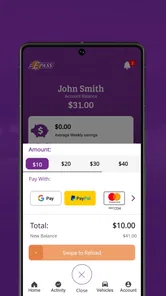
Reloading is most useful when treated as part of preparation, not a roadside reaction. If a balance looks low while you are at home, you can deal with it before the next trip rather than trying to solve an account question while distracted or pressed for time. I would still avoid making account changes while driving; the app is a planning and account-management tool, and any check or reload belongs in a safe parked moment.
Shared vehicles and account handoffs
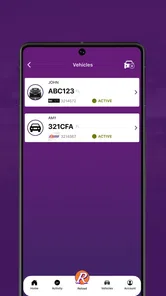
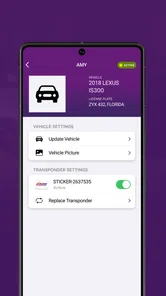
Another cool feature is the ability to link multiple vehicles to one account. This is a game-changer for families or businesses with a fleet of cars. Trust me, it’s like having a personal accountant for your toll expenses!
That shared-account approach is especially handy when one person handles household or work travel costs but more than one vehicle is involved. I’d still agree on who checks the account and reloads it, because a shared view is only useful if someone takes responsibility for keeping it current. For occasional drivers borrowing a vehicle, the app may be less helpful than simply asking the account holder to confirm the arrangement before setting out.
For a family, the handoff could be simple: the account holder checks the balance before a day when another family member will drive, then reviews the activity later to understand what changed. In a small business, the same routine can make it easier for the person handling expenses to keep toll activity in view without asking each driver to manage a separate process. The trade-off is responsibility: if everyone assumes somebody else is watching the account, a shared setup can become less clear than a single-driver arrangement. Agreeing who checks and reloads is a practical step, not busywork.
If you are the occasional driver rather than the account owner, I would not assume that access to the app means you can change everything you need. The safest approach is to ask the person responsible for the E-PASS account to confirm the vehicle and payment arrangement before you leave. That keeps the app in its proper role: a useful window into an account for the person managing it, rather than a substitute for clear communication between drivers.
What the road experience can—and cannot—tell you
On my first drive using the app, I was a bit skeptical. Would it really work as seamlessly as promised? Well, color me impressed! Passing through tolls was smooth and stress-free. No more fumbling for coins or cards—just a quick beep, and I was on my way.
A realistic routine is to check the account before a commute that includes toll roads, make the trip, then review the activity afterward if you’re tracking expenses or sharing the account with someone else. That sequence helps separate planning from checking: the first glance is about readiness, while the later review is about understanding what the trip cost against the account. I find that more useful than waiting until the balance feels unexpectedly low.
For example, imagine a weekday drive that normally uses toll roads, followed by an afternoon errand in a different vehicle. I’d check the account before leaving in the morning, make sure the relevant vehicle is covered by the arrangement, and then review activity later when I can compare it with the day’s driving. If a family member also uses the account, a quick conversation about who is responsible for checking it can prevent two people from assuming the other has handled a reload. The app helps with the account side of that routine; the driver still has to make sensible decisions about the route and timing.
The real-time balance updates were also a hit, as I could easily keep track of my expenses. Plus, I didn’t get any surprise deductions, which is always a win in my book. The app is intuitive and doesn’t bombard you with unnecessary notifications, which I really appreciated. It’s there when you need it, and quietly sits in the background when you don’t.
There is a trade-off, though: an account app is only as convenient as the information you keep current and the attention you give it. If you rarely drive on toll roads, checking and managing an account may feel like extra administration compared with choosing a route that avoids tolls or using another payment option available for your journey. And if you need turn-by-turn navigation or broad traffic planning, a dedicated maps app is the better tool; I wouldn’t rely on this one to do that job.
That comparison matters on a longer trip. A navigation app is better for deciding how to get somewhere and comparing route choices; E-PASS is more relevant once your journey involves an E-PASS account you need to manage. I would use them alongside each other rather than expecting either one to replace the other. Likewise, if you are not an E-PASS customer, a payment method intended for the toll roads on your route is more direct than installing an account app that does not match your needs.
Who benefits, and when another choice makes sense
I’d recommend it most to Central Florida drivers who use E-PASS routinely, commuters who want a quick balance check, and households or businesses managing toll activity across several vehicles. The Central Florida Expressway Authority develops the app, so its focus is specifically on E-PASS account tasks rather than serving as a universal toll account for every driver and road system. Before depending on it for a trip, make sure your account arrangement fits the roads and vehicle you plan to use.
It has a 4.6 average from around 2.3 thousand ratings, and more than 500 thousand installs, which suggests it has found a substantial audience among drivers. The current version is 2.9 and it requires Android 8.0 or later. Those details make it easy to judge basic compatibility, but the more important decision is whether you already use E-PASS: if not, a general navigation app or the payment option associated with your route may be a more natural fit.
Someone deciding whether to install it can start with a straightforward question: do I need to see or manage an E-PASS account? If yes, it is a sensible companion for checking the account and keeping activity visible. If you mostly travel without tolls, drive only occasionally, or simply want directions, its account focus may add another task without solving a problem you have. The app is free, but your time and attention still count; I would install it for a recurring account need, not just because I am planning one unfamiliar drive.
Compatibility is another practical check before relying on it. The Android requirement is version 8.0 or later, while the app is also available on iOS. For anyone managing a shared account, I would make sure the person who needs to review balances can actually use the app on their device, rather than assuming every driver needs to install it. One responsible account manager may be enough for a household or business, depending on how that group handles its records and travel.
A useful companion, not a complete travel system
In conclusion, if you’re someone who frequently hits the road and deals with tolls, the E-PASS Toll App is definitely worth checking out. It’s reliable, easy to use, and packed with features to make your driving experience smoother. The convenience of managing everything from your smartphone is unmatched, and I can confidently say it’s made my commutes a lot less hectic.
My recommendation comes with a clear boundary: use it to stay on top of an E-PASS account, and pair it with the tools that handle directions or other travel needs. The strongest use case is a regular driver or account manager who wants a repeatable check-before-and-after routine. The weaker one is a visitor, occasional toll-road user, or driver whose route relies on a different payment setup. In those situations, confirming the appropriate option for the trip is more useful than expecting this app to cover every toll-road question.
So, next time you’re planning a road trip or just your daily commute, give the E-PASS Toll App a shot. It’s like having a trusty sidekick along for the ride!
E-PASS Toll App Frequently Asked Questions
Is the E-PASS Toll App free, and what devices can I use it on?
The E-PASS Toll App is free to download and is intended for managing an E-PASS account on a mobile device. It is available for Android and iOS, so you can look for it in the app store used by your device. For Android, the minimum operating system requirement is version 8.0; check that your device meets the requirement before downloading.
Who develops the E-PASS Toll App, and what is it designed for?
The app is developed by the Central Florida Expressway Authority and is designed to help users manage an E-PASS account. Its main tools focus on monitoring toll activity and account balance, as well as reloading the account. It is a business-oriented app for people who want to handle these account tasks from a phone rather than relying only on other ways of managing their account.
What is the E-PASS Toll App and how does it work?
The E-PASS Toll App is a mobile application designed to facilitate seamless toll payments for users. It allows drivers to manage their toll accounts, view trip history, and monitor account balances directly from their smartphones. Users can also add funds, update personal information, and receive notifications about account activity, ensuring a hassle-free tolling experience.
Is the E-PASS Toll App available for both Android and iOS devices?
Yes, the E-PASS Toll App is available for both Android and iOS devices, making it accessible to a wide range of users. You can download it from the Google Play Store for Android devices and the Apple App Store for iOS devices. Ensure your device meets the app's system requirements for optimal performance.
How secure is my personal and payment information on the E-PASS Toll App?
The E-PASS Toll App utilizes advanced encryption technologies to protect users' personal and payment information. It adheres to industry-standard security protocols, ensuring that your data is safe from unauthorized access. Regular updates and security patches further enhance the app's security, providing users peace of mind regarding their information's safety.
Pros
- User-friendly interface for easy navigation.
- Real-time toll balance and transaction updates.
- Quick and easy online recharge options.
- Supports multiple vehicle accounts in one app.
- Secure payment processing for peace of mind.
Cons
- Limited customer service hours for support.
- Occasional app crashes during peak times.
- No offline mode for toll information.
- Incompatibility with older smartphone models.
- Limited features compared to competitors.











