Duke Energy
- 2.21K
- 3.0
- Installs
- 1.00M
- Price
- Free

Screenshots
Analysis by Reviewed
For a household that wants to handle its Duke Energy account without turning bill day into a project, the mobile app is worth considering. I see its clearest value in account access and bill payment: it puts those routine tasks on a phone, which can be handy when I’m away from home or don’t want to find a computer. It is a business app from Duke Energy, and it is free to use.
Readability and navigation
From the moment you download the Duke Energy app, you’ll notice its user-friendly interface. It’s like the developers knew exactly what you needed before you even opened the app! Navigation is a breeze, with a clean design that guides you effortlessly through each feature. Whether you’re tech-savvy or just getting started with smartphone apps, you’ll find this app intuitive and straightforward.
That ease matters most when you have a specific job in mind, such as checking your account or paying a bill. I’d use the app for those focused visits rather than expecting it to replace every way of dealing with a utility. If you prefer handling household finances on a larger screen, the website may feel more comfortable; if you are already on your phone, the app offers a more direct route to the account.
Motor and sensory considerations
A phone can make account tasks more convenient, but it also puts them on a smaller screen and relies on touch interaction. That can be less comfortable for anyone who finds small controls difficult to use, has limited dexterity, or prefers reading longer information on a computer. I would try the app with the device settings and input methods that work best for you, then use the website or another account channel if a particular task is easier there.
For sensory needs, a useful habit is to separate essential account work from optional browsing: open the app when you need to complete one task, such as paying a bill, and avoid relying on an alert as your only reminder. Notifications can be convenient, but a calendar reminder or another personal system is a safer backup if missing a payment would cause stress. The best setup is the one you can use consistently, not the one that assumes your phone will always be within reach.
Situational access and everyday use
A realistic use case is noticing a bill is due while you are away from home. Rather than waiting until you can get to a computer, you can open your account on your phone and take care of payment there. I’d still check the account details before confirming, especially if I’m in a hurry or using a small screen; convenience is most helpful when it doesn’t lead to a rushed mistake.
The app’s main advantage over a paper bill is access while you are out, while its advantage over a browser is having account tasks close at hand on a phone. Paper can still suit someone who likes a physical record, and a computer can be better for comparing documents or reviewing household finances alongside other bills. I’d treat the app as a convenient account tool, not as a complete budgeting or energy-management system.
More From Our News Desk

Weather by Xiaomi Review: Clear at a Glance, Less Clear Up Close

X Under Pressure: Can It Recover When Posting Goes Wrong?

Clash of Clans Is Won Between the Battles

Android Auto Makes the Case for Quieter Car Software

MobiOffice: Transforming Mobile Productivity with Seamless Integration

EA SPORTS FC™ Mobile Soccer: Redefining Mobile Sports Gaming
What the app can—and cannot—help with
It helps to separate the app’s dependable core from broader expectations about what a utility app should do. Duke Energy’s mobile product is most clearly suited to managing an account and paying a bill. I would make that the reason to install it, then judge any other information or tools by whether they are actually available and useful in my own account, rather than building a routine around assumptions.
Account tasks in a real household routine
For someone who handles household bills, a useful workflow is to check the account at a calm moment, review the amount, and then complete payment rather than trying to do everything between errands. If another person shares responsibility for bills, agree on who checks and who pays before relying on separate phones; a mobile account shortcut does not by itself create a shared household process. Keeping a note of the payment in whatever budget system you already use can also prevent the app from becoming the only place you remember what was paid.
That small bit of planning matters when the account holder is not the person who normally manages the family finances. If you are helping a parent or another relative, it may be easier to agree on a regular time to review the account together than to troubleshoot a payment while someone is stressed. The app can make the account reachable on a phone, but people still need to decide who is authorized to act and how they will keep one another informed.
Real-Time Energy Monitoring
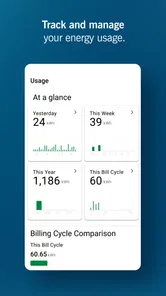
One of the most impressive features of this app is its real-time energy monitoring capability. You can literally watch your energy consumption ebb and flow throughout the day. This feature is perfect for those of us who love to geek out over data and find ways to optimize our energy use. It gives you the power (pun intended) to make informed decisions about when to ramp up or scale back your energy usage.
Customized Alerts and Tips
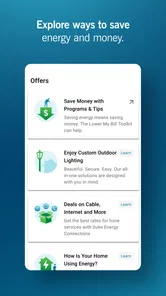
Another cool feature is the app’s ability to send you customized alerts and tips. Imagine receiving a notification that reminds you to turn off your lights or adjust your thermostat. These little nudges can add up to significant savings over time. Plus, the personalized energy-saving tips are like having an energy expert in your pocket, offering advice tailored specifically to your home and habits.
I’d use any energy information as a prompt to investigate, rather than assuming a change on a screen automatically proves what caused it. For example, if usage looks different after changing a routine, compare it with the same household’s usual pattern before drawing conclusions. That makes the app more useful for noticing questions to follow up on, while keeping expectations grounded: information can guide decisions, but it cannot make the household changes for you.
Billing Made Easy
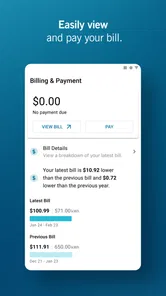
No one enjoys paying bills, but the Duke Energy app makes it a tad less painful. The app provides a straightforward breakdown of your energy bill, showing you exactly where your money is going. It’s transparency at its finest, and it helps you make sense of your monthly expenses. Plus, you can pay your bill directly through the app, saving you from the hassle of mailing checks or navigating clunky websites.
For a practical routine, I’d review the bill before paying instead of treating the payment button as the whole task. A quick look can help you notice a change that deserves a closer check, while keeping a separate household record can make month-to-month budgeting easier. If you manage several accounts or need to coordinate payments with other people, the app may be one part of that process rather than the shared overview you need.
When a different route may work better
Compared with a general banking app, this one is focused on a single utility relationship rather than giving you a broad view of spending across providers. Compared with a paper statement, it puts account work within reach when you are away from home, but paper can be easier to annotate or keep in a household folder. A browser on a computer remains a sensible alternative when you need a larger display, are working through several bills, or simply prefer a keyboard. I would not replace those options if they already suit the way you organize money.
It is also not the right choice for someone who wants one independent energy dashboard for multiple utility companies, or a full household budgeting tool. Its purpose is tied to a Duke Energy account. If you are not a Duke Energy customer, the app is unlikely to solve your utility-management needs; if you are, its value is in having that account close at hand, not in consolidating every part of your financial life.
Who is likely to find it useful?
I’d recommend it most to Duke Energy customers who want a straightforward way to reach their account and pay from a phone. It is less compelling if you are looking for a general energy tracker that works across providers, a detailed household budget, or a replacement for every customer-service interaction. Its usefulness depends on whether mobile account access fits your habits.
The app has an average rating of 3.4 from around 6,200 ratings, with about 2,000 written reviews, and it has been installed over a million times. Those figures suggest it has a sizable user base but also leave room for mixed experiences. It is rated for Everyone, was released on March 25, 2019, and its current version is 7.0.0, with Android 10 as the minimum operating system requirement. If your phone is older, check compatibility before planning to rely on it.
Practical expectations and inclusive use
In day-to-day use, I would keep the payment process deliberate: make sure you are in the correct account, read the amount, and give yourself enough time to review before confirming. That is especially helpful if you have low vision, use a screen magnifier, or need more time to navigate touch controls. A phone’s built-in display and input settings may help, but comfort varies by person and device, so I would test the tasks you actually need rather than assume every screen will work equally well.
For someone with hearing differences, the app may be useful as a visual route to account tasks, while any phone notifications should be treated as one possible cue rather than the sole way to keep track. For someone with limited dexterity or fatigue, completing one necessary task at a time may be more manageable than exploring several areas in one session. In either case, the website or another account channel can be a reasonable fallback when a particular interaction proves uncomfortable.
There is a practical trade-off in using a phone for important financial tasks: portability helps when you are out, but distractions, a small display, and an unreliable moment for focused attention can make errors easier. I would avoid paying while walking, driving, or juggling other responsibilities. Waiting until you can sit down and check the details turns mobile convenience into a genuine advantage instead of a rushed shortcut.
In conclusion, the Duke Energy app is more than just a tool for monitoring your energy usage—it’s a partner in your journey towards more efficient living. With its seamless user experience, real-time monitoring, and personalized tips, it empowers you to take control of your energy consumption like never before. So why not give it a try and see how much you can save? You might just be surprised at the difference it makes in your daily life.
My recommendation is more measured: it makes the most sense if quick account access and mobile bill payment are the jobs you need done. The app’s 3.4 average rating is a reminder that not every customer will find the experience equally smooth, so I would keep another way to reach your account available for important tasks. If you value doing routine utility business on your phone, it is a practical option; if you need broader budgeting, prefer paper, or find phone navigation uncomfortable, another approach may suit you better.
For inclusive use, I would decide based on whether the essential steps feel readable, controllable, and calm on your own device. A customer who can comfortably review and pay from a phone may find this a useful everyday shortcut; someone who depends on a larger screen, printed records, or help from another person may prefer a different route. The app is best seen as one option in a household’s utility routine, not a requirement for managing an account.
Duke Energy Frequently Asked Questions
Is the Duke Energy app free, and what devices can run it?
The Duke Energy app is free to download and is designed for customers who want to manage their account from a mobile device. It is available for Android and iOS, with the Android release requiring version 10 or later. Before installing, check that your device meets the operating-system requirement and has enough room for the app.
Who develops the Duke Energy app, and what is it intended for?
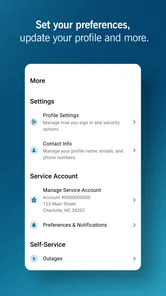
Duke Energy develops this business app to help customers manage their Duke Energy accounts from a phone or tablet. Its central purpose is reflected in the app’s store summary: managing an account and paying a bill from anywhere. It may be useful if you prefer handling routine account tasks on mobile rather than relying only on other ways of accessing your account.
What features does the Duke Energy app offer to its users?
The Duke Energy app provides a comprehensive suite of features designed to enhance user convenience and energy management. Users can easily view and pay their bills, track energy usage, receive outage alerts, and report service issues. Additionally, the app offers tailored energy-saving tips and allows customers to manage their account settings directly from their mobile devices.
Is the Duke Energy app available for both Android and iOS devices?
Yes, the Duke Energy app is available for download on both Android and iOS platforms. Users can find the app on the Google Play Store for Android devices and the Apple App Store for iOS devices. This ensures that a wide range of customers can access the app's features, regardless of their mobile device preference.
How can users report power outages using the Duke Energy app?
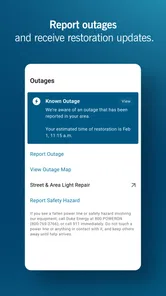
Reporting power outages through the Duke Energy app is a straightforward process. Users can navigate to the outage section within the app, where they can report an outage by providing necessary details such as their location and account information. The app also allows users to track the status of the outage and receive timely updates until the issue is resolved.
Pros
- User-friendly interface for easy navigation.
- Quick access to account and billing info.
- Real-time outage updates and alerts.
- Energy-saving tips and recommendations.
- Secure payment options integrated.
Cons
- Limited features for business accounts.
- Occasional app crashes reported.
- High data usage for some functions.
- Delayed customer support response.
- Some features require stable internet.











