

Drone Remote Control
- 2.08K
- 4.2
- Installs
- 500.00K
- Price
- Free
Screenshots
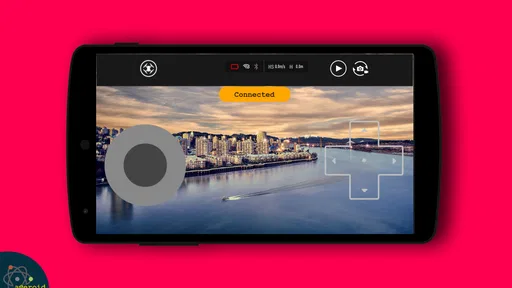
Analysis by Reviewed
I judge a drone-control app by a practical question: can it help me fly the drone I actually own, without making setup or piloting more complicated? Drone Remote Control is aimed at using a smartphone as a drone controller, and that simple idea will appeal to people who want a phone-based option. My main reservation is that a controller app is only useful when it works with a particular drone, so I would check compatibility before treating it as a replacement for the controls that came with your aircraft.
What a phone controller changes
The appeal is easy to understand: a phone is already something many people bring along, while a separate controller is one more item to pack, charge, and keep track of. But those conveniences are not the same as a better flying experience. A touchscreen asks you to look at and touch a flat display, whereas a dedicated handset gives your thumbs physical sticks to find without looking down. I would see this app as an alternative worth trying, not an automatic upgrade over the controller made for the drone.
That difference can shape the whole outing. If I am practising in a large, empty space, I can take time to learn where the controls sit and how the aircraft responds. If I am trying to frame a shot while keeping attention on the drone and nearby surroundings, unfamiliar touch controls may become a distraction. The more demanding the flight, the more I value a control method I can use confidently without diverting my attention.
Check the fit before planning a flight
Before relying on a phone for a flight, I would confirm that the app and drone can work together, then try the connection somewhere open and safe. A calm test gives you time to see how the controls respond without also dealing with trees, people, or a tight landing spot. It is also a sensible way to learn whether using a touchscreen feels comfortable for you. Phone controls can be convenient to carry, but they do not necessarily feel as precise as dedicated physical sticks.
That distinction matters most for beginners. A phone can make the idea of trying a drone feel approachable, but it does not remove the need to learn basic safe flying habits. I would start with short, low-risk practice rather than attempting a long flight or a complicated shot on the first outing. If a dedicated controller is important to your preferred style, the app may be less appealing than using the drone’s own controller.
For a realistic everyday use, imagine bringing a compatible drone to an open area for a brief practice flight. A phone-based control option means one less separate control device to manage, but I would still check the connection before taking off and keep the phone easy to reach. That small routine helps avoid discovering a setup problem after the drone is already in the air.
It also helps to think about what you expect from the word “remote.” A phone is a familiar device, but convenience alone does not guarantee that it will suit every drone or every flight. If you want a dependable setup for a particular aircraft, compatibility comes first; if you want the most tactile control, a dedicated handset may be the better choice.
More From Our News Desk

 Gmail
GmailGmail in a Busy Inbox: Who Benefits Most?
From first account to crowded workday, Gmail earns its place through dependable search and flexible sorting—but its best fit depends on how much inbox maintenance you can tolerate.

 Prime Video
Switching to Prime Video: What Changes in Your Viewing Routine
Prime Video can make a compelling second home for streaming, but switching means learning a different catalog, rental layer, and route from browsing to playback.

 Universal TV Remote Control
Universal TV Remote Control Works Best as a Reliable Backup
A phone remote earns its place through quick setup and reliable habits. Here is how to get more from Universal TV Remote Control—and where its limits show.

 Weather - By Xiaomi
Weather by Xiaomi Review: Clear at a Glance, Less Clear Up Close
Xiaomi’s weather app makes everyday forecasts quick to scan, but its calm surface can leave useful details and recovery paths harder to find than they should be.

 X
XX Under Pressure: Can It Recover When Posting Goes Wrong?
A resilience-focused review of X, examining setup, mistaken posts, interruptions, weak connections, and the gaps that matter when recovery needs to be dependable.

 Clash of Clans
Clash of Clans Is Won Between the Battles
Its raids are quick; its community is a long-term project of coordination, teaching, rivalry, and shared responsibility—with all the friction that entails.
Latest News



Within the Libraries & Demo category, this is a focused utility rather than a broad drone-planning or editing tool. Asteroid Tech is the developer, and the app is free, which makes it easier to consider as an option before investing in a separate control solution. It has an average rating of 4.2 from around 17,000 ratings, with over 500,000 installs. That reach suggests people are interested in phone-based drone control, but I would still base my decision on whether it suits my own equipment and needs.
Trying a phone-based controller
First things first, setting up the Drone Remote Control app was a breeze. After a quick download from the app store, I was greeted by a sleek and user-friendly interface. The app guides you through the initial setup with clear instructions, making it accessible even for those who aren’t tech-savvy. A couple of taps and my drone was ready to soar!
Making a first test useful
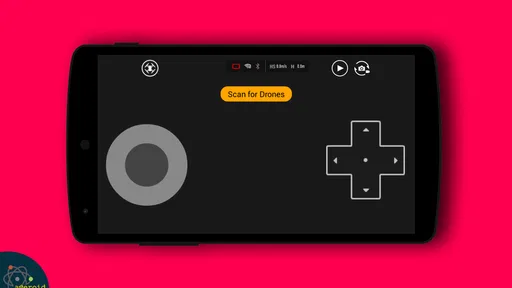
I would make the first session a deliberate compatibility and handling check, rather than a flight with a goal that depends on perfect control. Begin with the drone on the ground, take a moment to understand the screen, and confirm that the connection behaves as expected before lifting off. Once airborne, keep the first movements simple and close enough that you can respond calmly. This is a practical way to discover whether the phone interface suits you without turning a small uncertainty into a bigger problem.
One useful trade-off to consider is what the phone is doing besides controlling the aircraft. If it is also the device you use to check directions, take calls, or capture notes, interruptions or divided attention could make the outing less convenient than expected. I would put the phone into the state I want before starting, keep it within reach, and avoid planning a flight that depends on switching between unrelated tasks. That is not a special feature of the app; it is simply part of treating a phone as flight equipment.
What to weigh before flying
This app is packed with features that truly enhance the flying experience. One of my favorites is the customizable controls. You can tweak and adjust the sensitivity of the controls to suit your flying style, whether you’re a newbie or a seasoned pilot. Plus, the real-time video streaming feature is a game-changer. It feels like you’re in the cockpit, seeing what your drone sees as it glides through the skies. Talk about a bird’s eye view!
Another impressive feature is the GPS integration. It allows for precise tracking and navigation, ensuring your drone is always on the right path. This is particularly useful for capturing footage in tricky terrains. I also found the automatic return-to-home function incredibly handy, especially when I lost track of time during a sunset shoot.
For someone deciding whether a phone should be the main controller, those capabilities are only part of the decision. I would ask how comfortably the display can be read outdoors and whether the phone remains easy to handle while keeping an eye on the aircraft. A phone is already useful for many tasks, but it can also be a less familiar control surface than a set of physical sticks. Practising the layout before filming or flying near obstacles is a worthwhile trade-off.
Who is likely to get the most from it?
I can see the strongest case for a casual drone owner who wants to try phone control without committing to buying another control device. It may also suit someone who is curious about app-based piloting and is happy to spend time checking whether their aircraft works with it. The low barrier of a free download makes that experiment easier to consider, as long as the user treats compatibility as the first question rather than assuming every drone will connect.
It is a weaker match for a pilot whose work or hobby depends on precise, repeatable input, or for anyone who already finds touchscreen controls awkward. A physical controller remains the more sensible choice when tactile feedback is important to confidence. I would also skip relying on this app for an important flight until I had tested the setup in low-pressure conditions. A sunset, a family occasion, or a shot that cannot easily be repeated is a poor time to discover that the controls feel unfamiliar.
Compared with the usual alternatives, this sits between using a drone’s dedicated controller and using a phone for planning or viewing information without controlling the aircraft. The dedicated unit is generally the more straightforward choice when it is designed for the drone and its controls are already familiar. A phone-based approach wins on having fewer separate items to carry, but puts more responsibility on the user to confirm the connection and judge the screen-based handling. If your priority is planning, editing, or organizing footage rather than piloting, a dedicated tool for those tasks would be a better fit than a controller app.
How it fits into a flying routine
In terms of performance, the app doesn’t disappoint. It maintained a stable connection to the drone throughout my flights, even when I pushed it to its range limits. The responsiveness of the controls was spot-on, with minimal lag, which is crucial when you’re trying to capture that perfect shot.
The app also offers regular updates, which is a huge plus. It means they’re constantly working on improvements and new features. I’ve seen noticeable enhancements in the drone’s stability and battery management with each update.
For everyday use, I would treat the app as a control option to test, not as a reason to leave a familiar controller behind immediately. A short practice session lets you judge whether phone input feels natural and whether it suits the kind of flying you do. People who mainly want casual, nearby flights may appreciate carrying one less device; anyone who depends on consistent tactile input may prefer the usual dedicated controller.
A simple pre-flight habit can make the phone-based workflow less fussy: check the connection while still on the ground, confirm that the screen is readable where you plan to fly, and decide in advance where you will keep the phone between movements. If the display is difficult to see in the light or the controls feel cramped, treat that as a useful result of the test, not something to push through in the air. The point of a trial is to find the limits of the setup before they matter.
The app is rated for Everyone, and its minimum operating-system requirement is Android 4.4. It was released on May 28, 2019, and the current version is 25.0. Those details make it worth checking that your phone meets the requirement before downloading, while the version number gives you a straightforward way to distinguish the current release from older installs. I would also make sure the app is ready before heading out, rather than trying to sort out a new control setup at the flying spot.
A practical recommendation
All in all, the Drone Remote Control app is a must-have for any drone enthusiast. Its intuitive design, coupled with a robust set of features, makes it a standout in the realm of drone apps. It’s not just about controlling your drone; it’s about enhancing your entire flying experience. So, if you’re looking to take your drone adventures to new heights, give this app a whirl. You won’t be disappointed!
My recommendation is more measured: it is most appealing to drone owners who want to explore phone-based control and are willing to check the fit with their equipment first. It is less suitable for someone who needs assured compatibility without testing or strongly prefers a physical controller. For a beginner, I would start with a calm practice flight; for an experienced pilot, I would compare the phone’s feel with the usual controller before relying on it for demanding work. That makes this a potentially handy option, provided convenience matters more to you than the certainty of a dedicated control setup.
Before making it your regular controller
A common practical question is whether a phone can simply replace the controller that came with a drone. I would not assume that it can. The useful first step is to check the app against the exact aircraft you own, then test the pairing and controls before planning a flight around them. If the connection does not work smoothly or the handling does not feel right, the drone’s usual controller is the clearer option; there is little benefit in forcing a phone-based method that makes you less confident.
Another question is whether a beginner should start here. I think it can be approachable for someone who wants to explore the idea of phone control, but the app does not make safe flying automatic. A new pilot still needs to practise in an open, low-risk place and keep the first flights simple. If learning with physical sticks feels more natural, starting with a dedicated controller is perfectly reasonable and may reduce the mental effort spent interpreting touch input.
For people mainly interested in aerial footage, I would separate the appeal of a live view from the quality of the flight itself. Seeing a camera feed can help with framing, but it does not remove the need to monitor the drone and its surroundings. I would practise basic control first, then try composing a shot once managing the aircraft feels familiar. That order is especially sensible when the intended location is busy, confined, or difficult to leave safely.
Asteroid Tech’s app has a clear, narrow purpose, and that focus is its strongest argument: it offers a way to explore controlling a drone from a phone rather than asking the user to choose a broad suite of unrelated tools. At the same time, a narrow purpose makes the compatibility check decisive. The app is not a substitute for confirming that your specific drone and preferred style of flying are a good match.
I would recommend giving it a try if you own a compatible drone, value carrying fewer devices, and are willing to test the controls before depending on them. I would stay with a dedicated controller if tactile precision, a familiar layout, or reliable performance for demanding flights matters more than convenience. The right choice comes down to your aircraft and your hands-on preference, not the appeal of controlling a drone with a phone by itself.
Drone Remote Control Frequently Asked Questions
Is Drone Remote Control suitable for children and families?
Drone Remote Control is marked Everyone, so its age classification is suitable for a broad audience. It is a drone-control app rather than a game, and its purpose is to let a smartphone act as a remote. Families should still supervise children around real drones and follow the aircraft’s safety instructions whenever it is being operated.
How much does Drone Remote Control cost to download?
Drone Remote Control is free to download. That makes it possible to try the app without an upfront purchase, but it is still sensible to review the app’s current store page and any prompts shown during use before making decisions about optional spending. Check that your phone and drone are suitable for smartphone control before relying on the app.
Can I use Drone Remote Control on both Android and iOS?
Drone Remote Control is an app for using a smartphone as a remote control for drones. Before downloading, check that your phone meets the app’s operating-system requirements and that your drone can work with smartphone control. The app is free, and its age rating is Everyone, making it suitable for a broad range of users.
Do I need an internet connection to fly my drone with the app?
An internet connection is useful for downloading Drone Remote Control and obtaining app updates. The app’s stated purpose is to use your smartphone as a drone remote, so the key practical step is ensuring your phone can connect to your drone in the way that model supports. Check your drone’s instructions and the app’s setup guidance before relying on it for a flight.
What features does the Drone Remote Control app offer?
The Drone Remote Control app offers a range of features designed to enhance your drone flying experience. It includes real-time video streaming, GPS tracking, and customizable flight controls. Users can also set automated flight paths, monitor battery life, and receive real-time notifications about flight conditions. The intuitive interface ensures ease of use for both beginners and advanced users.
Pros
- Easy-to-use interface for beginners
- Compatible with various drone models
- Real-time video streaming
- Customizable control settings
- Low battery alerts
Cons
- Limited range in urban areas
- Requires stable internet connection
- High battery consumption
- No offline mode available
- Incompatibility with older devices










