

Dragon Con
- 421.00
- 3.5
- Installs
- 100.00K
- Price
- Free

Screenshots

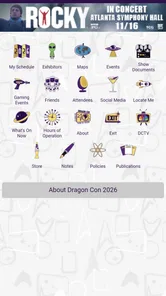
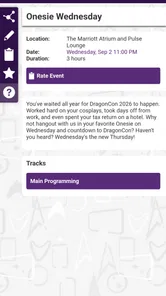
Analysis by Reviewed
Dragon Con is the kind of app I would install before attending the convention, not because it replaces every other planning tool, but because it puts the event’s information and updates in one place. I reviewed it as a free Books & Reference app from Core-apps, and its purpose is refreshingly focused: help visitors keep up with Dragon Con rather than trying to become a general social network, ticketing service, or entertainment platform.
That narrow purpose matters. Convention apps can be useful when schedules change, rooms fill quickly, or several activities compete for attention. They can also become frustrating when they demand too much personal information, bury practical details under promotional material, or leave users unsure what the app is doing in the background. My view of this one is cautious but positive: it is worth considering for Dragon Con attendees who want an official-style information companion, while people who prefer to avoid event-specific apps may still manage with a browser, saved screenshots, and a paper plan.
What the app is really useful for at Dragon Con
The strongest reason to use Dragon Con is convenience during a busy event. Before arriving, I would use it to get familiar with the convention’s information flow and decide which details I actually need close at hand. During the event, the value is less about browsing endlessly and more about checking what has changed since the last time I looked.
A realistic example is a visitor who starts the morning with a panel in mind, then discovers that the day is moving faster than expected. Instead of searching through several browser tabs, that person can open the convention app, check the latest information, and adjust the rest of the day. That small reduction in friction is exactly where a dedicated event app earns its place.
It is also useful for people attending in groups. Friends often split up, change plans, or want to compare what they are doing next. A shared understanding of the available event information can make those conversations quicker. I would still confirm meeting points separately, because an app designed for information and updates should not be treated as a substitute for a reliable group communication plan.
The app belongs in the Books & Reference category, which is a better description of its role than calling it a social or entertainment app. I see it as a digital reference desk for Dragon Con: something to consult when I need event context, updates, or a reminder of what is happening. That framing also helps set expectations. It is not the sort of app I would keep using after the convention simply for general reading.
Its store rating is a 3.6 average from around 1,200 ratings, with more than 400 written reviews. I read that as a sign of mixed practical experiences rather than an automatic rejection. Event apps are judged under pressure: crowded venues, weak reception, tired users, and last-minute changes can make even a well-designed tool feel unreliable. The rating suggests that I should test the app before depending on it for the entire weekend.
More From Our News Desk

 Gmail
GmailGmail in a Busy Inbox: Who Benefits Most?
From first account to crowded workday, Gmail earns its place through dependable search and flexible sorting—but its best fit depends on how much inbox maintenance you can tolerate.

 Prime Video
Switching to Prime Video: What Changes in Your Viewing Routine
Prime Video can make a compelling second home for streaming, but switching means learning a different catalog, rental layer, and route from browsing to playback.

 Universal TV Remote Control
Universal TV Remote Control Works Best as a Reliable Backup
A phone remote earns its place through quick setup and reliable habits. Here is how to get more from Universal TV Remote Control—and where its limits show.

 Weather - By Xiaomi
Weather by Xiaomi Review: Clear at a Glance, Less Clear Up Close
Xiaomi’s weather app makes everyday forecasts quick to scan, but its calm surface can leave useful details and recovery paths harder to find than they should be.

 X
XX Under Pressure: Can It Recover When Posting Goes Wrong?
A resilience-focused review of X, examining setup, mistaken posts, interruptions, weak connections, and the gaps that matter when recovery needs to be dependable.

 Clash of Clans
Clash of Clans Is Won Between the Battles
Its raids are quick; its community is a long-term project of coordination, teaching, rivalry, and shared responsibility—with all the friction that entails.
Latest News



Why a dedicated app can beat ordinary browsing
The usual alternative is to rely on a mobile browser. That can work, especially for someone who only needs occasional information or does not want another app installed. A browser also makes it easier to move between the convention’s information and other sources. However, browser tabs are easy to lose, and repeatedly searching for event details is inconvenient when I am walking between venues.
A second alternative is a printed schedule or saved screenshots. Those options are excellent for a fixed plan and have the advantage of working without opening an app. Their weakness is obvious: they become outdated when information changes. Dragon Con’s app is more useful precisely when I expect updates to matter.
I would not choose it as my only planning method. My preferred workflow would be to make a rough plan in advance, save the most important details in a form I can access quickly, and use the app as the live reference layer. That combination balances preparedness with flexibility and avoids turning every decision into a phone task.
Trust starts with a clear, limited purpose
For me, trust begins with whether an app’s purpose matches what it appears to do. Dragon Con presents itself as an information and update tool for the convention, and that is a sensible scope. A focused purpose makes it easier to judge whether a request or screen feels relevant. If I am checking event information, I expect to see event information—not an unrelated collection of features that makes the app difficult to understand.
The developer is Core-apps, and the application has been available since July 18, 2014. Its current version is 10.4.1.7, and it supports Android 8.0 or later. Those details tell me that it is an established app rather than something released only for a single short event cycle. They do not guarantee a perfect experience, but a long-running listing gives users a clearer history to consider when deciding whether to install.
The app is free, which lowers the risk of trying it before the convention. I can install it, inspect the screens, and decide whether it fits my planning style without paying first. Free does not automatically mean frictionless, though. I would still pay attention during setup and use, especially to any requests involving accounts, notifications, location, or other personal choices.
What I would check before relying on it
The first practical step is to install it while I still have time to explore. I would not wait until I am already in a crowded venue. Opening the app at home gives me a chance to understand its navigation, look for the information I care about, and decide whether notifications are useful or distracting.
Next, I would review the app’s visible settings and permission prompts rather than accepting every request automatically. The important question is not whether a permission sounds normal for an event app; it is whether I understand why I am being asked and whether the app remains useful when I decline an optional request. That habit gives me more control without assuming anything about permissions that I have not personally seen on my device.
I would also check whether the information I need is readable and easy to revisit. A schedule is only useful when I can find the relevant item quickly. If the app makes me repeatedly retrace the same path, I would create a backup using notes or screenshots. That is not a criticism unique to Dragon Con; it is a sensible safeguard for any event tool used in a crowded, time-sensitive setting.
One non-obvious advantage of testing early is that it separates app problems from convention-day problems. If something is confusing at home, I can decide whether to change my workflow before the event. If the app works well in a quiet setting but becomes difficult in a crowded location, I will already have a fallback rather than discovering that limitation when I am late.
Permissions, accounts, and visible choices
When I evaluate an app like this, I look for clear user choices rather than making assumptions about its data practices. The responsible approach is to read each permission prompt, note whether it is required or optional, and avoid granting access that does not match my intended use. I also look for account controls, sign-out options, and notification settings if the app presents them.
I would be particularly careful with location access. A convention information tool may be useful without continuous location sharing, but the correct choice depends on what the app actually asks for and how Android describes that request. I would choose the least access that still supports my needs. If a feature is unavailable after declining, I would decide whether that feature is important enough to justify the permission.
The same principle applies to notifications. Updates can be valuable during a convention, but constant alerts can become noise. I would begin with notifications enabled only if I expect schedule or event changes to matter, then reduce them if they interrupt more than they help. This is a practical form of user agency: I choose when the app is allowed to demand my attention.
For accounts, I would avoid creating one unless it clearly improves the experience. If the app offers useful information without an account, that is the route I would take. If an account is needed for a particular function, I would use a dedicated password rather than reusing credentials from another service. These are ordinary precautions, but they are especially worthwhile for a short-term event app that I may not use regularly afterward.
The content rating is Everyone, which makes the app broadly suitable from an age-classification perspective. I still would not interpret that label as a complete privacy or quality assessment. Age ratings describe content suitability, while trust also depends on the choices shown during installation and use.
Data-sensitive moments during a convention
The most sensitive moments are often not dramatic. They happen when I am tired, in a hurry, and presented with a prompt that seems easier to accept than to read. At Dragon Con, that could occur while I am trying to find information between activities. My rule would be simple: pause for a few seconds before granting access, especially if the request concerns location, contacts, storage, or notifications.
I would also avoid entering unnecessary personal details into any event app. If a field is not needed for the function I want, I would leave it blank when possible. I would not use the app to store information that belongs in a more appropriate secure service, such as sensitive identification details or private travel arrangements.
Another useful habit is to review the app after the convention. I would disable notifications that no longer serve a purpose, remove access I no longer want to grant, and decide whether I still need the app installed. This is a small but important distinction between installing an app for a specific event and allowing it to remain part of my digital routine indefinitely.
I would also keep an eye on battery and connectivity in practical terms. Even when an app is well intentioned, repeatedly checking a phone in a crowded venue can be inconvenient. I would charge my device before leaving, carry a backup plan for essential information, and avoid depending on a single screen for every decision. The app should reduce stress, not create a new point of failure.
Three workflows that make it more dependable
My first recommended workflow is the pre-event test. Install Dragon Con before traveling, open every section that seems relevant, and identify the information you expect to use most. Do not merely install it and assume it will be ready. A short inspection lets you notice confusing navigation, decide how much notification activity you want, and prepare alternatives while you still have time.
The second is the two-layer plan. Keep a simple personal outline—perhaps a note with the activities you care about and the people you need to meet—then use the app for current event information. This avoids asking the app to remember your entire weekend. It also means a temporary app issue does not erase your basic plan.
The third is the privacy reset. Once Dragon Con is over, revisit notifications, account settings, and permissions. If you installed the app only for the convention, ask whether it still has a reason to remain on your phone. This is more thoughtful than leaving every event app installed forever, and it gives you a clear endpoint for the information you shared or the access you granted.
A fourth tip is to use the app as a decision aid rather than a schedule dictator. If an update changes your plans, compare the new information with your energy, travel time, and group commitments. The app can tell me what is available; it cannot decide what is realistic for my day. That distinction helps prevent the common mistake of building an overpacked itinerary simply because many options are visible.
Who should use it, and who should skip it
Dragon Con is a good fit for first-time attendees who want a central place to orient themselves, returning visitors who want updates close at hand, and anyone whose plans are likely to change. It is especially sensible for people who dislike searching through browser tabs while walking around. The fact that it is free makes a trial easy, provided the Android device meets the minimum requirement of version 8.0.
I would be more hesitant to recommend it to someone who wants a completely offline, paper-first experience. A printed plan and saved notes may be calmer for that person. I would also suggest caution for users who dislike granting permissions or creating accounts: inspect the app’s actual prompts first and use only the parts that fit your boundaries.
It may not be the best choice for someone attending only briefly and needing one or two isolated details. In that situation, ordinary web browsing could be faster than learning a dedicated app. Likewise, a person who expects a full personal organizer, robust group chat, or a universal convention platform should not assume this focused reference app will provide all of those functions.
My cautious verdict
After weighing its purpose, age, free access, and practical role, I see Dragon Con as a useful companion rather than an essential command center. Its main strength is focus: it gives attendees a dedicated place to look for convention information and updates. That can save time when plans shift, especially if I test the app before arriving and keep a simple backup plan.
My recommendation comes with a clear condition: use it deliberately. Review the visible choices, grant only the access that makes sense, control notifications, and remove or reset the app when the event is finished if you no longer need it. Those steps let me benefit from convenience without handing over more control than necessary.
The mixed 3.6 average means I would not promise every user a smooth experience. Instead, I would say this: if you are attending Dragon Con and want a dedicated reference tool, Dragon Con is worth trying before the event. If you prefer browser searches, printed schedules, or strict limits on event-specific apps, you can reasonably skip it. For me, the best approach is neither blind trust nor automatic distrust—it is a short test, careful permissions, and a backup plan that keeps the convention enjoyable even when the app is not enough.
Dragon Con Frequently Asked Questions
Is Dragon Con’s app available for my phone?
Dragon Con is a mobile app in the Books & Reference category, developed by Core-apps. It is available for Android devices running version 8.0 or later, and its store age rating is Everyone. Before downloading, check that your phone’s operating system meets the requirement and that you are choosing the Dragon Con app rather than an unrelated convention or fan-made app.
What is Dragon Con, and what can I use its app for?
Dragon Con is a large fan convention celebrating science fiction, fantasy, comics, gaming, anime, film, television, and popular culture. Its official app is designed to help attendees manage the event more easily. After installing it, you can typically browse the schedule, explore guest information, find locations, review maps, check announcements, and organize activities you do not want to miss.
Does the Dragon Con app require an account or internet connection?
Some features may be available without signing in, but creating or using an account can provide a more personalized experience, such as saving favorite panels, building a personal schedule, or receiving event-related updates. An internet connection is generally useful for downloading current information and announcements. Because convention coverage and connectivity can vary, it is sensible to load important schedule details before arriving.
Can I use the app to create a personal Dragon Con schedule?
Yes, one of the most useful purposes of the Dragon Con app is organizing your convention plans. You can browse events by day, category, venue, or time and mark panels, meetups, and activities as favorites. A personal schedule helps prevent conflicts and makes it easier to decide what to attend, although popular events may still require early arrival or separate admission arrangements.
Does the Dragon Con app include maps and venue information?
The app is intended to help attendees navigate the convention’s various hotels, event spaces, and surrounding areas. Maps, venue listings, room information, and location details can be especially helpful because Dragon Con activities may be spread across several buildings. First-time visitors should still allow extra walking time, check signs on-site, and confirm room changes through official announcements.
Pros
- Easy access to event schedules
- maps
- and convention updates
- Helps attendees discover panels
- guests
- exhibitors
- and activities
- Useful for planning busy days across multiple convention locations
- Quickly highlights schedule changes and important event announcements
- Convenient digital alternative to carrying printed convention materials
Cons
- Some features may be less useful outside the Dragon Con event
- Large amounts of schedule information can feel overwhelming
- Requires internet access for timely updates and event details
- Notifications may become frequent during the convention
- Information may change quickly
- requiring regular app refreshes











