Dominion Energy
- 1.20K
- 4.5
- Installs
- 500.00K
- Price
- Free

Screenshots
Analysis by Reviewed
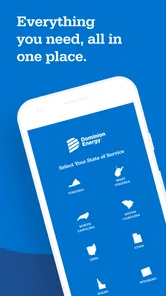
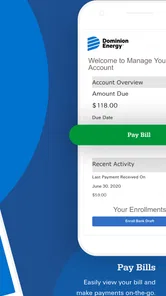
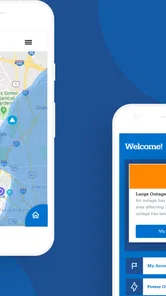
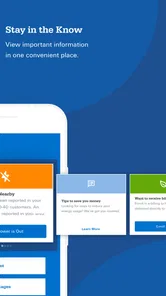
Managing an energy account is one of those chores I usually want to finish in a few seconds, not turn into a full visit to a website. Dominion Energy is built for that narrow purpose: it is a free business app from Dominion Energy Services Inc that puts bill payment, usage checking, and power-outage reporting on a smartphone. After using it, I see it as a practical account companion rather than an all-purpose energy adviser.
That distinction matters. The app is most useful when I already have a Dominion Energy account and need to handle a specific task quickly. It does not try to replace budgeting software, a home-energy monitor, or a general utility comparison service. Instead, it brings the provider’s customer-service functions into a mobile format, which can be valuable when I am away from a computer or dealing with an outage at an inconvenient time.
Its audience is broad: the app is rated for Everyone, costs nothing to download, and supports devices running Android 9 or later. The current release is version 2.0.117. Those details make it accessible to many existing customers, although the minimum operating-system requirement is still worth checking before installing it on an older phone.
Where Dominion Energy earns trust, and where I stay careful
My first impression is shaped less by visual polish than by the app’s limited, understandable job. When an app handles an energy account, I want to know why it needs access to my information and what I can accomplish after signing in. Here, the central purpose is clear: paying the bill, viewing usage, and reporting an outage all relate directly to the service I receive from Dominion Energy.
That direct connection gives it a stronger trust context than an unrelated third-party bill-payment tool. I am dealing with the developer responsible for the utility service rather than handing account activity to an unfamiliar intermediary. Dominion Energy Services Inc is identified as the developer, and the app has reached over half a million installs with an average rating of 4.5 from about eleven thousand ratings. Those figures suggest that it is a regularly used customer tool, although popularity alone is not proof that every account holder will have the same experience.
I also appreciate that the app does not need a complicated explanation to justify its existence. If I am checking whether a payment has been handled, looking at recent consumption, or notifying the provider that the power is out, the reason for opening it is obvious. That clarity reduces the temptation to grant access or share information with an app that offers vague benefits.
Still, trust is not the same as convenience. A utility account contains personal and billing information, so I would use the official app carefully. I would install it from the legitimate app marketplace, confirm that the developer name matches Dominion Energy Services Inc, and avoid entering account credentials after following an unexpected message or text. Those are simple habits, but they matter more than a polished interface when the app is connected to a household account.
More From Our News Desk

Weather by Xiaomi Review: Clear at a Glance, Less Clear Up Close

X Under Pressure: Can It Recover When Posting Goes Wrong?

Clash of Clans Is Won Between the Battles

Android Auto Makes the Case for Quieter Car Software

MobiOffice: Transforming Mobile Productivity with Seamless Integration

EA SPORTS FC™ Mobile Soccer: Redefining Mobile Sports Gaming
What the core controls are good for
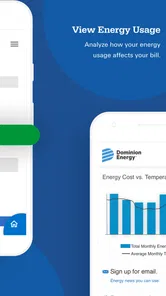
The strongest part of the experience is the way the main tasks map to common customer needs. Paying a bill from a phone is useful when I remember a due date while traveling or when I do not want to open a laptop just to complete one transaction. Checking usage is more valuable when I use it as a regular observation habit instead of opening the screen only after a surprisingly high bill.
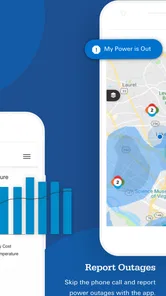
Reporting an outage is a different kind of task. It is time-sensitive, and a mobile route makes sense because my home internet connection may be unavailable while cellular service still works. I would not treat the app as a substitute for emergency services or assume that reporting an outage tells me exactly when power will return. Its value is in giving the utility a direct customer report and letting me begin the official communication process.
A useful workflow is to check the account before making a payment rather than rushing straight to the payment screen. I can confirm that I am looking at the correct service account, review the amount due, and then decide whether the transaction matches what I expected. That small pause is an important account-control habit, especially for anyone who manages more than one property or household service.
Usage checking also deserves a little discipline. A single reading can be misleading because weather, occupancy, appliances, and billing periods all affect consumption. I find the feature more useful when I compare it with my own routine: Was the home occupied more often? Did heating or cooling run unusually hard? Did guests stay over? The app can show account activity, but I still have to interpret the reason behind a change.
Permissions, privacy, and the moments that deserve attention
For an app connected to billing and service status, I pay close attention to the choices shown during installation, sign-in, and account management. I do not assume that a familiar company automatically means every permission is necessary. I review the permission prompts on my phone, allow only what makes sense for the task, and revisit those choices later through the operating system if I no longer want an access setting enabled.
The most sensitive moment is signing in. I avoid using the app on a shared or borrowed device, and I do not save credentials in a place where other people can easily access them. If the phone is lost, the risk is not limited to the app itself; an unlocked device can expose many services. A screen lock, current operating-system security, and careful logout habits are sensible companions to any utility account app.
Payment is another point where I slow down. Before confirming anything, I check the service account and amount displayed on screen. I also keep the confirmation information available until I am satisfied that the transaction has been accepted. This is not because I found the app confusing, but because duplicate payments and mistaken account selections are costly annoyances that a few seconds of checking can prevent.
Outage reporting has its own privacy and safety angle. I would use the account’s official reporting path, provide only the information requested, and avoid posting personal account details publicly while asking neighbors whether their power is also out. If there is a dangerous downed line or another immediate hazard, I would treat that as a safety issue rather than relying only on a mobile form.
These habits reveal an important limitation: the app can present account controls, but it cannot make judgment calls for me. It cannot tell whether an unexpected bill is caused by a faulty appliance, a change in household behavior, or a billing question that needs human support. When the issue is disputed billing, identity verification, or a complicated service request, I would be prepared to move from the app to Dominion Energy’s customer-support channels.
How much control the user really has
I judge account apps by whether they help me act without hiding the consequences of an action. Dominion Energy works best when I use it as a deliberate control panel. I can choose when to inspect usage, when to pay, and when to report a service problem, rather than waiting for a paper notice or finding a browser on a small screen.
That control is especially handy in an everyday situation such as returning home to find the lights off. I would first check whether the outage appears limited to my property, make sure there is no immediate danger, and then open the app to report the interruption. If my phone battery is low, I would complete the essential communication first and avoid spending time exploring unrelated account pages. The mobile format is useful here because it keeps the service interaction close at hand during a disruption.
For a household budget, I would use the app at two separate points. Near the start of a billing cycle, I would look at usage to understand the recent pattern. Before paying, I would review the amount and account details. Keeping those activities separate helps me avoid treating the usage screen as a bill estimate or assuming that a payment screen explains every change in consumption.
Families and shared households may need an agreed routine. One person should know who is responsible for checking the account and confirming payments, while others should know how an outage will be reported. That simple division reduces the chance that two people pay the same bill or that everyone assumes someone else has reported the problem.
There is also a trade-off between an official utility app and a general finance app. A budgeting app may give me a wider view of rent, subscriptions, groceries, and energy in one place. Dominion Energy is better for the provider-specific actions that a general finance tool may not offer, particularly usage review and outage reporting. I would use the two together if I wanted both detailed household budgeting and direct utility account control.
A browser can be the better option for someone who rarely manages the account from a phone, dislikes installing service apps, or needs to work on a device that cannot run Android 9 or later. The app’s advantage is not that it makes every task deeper; it is that the most relevant tasks are available in a mobile setting. If that convenience does not matter to you, the browser route may be simpler.
Who should install it, and who should skip it
I would recommend Dominion Energy to customers who regularly pay their own energy bill, want a quick way to inspect usage, or would value an official mobile route for outage reporting. It is also a sensible choice for people who travel, manage a property from a distance, or prefer handling routine account tasks while away from a desk.
I would be more cautious about recommending it to someone who is not a Dominion Energy customer. The app’s usefulness depends on having a relevant account, so installing it merely to browse general energy information would not make much sense. It is also not the right tool for someone looking for a detailed home-energy audit, appliance-level monitoring, or a consolidated dashboard covering several unrelated utility providers.
Customers with older phones should check compatibility before planning around it, since Android 9 is the minimum operating-system requirement. People who are uncomfortable managing financial information on a smartphone may prefer the provider’s web experience or another established payment method. That is a personal workflow choice, not a failure of the app.
I would also skip relying on it as the only way to handle urgent or complicated matters. A mobile report is convenient, but a serious safety hazard, a disputed payment, or an account-access problem may require a different support route. The app is strongest for routine actions with a clear beginning and end.
My verdict after looking beyond the download screen
Dominion Energy is a focused, free utility-account app that makes sense because its controls match real customer tasks. I like the direct connection between the developer, the energy account, and the actions available in the app. Paying, checking usage, and reporting an outage are practical functions, and the mobile format adds value when I am away from a computer or dealing with a service interruption.
Its limitations are just as important. It is not a complete budgeting system, a diagnostic tool for household energy waste, or a replacement for human support when an account problem becomes complicated. The app also deserves the same privacy care as any service that handles billing details: review permissions, protect the phone, verify account information before payment, and avoid treating a familiar brand as a reason to stop checking what is on screen.
With those boundaries in mind, I consider it a worthwhile install for an active Dominion Energy customer. The app has been available since September 25, 2020, and its current version, 2.0.117, shows that it remains an actively maintained part of the provider’s mobile presence. I would keep it for quick account control, while using a browser or broader finance tool whenever the task goes beyond Dominion Energy itself.
My practical recommendation is simple: use it for direct utility actions, pause before sensitive confirmations, and keep an alternative support route in mind. That approach gives the app room to be genuinely convenient without asking it to do a job it was never designed to handle.
Dominion Energy Frequently Asked Questions
What devices can I use to access Dominion Energy?
Dominion Energy is a mobile app for managing energy services from a smartphone. It is available for Android and iOS, and its age rating is Everyone. Before downloading, check that your device meets the app’s operating-system requirements and that you are installing the official app from your platform’s app store. The developer is Dominion Energy Services Inc.
What is the Dominion Energy app used for?
The Dominion Energy app is designed to help customers manage their electricity or natural gas account from a mobile device. After signing in, you can review your current balance, check payment history, make a payment, monitor usage when available, and access account information. It also provides a convenient way to receive service updates and manage certain account preferences without visiting the company website.
Can I pay my Dominion Energy bill through the app?
Yes, eligible customers can generally use the Dominion Energy app to pay their bill. Depending on the account and service area, payment options may include a bank account, debit card, or credit card. Before confirming a payment, carefully review the amount and selected payment method. Processing times, convenience fees, and available options can vary, so the app’s final payment screen should be treated as the most accurate information.
Does the Dominion Energy app show power outages and restoration updates?
The app can provide outage-related information for supported Dominion Energy service areas, including reported outages, estimated restoration details, and notifications when conditions change. You may need to report an outage separately if it has not already been detected. Availability and accuracy can depend on your location and the scale of the incident, so urgent hazards such as downed power lines should always be reported through emergency services rather than handled only in the app.
Is the Dominion Energy app free to download and use?
The Dominion Energy app is free to download from the official Google Play Store or Apple App Store. However, normal mobile data charges may apply if you use it without Wi-Fi, and some payment methods or optional services could involve fees depending on your account and region. Always download the official application, check the listed developer, and review the store description before entering your login or billing information.
Pros
- Convenient access to account balances
- bills
- and payment history.
- Multiple payment options make settling bills quick and flexible.
- Outage maps help users check service issues in their area.
- Usage details can help customers monitor and manage energy consumption.
- Push notifications provide timely billing and outage updates.
Cons
- Features may vary depending on the customer’s service region.
- Some users report occasional login or loading problems.
- The app requires personal and account information to function fully.
- Payment processing times may differ by method and financial institution.
- Limited in-app support may require contacting customer service separately.











