Dogo — Puppy and Dog Training
- 4.17K
- 4.6
- Installs
- 5.00M
- Price
- Free

Screenshots


Analysis by Reviewed
Training a dog is easiest when practice fits into ordinary life, rather than becoming another complicated project. I found Dogo — Puppy and Dog Training most useful as a prompt to make short lessons feel manageable: choose one behavior, work on it calmly, and notice small improvements instead of expecting a puppy to change overnight. That makes it a better fit for owners who want structure and encouragement than for anyone looking for an instant fix.
A training aid, not a substitute for judgement
Dogo is an education app from Dogo, focused on helping people teach dogs through guided activities. It has a 4.6 average from around 126,000 ratings, and has been installed over 5 million times. Those figures suggest that many owners find it worth trying, but popularity doesn’t guarantee that every lesson suits every dog. I’d treat the app as a source of ideas and routine, while adjusting the pace to the animal in front of me.
That distinction matters because dogs learn at different speeds, and a behavior that looks simple on a screen can be difficult in a noisy hallway or around visitors. If your dog seems stressed or confused, I’d pause rather than repeat a cue more forcefully. For serious aggression, persistent fear, or a safety concern, an app is not a replacement for help from a qualified professional who can assess the situation directly.
Small choices that make practice more useful
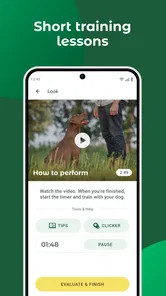
A practical way to use a lesson is to decide in advance what counts as success. For example, if you’re working on “stay,” start with a brief pause in a quiet room before adding distance or distractions. Keep treats ready, finish while your dog is still engaged, and try again later instead of turning one session into a test of endurance. The app can offer a plan; your observations should determine when to move on.
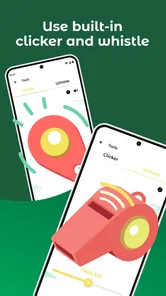
The built-in clicker is convenient, but a phone is not always the easiest tool to handle while you’re guiding a dog. I’d open the lesson before starting, keep the phone somewhere secure, and avoid staring at the screen when timing matters. A separate clicker may be simpler if you train frequently or need both hands free. That is a small trade-off, but it can make practice calmer for both of you.
Who will get the most from it
I can see Dogo working especially well for a first-time owner who wants a starting point for everyday manners, or for a family that needs a shared routine. A useful household approach is to agree on one cue and one reward rule before everyone practises; otherwise, different words and expectations can confuse the dog. The app’s guidance is most valuable when the people using it stay consistent.
It may be less suitable if you already follow a detailed training plan, prefer working face to face with a trainer, or need individualized help for a complex behavior. Compared with a book or a collection of free videos, an app can make it easier to revisit lessons and keep track of goals, while videos may be quicker for seeing a movement demonstrated and a professional can respond to your specific dog. I’d choose based on the kind of support you actually need, not on the number of features.
More From Our News Desk

 Instagram
’s Power Comes From Its Place in Your Phone
A close look at how Instagram turns Meta’s reach, recommendation systems and everyday camera habits into durable platform power—and what that costs users.

 Gmail
Gmail in a Busy Inbox: Who Benefits Most?
From first account to crowded workday, Gmail earns its place through dependable search and flexible sorting—but its best fit depends on how much inbox maintenance you can tolerate.

 Prime Video
Switching to Prime Video: What Changes in Your Viewing Routine
Prime Video can make a compelling second home for streaming, but switching means learning a different catalog, rental layer, and route from browsing to playback.

 Universal TV Remote Control
 Works Best as a Reliable Backup
A phone remote earns its place through quick setup and reliable habits. Here is how to get more from Universal TV Remote Control—and where its limits show.

 Weather - By Xiaomi
Weather by Xiaomi Review: Clear at a Glance, Less Clear Up Close
Xiaomi’s weather app makes everyday forecasts quick to scan, but its calm surface can leave useful details and recovery paths harder to find than they should be.

 X
X Under Pressure: Can It Recover When Posting Goes Wrong?
A resilience-focused review of X, examining setup, mistaken posts, interruptions, weak connections, and the gaps that matter when recovery needs to be dependable.
Latest News



The app is free to download and is rated for Everyone. Optional in-app purchases range from $0.49 to $299.99 per item, so I’d check the purchase details carefully before committing to anything. The current version is 10.33.0 and it requires Android 7.0 or later. That makes the basic starting point accessible, but the range of optional purchases is a reason to involve whoever manages spending on a shared device.
For a realistic routine, imagine your puppy gets overexcited when someone comes to the door. I’d practise a simple alternative behavior during a quiet moment, then revisit it in short sessions before the next expected visitor. When the real arrival comes, I’d focus on safety and reward any calm pause rather than expecting a perfect performance. This is where a training app can help: it gives practice a place in the week, but real-world progress still depends on repetition and sensible expectations.
Privacy and account choices deserve the same care as purchase choices, particularly if you’re sharing information about your household or dog. I would review the permissions requested by the app and the available account and privacy controls on the device before entering personal details. I wouldn’t assume that an app needs access simply because a feature might be convenient; if a request does not make sense for how I plan to use it, I’d stop and reconsider. That cautious habit is useful with any training tool, not a reason to assume a particular data practice.
Overall, I’d recommend trying Dogo if you want a guided, positive approach to basic training and are comfortable learning at your own pace. I would not rely on it alone for difficult behavior or expect a phone-based lesson to work equally well in every setting. Used thoughtfully, it can help turn scattered attempts into a steadier routine, while leaving the owner in charge of the dog’s comfort, safety, and progress.
Getting Started with Dogo
From the moment I downloaded Dogo, I felt like I had a personal dog trainer right in my pocket. The app is beautifully designed and user-friendly, making it easy to navigate through the various training modules. Right off the bat, it asks for some information about your dog, such as age, breed, and any specific behavioral challenges you’re facing. This allows Dogo to tailor the training experience specifically to your furry friend’s needs.
Training Modules Galore
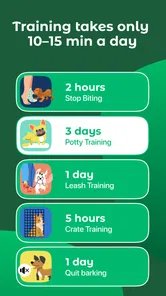
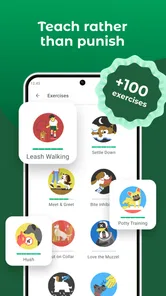
The app offers a plethora of training modules that cover everything from basic commands to advanced tricks. If you’re looking to teach your pup to sit, stay, or even roll over, Dogo’s got you covered. What I loved most, though, was the positive reinforcement approach. The app encourages you to reward your dog with treats, ensuring that learning becomes a fun and rewarding process for both you and your pet.
Another feature I found particularly helpful is the built-in clicker. If you’re new to dog training, a clicker is a device used to mark a desired behavior. With Dogo, you don’t need to purchase a separate clicker; it’s all integrated within the app. Such convenience!
Progress Tracking and Community Support
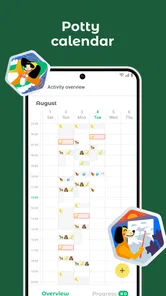
Dogo doesn’t just stop at providing training tips and tricks. It also helps you track your pup’s progress. The app allows you to set goals and monitor achievements as your dog learns new commands. It’s incredibly satisfying to see the progress bar fill up as your dog masters each skill!
Additionally, Dogo boasts a vibrant community of dog owners. You can share your achievements, seek advice, or simply connect with other dog enthusiasts. This sense of community adds a layer of support that can be incredibly motivating when tackling the ups and downs of dog training.
Why Choose Dogo?
So, why should you choose Dogo over other dog training apps out there? For starters, the app is constantly updated with new content and features. The developers clearly have a passion for helping dogs and their owners, and it shows in the quality of the app’s content.
Moreover, Dogo’s approach to training is rooted in positive reinforcement, which is known to be one of the most effective methods for training dogs. This, combined with the app’s community support and progress tracking, makes it a comprehensive tool for any dog owner looking to improve their pet’s behavior.
In conclusion, Dogo — Puppy and Dog Training has been a game-changer for me and my mischievous pup. With its user-friendly interface, extensive training modules, and supportive community, it’s no wonder this app is quickly becoming a favorite among dog owners. If you’re looking for a reliable and fun way to train your dog, I’d highly recommend giving Dogo a try. You might just find that your once-rambunctious puppy turns into a well-behaved companion.
Dogo — Puppy and Dog Training Frequently Asked Questions
What is Dogo, and what does the app focus on?
Dogo is an education app centered on puppy and dog training. Its store description highlights training games, puppy playtime, and the use of a dog whistle and clicker. It is intended for owners who want to explore dog-training activities through an app, rather than a general pet-care tool. The app is developed by Dogo.
What devices and operating systems can I use Dogo on?
Dogo is a dog-training app in the Education category, and it is available for Android devices running Android 7.0 or later. Before downloading, check that your device meets that minimum requirement and has enough space for an app. The app is rated for Everyone, so its store age classification is suitable for a general audience.
Is Dogo free to download, and what should I know about in-app purchases?
Dogo is free to download, and the app offers in-app purchases. Individual purchase prices range from $0.49 to $299.99, so review the purchase details shown in the app before confirming anything. You can explore the app’s available training content, but some features may require payment. This is worth considering if you want to use Dogo regularly or access more than its free offerings.
What is Dogo and how does it work?
Dogo is a comprehensive puppy and dog training app designed to help pet owners train their dogs effectively. It offers various training programs and exercises tailored to different age groups and skill levels. Users can access video tutorials, track their dog's progress, and even receive feedback from professional dog trainers within the app, making it a versatile tool for improving your dog's behavior and skills.
Is Dogo suitable for all dog breeds and ages?
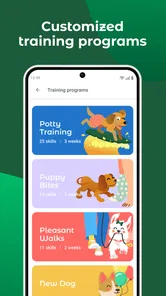
Yes, Dogo is designed to cater to dogs of all breeds and ages. The app provides customized training programs that consider your dog's specific needs, whether you're starting with a puppy or working on advanced skills with an older dog. The flexibility of the app ensures that every pet owner can find valuable resources and exercises that suit their dog's unique requirements.
Pros
- User-friendly interface for easy navigation.
- Offers a variety of training exercises.
- Includes a progress tracking feature.
- Provides expert tips and guidance.
- Customizable training plans available.
Cons
- Requires a subscription for full access.
- Limited free content available.
- Some features need internet access.
- Ads present in free version.
- Might not suit all dog breeds.