

DNA Launcher
- 255.00
- 4.1
- Installs
- 5.00M
- Price
- Free

Screenshots
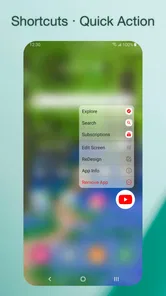
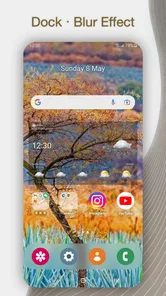
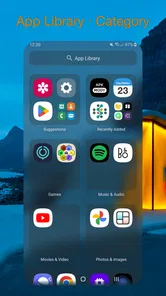
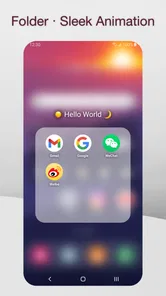
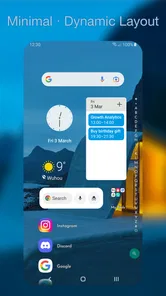
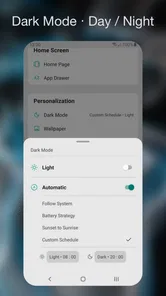
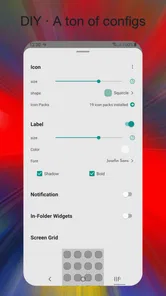
Analysis by Reviewed
On a first try, I’d treat DNA Launcher as a way to reshape the everyday parts of Android rather than as a separate productivity app. It replaces the home-screen experience, so the first useful result is simple: your familiar apps are arranged in a layout that feels easier to scan and more like your own. I’d start small, then change the details I actually notice during the day.
What to expect from a home-screen change
A launcher can affect how you reach apps, browse the app drawer, and use the space around icons. That makes it more personal than changing a wallpaper, but it also means the adjustment is most noticeable in little routines: finding a work app, checking a widget, or getting back to the home screen. DNA Launcher is a personalization app from Atlantis Ultra Station, and its appeal is the chance to tune that everyday surface instead of accepting the phone’s default arrangement.
It’s free to install and rated for Everyone. The app has a 4.1 average from around 18,000 ratings, with over 5 million installs. Optional in-app purchases range from $0.49 to $49.99 per item, so I’d check any purchase screen carefully and stick to the free experience if that covers what I want. Its current version is 2.9.9.108, and it runs on Android 7.1 or later.
Those details make it approachable to try, but I’d think of a launcher as a daily-use interface, not a one-time theme download. The payoff depends on whether the screen makes your normal actions simpler after the novelty wears off. I would give myself a few ordinary days with a modest layout before deciding whether its customization is genuinely useful.
A calmer first setup
When you install a launcher, Android may ask you to choose which home app to use. I’d select DNA Launcher for the home-screen role, then take a moment to look around before changing everything at once. A practical first pass is to put the apps you use most within easy reach, adjust the icon arrangement only if it solves a real clutter problem, and leave the rest alone until the new layout feels familiar.
That gradual approach is useful because a dramatic redesign can look exciting at first but make routine taps harder. If you rely on muscle memory, change one part at a time: for example, make the app drawer easier to browse before rearranging the main screen. If the new layout doesn’t feel right, revisit the launcher’s settings and simplify rather than adding more visual changes.
I also recommend checking which home app Android has selected if the new screen does not appear when you press the Home button. It is easy to assume the launcher failed to install when the phone has simply returned to its previous default. Choosing the intended home app again is a more sensible first fix than reinstalling or rebuilding the layout.
More From Our News Desk

 Gmail
GmailGmail in a Busy Inbox: Who Benefits Most?
From first account to crowded workday, Gmail earns its place through dependable search and flexible sorting—but its best fit depends on how much inbox maintenance you can tolerate.

 Prime Video
Switching to Prime Video: What Changes in Your Viewing Routine
Prime Video can make a compelling second home for streaming, but switching means learning a different catalog, rental layer, and route from browsing to playback.

 Universal TV Remote Control
Universal TV Remote Control Works Best as a Reliable Backup
A phone remote earns its place through quick setup and reliable habits. Here is how to get more from Universal TV Remote Control—and where its limits show.

 Weather - By Xiaomi
Weather by Xiaomi Review: Clear at a Glance, Less Clear Up Close
Xiaomi’s weather app makes everyday forecasts quick to scan, but its calm surface can leave useful details and recovery paths harder to find than they should be.

 X
XX Under Pressure: Can It Recover When Posting Goes Wrong?
A resilience-focused review of X, examining setup, mistaken posts, interruptions, weak connections, and the gaps that matter when recovery needs to be dependable.

 Clash of Clans
Clash of Clans Is Won Between the Battles
Its raids are quick; its community is a long-term project of coordination, teaching, rivalry, and shared responsibility—with all the friction that entails.
Latest News



Getting to a first useful result
A good first success is not a perfect theme; it’s a home screen where you can find a few important apps without hunting. I’d use the grid controls to make room only when the current layout genuinely feels cramped. More icons can mean fewer swipes, but too many can make labels and visual grouping harder to read, especially if you depend on recognizing apps quickly.
Think about a normal morning: you unlock your phone, check the day, open a message, and then head to a calendar or navigation app. Arrange those frequent destinations so the first screen supports that sequence, rather than filling it with every app you own. This small workflow test tells you more about whether the launcher suits you than spending the first session chasing a highly decorated look.
For a more practical test, use the arrangement for a full day before making another change. Notice the moments when you pause: perhaps a frequently used app is too far from your thumb, or a crowded row makes two icons easy to confuse. Move only what caused friction. This turns customization into a small usability experiment instead of an endless search for a perfect home screen.
Where customization helps—and where it costs time
The advantage over a phone’s stock launcher is the freedom to adjust the app drawer, themes, icons, and grid. Compared with a minimalist home-screen setup, DNA Launcher gives a tinkerer more room to personalize, but that freedom can invite repeated tweaking. I’d choose a clear visual rule—such as grouping daily-use apps together—and stop once it makes the phone easier to use.
There is a trade-off between a distinctive look and quick recognition. If you change many icons at once, familiar apps may take longer to spot; if you pack the grid, the screen can feel busy. Keep a few visual cues consistent and test the arrangement during real use. That is a more reliable way to decide whether a theme is working than judging it only while you’re in the settings.
One useful compromise is to keep the first screen deliberately boring and experiment elsewhere. Put only the apps you reach for repeatedly on the main screen, then use the app drawer for everything less frequent. That gives you room to explore the visual options without making every unlock a fresh navigation puzzle. It also makes it easier to undo a change: you can restore one small area rather than rethink the whole layout.
When personalizing a phone, I find it helpful to separate appearance from access. A theme can make the screen feel more individual, while the grid and app placement determine whether it works efficiently. If I’m choosing between two designs, I’d favor the one that lets me identify and tap the right app quickly, even if the other looks more striking in a screenshot.
When it comes to personalizing our smartphones, the options can seem endless. But let me tell you about my latest find – the DNA Launcher. This app caught my eye, not just because of its catchy name, but because it promised to revolutionize my home screen experience. And boy, did it live up to the promise!
Unleashing a New World of Customization
So, what's all the fuss about the DNA Launcher? Right off the bat, I was impressed by its sleek interface and intuitive design. Installing it was a breeze, and I was immediately welcomed by a user-friendly setup wizard that walked me through the initial customization process. Within minutes, I had a home screen that felt uniquely mine.
The level of customization here is insane! From changing icons to selecting different themes, the possibilities are practically endless. I could even customize the app drawer and tweak the grid size to fit more apps on my screen without making things look cluttered. If you're someone who loves to tinker with every detail, this app is a dream come true.
For a first-time user, I’d resist trying to make every screen match immediately. Start with one theme or icon change, then leave the rest alone until you know how it feels in motion. A home screen is something you use in short bursts, so the right test is whether it helps when you are in a hurry, not whether every detail looks coordinated while you are sitting in the settings.
Performance and Usability
Now, aesthetics are important, but how does it perform? In one word: flawlessly. The DNA Launcher is super lightweight, ensuring that it doesn't hog your phone's resources. My phone didn’t slow down one bit, even with all the visual flair I added. Plus, it’s fast – switching between screens and launching apps happens in a snap.
What really stood out to me was the smart widget feature. It's like having a personal assistant right on your home screen. I could access my calendar, weather updates, and even recent apps without diving into separate apps. It's not just a launcher; it's a productivity booster!
Widgets are most useful when they answer a quick question without turning the home screen into a wall of information. I’d place one where it is easy to glance at, then check whether it actually saves a trip into another app. If it becomes visual noise, remove it; the best arrangement is the one that supports your habits rather than displaying everything at once.
When another launcher may suit you better
I’d consider a different option if I want to keep a strictly stock Android layout or prefer not to spend time tuning icons and screens. A manufacturer’s default launcher can be the simpler choice when familiarity matters more than personalization. I’d also avoid relying on a launcher widget as my only route to time-sensitive information; opening the original app is the safer habit when I need to check details directly.
Compared with a basic wallpaper change, a launcher can alter how you reach and organize apps, which is more useful but also asks for more adjustment. Compared with a minimalist setup, this one is a better fit for someone who enjoys options and wants control over the app drawer and grid. If you want the home screen to stay almost exactly as your phone shipped, those extra choices may feel like work rather than a benefit.
I’d also skip a heavily customized layout if several people regularly use the same phone and depend on a shared, predictable arrangement. A personal setup can be efficient for its owner but confusing to someone who expects the standard screen. In that situation, keeping the main page familiar and limiting changes to less prominent areas is a reasonable middle ground.
For someone who enjoys making a phone feel less generic, the best reason to try this one is that the customization can solve practical annoyances, not just decorate the screen. I’d pay attention to whether I find apps faster after a few days. If I don’t, I’d simplify the layout or return to the default launcher rather than keep adjusting settings for their own sake.
Why You Should Give It a Try
One of the things I appreciate most about the DNA Launcher is its accessibility. Whether you're a tech-savvy user or just someone wanting a fresh look for your phone, this app caters to everyone. It’s packed with features, yet somehow manages to be easy to navigate and use.
The practical question I’d ask before spending money is whether the free version already covers the changes I want. Optional purchases are available, but I wouldn’t buy anything simply because a customization screen presents it as the next step. First live with the setup you have, identify a specific limitation, and only then decide whether paying for an item would solve that particular problem.
If you change your mind about using a different home app, you can switch the default home choice back through Android’s home-app settings. I’d do that before uninstalling if I want to return to a familiar arrangement. The important thing is to make the change deliberately: a launcher affects the home screen, not the underlying apps themselves, so switching launchers is a choice about how you access them.
In the end, this app is all about making your device reflect who you are. It's like having your own digital DNA, shaping your phone to your lifestyle and preferences. So, if you're in the market for a new launcher, give DNA Launcher a shot. It just might make your phone feel brand new again.
My recommendation is to try it with one clear goal: make a routine action easier, such as reaching a small group of daily apps or reducing clutter in the drawer. If the new arrangement helps after the novelty fades, keep refining it in small steps. If you find yourself adjusting icons more often than using the phone, the stock launcher may be the better fit. That is the difference I’d use to judge whether this personalization app has earned a place on your home screen.
DNA Launcher Frequently Asked Questions
Can I use DNA Launcher alongside my phone’s existing home screen?
Yes. DNA Launcher is a home-screen launcher, so you can try it as an alternative to the interface your Android device currently uses. When Android prompts you to choose a default home app, you can select DNA Launcher to use it. You can switch back by choosing another launcher in your device settings, which makes it possible to compare the experience before settling on one.
Is DNA Launcher available for iPhone or iPad?
DNA Launcher is an Android app, designed for devices that meet its Android operating-system requirement. It is not an iOS home-screen replacement, because iPhone and iPad manage their home screens differently. If you are looking for a launcher that changes an Android home screen, check that your device’s Android version is compatible before downloading; iOS users should look for personalization options intended for Apple devices.
Can I customize DNA Launcher gradually, or do I need to change everything at once?
You can approach a launcher gradually: begin by using DNA Launcher as your home screen, then explore its customization choices at your own pace. Its options include themes, icon packs, widgets, app drawer styles, transition effects, and gesture controls, so you can adjust the parts that matter to you rather than changing everything immediately. Review each setting as you go to find a layout that feels comfortable.
Can I change back to my previous launcher after installing DNA Launcher?
Yes. You can select another launcher through your Android device settings if you want to stop using DNA Launcher. Switching back changes the home-screen interface you use; it is not a step intended to uninstall your apps. If you have arranged shortcuts or customized your screen, check the other launcher’s home screen after switching, since its layout may differ from the one you set up in DNA Launcher.
Can I try DNA Launcher without paying?
Yes. DNA Launcher is free to download, so you can install it and explore the launcher before deciding whether to buy anything. In-app purchases are available, ranging from $0.49 to $49.99 per item, and are optional. Check the purchase details shown in the app before confirming a transaction so you know what you are selecting.
Pros
- User-friendly interface with intuitive navigation
- Customizable themes and icon packs
- Fast performance with minimal lag
- Seamless integration with widgets
- Battery-efficient design
Cons
- Limited support for older Android versions
- Occasional crashes on some devices
- Ads in free version can be intrusive
- Lacks advanced gesture controls
- Limited options for folder customization











