DIY Cat Language Wallpaper
- 24.00
- 4.1
- Installs
- 500.00K
- Price
- Free
Screenshots
Analysis by Reviewed
I judge a wallpaper maker by what it lets me do in the few minutes between picking up my phone and deciding whether I want to keep the result. DIY Cat Language Wallpaper has a clear, playful focus: building a cat-themed look for the screen, with symbolic “cat language” as part of the design. That makes it more personal than simply choosing a picture, though it also means the appeal depends on whether you enjoy decorating your phone rather than just setting a photo and moving on.
Readability and navigation
As a personalization app, it is aimed at a simple creative task, not at teaching a language or managing a complicated collection. The stated idea is to make a cat wallpaper and lock screen yourself, so the useful question is whether you enjoy making small design choices. I would approach it as a casual editor: decide on a cat image or visual style first, then consider whether extra symbols and text make the finished screen more charming or more crowded.
That order matters on a phone. A design that looks lovely in an editing view can become harder to live with once icons, the clock, or notifications sit over it. I’d keep the central area fairly calm and put decorative details toward the edges, then check both the home screen and lock screen before settling on a design. This is a practical way to protect readability without assuming the app offers a dedicated preview or layout tool.
One helpful way to make those choices is to begin with the screen you look at most often, rather than trying to perfect both screens at once. I’d make a first pass with only the main cat image, then add a symbol or short decorative phrase and check whether it still feels easy to scan. If the result is difficult to read, removing an element is often more effective than moving several pieces around. That simple edit-first approach keeps the task manageable, especially on a small display.
Unpacking the Basics
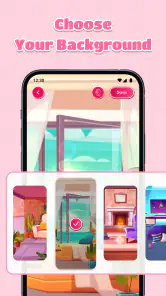
First things first, the DIY Cat Language Wallpaper is not just a wallpaper app. Oh no, it's much more than that. It combines the love for cats with the creativity of personalized wallpapers. You get to choose from a plethora of adorable cat images and patterns, and then add a twist. The twist? Incorporating cat language symbols and messages into your designs. It's like creating a secret code between you and your feline buddy, right on your phone's screen.
The Setup and Features
Setting up the app is a breeze. Once you've downloaded it, you're greeted with a user-friendly interface that's as inviting as a warm patch of sun on a lazy afternoon. The app walks you through the process of selecting your preferred wallpaper base. Whether you're into playful kittens or majestic cats, there's something for everyone.
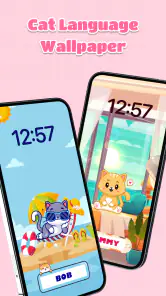
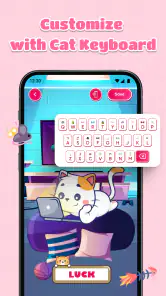
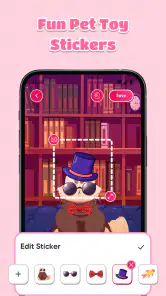
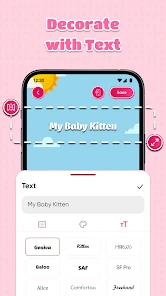
But here's where it gets interesting: the customization. You can tweak the colors, adjust the brightness, and even add text in "cat language". It's a playful nod to those quirky moments when your cat meows at you, and you pretend to understand. The app provides a variety of symbols and phrases that you can overlay onto your chosen wallpaper, making it truly unique to your style.
More From Our News Desk

Clash of Clans Is Won Between the Battles

Android Auto Makes the Case for Quieter Car Software

MobiOffice: Transforming Mobile Productivity with Seamless Integration

EA SPORTS FC™ Mobile Soccer: Redefining Mobile Sports Gaming

How Microsoft OneDrive Became a Mobile Productivity Giant

How Google Translate Breaks Language Barriers Effortlessly
For a more considered result, I’d treat brightness as a finishing adjustment rather than the first step. Start with the image and symbols, then tune the brightness while looking at the screen as you normally use it. A background that is attractive on its own can become overpowering beneath icons, so the aim is not necessarily maximum color or contrast; it is a design that remains comfortable when the phone is doing its everyday job.
Motor and sensory considerations
The design activity is mainly visual, so it may suit someone who wants a light, low-pressure way to personalize a phone rather than a demanding editing workflow. Still, small controls and layered choices can be tiring for people who find precise tapping difficult. I’d make one change at a time, pause to inspect the result, and avoid adding several decorative elements just because they are available. A simpler composition is often easier to read at a glance.
Color and detail are worth thinking about too. Bright, busy imagery can feel cheerful, but it may compete with app icons or become distracting during ordinary phone use. If you prefer a quieter screen, choose a less crowded base and treat the cat-language accents as a small flourish. That gives the theme personality without turning every glance at the phone into a visual puzzle.
There is a useful trade-off here for anyone who finds visual editing tiring: a highly decorated design may be more fun to make, but a restrained one can be easier to live with for weeks. I’d consider whether the wallpaper needs to work behind a busy home screen, a long list of notifications, or only a relatively uncluttered lock screen. The answer can guide how much detail to add and whether the same design should be used in both places.
For users who rely on larger system text or other phone-level display adjustments, it is worth checking the finished wallpaper after those settings are active. The background does not need to carry information, so it should not compete with text the user needs to read. If symbols or bright areas sit behind important screen content, moving toward a simpler composition is a sensible compromise rather than a failure to customize.
Why It's Purr-fect for Cat Lovers
Now, you might be wondering, "What's so special about cat language?" Well, for starters, it's a fun and whimsical way to express your love for your pet. Plus, it's a conversation starter! Imagine showing your phone to a fellow cat enthusiast and explaining the meaning behind the symbols. It's these small, delightful interactions that make the app so appealing.
Additionally, the app's attention to detail is impressive. From the high-resolution images to the seamless integration of design elements, it's clear that a lot of thought went into making this app a joy to use. And let's not forget the regular updates. The developers seem to have their paws on the pulse of what users want, frequently adding new features and content to keep things fresh.
The clearest fit is someone who enjoys small personal touches and sees a phone background as a way to show a hobby or a favorite animal. It could also be a cheerful choice for a shared family device, provided the person setting it up keeps the design readable for everyone who uses that screen. On the other hand, someone who changes wallpapers only to improve legibility, or who prefers a neutral work-focused display, may get more practical value from a plain image or a system wallpaper picker.
A realistic routine might be to make a cat-themed lock screen during a relaxed evening, then live with it through a normal day before deciding whether to add more decoration. Check it while notifications are visible, when the screen is dimmer, and in the place where you most often unlock your phone. That little trial catches problems that are easy to miss while concentrating on the design itself, and it avoids spending extra time polishing a layout that turns out to be distracting.
Situational access and everyday use
A realistic use is to make a cheerful lock-screen background during a quiet break, then keep the home screen more restrained so notifications and icons remain easy to spot. Someone who likes changing their phone’s look with the seasons, a new pet photo, or a favorite cat motif may enjoy making a fresh composition now and then. If you mainly want a plain, high-contrast background that disappears behind your apps, a standard wallpaper picker or a simple photo crop tool will probably be quicker.
It is also worth considering where you use the phone. A detailed background may be delightful at home but less comfortable to glance at in bright outdoor light or when you are in a hurry. Before committing, check the image at the brightness you normally use and see whether the important parts of the screen still stand out. This small check can save the annoyance of repeatedly changing a design that looked better in the editor.
For a quick morning check, the lock screen is the more revealing test: the time and notifications need to remain easy to pick out before you have time to study the artwork. At home, there may be more room to enjoy a detailed cat design; while walking or juggling errands, a calmer background can be kinder to the eyes. I’d make the decision based on the moments when I actually glance at the phone, not just on how attractive the wallpaper looks when viewed by itself.
This is also a useful distinction for children and older family members who share a device: a cute theme can make a phone feel more personal, but the people using it still need to recognize their usual icons and alerts. A simple design with a clear area behind those elements is more practical than filling every open space. The app’s Everyone age rating makes it broadly suitable in that respect, but comfort and readability still depend on the individual user and the chosen design.
How it compares, and what to expect
Compared with the usual wallpaper alternatives, this app’s distinguishing idea is the combination of cat imagery and playful symbols or phrases, rather than broad libraries of general photography or abstract backgrounds. That narrow focus is a plus if you want a screen that feels distinctly cat-themed; it is less useful if you want a large range of unrelated styles or a practical editor for cropping personal photos. Think of it as a themed creative detour, not a replacement for every wallpaper tool.
It is free and rated for Everyone, which makes trying it a low-commitment choice for cat fans. It is published by Akihabara Apps Solutions, has an average rating of 4.1 from around 1.1 thousand ratings, and has passed 500 thousand installs. The app was released on September 17, 2024, and version 1.0.6 is listed for devices running Android 5.0 or later. Those details make it easy to assess basic fit, but they don’t change the main decision: whether you want a decorative cat design enough to spend time arranging one.
Compared with choosing a favorite photo directly in the phone’s wallpaper settings, this is a better fit when you want the cat theme and symbolic decoration to be part of the creative process. A general design editor is the more flexible choice if you want to work with your own images or make something outside the cat motif. I’d see the difference as focus versus flexibility: a narrow theme can make a fun choice easier, but it also gives you less reason to open the app if your tastes change.
If you are deciding whether to try it, the practical question is whether you want to make a design or simply select one. The free price lowers the barrier to exploring its particular style, while the Android 5.0 minimum gives older Android users a clear compatibility point to check against their device. A person who wants an immediate, no-edit setup may still prefer the built-in picker, whereas someone who enjoys arranging cat-themed details has a clearer reason to spend time here.
Remaining barriers
Customization is only an advantage when the choices feel worthwhile. If you do not care about cat motifs, the narrow theme will likely feel limiting, and a general wallpaper app offers more variety. If you need a very plain background for quick icon recognition, decorative symbols and text may be extra clutter rather than added value. I would also avoid assuming that a playful “cat language” is a translation tool; its role here is visual expression, not a reliable way to interpret a pet’s behavior.
For someone with low vision, sensitivity to busy imagery, or difficulty making precise selections, the most useful test is practical: can you comfortably choose a base, adjust the design, and read your usual screen afterward? I’d start with a simple layout and stop once it feels clear. A wallpaper app should make the phone more pleasant, not create another task to manage.
Another limitation is the time involved in deciding what looks right. Even a light personalization task can become fiddly if you keep changing colors, brightness, and decorative details without a clear idea of the result you want. I’d set a modest goal before opening it—perhaps a calm cat image with one accent—and stop once the screen works well in daily use. If you would rather spend no time on styling, the phone’s built-in backgrounds are likely the more comfortable option.
It is also worth keeping expectations grounded around the “language” idea. The symbols and phrases add character to a wallpaper, but they should be treated as decoration rather than a practical communication system or an explanation of feline behavior. That distinction matters if you are looking for help understanding a pet: a wallpaper design can express affection, but it cannot replace observation or advice suited to an animal’s needs.
Final Thoughts
At the end of the day, the DIY Cat Language Wallpaper is more than just an app. It's a celebration of our feline friends and a creative outlet for cat lovers everywhere. Whether you're looking to spruce up your phone's look or simply want to indulge in some cat-themed fun, this app delivers on all fronts.
So, if you're ready to embrace your inner cat whisperer, give the DIY Cat Language Wallpaper a try. It's a delightful mix of creativity, customization, and cat-lovin' charm that might just make your day a little brighter.
My inclusive verdict is that this works best when the user can comfortably make a few visual choices and wants a playful theme more than a utility-focused wallpaper tool. I’d recommend trying a restrained design first, then judging it on the actual phone screen in the settings and situations that matter to you. If the cat imagery makes your phone feel more yours without obscuring the information you need, it has done its job; if it adds visual effort, a simpler alternative is the better choice.
DIY Cat Language Wallpaper Frequently Asked Questions
What devices and operating systems can run DIY Cat Language Wallpaper?
DIY Cat Language Wallpaper is an Android personalization app that can run on devices using Android 5.0 or later. Before downloading, check your device’s Android version in its settings to make sure it meets that requirement. The app is intended for creating cat-themed wallpapers and lock screens, so you can decide whether its customization focus suits the way you like to personalize your phone.
What is DIY Cat Language Wallpaper, and how does it work?
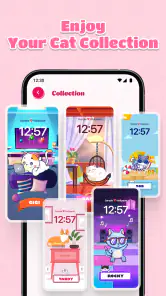
DIY Cat Language Wallpaper is a creative app designed for cat lovers who want to personalize their device backgrounds with unique cat-themed designs. The app offers a variety of customizable wallpaper options featuring adorable cats in various poses and settings. Users can select templates, colors, and styles to create their perfect wallpaper. The app also includes features to add custom text in a playful 'cat language,' making it a fun and interactive experience for cat enthusiasts.
Is DIY Cat Language Wallpaper free to use, or are there any costs involved?
DIY Cat Language Wallpaper is free to download. It is listed as a free app, so you can try it without paying for the download. The app is developed by Akihabara Apps Solutions and has attracted over 500,000 installs, reflecting interest from users who want a cat-themed personalization tool. As with any app, review the options shown during installation and use before making a decision.
What are the main features of DIY Cat Language Wallpaper?
The main features of DIY Cat Language Wallpaper include a wide range of customizable cat-themed templates, the ability to add personalized text in 'cat language,' and a user-friendly interface for creating unique wallpapers. The app also provides tools for adjusting colors, styles, and layouts, as well as options to share your creations on social media. Premium users gain access to exclusive templates and advanced editing features, providing endless creative possibilities for cat lovers.
Is DIY Cat Language Wallpaper suitable for all ages?
DIY Cat Language Wallpaper is designed to be user-friendly and suitable for all ages, making it a perfect choice for anyone who loves cats. The app's intuitive interface and playful cat-themed designs appeal to both young users and adults. Its content rating is Everyone, which makes it a family-friendly option for cat enthusiasts. Parents can still supervise younger children using a device, as they would with any app.
Pros
- Customizable cat-themed wallpapers.
- User-friendly interface.
- Regular updates with new designs.
- Offline functionality.
- Lightweight and fast app.
Cons
- Limited free content.
- In-app purchase for premium features.
- Ads can be intrusive.
- Requires Android 5.0 or later.
- No support for live wallpapers.
- Category
- Personalization
- Version
- 1.0.6











