

Disposable Camera App
- 8.00
- 4.5
- Installs
- 10.00K
- Price
- Free

Screenshots
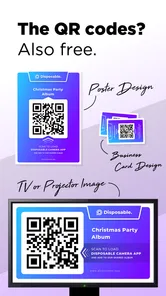
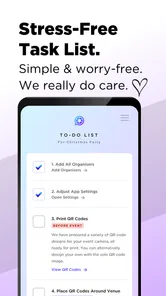
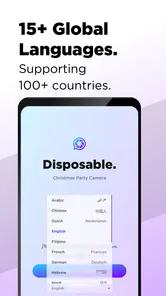
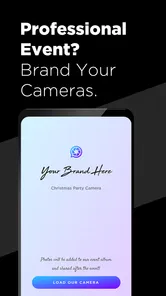
Analysis by Reviewed
Disposable Camera App is the kind of small event tool I would suggest when the goal is not to create another polished social feed, but to give guests a simple way to contribute photos during a shared occasion. I looked at it as a first-time user would: install it, understand what it is meant to do, and decide whether it could genuinely fit a wedding, birthday, party, or similar gathering. The idea is appealing because guests often take many pictures on their phones, yet those pictures usually remain scattered across private camera rolls. A disposable-camera approach gives the event a more focused identity.
Developed by hakJav Studios, this free Events app is aimed at Android users who want a casual camera experience for group occasions. It has an Everyone age rating, so its presentation is suitable for a broad audience. The app was released on March 6, 2024, and the current version is 1.1. It works on devices running Android 5.0 or later, which makes it accessible even to people using older phones.
What I like most about the concept is the change in behavior it encourages. Instead of asking guests to send pictures later, remember a shared folder, or join a complicated platform, the event can have one clearly defined photo activity. That does not automatically make every image better, but it can make the collection feel more personal and less like a random dump of phone snapshots.
What to expect from this event camera
The first thing to understand is that this is not trying to replace a full camera editor or a serious photo-management service. Its appeal comes from being focused. You open it for an occasion, take pictures in the moment, and treat the results as part of the event experience. If you are looking for advanced editing, detailed controls, professional image organization, or a broad social network, this is probably too narrow for your needs.
For a wedding, the disposable-camera idea can work especially well because it gives guests permission to capture details that an official photographer may not notice: a quiet conversation at the table, a child dancing near the edge of the room, a half-finished dessert, or the group laughing between formal moments. At a birthday party, it can turn the phone into a shared activity rather than something people use separately. For a house party, the casual format may feel more natural than asking everyone to upload files to a formal album.
My expectation would be modest but useful: this app should help create a collection of spontaneous event memories. I would not install it expecting the same control as the regular camera app on a modern phone. The usual camera app is better when I need predictable focus, exposure control, quick access to every camera mode, or immediate editing. A dedicated event camera is better when the social purpose matters more than technical perfection.
The app has passed ten thousand installs and holds a 4.5 average from around sixty ratings, with eight written reviews. Those figures suggest that it has found an audience, while still being small enough that I would approach it as a focused utility rather than a mature, feature-heavy platform. That distinction matters: its value depends heavily on how well the organizer introduces it and how willing guests are to participate.
More From Our News Desk

 Gmail
GmailGmail in a Busy Inbox: Who Benefits Most?
From first account to crowded workday, Gmail earns its place through dependable search and flexible sorting—but its best fit depends on how much inbox maintenance you can tolerate.

 Prime Video
Switching to Prime Video: What Changes in Your Viewing Routine
Prime Video can make a compelling second home for streaming, but switching means learning a different catalog, rental layer, and route from browsing to playback.

 Universal TV Remote Control
Universal TV Remote Control Works Best as a Reliable Backup
A phone remote earns its place through quick setup and reliable habits. Here is how to get more from Universal TV Remote Control—and where its limits show.

 Weather - By Xiaomi
Weather by Xiaomi Review: Clear at a Glance, Less Clear Up Close
Xiaomi’s weather app makes everyday forecasts quick to scan, but its calm surface can leave useful details and recovery paths harder to find than they should be.

 X
XX Under Pressure: Can It Recover When Posting Goes Wrong?
A resilience-focused review of X, examining setup, mistaken posts, interruptions, weak connections, and the gaps that matter when recovery needs to be dependable.

 Clash of Clans
Clash of Clans Is Won Between the Battles
Its raids are quick; its community is a long-term project of coordination, teaching, rivalry, and shared responsibility—with all the friction that entails.
Latest News



Who will get the most from it
I think the strongest audience is an organizer who wants a low-pressure shared photo experience. You do not need to be a photography enthusiast. In fact, people who normally avoid complicated apps may appreciate the limited purpose. It can also suit hosts who want guests to notice the room, the people, and the little moments instead of spending the whole event inside a public social feed.
It is less suitable for someone who needs a carefully controlled archive. If your priority is original-quality files, professional delivery, searchable albums, or a guaranteed workflow for hundreds of guests, a dedicated photo-sharing service or a photographer’s gallery will be a better choice. Likewise, if every guest must be able to participate without installing anything, a browser-based upload page may create less friction.
There is also a social trade-off. Some guests will enjoy the novelty, but others may not want to use a separate camera app. Older relatives, people with limited storage, or anyone cautious about installing unfamiliar software may need a simple explanation. The app can support an event, but it cannot remove the human part of organizing one.
Getting from installation to the first useful photo
For a first-time user, I would begin before the event rather than handing the app to guests at the door. Install it on the phone that will be used for the first test, open it in a quiet moment, and look for the basic path to taking a picture. The important goal is not to explore every screen. It is to confirm that the camera opens, that the controls are understandable, and that a test image behaves as expected.
Because the app is free, the initial decision is easy: there is no purchase to evaluate before trying the core experience. I would still avoid waiting until guests arrive. A short rehearsal gives the organizer time to decide where the phone will be placed, how guests will be invited to use it, and how the resulting pictures will be handled after the event.
My practical setup would be simple. I would choose one clearly visible location, such as a welcome table or a small station near the main gathering area. A short handwritten instruction can be more effective than a long explanation: take a picture, include people or details from the event, and return the phone or continue using the app as instructed. The exact wording is less important than making the action obvious.
A useful, non-obvious tip is to test the app in the same lighting where it will actually be used. A camera that feels straightforward beside a bright window may feel different in a dim reception room. This is not a reason to reject the app; it is a reason to avoid discovering the environment problem after the first group photo. I would also take a few test shots from standing height and from a seated position, since guests will not all hold the phone in the same way.
Another worthwhile preparation step is deciding who owns the workflow. If the host is busy greeting people, a trusted helper should know where the device is and what guests are supposed to do. Without that person, a shared camera can quietly become an abandoned phone on a table. The app provides the central activity, but the event still needs a human point of contact.
The first successful action
The first meaningful success is not simply opening the camera. It is taking one picture that makes the purpose immediately clear. I would use a small test group: two or three people, a recognizable event detail, and a quick review of the result. This confirms that the app feels approachable and gives the organizer a sample to show other guests.
For a wedding, that first test could be the rings, the decorated table, and the couple’s friends gathered nearby. For a birthday, it could be the cake before it is cut. At a party, it might be a group shot near the entrance. The point is to demonstrate that the app is not asking guests to create perfect portraits. It is inviting them to record the atmosphere.
I would encourage users to vary what they photograph. A collection made entirely of posed faces can feel repetitive. A better mix includes people, food, decorations, hands holding gifts, empty spaces before the crowd arrives, and small interactions that would otherwise disappear. This is one of the app’s strongest creative advantages over the ordinary camera roll: once everyone understands that the pictures belong to the event, they may look for moments with a shared context.
One practical trade-off is that spontaneity can produce uneven results. Some pictures will be blurry, poorly framed, or accidentally aimed at the floor. I would not treat that as failure. A disposable-camera style works partly because the collection includes imperfect evidence of real participation. However, if the event requires consistently flattering portraits, I would use the phone’s normal camera or hire a photographer instead.
For a realistic everyday scenario, imagine a small birthday dinner where the host is busy serving food and talking with relatives. A phone running this app sits near the entrance with a short note. One guest photographs the cake, another captures the birthday person opening a gift, and a child takes a picture of the table after everyone has eaten. None of those images needs to be technically impressive. Together, they tell a fuller story than the single posed photo the host might otherwise remember to take.
Where first-time users may hesitate
The biggest possible confusion is assuming that a disposable-camera concept works exactly like a physical disposable camera. On a phone, the experience still depends on the device, the app’s interface, and the organizer’s chosen process. I would explain the task in ordinary terms rather than relying on the name alone. Guests should know whether they are taking one picture and passing the phone along, using their own devices, or participating in a broader event collection.
Another point worth clarifying is the difference between taking a picture and completing the event’s sharing workflow. A guest may believe that capturing an image automatically means everyone can see it. Organizers should establish the expected handoff or collection method before the party begins. This is a general event-planning concern, but it becomes especially important when the app is being used as a shared camera rather than as an isolated personal camera.
I would also avoid presenting it as a replacement for every guest’s regular camera. Some people will want to keep their own high-quality pictures, use familiar editing tools, or photograph moments privately. That is perfectly reasonable. The strongest setup lets this app provide a communal layer while guests continue using their normal camera when they have a different purpose.
Storage and battery are sensible considerations for any phone-based event activity. I would start with a charged device and keep the station somewhere safe from spilled drinks, crowded elbows, and direct sunlight. These are simple precautions, but they make the difference between a fun feature and a technical interruption.
The Android requirement is broad enough to include older devices, which can be useful when an organizer has a spare phone available. Still, I would test the actual device in advance rather than assuming that an older handset will feel equally responsive. The minimum operating-system support tells me the app is designed to be accessible, but the quality of the event experience also depends on the phone’s camera, battery condition, and physical placement.
How it compares with familiar alternatives
The default camera app wins on speed and familiarity. Almost every guest already knows how to open it, switch between cameras, review a shot, and share an image. If the only goal is to take excellent pictures quickly, I would not replace it. A shared album can also be better when guests are expected to contribute from their own phones, because it avoids passing one device around.
Cloud photo services are stronger for organization, backup, and later browsing. They make sense for a large event where many people already have pictures and the organizer wants everything in one searchable place. Their weakness is that they can feel like administration: guests may need an invitation, an account, a link, or several taps before they contribute. The disposable-camera approach is more physical and immediate.
Printed disposable cameras create a different kind of anticipation, but they bring film processing, delayed results, and less control over the final collection. A phone app can provide a quicker digital workflow and remove the need to buy film. The trade-off is that it does not have the same physical object quality or nostalgic ritual. I would choose the app when convenience matters more than the charm of waiting for prints.
Event photo booths are better when the organizer wants a defined backdrop, lighting, and guided portraits. They are also more expensive and stationary. This app is more flexible because the camera can move through the event, but it depends on guests creating the energy themselves. Neither option is universally better; they serve different kinds of gatherings.
My recommendation after using it as an organizer
I see Disposable Camera App as a focused, free tool for adding a shared photo ritual to an event. Its best quality is not a long feature list. It is the way the concept gives ordinary snapshots a common purpose. When the host prepares the station, demonstrates the first picture, and explains what happens afterward, the app can make guests more observant and more involved.
The most effective workflow is deliberately small: install it ahead of time, test it in the event lighting, choose a responsible person, demonstrate one successful shot, and give guests a clear invitation. I would also set expectations honestly. The collection may include awkward angles and imperfect timing, and that is part of the appeal. If you need polished coverage, use a professional camera workflow alongside it.
With a 4.5 average and over ten thousand installs, the app has enough early adoption to feel worth trying, while its compact scope makes it easy to understand. I would recommend it to someone planning a wedding, party, or family gathering who wants a playful alternative to asking everyone to send photos later. I would skip it for a formal production, a large-scale archive, or any event where guests cannot reasonably install or handle a separate camera tool.
My final advice is to treat it as an event activity, not just a camera. That mindset leads to better results. Put it where people naturally gather, give them one clear first action, and let the imperfect pictures become part of the memory. Used that way, this small Events app from hakJav Studios can add a personal layer that the standard camera roll often fails to create.
Disposable Camera App Frequently Asked Questions
Is Disposable Camera App compatible with my phone?
Disposable Camera App is listed for Android devices running version 5.0 or later, so check your phone’s software version before downloading. The app is an events-focused camera tool, with a store summary aimed at weddings, parties, and other gatherings. If you use an iPhone, check the relevant app store for availability and compatibility before proceeding.
Who makes Disposable Camera App, and what do users think of it?
The app is developed by hakJav Studios and is presented as a disposable-camera experience for events. Its store rating averages 4.5, based on 61 ratings, with 8 written reviews. Those figures offer a quick sense of how users have responded, but individual experiences can differ, so it is worth reading recent reviews to see whether the app suits the way you plan to take and share photos.
What is the Disposable Camera App and how does it work?
Disposable Camera App is designed to recreate the experience of using a traditional single-use film camera on a smartphone. After opening the app, you can take photos through a simple camera interface, often with limited controls and a nostalgic visual style. Depending on the version, images may include film-inspired colors, grain, light leaks, or date stamps. The exact editing tools and development process can vary by app, so check its current features before downloading.
Can I use the Disposable Camera App without an internet connection?
In many cases, the basic camera function works without a constant internet connection because photos are captured and stored locally on your device. However, an internet connection may be required for downloading the app, activating certain features, viewing advertisements, syncing images, using cloud backups, or accessing premium filters. If offline photography is important to you, test the camera after enabling airplane mode and review the app’s permissions and store description.
Where are photos taken with Disposable Camera App saved?
Photos are usually saved either inside the app’s private gallery or directly to your phone’s standard photo library, depending on the application’s design and the permissions you grant. Some disposable-camera apps delay access to images to imitate film development, while others make pictures available immediately. Before taking important photos, check the save settings, allow photo-library access when requested, and confirm that images appear in your device gallery.
Pros
- Simple interface makes it easy to take photos quickly.
- Retro filters give pictures an authentic disposable-camera feel.
- Date stamps add a nostalgic touch to saved images.
- Works well for parties
- trips
- and casual photo challenges.
- Sharing finished photos to social platforms is straightforward.
Cons
- Some useful filters or tools may require in-app purchases.
- Photo previews can be limited until the roll is developed.
- Low-light results may appear grainy or lack detail.
- The vintage effect may feel repetitive for everyday photography.
- Saving many developed photos can use noticeable storage space.











