Digital Iwasa Watch Face
- 9.00
- 4.3
- Installs
- 5.00K
- Price
- $0.99
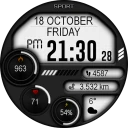
Screenshots
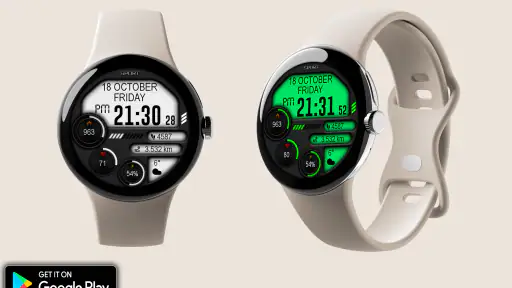
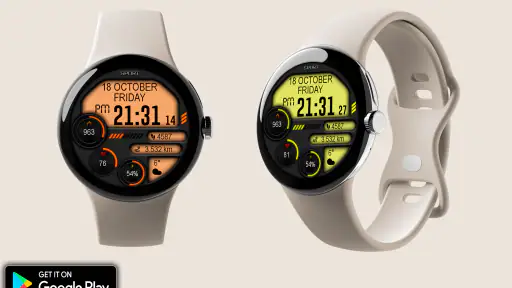
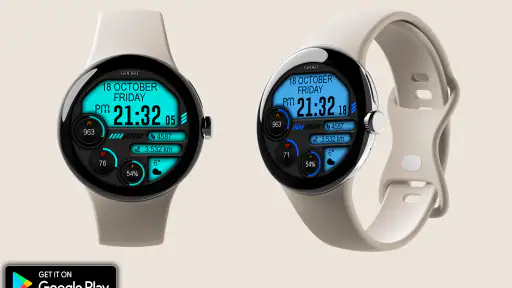
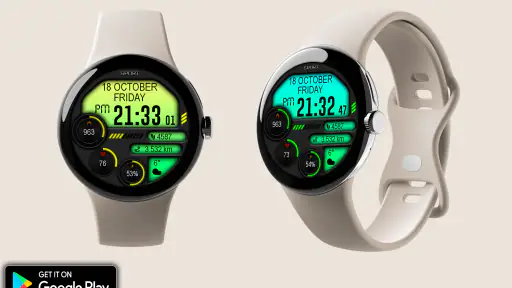
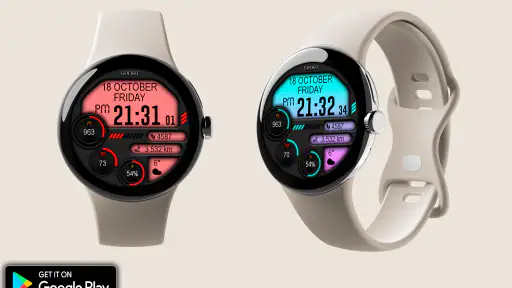
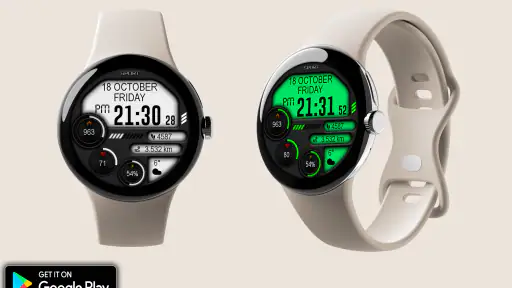
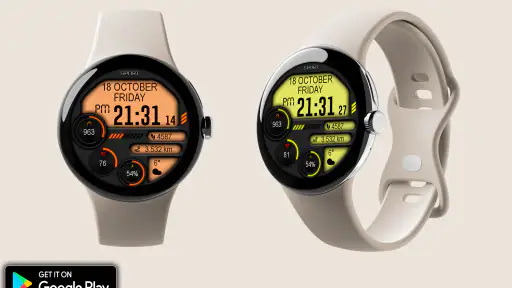
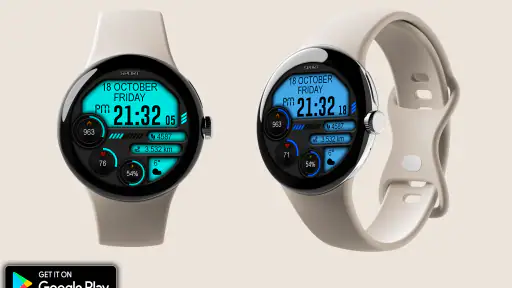
Analysis by Reviewed
When I’m choosing a watch face, I want the time to be easy to read and the look to feel like mine, without turning a small setup into a project. Digital Iwasa Watch Face is a paid personalization app from Magnum Watch Faces for Wear OS, listed at $0.99. Its appeal is straightforward: it gives your watch a distinct digital presentation. Whether that is enough depends on what you expect to customize, so I’d approach it as a focused style choice rather than a full smartwatch utility.
Where setup can feel less simple
A common point of confusion with watch-face apps is that installing one on a phone does not always mean it is already active on the watch. The face may need to be selected through the watch’s face picker or the companion setup flow available on your device. I’d check both screens before assuming the purchase or installation failed. The exact path can vary between Wear OS watches, so follow the prompts shown on your own devices rather than relying on instructions meant for another model.
It also helps to separate the face itself from the watch’s existing capabilities. A watch face changes the display; it does not turn the watch into a different model or guarantee that every piece of information you might want will appear. Before buying, think about what you need to see at a glance—perhaps a clear time display for work or a less formal look for weekends—and compare that with the preview and options available in the app.
Check the watch before troubleshooting
If the face does not appear immediately, I’d first confirm that the watch is running Wear OS and that it is connected to the phone used for setup. Then I’d reopen the watch-face selection screen and look for the newly installed design. A quick check of the watch’s connection and a fresh visit to the selection menu are sensible first steps; repeatedly reinstalling the app before checking those basics can waste time.
One useful habit is to make setup changes while the watch and phone are nearby and connected. That makes it easier to tell whether a delay is part of installation or simply a connection hiccup. If the face appears on the watch but does not look the way you expected, revisit the available settings rather than assuming the display is broken. I’d change one option at a time, then check the actual watch screen; a small display can make differences look subtler than they do in a phone preview.
Recovering a setup that seems stuck
If you have selected the face but still see the old one, return to the watch’s face picker and select it again. If that does not help, check that the installation has completed on the watch, then give the phone and watch a moment to reconnect before repeating the selection. These simple steps are more useful than making several changes at once, because they help identify where the process stalled.
For a face that appears but seems incomplete, check the settings offered for that face and the information your watch can provide. Some details depend on the watch and its configuration, so I would not assume that a display option can create a data source the device does not already support. This is especially worth remembering when moving between watches: a setting that worked on one device may not behave identically on another.
More From Our News Desk

Weather by Xiaomi Review: Clear at a Glance, Less Clear Up Close

X Under Pressure: Can It Recover When Posting Goes Wrong?

Clash of Clans Is Won Between the Battles

Android Auto Makes the Case for Quieter Car Software

MobiOffice: Transforming Mobile Productivity with Seamless Integration

EA SPORTS FC™ Mobile Soccer: Redefining Mobile Sports Gaming
When the watch, not the face, is the issue
A watch face is only one part of the Wear OS experience. If the watch is slow to respond, disconnected, or not updating information elsewhere, I would check the watch’s connection and general system behavior before blaming this app. Switching temporarily to a built-in face can help you compare: if the same issue remains, the cause is more likely elsewhere in the watch setup.
Battery expectations deserve the same careful approach. The original appeal of this face is its look and glanceable presentation, but actual battery use can vary with the watch and its settings. I would compare a normal day with this face against your usual routine rather than drawing conclusions from a short test. If battery life is your main concern, a very simple built-in face may be the safer choice, especially if you rarely change appearance and mainly want the longest time between charges.
Who will enjoy this focused look
This is most suitable for someone who already uses a Wear OS watch and wants a digital face with a more personal feel. For example, if I were heading into a busy day of errands, I’d choose a display I can read with a quick glance instead of waking the phone to check the time. At the end of the day, I might switch back to a familiar face if I wanted a different look. That kind of occasional change is a practical use for personalization: it refreshes the watch without changing how I organize the rest of my day.
Compared with the usual alternatives, a built-in face is convenient and already part of the watch, while a highly configurable face may suit people who enjoy adjusting lots of details. This app sits between those choices as a paid, dedicated design. It is not the right fit if you want a broad collection before deciding, prefer not to pay for a face, or need a specific complication that is not shown among its available options. I would inspect the preview and the actual settings before purchasing rather than assuming every element can be rearranged.
What the price and listing tell you
The app costs $0.99, carries an Everyone age rating, and has a 4.3 average from around 216 ratings, with 5K+ installs. Magnum Watch Faces is the developer. Those details suggest it has found an audience, but ratings cannot tell you whether its particular look will suit your wrist or whether it matches your preferred information layout. I’d treat the price as a small, specific purchase: worthwhile if you already like the design, less compelling if you are still searching for a style.
The app was released on Oct 18, 2024. If you are checking it out now, the most useful decision is still personal: does the face make the time and the overall display feel right on your watch? A quick glance at the preview, followed by a careful check of the on-watch selection and settings, will answer that better than expecting a watch face to solve unrelated connectivity or battery problems.
First Impressions and Interface
Right off the bat, the Digital Iwasa Watch Face app greets you with a sleek and intuitive interface. It's like stepping into a digital wonderland where everything is neat and easy to find. The app is designed to make customization a breeze, and it doesn’t disappoint. You don't need to be a tech wizard to navigate through its settings, which is a huge plus in my book. Everything from the color schemes to the layout is just a few taps away.
Customization Galore!
One of the standout features for me is the level of customization offered. You can choose from a plethora of watch face designs, each one cooler than the last. Whether you're in the mood for something minimalistic or something that screams attention, there's a design here for you. I had a blast experimenting with different combinations, and the best part? You can change it up as often as you like without any hassle.
The app also allows you to tweak the smallest details. Want your watch face to show weather updates or your heart rate? Done and done. It's like having a mini smartphone on your wrist, tailored just the way you want it.
Performance and Battery Life
Now, let's talk about performance. I was pleasantly surprised at how smooth everything ran. No lag, no stuttering, just seamless operation. It's clear that the developers put a lot of thought into optimizing this app for performance. And as for battery life, I was a bit worried that all these features would drain my watch’s battery faster than you can say "smartwatch," but that wasn't the case. The app is efficient and doesn’t hog resources, which means you can enjoy all its features without constantly reaching for your charger.
Choosing it for a real routine
The strongest case for this kind of digital face is a day when I need quick time checks without turning my wrist into a miniature dashboard. Imagine commuting, carrying groceries, or moving between appointments: a glance should tell me the time immediately, while the watch remains a watch rather than another screen demanding attention. I’d try it in the lighting and clothing I actually wear, not just admire a preview indoors. A high-contrast design can feel quite different under bright daylight or against a sleeve, and those everyday conditions are what determine whether a face earns a permanent place on my wrist.
It can also make sense to treat the face as a small change of mood. I might keep a familiar built-in option for a long workday, then switch to this digital look for a weekend walk or evening plans. That is a more grounded reason to pay for a design than expecting it to reorganize my smartwatch habits. The useful question is not whether I can keep changing settings, but whether I still enjoy the display after the novelty wears off and it becomes the thing I see dozens of times a day.
A sensible way to decide before buying
Before paying, I’d check the app preview against the shape and proportions of my own watch screen, then consider what I personally need to read at a glance. If the main appeal is the digital styling, the decision is relatively simple: do I like how it looks? If I am buying for a particular extra item of information, I would verify that the option is actually presented in the app and that my watch can supply it. This avoids confusing a watch-face design with a promise that every device will show the same content in the same way.
There is a trade-off between a focused design and a broad face library. A collection gives me more choices to browse, but it can also mean spending time comparing options when I only want one appearance I genuinely like. A dedicated paid face is more appealing when I have already settled on its visual direction; it is less attractive if I am still unsure whether I prefer digital, analog, or information-heavy layouts. In that case, trying the watch’s built-in choices first is the more practical route.
Small checks that make the display more useful
After installation, I’d spend a minute checking the face on the watch itself rather than judging it only from a phone screen. Confirm that the time is comfortable to read at a natural wrist angle, and see whether the parts of the display I care about remain visible with my usual sleeve. Then I’d leave it in place for a normal day before deciding whether to adjust anything. A quick real-world trial is more informative than repeatedly changing settings in search of a perfect preview.
If I share the watch with a busy schedule, I would keep setup simple: make one change, check the result, and stop once the essentials are readable. That makes it easier to spot whether an option improves the experience or merely adds visual clutter. For someone who uses a watch mainly to check time and prefers not to tinker, the best customization may be no customization at all beyond selecting the face and confirming it looks right.
Knowing when another choice is better
I would skip this purchase if I want a free option, a large collection to browse, or a face built around a particular complication that I cannot see in its available choices. Someone who relies on a watch for a detailed information panel may be happier with a face designed specifically around those needs. Likewise, if the built-in face already gives me the exact look and glanceable information I want, adding a paid alternative may not improve my day in a meaningful way.
On the other hand, someone who likes a digital presentation, already owns a Wear OS watch, and is comfortable choosing one design rather than shopping through a catalog is closer to the intended audience. I’d recommend judging it on the wrist, not on the assumption that a personalization app must offer endless options. The face is worthwhile when its particular appearance is the reason to install it; it is not a substitute for watch features, a connection fix, or a general-purpose customization toolkit.
Final Thoughts
All in all, the app is a fantastic way to breathe new life into your smartwatch. It’s not just about telling time; it’s about making a statement. With its easy-to-use interface, extensive customization options, and reliable performance, it’s hard not to be impressed. Whether you’re a tech enthusiast or just someone looking to add a touch of personality to their watch, it’s worth checking out. Go ahead, give it a whirl and let your wrist do the talking!
Digital Iwasa Watch Face Frequently Asked Questions
Is Digital Iwasa Watch Face a watch app or a standalone phone app?
Digital Iwasa is a personalization app that provides a watch face for Wear OS. It is intended to change the appearance of a compatible smartwatch display rather than serve as a general-purpose phone app. Before downloading, make sure you are looking for a watch face and that your wearable runs Wear OS, so the app fits the device you plan to use it on.
What does Digital Iwasa Watch Face cost, and what is its age rating?
Digital Iwasa Watch Face is priced at $0.99 and has an Everyone content rating. That makes it a paid download rather than a free watch face, so consider the price before proceeding. The age rating indicates that its content is suitable for a general audience; the main practical consideration is whether you have a compatible Wear OS smartwatch.
What features does the Digital Iwasa Watch Face offer?
The Digital Iwasa Watch Face offers a range of customizable features for your smartwatch. It includes multiple display themes, weather updates, battery status, and step counter integration. You can also personalize the color schemes and widget placements to suit your style and preferences, making it a versatile choice for smartwatch users.
Is Digital Iwasa Watch Face compatible with all smartwatches?
Digital Iwasa Watch Face is compatible with most Android-based smartwatches running Wear OS. However, it is essential to check your device's compatibility before downloading, as certain features might not be available on all models. Unfortunately, it is not available for iOS devices, limiting its use to Android users only.
How user-friendly is the Digital Iwasa Watch Face?
The Digital Iwasa Watch Face is designed to be user-friendly, with an intuitive interface that allows for easy customization. Users can navigate through settings and features with ease, thanks to its straightforward design. Whether you're a tech-savvy user or new to smartwatches, the app ensures a seamless experience.
Pros
- Highly customizable watch face.
- Clear and easy-to-read design.
- Battery-friendly performance.
- Compatible with most Android devices.
- Regular updates and support.
Cons
- Limited free features.
- Occasional sync issues.
- Ads in free version.
- Some settings are hard to find.
- Requires Android 6.0 or later.
- Category
- Personalization
- Version
- Varies with device











