Dice Tech Careers
- 1.71K
- 4.3
- Installs
- 500.00K
- Price
- Free

Screenshots
Analysis by Reviewed
When I look for a tech job, I do not want another app that simply throws a long list of vacancies at me. I want a tool that helps me move from “I should start searching” to a short, manageable set of roles I can actually evaluate and apply for. That is where Dice Tech Careers makes sense. It is a free business app from DHI Group Inc. focused on technology jobs across the United States, and I found its value strongest when I used it as part of a repeatable job-search routine rather than as a place to browse endlessly.
The app has a clear purpose: helping people find and apply for open tech positions from a phone. Its audience includes software developers, IT specialists, data professionals, cybersecurity candidates, project managers, and people trying to move into technology from another field. It is available to an Everyone audience, runs on Android eleven or later, and its current version is 4.3. The service has been around since June 24, 2014, which gives it a more established feel than a brand-new job-search experiment.
My overall impression is positive, but not uncritical. The app is useful when I already know the kind of work I want and can give the search some structure. It is less convincing as a complete career-management system. It will not replace careful research into employers, a well-prepared résumé, or the judgment needed to decide whether a role is genuinely suitable. Think of it as a focused doorway into the tech-job market, not the entire house.
Building a better job-search workflow before opening the app
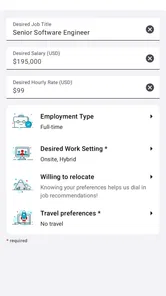
The biggest improvement I made was deciding what I wanted before searching. Without that preparation, a job app can become a distraction: I read attractive titles, open several listings, forget why I saved them, and end the session without applying anywhere. Dice works better when I begin with a simple target such as “remote backend roles,” “entry-level support positions,” or “contract data work in my region.”
I also prepare a short list of acceptable job titles and related terms. A person searching only for “software engineer” may miss roles described as application developer, platform engineer, or systems programmer. On the other hand, searching too broadly creates noise. I prefer starting with one specific role, reviewing the results, and then widening the wording only if the list is too narrow.
This small planning step matters because the app is centered on tech careers rather than general employment. That focus is a real advantage for someone who already works in technology. I do not have to spend as much time filtering out unrelated retail, hospitality, or general office listings. The trade-off is obvious: if I am looking for a nontechnical position, or a role where technology is only a minor part of the work, this is probably not the right first stop.
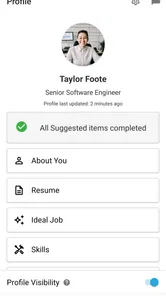
Before I begin, I keep my résumé current and decide which version fits the search. A cloud-focused résumé should not be treated exactly like one aimed at help-desk work. The app can help me locate opportunities, but it cannot compensate for sending an unfocused application. I get better results when I treat each listing as a prompt to check whether my experience matches the language used by the employer.
More From Our News Desk

Weather by Xiaomi Review: Clear at a Glance, Less Clear Up Close

X Under Pressure: Can It Recover When Posting Goes Wrong?

Clash of Clans Is Won Between the Battles

Android Auto Makes the Case for Quieter Car Software

MobiOffice: Transforming Mobile Productivity with Seamless Integration

EA SPORTS FC™ Mobile Soccer: Redefining Mobile Sports Gaming
Turning browsing into a manageable capture process
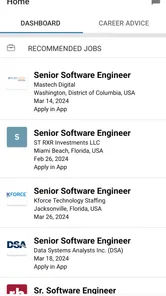
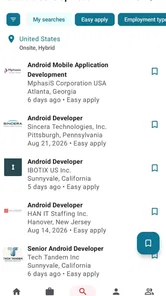
During a typical session, I do not try to read every result in full. I scan the title, location or remote arrangement when shown, employer, and the main requirements. If a role seems relevant, I open it and look for practical details: the technologies mentioned, the seniority implied by the responsibilities, and whether the position is genuinely aligned with my background. This is more efficient than applying based on a title alone.
One useful habit is to separate “interesting” from “ready to apply.” A listing can be interesting because it mentions a technology I want to learn, while still being a poor immediate match. I keep those two groups mentally distinct. Otherwise, the most exciting roles crowd out realistic opportunities that deserve an application today.
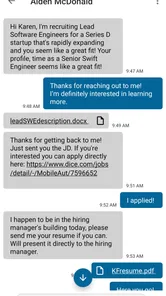
The app’s focused job-search design makes it suitable for this capture stage. I can use it to collect possible roles while I am away from my computer, then review the strongest candidates later. That phone-first workflow is practical for people who commute, study, or have only short breaks during the day. It also lowers the barrier to checking new opportunities without turning the search into a full evening project.
There is a limitation here: a mobile listing is not always the best environment for careful comparison. Job descriptions can be long, and small differences in requirements are easy to miss on a phone. My solution is to capture only the roles that pass an initial screen, then compare them in a separate note or on a larger screen before applying. The app starts the process well; I would not rely on it alone for detailed decision-making.
A second practical tip is to read the wording around experience carefully. A listing asking for several tools may describe a preferred stack rather than a strict checklist, but another employer may treat every requirement as essential. I look for the responsibilities first. If I can perform the central work and only lack one secondary tool, I may still apply. If the core duties are outside my experience, I move on rather than forcing a weak application.
A repeatable routine that keeps the search sustainable
I get more from Dice Tech Careers when I use it at set points in the week instead of checking it constantly. A short search session can follow a simple rhythm: define the target, scan new or relevant roles, inspect the strongest listings, and choose a small number for action. The exact schedule depends on the person, but the principle is the same: searching should lead to decisions, not endless refreshing.
For example, imagine someone working in technical support who wants to move toward cloud operations. Before opening the app, that person can decide to search for support roles with cloud responsibilities, junior cloud operations positions, and infrastructure support work. During the session, they can note which tools appear repeatedly, identify realistic openings, and mark one skill gap to address. The next session can then use that information to refine the search rather than starting from zero.
This approach turns job hunting into a learning loop. The listings show how employers describe roles, which skills recur, and what level of experience is expected. I do not treat every requirement as a command to collect another certificate. Instead, I look for patterns. If several suitable roles emphasize the same platform or practice, that may be a sensible area for focused preparation.
Another routine that works well is a two-pass review. In the first pass, I collect only plausible options and avoid applying immediately. In the second, I reread the shortlist with my résumé open. This helps expose gaps between what a listing asks for and what my application actually demonstrates. It also reduces impulsive applications sent simply because a job title sounds appealing.
The app is free, so it is easy to include in that routine without adding a subscription decision to the process. Its audience reach is also substantial, with more than 500 thousand installs and an average rating of 4.3 from roughly 6.4 thousand ratings. Those figures suggest that it has found a useful place for many job seekers, although popularity should not be confused with a guarantee that every search will produce a good match.
Where the workflow can break down
The first failure point is over-broad searching. Technology titles are inconsistent, and a single general term can bring together jobs with very different responsibilities. If I search too loosely, I spend more time filtering than evaluating. The fix is to use a narrow starting point and expand deliberately, recording which related titles produce worthwhile results.
The second problem is confusing availability with suitability. A listing may look attractive because it is remote, uses a familiar technology, or comes from a recognizable employer. None of those details proves that the role fits. I check the day-to-day duties, required experience, and working arrangement before investing time in an application. This is especially important for candidates changing specialties, because a familiar tool can appear in a job that is otherwise far beyond their current level.
A third weakness is the natural limit of a mobile job app. Reading and applying from a phone is convenient, but editing a résumé, comparing several descriptions, and writing thoughtful answers are usually easier elsewhere. I use the app for discovery and early review, then switch to a fuller workspace when the application deserves careful attention. That division of labor prevents the convenience of mobile access from lowering the quality of my submissions.
There is also the risk of treating one job board as the whole market. Dice is particularly relevant to technology careers, but no single source should define every opportunity. Some employers post directly on their own career pages, while others rely on professional networks, specialist communities, or recruiters. I would use this app as a focused channel alongside those alternatives, not as a promise that every suitable role will appear in one feed.
Finally, job seekers should remain alert to listings that deserve extra scrutiny. I look for clear responsibilities, a coherent description, and application steps that make sense. If a role is vague, pressures me to act immediately, or requests information that seems unrelated to a normal application, I stop and investigate through another channel. A job-search app can organize opportunities, but it cannot remove the need for basic caution.
How it compares with broader job apps and direct employer searches
Compared with a general job marketplace, Dice’s main advantage is focus. A broad platform may offer more variety across industries, but that variety can mean more irrelevant results for someone who wants a technical position. Here, the starting point is already closer to software, IT, data, and related work. I spend less energy explaining to the search what kind of career I am pursuing.
Against direct searches on company career pages, the app is more convenient for discovery. I can explore multiple employers in one place instead of visiting each site separately. The downside is that an employer’s own page may provide richer context about teams, benefits, culture, or the exact hiring process. Once I find a promising role through the app, I still prefer to investigate the employer independently before committing time to the application.
Professional networking platforms can be stronger for relationship-building, referrals, and seeing a person’s connections to a company. Dice is more direct when my immediate goal is to find open technology roles. If I need introductions or want to build a visible professional profile, I would use a networking service as well. If I simply want a concentrated search for technical vacancies, this app is the more focused companion.
Recruiters and specialist communities offer another alternative. They may know about roles that are not widely advertised or can explain the hiring manager’s priorities. However, they can also introduce an extra layer between me and the opportunity. Dice gives me more control over what I inspect and pursue, while recruiter-led searches may be better for senior candidates with a highly specific background or people who value personal guidance.
Who should adopt it, and who should choose another route
I would recommend the app to someone actively pursuing a technology career in the United States, especially a person who wants a concentrated way to discover openings from a phone. It is also useful for passive candidates who are not ready to apply immediately but want to understand how companies describe roles in their field. Students, career changers, and experienced professionals can all benefit, provided they use the listings as research rather than assuming every result is an appropriate target.
It is a particularly good fit for people who struggle with starting. Opening a focused tech-job app can be easier than searching across many unrelated sites. Once I have a clear role in mind, the app helps turn a vague intention into a concrete shortlist. The free price also makes it easy to test without financial commitment.
I would be more cautious about recommending it to someone seeking work outside technology, someone who needs extensive career coaching, or someone who wants a complete application tracker and résumé workspace in one product. It is also not the best sole option for a candidate who depends heavily on referrals, executive recruiting, or local opportunities in a field with little connection to technology.
For a person applying internationally, I would first check whether the available roles match their location and work authorization needs. The app’s stated focus is technology jobs across the United States, so a search centered on another national market may be better served by a local specialist platform. That does not make the app weak; it simply defines where its focus is most useful.
My final assessment after fitting it into a real routine
What I like most about Dice Tech Careers is not the idea of searching for jobs on a phone; many apps can do that. Its stronger point is the combination of a technology-specific audience and a low-friction way to begin a focused search. When I set a target first, capture only plausible roles, and review applications carefully outside the browsing stage, it becomes a practical part of a sustainable job-search system.
Its limitations are equally clear. A focused listing source is not the same as a full career platform. Mobile browsing can make comparison and application writing less comfortable, and the app cannot tell me whether an employer is a good fit or whether my résumé presents my experience convincingly. I also would not stop using direct employer pages, networking, or other job sources simply because this one is convenient.
Still, for the right user, the balance is favorable. DHI Group Inc. has built an app with a clear business purpose, a mature presence, and an Everyone content rating. The current 4.3 version is best approached as a disciplined discovery tool: define the kind of technology work you want, use the search to build a shortlist, verify the details, and apply selectively.
My recommendation is straightforward: install it if your next career move is in the US technology market and you want a focused, free way to find openings. Skip making it your only job-search channel, and do not confuse a convenient listing with a suitable opportunity. Used with a clear routine, it can save time and make the first step feel much more manageable.
Dice Tech Careers Frequently Asked Questions
Can I use Dice Tech Careers on my device?
Dice Tech Careers is an app for people searching for technology jobs, and it requires Android 11 or later. Before downloading, check your device’s operating system version to make sure it meets that requirement. The app is free to download, so you can install it and explore its job-search features without paying an upfront purchase price.
What is Dice Tech Careers?
Dice Tech Careers is a technology-focused job search platform designed to help candidates discover employment opportunities in software development, IT, cybersecurity, data, engineering, and related fields. It typically allows users to browse vacancies, review employer and position details, and submit applications. The service is especially useful for professionals seeking specialized technology roles rather than general employment listings.
Do I need an account to apply for jobs on Dice Tech Careers?
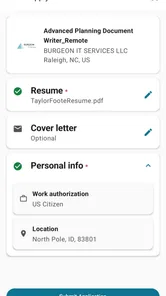
You may be able to browse job listings without creating an account, but an account is generally useful when you want to save vacancies, manage applications, upload or maintain a résumé, and receive personalized job recommendations. Some application processes may redirect you to an employer’s website, while others can be started through the platform. Check the specific listing because requirements can vary by employer.
Is Dice Tech Careers suitable for entry-level candidates?
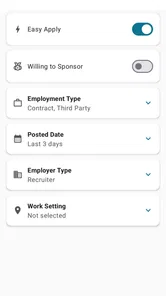
Yes, Dice Tech Careers can be useful for entry-level applicants, although many listings target experienced technology professionals. Search filters and carefully chosen keywords can help you find internships, junior developer roles, help desk positions, graduate opportunities, and other beginner-friendly jobs. Before applying, review the required skills closely and highlight relevant coursework, certifications, projects, portfolios, or practical experience.
How can I improve my chances of finding relevant jobs?
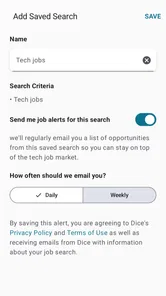
Use precise search terms based on your skills, such as a programming language, cloud platform, certification, or job title, and combine them with a preferred location or remote-work option. Keep your résumé current and make sure your profile reflects your strongest technical abilities. Setting job alerts, checking new postings regularly, and tailoring each application to the employer can also improve results.
Pros
- Lists technology roles with clear career paths
- Useful for discovering in-demand skills and job areas
- Simple interface makes browsing opportunities quick
- Can help students compare different tech careers
- Relevant for users planning a career change
Cons
- May offer limited details about individual job openings
- Career information may not reflect every regional job market
- Some recommendations could feel broad or generic
- No guarantee of employment or direct recruiter contact
- Users may need other resources for salary comparisons











