

dēzl™
- 2.34K
- 4.7
- Installs
- 100.00K
- Price
- Free
Screenshots
Analysis by Reviewed
Hey folks! Today, I want to chat about an app that's been getting quite the buzz among truck drivers and logistics enthusiasts alike. Ever heard of dēzl™? Well, if not, buckle up because this app is about to make your trucking life a whole lot smoother.
The appeal of a truck-focused app is easiest to judge during an ordinary workweek, not just on a first drive. A route that looks simple in a car can become a planning problem when a vehicle’s dimensions and load matter. I’d consider this most useful to drivers who regularly travel unfamiliar roads and want their planning tools to reflect the realities of a truck, rather than adapting a general-purpose map by guesswork.
What the first week can tell you
My advice for the first few trips is to resist treating any new navigation tool as a set-and-forget co-driver. Learn how its route suggestions fit your actual vehicle and work routine while parked, then compare them with the roads you know. That gives you a practical sense of when its truck-aware planning is helpful and when a local detail calls for another check.
A realistic test is a run from a familiar depot to a customer you have not visited before. Before setting off, I’d review the planned route, confirm the vehicle information you depend on, and think through the final approach—not just the highway portion. A route can be sensible for most of the journey and still deserve extra attention near a delivery entrance, industrial estate, or unfamiliar local road.
This is also where the app’s role becomes clearer: it can help organize decisions, but it cannot replace a driver’s judgement about conditions on the ground. If you are already comfortable with your regular routes, try it first on a trip where a second planning perspective has value rather than changing your whole routine at once.
The Ultimate Co-Pilot for Truckers
Imagine cruising down the highway, the open road ahead of you, and having a trusty co-pilot by your side. That's what dēzl™ feels like in the palm of your hand. This app is designed specifically for truck drivers, and it’s like having a personal assistant who knows the ins and outs of the trucking world.
In practical terms, I would treat it as a planning aid, not as permission to stop paying attention to signs or road conditions. Before a new route, it makes sense to check the vehicle details you rely on and review the route with the same care you would give any navigation system. A phone can be convenient for a quick glance while parked, but it should be mounted safely and set up before driving; changing a route while moving is a distraction, not a shortcut.
More From Our News Desk

 Gmail
GmailGmail in a Busy Inbox: Who Benefits Most?
From first account to crowded workday, Gmail earns its place through dependable search and flexible sorting—but its best fit depends on how much inbox maintenance you can tolerate.

 Prime Video
Switching to Prime Video: What Changes in Your Viewing Routine
Prime Video can make a compelling second home for streaming, but switching means learning a different catalog, rental layer, and route from browsing to playback.

 Universal TV Remote Control
Universal TV Remote Control Works Best as a Reliable Backup
A phone remote earns its place through quick setup and reliable habits. Here is how to get more from Universal TV Remote Control—and where its limits show.

 Weather - By Xiaomi
Weather by Xiaomi Review: Clear at a Glance, Less Clear Up Close
Xiaomi’s weather app makes everyday forecasts quick to scan, but its calm surface can leave useful details and recovery paths harder to find than they should be.

 X
XX Under Pressure: Can It Recover When Posting Goes Wrong?
A resilience-focused review of X, examining setup, mistaken posts, interruptions, weak connections, and the gaps that matter when recovery needs to be dependable.

 Clash of Clans
Clash of Clans Is Won Between the Battles
Its raids are quick; its community is a long-term project of coordination, teaching, rivalry, and shared responsibility—with all the friction that entails.
Latest News



Features That Keep You On Track
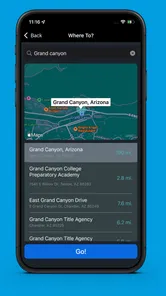
So, what makes this app a must-have? For starters, its navigation system is top-notch. It's not your average GPS; it's tailor-made for trucks. It considers the size, weight, and cargo type of your vehicle to ensure you’re always on the best route. No more worrying about low bridges or weight restrictions!
That truck-specific approach is the key distinction from the usual alternative: a standard phone map that primarily plans for ordinary passenger vehicles. It can be reassuring when a route crosses unfamiliar roads, but I would still verify restrictions locally, especially if a delivery site has awkward access or the final approach is not a major road. A useful habit is to look over the whole route before setting off, rather than judging it only by the next turn.
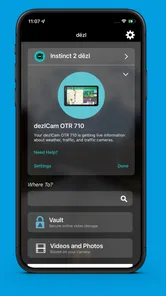
Another cool feature is the real-time traffic updates. We all know how frustrating it can be to get stuck in traffic, especially when you’re on a tight schedule. With dēzl™, you get up-to-date info on traffic conditions, helping you to plan detours and save valuable time.
For example, if a delay appears while I’m parked before leaving a depot, I can compare the suggested detour with the route I already planned and decide whether the time saved is worth changing course. In a truck, the shortest-looking alternative is not automatically the sensible one. That extra pause to consider road suitability can matter more than reacting instantly to every traffic alert.
Making it useful beyond the first trip
The strongest reason to keep a truck app in regular use is not that it makes every drive effortless; it is that it can support a repeatable planning routine. I’d check the route before a shift, use traffic information as one input rather than an instruction, and review the day’s records at a consistent point. When those steps solve recurring problems, the app earns its place. If they create more taps than useful decisions, that is a sign to simplify the setup or rely on a tool that better matches the job.
There is a useful trade-off between familiar habits and a fresh route recommendation. Drivers who know a corridor well may spot a practical issue that a map view does not make obvious, while a driver entering an unfamiliar area may benefit more from truck-focused planning. I would not force the same level of reliance on the app for every trip: use it most where its specific perspective adds something, and keep your established judgement in charge elsewhere.
Keep Your Logs in Check
Paperwork is the bane of any trucker's existence, right? Well, this app simplifies it all with its log-keeping feature. Keeping track of hours of service has never been easier. The app automatically logs your driving hours, so you can focus on the road instead of fiddling with paperwork.
For recurring use, the real question is whether logging fits the way you already work. I’d make a brief end-of-shift check part of the routine instead of assuming an automatic record is always complete or ready for every official need. That small habit is a sensible safeguard: an app can reduce repetitive effort, but a driver remains responsible for keeping required records accurate and reviewing anything that needs attention.
That check can be especially useful when a day does not follow its original plan. A delayed departure, an unexpected stop, or a change in the work sequence is exactly the sort of situation where I would not rely on memory alone. Treating the log as a record to review—not a task that has disappeared—keeps convenience from turning into misplaced confidence.
Whether the logging workflow fits depends on how your work is organized. If you already use a company process or another system for official records, compare the steps before making this app part of the routine. Keeping two records can mean extra reconciliation, so the useful question is not simply whether the feature exists, but whether it reduces effort without creating a second source to maintain.
Fuel decisions that make sense on the road
Fuel can be a major expense, but dēzl™ has got your back. The app helps you locate the best fuel prices along your route. Plus, it can sync with your fuel card to track expenses and manage your budget efficiently.
For someone who drives the same corridors often, fuel information and expense tracking can become more useful over time than they seem on day one. I’d use a regular stop as a chance to compare the displayed option with the practical needs of the trip, rather than detouring solely for a small apparent saving. A cheap stop that disrupts a workable schedule may not be a genuine win, and fuel-card syncing is only helpful if the card and the driver’s expense routine are compatible in practice.
A practical way to judge this part is to consider the whole stop, not just the price shown. If an option fits the route and your planned break, it may be worth considering; if it requires a detour or complicates the schedule, the apparent saving may not justify the extra time and attention. I’d also decide whether expense tracking is something I will actually check later. A feature that quietly collects information but never changes a decision is less valuable than a simple method I reliably use.
Who will keep reaching for it
Garmin makes this a free Auto & Vehicles app, rated for Everyone, and its 4.6 average from around 8,200 ratings suggests a substantial audience has found a reason to keep it installed. It has over 100,000 installs, and version 2.09.37 is listed for devices running Android 9 or later. Those details make it easy to try, but they don’t mean it suits every driver: someone who rarely drives a truck, prefers a dedicated navigation unit, or already has a trusted work system may gain little from adding another app to the routine.
It is most compelling for a driver who regularly needs to plan around a truck’s characteristics, travels beyond familiar routes, and appreciates having navigation, traffic, logging, and fuel-related tasks in one place. The benefits are less convincing for someone whose work is almost entirely local and predictable, or whose employer already has a well-established setup that covers the same needs. In those cases, a general map or the existing work tool may be simpler precisely because it avoids duplicate checks and another screen to manage.
The comparison is not just between this app and a regular phone map. A dedicated navigation device can suit drivers who prefer a separate screen and a purpose-built setup, while a phone app can be easier to try and carry into an existing routine. I would choose based on the working environment: if you need the phone for other tasks or dislike depending on it for navigation, a dedicated unit may feel less distracting. If you want one familiar device for planning and are comfortable preparing it before driving, an app can be the more convenient fit.
For a small operator, the practical question is whether the app slots into the way vehicle details, routes, records, and expenses are already handled. For a driver in a larger operation, it is worth checking whether using it would complement or duplicate company procedures. Either way, I would avoid changing a reliable process just because a new tool has several useful-looking functions; adopt only the parts that improve the workday.
Final Thoughts
All in all, if you're a truck driver looking for a reliable companion on the road, dēzl™ is worth checking out. It offers a suite of features that not only make your trips more efficient but also help you stay organized and save money. It's like having a co-driver who’s always looking out for you.
For lasting value, I’d judge it by whether its truck-aware routing, traffic information, logs, and fuel workflow keep earning attention after the novelty wears off. The maintenance burden is mostly habit: keep the app and vehicle information current, review routes before moving, and check records rather than trusting them blindly. The possible fatigue is also real—alerts, another screen to manage, or a route suggestion that needs a second look can make a busy day feel busier. If you mainly need simple car navigation, a familiar general map may be less work; if truck-specific planning is a regular part of your job, this is a more relevant tool to keep at hand.
I would also be deliberate about what I expect from it. It can make planning more truck-aware and bring recurring tasks into view, but it should not be treated as a guarantee that every suggested road or record is right for every circumstance. The best use is a balanced one: prepare before the drive, make considered choices when conditions change, and review the administrative side when the shift is over.
My long-term test would be simple: after a few weeks, ask whether it has prevented avoidable uncertainty, made a routine task easier, or helped you make a better-informed stop. If the answer is yes, keep it in the workflow and maintain the small habits that make it dependable. If you find yourself ignoring its suggestions, duplicating its records, or checking a second map every time, it may be adding friction rather than value.
So, next time you hit the road, why not give dēzl™ a try? It might just become your new favorite travel buddy. Safe travels, and keep on trucking!
dēzl™ Frequently Asked Questions
What does the name and tagline tell me about dēzl™?
dēzl™ is an app in the Auto & Vehicles category, with the tagline “Connect for the long haul.” It is aimed at people looking for a driving-focused mobile app. The app is free to download and is rated for Everyone, so its basic store details may help you decide whether it suits your needs before installing it.
What is dēzl™ and who is it for?
dēzl™ is a specialized GPS navigation app designed specifically for professional truck drivers. It offers features such as customizable truck routing, live traffic updates, and road hazard warnings. The app aims to make the journey safer and more efficient by considering the vehicle's size and load restrictions, ensuring that drivers are not led down inappropriate routes.
How does dēzl™ enhance navigation for truck drivers?
dēzl™ enhances navigation by providing truck-specific routing based on the dimensions, weight, and load of the vehicle. It offers real-time updates on road conditions, traffic, and weather. Additionally, the app includes features like points of interest for truckers, such as rest stops and weigh stations, helping drivers plan their trips more effectively and avoid unnecessary detours.
Can I use dēzl™ without an internet connection?
dēzl™ allows users to download maps for offline use, which is particularly beneficial in areas with poor internet connectivity. While some features like live traffic updates require an internet connection, the core navigation functions can operate offline using pre-downloaded maps, ensuring continuous guidance even in remote locations.
What devices are compatible with dēzl™?
The dēzl™ app is available for both Android and iOS devices. It requires a smartphone or tablet running on a relatively recent operating system to ensure compatibility and access to all the latest features. Users should check the app's listing on the Google Play Store or Apple App Store for specific version requirements before downloading.
Pros
- User-friendly interface for easy navigation
- Extensive database of truck stops and services
- Customizable routes based on vehicle size
- Real-time traffic updates for efficient routing
- Offline maps available for no-signal areas
Cons
- High battery consumption during use
- Occasional GPS signal loss in remote areas
- Limited customization for alerts
- Requires large storage space for map data
- Subscription needed for premium features













