

Dental Shooting
- 6.00
- 1.7
- Installs
- 10.00K
- Price
- Free

Screenshots
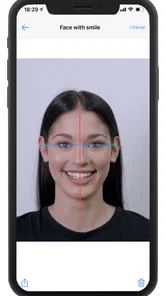
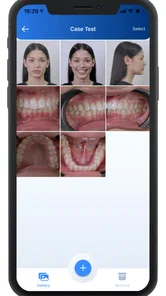
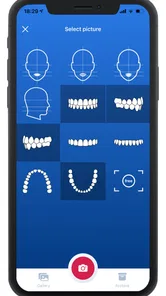
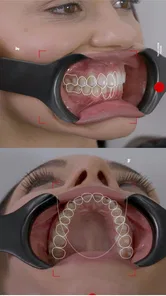
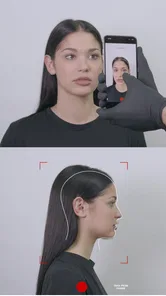
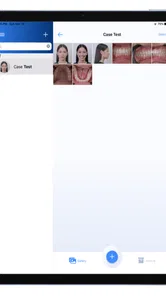
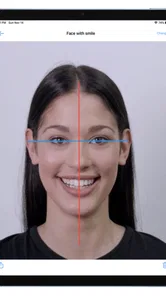
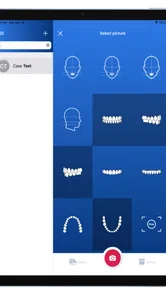
Analysis by Reviewed
Dental Shooting is a medical photography app from Dental Shooting SRLs, built around capturing and editing dental images. I see its purpose as quite focused: it is not a general camera replacement, a patient-management platform, or a diagnostic tool. Its appeal depends on whether you regularly need a more organized way to produce dental photographs and then refine them before using them in a professional workflow.
I approached it as someone deciding whether a specialist tool deserves space on a phone. The answer is not automatically yes. The app has a clear professional idea behind it, but its low average rating of 1.7 from roughly 75 ratings is an important warning sign. That does not tell me exactly which problems users encountered, yet it does mean I would test it carefully before making it part of a busy clinic routine.
How Dental Shooting fits into dental photography
The central promise is simple: take dental photos and edit them in the same app. That combination can be useful when the goal is to create consistent visual records, prepare images for discussion, or make a before-and-after comparison easier to view. In my experience, the advantage of a dedicated app is less about taking a picture and more about reducing the number of separate steps afterward.
With an ordinary phone camera, I would typically capture an image, open it in a gallery editor, crop or adjust it, rename or sort it elsewhere, and then share it through another workflow. Dental Shooting is aimed at bringing the capture and editing parts closer together. That can save attention, especially when I am handling several images during a consultation or trying to document a specific area without switching between unrelated tools.
Still, I would keep the scope in perspective. An edited photograph is not automatically a clinical finding, and a camera app cannot replace examination, imaging equipment, or professional judgment. I would use the app to support visual documentation and communication, not to treat its edits as evidence that changes the underlying medical meaning of a photograph.
The cost is easy to understand, but the value needs testing
The app is free to install, which makes the first evaluation relatively straightforward. I do not have to commit money just to see whether the capture and editing workflow suits my phone, my habits, and the way I handle dental images. That free entry is the strongest part of the pricing proposition for anyone who is curious but cautious.
There are also in-app purchases listed between $49.99 and $139.99 per item. Those are substantial amounts compared with a casual photo editor, so I would not treat the free installation as proof that the complete experience is free. The sensible approach is to explore the accessible workflow first, identify exactly what I need, and only then decide whether a paid item produces enough practical value.
More From Our News Desk

 Gmail
GmailGmail in a Busy Inbox: Who Benefits Most?
From first account to crowded workday, Gmail earns its place through dependable search and flexible sorting—but its best fit depends on how much inbox maintenance you can tolerate.

 Prime Video
Switching to Prime Video: What Changes in Your Viewing Routine
Prime Video can make a compelling second home for streaming, but switching means learning a different catalog, rental layer, and route from browsing to playback.

 Universal TV Remote Control
Universal TV Remote Control Works Best as a Reliable Backup
A phone remote earns its place through quick setup and reliable habits. Here is how to get more from Universal TV Remote Control—and where its limits show.

 Weather - By Xiaomi
Weather by Xiaomi Review: Clear at a Glance, Less Clear Up Close
Xiaomi’s weather app makes everyday forecasts quick to scan, but its calm surface can leave useful details and recovery paths harder to find than they should be.

 X
XX Under Pressure: Can It Recover When Posting Goes Wrong?
A resilience-focused review of X, examining setup, mistaken posts, interruptions, weak connections, and the gaps that matter when recovery needs to be dependable.

 Clash of Clans
Clash of Clans Is Won Between the Battles
Its raids are quick; its community is a long-term project of coordination, teaching, rivalry, and shared responsibility—with all the friction that entails.
Latest News



This distinction matters for a clinic. A free download can be useful for a trial, but a professional decision should be based on the total cost of the functions required for regular work. If the basic experience already covers the intended photo workflow, the app may be an inexpensive experiment. If the features I need sit behind a purchase, I would compare that expense with the time saved and with alternatives already available on the phone.
I would also avoid judging the purchase solely by the number on the screen. The relevant question is whether the app helps me produce more consistent records, communicate more clearly with patients, or reduce repetitive editing. If it only changes the appearance of images without improving how they are captured, reviewed, or stored, the higher purchase range becomes harder to justify.
What the editing focus can do for a real workflow
A realistic use case would be a dentist taking intraoral photographs during a consultation. I might capture several views, make a quick adjustment so the important area is easier to see, and use the resulting images while explaining a treatment option. The benefit is practical: the patient sees the same visual material I am discussing instead of trying to follow a verbal description alone.
Another useful situation is preparing images for an internal case discussion. A focused photograph can be easier for a colleague to review than a full, unedited camera roll containing unrelated pictures. The editing step may help me crop attention toward the relevant region and present the case more clearly. That is a communication benefit rather than a diagnostic one, and I think that distinction keeps expectations realistic.
A less obvious advantage is consistency. When the same person uses a familiar capture-and-edit routine, the resulting images may become easier to compare over time because the process is less improvised. I would create a small personal checklist: use the same general orientation, avoid unnecessary edits, review the image before moving on, and keep the original whenever the workflow allows it. The app can support that discipline, but it cannot create consistency by itself.
I would also use the editing stage as a quality-control pause. Before sharing an image, I would check whether the subject is actually visible, whether glare or blur hides the area of interest, and whether the crop removes useful context. This is a concrete place where a dedicated workflow can help: it encourages me to inspect the photograph instead of immediately sending the first version from the camera roll.
Where a specialist app is more useful than a normal camera
The usual phone camera is often faster for a single casual image, and the built-in gallery may be enough for basic cropping. If I only need occasional dental photographs and already have a reliable way to organize them, Dental Shooting may not add enough value to justify learning another tool or paying for additional functions.
The specialist approach becomes more attractive when the same type of dental image is captured repeatedly and needs light preparation before discussion. A general camera is designed for everything from landscapes to portraits; this app is much narrower. That narrowness can be helpful because it keeps the task centered on dental photography rather than surrounding me with unrelated camera controls.
There is a trade-off, though. General-purpose tools are familiar, widely supported, and often easier to replace if a phone changes. A dedicated app creates dependence on its own workflow. Before adopting it, I would test whether I can retrieve the finished image in the format and location I need, whether the process is comfortable with one hand, and whether it fits the way my practice already handles records. Those questions matter more to me than the presence of an editing button.
Practical habits that improve the experience
My first tip would be to test the app with a small, controlled set of photographs rather than beginning with a full day of patient work. Use the same phone, the same lighting conditions, and the same type of dental view for the first trial. That makes it easier to separate problems caused by the app from problems caused by technique, positioning, or the phone itself.
Second, I would compare an edited image with its original before deciding that an adjustment is helpful. A brighter or tighter image may look clearer on a screen while losing context that matters later. Keeping the original beside the edited version is a simple safeguard, particularly when the image may be reviewed by someone who was not present during capture.
Third, I would establish a naming and storage routine outside the moment of capture. Even a good dental photo becomes difficult to use if it is mixed with personal pictures or saved without a clear case reference. The app’s capture and editing role does not remove the need for careful record handling. I would decide in advance where the final images belong and who should be able to access them.
Fourth, I would avoid using aggressive edits to make a case look more dramatic. The best clinical photograph is not necessarily the most attractive one. I would favor adjustments that improve visibility while preserving a believable representation of the original scene. That is especially important when images are shown to patients or compared across appointments.
What may cause friction
The rating profile makes me cautious about relying on the app without a backup plan. With an average of 1.7, I would expect that at least some users have found the experience disappointing, unstable, confusing, or poorly matched to their needs. I cannot turn that rating into a specific diagnosis, but I would take it seriously when deciding whether the app is ready for a central professional workflow.
That means I would not make it the only place where important photographs exist. During a trial, I would confirm that images can be preserved through the broader workflow I already trust. If an app becomes unavailable or behaves unexpectedly, I still need access to the photographs and a way to continue documenting cases.
The version currently identified for the app is 2.9.10, and it supports Android devices running version 5.0 or later. That broad minimum requirement may make it accessible on older Android hardware, but compatibility on paper is not the same as a smooth experience on every phone. Camera quality, screen size, storage, and device performance can all affect how comfortable a photography app feels in practice.
I would be particularly careful with older devices. A phone may technically install the app yet still be inconvenient for repeated image capture or editing. Before using it in front of patients, I would perform the entire sequence from opening the app to reviewing the finished image. A workflow that feels acceptable once may become frustrating after many repetitions.
Who is most likely to benefit
I think the best audience is a dental professional who frequently creates visual records and wants capture and editing to happen in one focused environment. It may also suit a small practice that needs a simple way to prepare images for patient conversations without investing immediately in a larger imaging system.
Students and trainees could find value in using a dedicated dental-photo routine, provided they understand that the app is a documentation aid rather than a substitute for clinical teaching. It may encourage better habits around framing, reviewing, and presenting images. The free installation also makes it possible to assess the workflow before considering any purchase.
Patients, casual users, and people looking for a general oral-health camera should probably look elsewhere. The app’s narrow purpose is unlikely to justify learning it for occasional personal use. Someone who only wants to take a quick picture for a remote conversation may find the ordinary camera and a trusted sharing method simpler.
I would also advise caution for a clinic that needs a complete patient-record system, advanced collaboration, or guaranteed operational continuity. Dental Shooting is described as a photography and editing app; I would not assume that it replaces scheduling, consent management, case storage, reporting, or other practice software. If those are the real requirements, a broader dental platform is likely a better fit.
Privacy and professional responsibility in daily use
Dental photographs can become sensitive records as soon as they are connected with an identifiable person. I would therefore treat every image as professional material, even when the app itself feels like a camera utility. Before sharing anything, I would check the recipient, remove accidental unrelated content, and follow the practice’s established handling rules.
A useful habit is to separate demonstration images from patient-specific records. If I am explaining a general concept, I would use material that does not expose someone’s identity whenever possible. For actual case documentation, I would make sure the image is associated with the correct record through the practice’s approved process rather than relying on memory or an informal phone album.
This is another reason I would not choose the app solely because it is convenient. Convenience is valuable only when it fits responsible clinical handling. A slightly slower workflow that keeps images organized and appropriately controlled may be better than a fast workflow that creates confusion later.
My value judgment after weighing the trade-offs
The free installation gives Dental Shooting a fair chance, but the paid items change the decision. I would call it worth trying for a dental professional who already knows that dedicated photo capture and editing would solve a recurring problem. I would not call it an automatic purchase, especially with the low average rating and the possibility that the required functions may cost considerably more than a basic photo editor.
The strongest value comes when the app replaces repeated switching between a camera, gallery editor, and informal sharing process. The weakest value comes when the user only needs occasional photographs or expects a full clinical record system. In other words, the app’s usefulness depends less on the word “professional” and more on how often the specific workflow appears in my day.
I would also measure value in time and reliability, not just image appearance. If I can capture, inspect, edit, and move a photograph into my normal record process with fewer interruptions, that is meaningful. If the app adds another place to manage images without making the process more dependable, the free entry point may be as far as I go.
My final recommendation
Dental Shooting is a focused tool to trial, not a product I would adopt blindly. I like the idea of combining dental photography with editing, and I can see a clear role for it in consultations, case discussions, and more disciplined visual documentation. The free installation lowers the risk of an initial test, while the Android compatibility makes it approachable for many devices.
My recommendation is to install it only if dental photography is a regular part of your work, then test it with non-critical images and your complete intended workflow. Check the editing process, image handling, reliability, and the exact value of any paid item before using it for important records. Keep a dependable alternative available during that evaluation.
For a professional who needs a dedicated photo routine, it may become a useful niche companion. For everyone else, the ordinary camera or a broader dental platform will probably be the more sensible choice. The app has a specific problem it may help solve, but its low user rating and paid upgrade range mean that the final buy-or-skip decision should come from hands-on testing rather than the store summary alone.
Dental Shooting is free to start, rated for Everyone, and was released on April 28, 2022. The developer is Dental Shooting SRLs, and the app has passed 10K+ installs. Those details make it easy to discover, but they do not remove the central question: does its capture-and-edit workflow make your dental documentation clearer and easier enough to justify keeping it in daily use?
Dental Shooting Frequently Asked Questions
What kind of device do I need to use Dental Shooting?
Dental Shooting is an app for Android devices, and it requires Android 5.0 or later. Check your device’s operating system before downloading so you can confirm it meets that requirement. The app is free to download, while in-app purchases are available, so review the purchase options before using it if you want to avoid unexpected charges.
Who developed Dental Shooting, and what is its age rating?
Dental Shooting is developed by Dental Shooting SRLs and is categorized as a medical app. It has an Everyone content rating, which indicates that its store rating is suitable for a general audience. As with any app, parents may want to look over its features and purchase options together with younger users before installing it.
What is Dental Shooting?
Dental Shooting is a casual mobile game that combines dental-care activities with shooting-style gameplay. Players typically complete levels by aiming at targets, removing threats, or handling dental-themed challenges. Its colorful presentation and simple controls make it easy to understand, although the exact objectives and available mechanics may vary between levels and updates.
How do you play Dental Shooting?
The game is designed around straightforward touch controls. You generally aim by moving your finger across the screen and tap or release to shoot at the required targets. Progress depends on accuracy, timing, and completing the objective of each stage. New challenges may introduce moving targets, limited attempts, obstacles, or additional requirements.
Is Dental Shooting suitable for children?
Dental Shooting has a playful, cartoon-style concept rather than a realistic medical presentation, which may make it appealing to younger players. However, parents should still check the age rating, advertisements, in-app purchase options, and privacy information on the relevant app store. Some levels may also include shooting effects that parents may want to review first.
Pros
- Simple shooting mechanics are easy for casual players to understand.
- Short rounds make it convenient for quick gaming sessions.
- Bright visuals give the game a playful
- cartoon-like appearance.
- Progression provides a sense of reward as new stages are completed.
- The game can be entertaining for players who enjoy unusual themes.
Cons
- The gameplay may become repetitive after extended play.
- Some levels can feel more frustrating than challenging.
- Ads may interrupt the experience
- depending on the version.
- The unusual dental theme may not appeal to every player.
- Limited depth may disappoint users seeking a more strategic game.











