DeepSkyCamera Pro
- 11.00
- 3.9
- Installs
- 1.00K
- Price
- $9.49
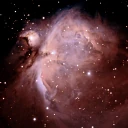
Screenshots
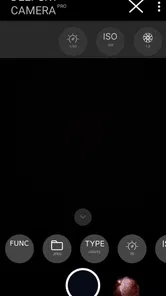
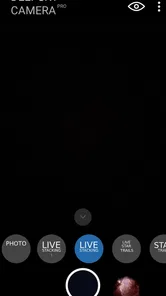
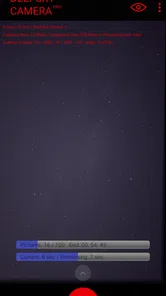
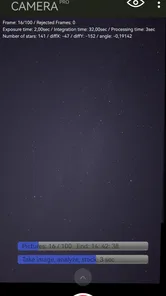
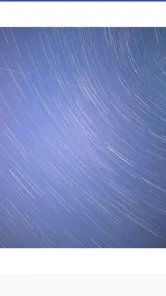
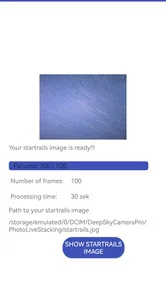
Analysis by Reviewed
I see DeepSkyCamera Pro as a specialist tool for people who want to do more with phone-based astrophotography than tap the shutter and hope for the best. Its focus on long night-sky sessions and live stacking makes it more purposeful than a standard camera app, but that focus also asks for patience: good results still depend on your phone, the sky, and how carefully you set up. I’d recommend it to curious night-sky photographers, not to someone looking for a quick filter or effortless snapshots.
What the specialist approach changes
In the usual phone-camera app, the goal is a pleasing picture with minimal effort. Here, the appeal is having a workflow built around faint celestial subjects, including photo live stacking. Stacking can help build an image from multiple captures, so the practical advantage is less about a magical one-tap result and more about giving a session time to gather detail. That makes a steady phone and a stable view of the sky more important than they are for casual night mode.
A useful habit is to treat the first attempt as a test rather than a finished image. Try a short session, check whether the framing and focus hold, then commit to a longer capture only when the setup looks right. A small shift in the phone or an obstruction crossing the view can waste time, and live stacking rewards consistency. I’d also keep notes on which settings worked with a particular scene; that is more reliable than assuming one preset suits every night.
This is where the app’s specialist identity is both its strength and its main trade-off. Someone who enjoys learning how exposure choices affect a photo may welcome the extra control. If you mainly want the phone to detect a night scene and produce a ready-to-share result, the built-in camera app or a simpler night-photography app may feel more convenient. DeepSkyCamera Pro is better approached as a tool for a deliberate session than as a replacement for every camera task.
A realistic night-sky routine
Picture a clear evening when you have a little time after dinner. Instead of taking one hurried picture from a bright window, you head somewhere with a more open view, set the phone securely, and use the app to frame a target. You check the image early, make a small adjustment if the framing is off, and let the session continue only once the phone is steady. That kind of calm, repeatable process is a better fit than trying to capture stars while walking or between other tasks.
For a beginner, I’d start with an easy-to-find patch of sky and a short experiment, then compare the outcome with an ordinary phone-camera shot from the same spot. This reveals whether the extra workflow is worthwhile for your particular device and conditions. For someone already comfortable with manual camera controls, the attraction is having an app centered on astrophotography rather than having to repurpose a general camera interface. Neither route guarantees a dramatic image: cloud, nearby lights, and phone hardware still shape what you can capture.
Capturing the Stars with Ease
First things first, the setup is as easy as pie. Once I downloaded DeepSkyCamera Pro, I was immediately impressed with its user-friendly interface. The app guides you through the process of capturing celestial images in a way that even a complete newbie could understand. Just aim your phone skyward, adjust a few settings, and you’re ready to snap away. It’s like having an astrophotographer buddy right in your pocket!
More From Our News Desk

 Gmail
Gmail in a Busy Inbox: Who Benefits Most?
From first account to crowded workday, Gmail earns its place through dependable search and flexible sorting—but its best fit depends on how much inbox maintenance you can tolerate.

 Prime Video
Switching to Prime Video: What Changes in Your Viewing Routine
Prime Video can make a compelling second home for streaming, but switching means learning a different catalog, rental layer, and route from browsing to playback.

 Universal TV Remote Control
 Works Best as a Reliable Backup
A phone remote earns its place through quick setup and reliable habits. Here is how to get more from Universal TV Remote Control—and where its limits show.

 Weather - By Xiaomi
Weather by Xiaomi Review: Clear at a Glance, Less Clear Up Close
Xiaomi’s weather app makes everyday forecasts quick to scan, but its calm surface can leave useful details and recovery paths harder to find than they should be.

 X
X Under Pressure: Can It Recover When Posting Goes Wrong?
A resilience-focused review of X, examining setup, mistaken posts, interruptions, weak connections, and the gaps that matter when recovery needs to be dependable.

 Clash of Clans
 Is Won Between the Battles
Its raids are quick; its community is a long-term project of coordination, teaching, rivalry, and shared responsibility—with all the friction that entails.
Latest News



Features That Shine
What truly sets this app apart is its array of features designed specifically for night sky photography. There’s a nifty low-light mode that enhances the clarity of the stars, and a long exposure setting that helps in capturing those beautiful star trails. I was particularly fond of the built-in noise reduction feature, which ensures that your photos are as clear as the night sky itself.
Moreover, the app provides handy tips on how to position your smartphone and what camera settings to use, making it ideal for both beginners and experienced photographers. I found the ability to save settings as presets a real time-saver. It’s like having my very own customized toolkit for night photography!
Making the setup work for you
A detail that matters in practice is separating setup problems from image-quality problems. If a first frame looks weak, I would not immediately change several settings at once. Check that the phone is not moving, confirm that the composition is still where you want it, and then adjust one control before trying again. That makes each short test useful: you learn whether the issue is framing, steadiness, or the way the scene is being captured, rather than ending up with a different result and no clear reason why.
Presets are most helpful when treated as starting points for repeatable situations, not universal recipes. A setting combination that suits one phone and a darker location may not transfer well to another night or a brighter place. I’d save a setup after it has worked, label it in a way I can recognize later, and still check the preview before letting a session run. This small bit of discipline makes returning to astrophotography less of a guessing game.
There is also a practical choice between chasing a wide view and concentrating on a smaller part of the sky. A broad composition can make a more immediately recognizable night-sky photograph, while a tighter framing may be more rewarding if you are trying to study a particular area. The right choice depends on your camera and what you hope to show; I would begin with a composition that is easy to keep steady, then experiment once the basic workflow feels predictable.
Deciding if it suits your kit
One thing I would check before paying is whether your phone’s camera gives you enough manual control and produces usable results in low light. The app cannot make a small sensor gather detail that the hardware cannot capture, and a bright urban sky can limit what appears in a frame. A stable support is also a sensible companion for longer exposures; hand-holding is likely to undermine the careful setup this kind of photography needs. These are not reasons to avoid the app, but they do affect how much value you’ll get from it.
It is an Android photography app from Michael Seeboerger-Weichselbaum seebi.systems, priced at $9.49, with a Everyone age rating. Its current version is 1.1.0, and it requires Android 6.0 or later. The app has a 3.9 average from around 62 ratings, with 1K+ installs. Those figures suggest a focused, relatively small audience rather than a universal camera choice; I’d weigh that against how often you expect to take deliberate night-sky photos.
Who will get the most from it
I think the best fit is someone who already enjoys being outside after dark, is curious about how camera settings affect a result, and does not mind repeating a shot. A phone-based astrophotography app is appealing if carrying a separate camera feels like too much, but the user still needs to bring the patience that a dedicated camera workflow demands. Someone who likes comparing attempts and gradually building a reliable routine is more likely to appreciate the learning curve than someone who only wants a striking image on the first try.
It is less suitable for quick family photos, holiday snapshots, or a spontaneous picture taken while moving. In those situations, the phone’s regular camera is usually the more sensible option because convenience matters more than taking time to stabilize and refine a night-sky frame. I would also hesitate to buy it purely for an occasional novelty if I had no realistic place or time to use it. A specialized tool pays off when its particular job comes up often enough.
For an everyday example, imagine an evening walk ending at a quiet open space. I would first take a quick look at the sky and choose a simple composition rather than spending the whole outing searching for a perfect target. Then I’d place the phone on a stable support, make a brief test capture, and check the framing before committing to a longer attempt. If a tree or passing cloud changes the view, I would restart with the new composition instead of hoping the original setup still makes sense. That workflow is slower than an automatic night mode, but it turns a spare half-hour into a focused photography session.
How it compares with familiar camera options
Compared with the camera app that comes with a phone, the attraction here is its astrophotography focus and live-stacking approach, rather than a promise that every ordinary photo will be better. Built-in night modes are typically the easier choice when I want a quick result with minimal setup. A general manual camera app may suit someone who wants to control a broad range of scenes, while this one is easier to justify if the night sky is the subject that brings them back to manual shooting.
The trade-off is specialization. A general camera interface can cover daytime photos, portraits, and casual night scenes in one place, but it may not make an extended sky session feel like its main purpose. Conversely, a focused astrophotography workflow is of little advantage when there is no time to set up, when the view is obstructed, or when the sky is too bright for the result you want. I would choose based on the kind of photography I actually do, not the most impressive possible image I imagine taking someday.
Getting the Perfect Shot
Now, let’s talk about results. The first time I used DeepSkyCamera Pro, I was blown away by the quality of the images. The stars appeared crisp and vivid, and even with a bit of light pollution, the app managed to capture the essence of the night sky beautifully. The app's ability to handle different lighting conditions is impressive, and it really does feel like magic when you see the final photo.
I also appreciated the community feature, where users can share their stunning astrophotos. It’s inspiring to see what others have captured and learn from their techniques. Plus, it’s a great way to get feedback on your own work.
When looking at shared images, I would pay attention to the choices behind them rather than treating them as a direct forecast for my own results. Notice how the photographer frames the subject and how they describe the conditions, then borrow one idea for your next attempt. It is a better learning tool than copying every setting, since phones, locations, and skies vary. Sharing can encourage experimentation, but your own sequence of test captures remains the fairest measure of progress.
Where expectations need a reality check
My main caution is that the easy interface should not be mistaken for effortless astrophotography. Getting a pleasing result can involve choosing a darker location, keeping the phone still, and trying more than one framing or setting. If you need a dependable picture immediately, a normal camera app’s automatic processing may be the better choice. I would also think about the purchase in terms of use: at $9.49, it makes the most sense for someone who expects to return to the night sky, rather than someone curious about stars for a single evening.
The community element can offer inspiration, but I would treat other people’s images as ideas rather than promises of what your own phone will produce. Their conditions and equipment may differ. The most useful comparison is with your own earlier attempts: change one thing at a time, keep the phone position consistent, and see whether the resulting image improves. That simple approach helps separate a real gain from a lucky break in the weather or sky.
There is a patience cost beyond the time spent taking photographs: a night session depends on finding a moment when the sky, surroundings, and your schedule cooperate. If you are tired, cold, or short on time, the fiddly parts can outweigh the enjoyment. I would keep expectations modest for a first outing and decide in advance how long I want to experiment. That way, a less successful result is still useful practice rather than a frustrating attempt to force a perfect image from poor conditions.
Another question worth answering before purchase is whether this is likely to become a regular hobby or simply a one-night experiment. At $9.49, frequent use makes the dedicated workflow easier to justify; occasional curiosity makes the phone’s existing camera a lower-commitment starting point. The app is intended for everyone, and it is an Android option for devices running Android 6.0 or later, but compatibility alone does not guarantee that every phone camera will suit the task. I would check my device’s low-light performance and try a stable setup before expecting the app to overcome hardware limits.
Final Thoughts
In conclusion, if you’ve ever looked up at the sky and wished you could capture its beauty, DeepSkyCamera Pro is the app to have. It’s intuitive, packed with features, and produces professional-grade results that’ll make your social media followers wonder if you’ve secretly been taking photography classes. Whether you’re a seasoned pro or just starting out, this app will make your astrophotography journey a stellar experience.
My recommendation is narrower than that closing enthusiasm suggests: choose it if you’re willing to plan a session, experiment, and accept that the phone and sky set limits. Skip it if you want automatic everyday photos, or if you rarely have a dark place and time to use it. For the right person, its dedicated approach is the point; for everyone else, a general camera app is likely the simpler companion.
DeepSkyCamera Pro Frequently Asked Questions
What Android version is required to run DeepSkyCamera Pro?
DeepSkyCamera Pro is an Android photography app, and it requires Android 6.0 or later. Before downloading, check your phone’s operating system version in its settings to make sure it meets that requirement. The app is intended for smartphone astrophotography, so you will also want a device with a camera that you can control comfortably for night-sky images.
How much does DeepSkyCamera Pro cost, and what age rating does it have?
DeepSkyCamera Pro costs $9.49 and is rated Everyone. That means it is presented as suitable for a broad audience, while its main purpose is helping users explore smartphone astrophotography. Consider the one-time app price alongside your device’s capabilities and your interest in photographing the night sky before you decide whether it is the right download for you.
What is DeepSkyCamera Pro and what does it do?
DeepSkyCamera Pro is a sophisticated mobile application designed for astronomy enthusiasts and amateur astrophotographers. It allows users to capture stunning images of celestial objects, such as stars, planets, and galaxies, using advanced imaging technologies. The app provides tools for long exposure, stacking, and post-processing, making it a perfect companion for stargazing and deep-sky photography on Android and iOS devices. Its store summary highlights smartphone astrophotography and photo live stacking, making it an option for people interested in experimenting with night-sky images.
Is DeepSkyCamera Pro suitable for beginners in astrophotography?
Yes, DeepSkyCamera Pro is designed to be user-friendly for both beginners and experienced astrophotographers. It offers a range of features that can help novices learn the basics of capturing celestial images, such as tutorials, guided modes, and automatic settings. The app simplifies complex astrophotography techniques, allowing newcomers to produce impressive results without needing extensive technical knowledge. Beginners can start with the core idea of capturing the sky with a phone and explore the app’s tools as their confidence grows.
What equipment do I need to use DeepSkyCamera Pro effectively?
To use DeepSkyCamera Pro effectively, you primarily need a smartphone with a decent camera. However, for optimal results, especially in capturing detailed images of deep-sky objects, it's advisable to use a tripod to stabilize your shots and possibly an external lens or telescope adapter compatible with your phone. These accessories can significantly enhance the quality of your astrophotography. A steady setup is especially useful when working with night-sky images, where even small movements can affect a photograph.
Pros
- High-quality astrophotography
- User-friendly interface
- Wide range of filters
- Fast post-processing
- Supports RAW format
Cons
- Expensive premium features
- Occasional app crashes
- Limited free version
- High battery consumption
- Requires stable internet