DDS 2 GO
- 683.00
- 3.1
- Installs
- 500.00K
- Price
- Free

Screenshots
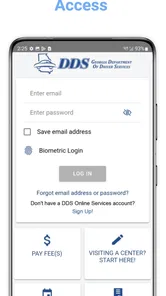
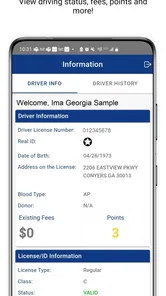
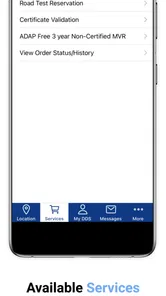
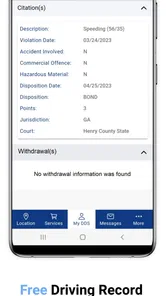
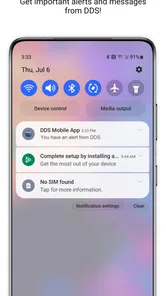
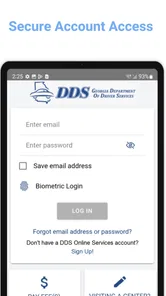
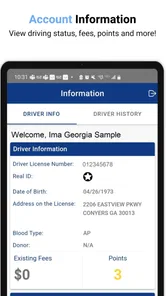
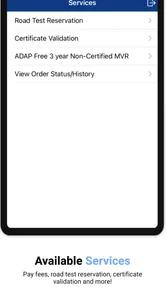
Analysis by Reviewed
When I need to deal with Georgia driver services, I would rather start with an official mobile tool than search through general websites and hope I have found the right page. That is the practical appeal of DDS 2 GO: it puts the Georgia Department of Driver Services in a phone-friendly format and gives residents a more direct starting point for common driver-service tasks.
I see it as a focused business and government-services app, not an all-purpose driving companion. It will not replace preparation, required documents, or an in-person visit when a situation demands one. What it can do is reduce the small amount of friction that often comes before an appointment or service request. The app is free, rated for Everyone, and developed by the Georgia Department of Driver Services, which matters because official information is especially important when licenses, permits, identification, and records are involved.
My overall impression is useful but restrained. The app is most valuable when I treat it as a dependable access point for Georgia DDS information rather than expecting a polished, feature-heavy platform. Its average rating is 3.1 from around 1,600 ratings, and it has passed 500,000 installs, so plenty of people have tried it while the mixed score suggests that the experience may not feel equally smooth for everyone. I would recommend it to Georgia residents who want an official mobile route into DDS services, with the reminder that convenience does not remove the need to double-check the details of an important transaction.
Starting with the everyday DDS workflow
I start with one specific Georgia DDS task rather than browsing at random, because that makes it easier to tell whether the app is helping me move forward. In this section, I’ll explain how I use it to prepare, check official guidance, and keep an ordinary service visit from becoming a last-minute scramble.
What I would do before opening the app
The best way to use this app is to begin with a clear task. I would not open it casually and browse without knowing whether I am trying to prepare for a license-related visit, find service information, or handle another matter connected with the Georgia Department of Driver Services. Having that goal in mind makes an official service app much easier to judge because I can quickly tell whether it is helping me move forward.
For a first-time user, the sensible routine is simple: open the app, identify the relevant DDS service, read the instructions carefully, and write down anything that needs to be completed outside the phone. That last step is important. A mobile app can organize information, but it cannot make missing documents appear or guarantee that a particular transaction can be completed digitally.
I would also keep the app separate from general navigation and driving apps. A map application may be better for directions, while a search engine may be faster for broad questions. DDS 2 GO has a narrower role: it is the official channel I would check when the answer needs to come from Georgia DDS rather than from a forum, a social-media post, or an outdated third-party page.
More From Our News Desk

Weather by Xiaomi Review: Clear at a Glance, Less Clear Up Close

X Under Pressure: Can It Recover When Posting Goes Wrong?

Clash of Clans Is Won Between the Battles

Android Auto Makes the Case for Quieter Car Software

MobiOffice: Transforming Mobile Productivity with Seamless Integration

EA SPORTS FC™ Mobile Soccer: Redefining Mobile Sports Gaming
A realistic appointment-day example
Imagine that I have realized my Georgia driver-service matter needs attention and I am trying to avoid arriving unprepared. I would use the app during a quiet moment at home, locate the service information, and review the instructions before choosing when to go. I would then make a short checklist on paper or in my phone for identification, forms, and any other items the instructions mention.
On the day itself, I would open the app again instead of relying entirely on memory. This is a small habit, but it prevents a common mistake: preparing for what I think the office requires rather than what the current official guidance says. If the app points me toward an action that must happen elsewhere, I would treat that as part of the workflow, not as a failure. Government services often involve several steps, and a mobile guide is useful precisely because it helps me understand those steps before I leave home.
The trade-off is that this approach requires attention. I would not skim a page, assume that every service follows the same process, and head out. The app is a starting point and an organizer. Its value depends on reading the service-specific information instead of treating the entire DDS system as one identical transaction.
Why the official source matters
For driver services, accuracy is more important than entertainment or visual novelty. An unofficial app might present information in a cleaner way, but I would still want to confirm important requirements through the Georgia Department of Driver Services. That is where DDS 2 GO has its clearest advantage over generic alternatives.
I also appreciate the distinction between an official app and a general search result. Search can surface useful pages, but it can also mix current instructions with old discussions, advertisements, or advice from people in different states. Starting with the official app narrows the chance of following guidance that belongs somewhere else. I would still read carefully, but I would rather begin from the agency responsible for the service.
What I expect from the first session
The first session should be about orientation, not mastery. I would look for the main service paths, learn how the information is arranged, and decide whether the app covers the kind of task I need. If I can reach the relevant instructions without repeatedly searching the web, it has already earned a place in my routine.
I would also notice how much of the process remains outside the app. That tells me how to use it efficiently later. If the phone mainly helps me find guidance and prepare, I will stop expecting it to act like a complete digital replacement for every DDS interaction. That realistic expectation makes the experience less frustrating and helps me use the app for what it does best.
Settings and preparation habits worth checking
Before relying on the app for a deadline, I make sure it opens comfortably on my phone and think through what I’ll need to do outside the screen as well. I also turn relevant instructions into a short personal checklist, which is easier to consult while getting ready than trying to remember every detail from a previous session.
Keep the app ready before an urgent task
The most useful “setting” for this app is a personal habit: install it before I urgently need it. When a license or identification issue becomes time-sensitive, I do not want my first interaction with the app to happen while I am standing in a parking lot or rushing to an office. Installing it earlier gives me time to understand its layout and notice whether my device handles it comfortably.
DDS 2 GO requires Android 6.0 or later, so compatibility is worth checking before depending on it. The current version is 2.2.8, and I would keep the app updated through the normal app-store process rather than postponing updates indefinitely. An official service tool is most useful when the information and software on my phone are reasonably current.
Use phone-level settings intelligently
I would review ordinary phone settings that affect the experience, especially notification behavior, mobile-data access, and battery restrictions. I am not assuming that every phone handles the app in the same way. Some Android devices aggressively limit background activity or interrupt apps that have not been opened recently. If I expect to use DDS 2 GO while traveling to an office, I would open it at home first and make sure it loads properly.
I would also avoid relying on a weak connection for the first serious use. Even when an app is designed for mobile access, public networks and poor reception can make pages slow or incomplete. My practical habit would be to review the needed information before leaving, then use the app as a reference rather than waiting until the last possible moment.
Privacy-conscious users should apply the same sensible rule they use with any government-service app: read what the app asks for, grant only appropriate device permissions, and avoid sharing screenshots that contain personal information. I would not store sensitive documents in random photo folders just because I am preparing for a visit. The app can help me understand a process without turning my phone into an unsecured filing cabinet.
Build a personal checklist from the app
One of the better advanced habits is to turn the app’s guidance into a short checklist. I would write the exact service I am pursuing, the questions I still need answered, the documents I need to bring, and any step that must be completed separately. This is more reliable than repeatedly reopening the same information while distracted.
The checklist also exposes uncertainty early. If the instructions use a term I do not understand, I can resolve that before leaving home. If two parts of my plan seem inconsistent, I have time to investigate rather than discovering the problem at the counter. In my experience, this preparation is where an official service app creates its greatest practical benefit.
Do not confuse convenience with confirmation
I would be careful about treating information viewed in the app as personal confirmation that a transaction is complete. Reading requirements is different from submitting something, receiving approval, or changing an official record. The app may make the path clearer, but I would keep any confirmation screens, reference details, or appointment information that the service itself provides.
This distinction answers a question many people have before installing: can the app replace every other DDS step? I would not plan around that assumption. Use it to prepare and navigate the official process, then follow the instructions for the particular service. If the matter is urgent or unusual, I would contact the department through its recognized channels rather than guessing from a general screen.
Faster patterns for repeat users
Once I know where the relevant information lives, I can make repeat visits more orderly by separating finding the guidance from acting on it. I’ll look at routines for avoiding unnecessary searching, keeping different people’s tasks distinct, and pairing DDS information with the tools that handle travel better.
Use a repeatable three-pass routine
After becoming familiar with the app, I would use a three-pass routine. The first pass is discovery: find the relevant DDS service. The second is verification: read the requirements slowly and compare them with what I already have. The third is execution: complete the next action, whether that means preparing documents, arranging a visit, or following another official instruction.
This is faster than browsing randomly because each pass has a purpose. It also reduces the chance of acting on a headline or short summary without understanding the details below it. The routine is especially useful for people who help family members with driver-service matters and need to keep several tasks organized without mixing their requirements together.
Save time by separating information from action
I would not repeatedly search for information while trying to complete the action itself. First, I would read and note the requirements. Then I would gather what I need. Only after that would I return to the app for the next step. Separating those phases prevents the common loop of opening, closing, forgetting, and reopening the same page.
For example, if I am helping a relative understand a DDS process, I would review the information alone first, turn it into plain-language notes, and then explain the steps. That is better than handing over the phone and expecting someone unfamiliar with the app to interpret every screen under pressure. The app becomes a planning tool rather than just a place to tap through menus.
Use the app alongside, not instead of, a map
A general map app remains the better choice for traffic, route planning, and estimating travel time. I would use DDS 2 GO for official service information and a map for getting there. Combining the two is more efficient than expecting one app to handle both jobs.
This comparison also shows where the app is not the right choice. If I only need directions, I would not install a government-service app for that purpose. If I need broad driving education, road alerts, or vehicle-focused tools, a specialized app may serve me better. DDS 2 GO is strongest when the question is specifically connected to Georgia DDS procedures.
Keep a record of what I still need to do
After using the app, I would close the session by writing one clear next action. “Find information” is not a next action; “gather the listed identification documents” or “review the instructions again before the visit” is. This small distinction keeps the app from becoming a place where I read useful information but never finish the preparation.
For repeat use, I would keep separate notes for separate people or transactions. Mixing a family member’s requirements with my own can create avoidable errors. The app supplies the official reference point, while my notes provide the personal organization that the phone alone cannot guarantee.
Advanced limits and where judgment still matters
A familiar workflow helps, but it cannot settle every unusual personal circumstance or substitute for a clear answer when instructions leave room for doubt. Here I’ll draw the line between using the app as a practical official reference and knowing when I should pause, verify, or choose another channel.
A mobile interface cannot resolve unusual cases
The more complicated the situation, the less I would rely on a quick interpretation of an app screen. Name changes, unusual documentation, record discrepancies, or circumstances that do not fit a standard service path deserve extra care. In those cases, I would use the app to identify the relevant DDS area and prepare my questions, but I would seek direct clarification before making assumptions.
This is not a criticism unique to DDS 2 GO. Official service systems have rules that depend on personal circumstances, and a general mobile interface cannot know every detail about the person holding the phone. The limitation is important because a confident but incorrect assumption can waste more time than checking first.
Expect occasional friction from the device or connection
My experience with any government app includes a little less polish than I might expect from a commercial banking or shopping app. Pages may feel more functional than elegant, and the process may still direct me elsewhere. The mixed average rating reflects that the app has not been universally effortless for its audience.
I would respond to that friction with preparation rather than repeated tapping. If a page seems slow, I would check my connection and reopen the app once instead of pressing the same control many times. If information appears unclear, I would read the surrounding instructions and note the exact question. These habits do not fix a technical problem, but they prevent a small interface issue from turning into a larger mistake.
Know when another option is genuinely better
There are clear situations where I would choose something else. For directions, I would use a navigation app. For general driving advice, I would look for a dedicated educational resource. For a complex personal case, I would prefer direct communication with DDS over trying to infer an answer from a standard information page.
I would also skip the app if I am not dealing with Georgia driver services. Its official focus is its strength, but that focus makes it irrelevant for another state or a completely different government agency. Installing it only makes sense when Georgia DDS information is part of my actual task.
What the rating tells me, and what it does not
The app’s 3.1 average from roughly 1,600 ratings gives me a balanced expectation: it is established enough to be worth trying, but I would not assume every user finds it flawless. Ratings can reflect device differences, service frustrations, and expectations that go beyond the app itself. I use the score as a signal to stay practical, not as a reason to reject an official tool automatically.
The same applies to its reach. With more than 500,000 installs, DDS 2 GO is clearly familiar to a substantial number of Android users. That does not guarantee that it will solve my particular problem, but it does make it a reasonable first option for someone who wants the department’s mobile access point rather than an unofficial substitute.
My verdict after using it as a working tool
My view comes down to fit: this is most useful when Georgia driver services are an actual part of my plans and I approach the app as a preparation aid. I’ll close by weighing who is likely to benefit, where its functional approach may frustrate, and the habits that make it a more dependable part of a real-world process.
Who will get the most from it
I would recommend DDS 2 GO to Georgia residents who want to prepare for a driver-service task from their phone, especially people who prefer an official source over scattered search results. It is also useful for family members helping someone else organize a visit, because the information can serve as a shared reference while each person keeps a separate checklist.
The app makes the most sense when I use it before a deadline, read the instructions carefully, and treat it as part of a larger workflow. Its strongest quality is not flashy functionality; it is the direct connection to the Georgia Department of Driver Services. For this kind of app, that trust and relevance matter more to me than entertainment-style design.
Who should look elsewhere
I would not recommend it as a general driving app, a navigation replacement, or a complete solution for complicated cases. Users who expect every government transaction to finish entirely inside a phone may also find it limiting. The app can guide preparation, but I would not assume that every service, confirmation, or exception is handled in the same way.
If I only need a one-time answer and already know where to find the official DDS information, installing the app may not add much. On the other hand, if I expect to deal with Georgia driver services more than once, keeping an official reference on my phone becomes more worthwhile.
The practical balance
DDS 2 GO is free and carries an Everyone content rating, so the barrier to trying it is low. It was released on March 10, 2015, and the current 2.2.8 version supports Android 6.0 and newer devices. I would interpret that history as evidence of a long-running service tool, while still judging it by how well it helps with my current task rather than by age alone.
My final advice is to use it deliberately: identify the service, read the full guidance, create a checklist, prepare before traveling, and keep a backup plan for questions the app cannot answer. The winning habit is preparation, not blind trust in a single screen. Used that way, the app is a sensible official companion for Georgia DDS matters, even if its mixed rating and functional style mean I would approach it as a practical utility rather than a perfectly polished digital service.
DDS 2 GO Frequently Asked Questions
Is DDS 2 GO available for both Android and iPhone?
DDS 2 GO is the official Android app of the Georgia Department of Driver Services, so Android users can look for it on Google Play. The app is listed as free and is intended for devices running Android 6.0 or later. If you use an iPhone, check the Apple App Store for any official Georgia DDS offering rather than assuming this Android app is available there.
Who publishes DDS 2 GO, and is it an official government app?
DDS 2 GO is published by the Georgia Department of Driver Services, making it the official Android app for that state agency. That distinction matters when using an app for driver services or personal information: check the publisher name before installing, and avoid similarly named apps that are not from Georgia DDS. It is meant for Georgia DDS services, not as a general app for every state’s motor vehicle agency.
What is DDS 2 GO and what can I use it for?
DDS 2 GO is the official mobile app for the Delaware Division of Motor Vehicles. It is designed to give drivers convenient access to selected DMV services and information from an Android or iOS device. Depending on your eligibility and the service available in your area, you may be able to view credentials, access digital documents, check vehicle or driver information, receive reminders, and find useful DMV resources without visiting an office for every task.
Can I use DDS 2 GO as a digital driver’s license or identification card?
The app may support mobile or digital credential features for eligible users, but availability depends on the specific credential, state requirements, device compatibility, and current DMV policies. A digital version should not automatically be assumed to replace a physical license or identification card everywhere. Before relying on it while driving or traveling, check the official instructions and keep your physical credential with you when required.
Is DDS 2 GO safe to use with my personal information?
Because DDS 2 GO is connected with official motor vehicle services, it may handle sensitive information such as identity details, driver records, vehicle information, or account credentials. Use the official version downloaded from Google Play or the Apple App Store, avoid unofficial copies, and protect your account with a strong password or device security. Review the app’s privacy policy and permissions before completing registration.
Pros
- View your driving schedule and trip details in one place.
- Receive timely updates about route changes or service notices.
- Useful tools help organize daily school transportation information.
- Simple interface makes essential trip information easy to find.
- Supports communication between families and transportation staff.
Cons
- Features depend on your school district’s participation and configuration.
- Some users may experience delayed notifications or schedule updates.
- Requires an account or access credentials provided by the district.
- The app offers limited value outside supported transportation services.
- Availability and features can vary significantly by location.











