

Dayuse: Hotel rooms by day
- 595.00
- 4.9
- Installs
- 1.00M
- Price
- Free

Screenshots

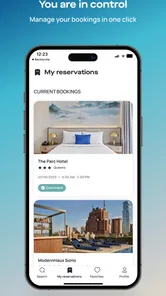


Analysis by Reviewed
Dayuse: Hotel rooms by day is one of those travel apps that sounds like a niche solution until a long layover, an awkward workday, or an exhausting drive makes the idea suddenly practical. I tested it with that question in mind: does booking a hotel room for daytime use become a dependable habit, or does it remain an interesting option that is easy to forget? My answer is positive, with an important qualification. The app is genuinely useful when your schedule sits between the usual hotel check-in and check-out rhythm, but its value depends heavily on location, timing, and whether you actually need a private place rather than simply somewhere to wait.
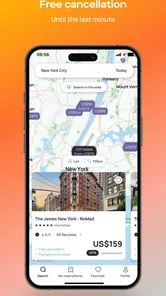
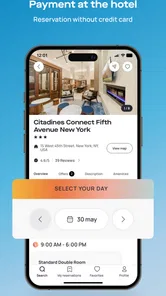
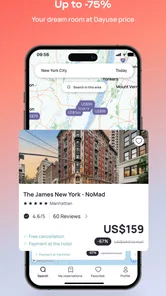
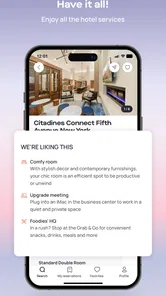
Developed by DAYUSE, this free Travel & Local app focuses on daytime hotel stays rather than conventional overnight reservations. The core idea is simple: find a participating hotel, choose one of the available daytime periods, and reserve a room for a few hours. That makes it different from a standard hotel app, where a single night is usually the basic unit. In my experience, the best way to understand it is not as a replacement for every hotel-booking service, but as a scheduling tool for the strange gaps that ordinary travel planning handles badly.
Why the first week feels surprisingly useful
The first time I used Dayuse: Hotel rooms by day, the appeal came from removing a familiar compromise. If I arrived in a city before evening, a normal hotel booking could mean paying for a full night even though I only needed a bed, shower, desk, or quiet room for part of the day. A café might be too noisy, a public lounge might lack privacy, and waiting at an airport or station can turn a manageable delay into a miserable one. Dayuse addresses that specific gap directly.
The app’s strongest use case is a short, deliberate stop. Imagine landing in the morning after a night flight, with several hours before an evening appointment. Instead of carrying luggage around, I could search for a daytime room, rest properly, shower, charge devices, and leave with enough energy to continue. That is more than a cheaper version of an overnight stay; it is a different type of reservation built around the shape of the day.
I also found the idea useful for work. A remote worker between meetings may need a quiet room for a video call, a place to concentrate, or a temporary base near an airport or business district. The important distinction is that the room is not merely somewhere to sit. It gives a person control over noise, privacy, temperature, and personal belongings for a defined period. Those small comforts matter when the alternative is trying to work in a crowded public space.
The browsing experience is most helpful when I begin with a clear purpose. Searching without a date, area, or approximate time can feel less productive because daytime availability is naturally more specific than ordinary hotel inventory. I would first decide whether I need a morning, afternoon, or evening block, then compare the available properties rather than opening every listing at random. This simple habit makes the app feel less like a novelty and more like a practical planning instrument.
One detail worth considering is the difference between a hotel’s daytime location and its overnight convenience. A property that looks ideal for a daytime rest may be close to an airport but far from the city center, or near a business district that becomes inconvenient once the appointment ends. I recommend judging the room as part of the whole route. The best booking is not always the most attractive hotel; it is the one that reduces the total amount of waiting, carrying, and backtracking.
More From Our News Desk

 Weather - By Xiaomi
Weather by Xiaomi Review: Clear at a Glance, Less Clear Up Close
Xiaomi’s weather app makes everyday forecasts quick to scan, but its calm surface can leave useful details and recovery paths harder to find than they should be.

 X
XX Under Pressure: Can It Recover When Posting Goes Wrong?
A resilience-focused review of X, examining setup, mistaken posts, interruptions, weak connections, and the gaps that matter when recovery needs to be dependable.

 Clash of Clans
Clash of Clans Is Won Between the Battles
Its raids are quick; its community is a long-term project of coordination, teaching, rivalry, and shared responsibility—with all the friction that entails.

 Android Auto
Android Auto Makes the Case for Quieter Car Software
The car interface is no longer judged by how much it can do, but by how quietly it helps. Android Auto shows what drivers now expect—and what still gets in the way.

 MobiOffice: Word, Sheets, PDF
MobiOffice: Transforming Mobile Productivity with Seamless Integration
MobiOffice: Word, Sheets, PDF is redefining mobile productivity with a surprising blend of functionality and innovation.

 EA SPORTS FC Soccer Mobile 26
EA SPORTS FC™ Mobile Soccer: Redefining Mobile Sports Gaming
Dive into EA SPORTS FC™ Mobile Soccer, where immersive gameplay and strategic depth transform mobile sports gaming.
Latest News



The app is free to install, and its Everyone age rating makes it approachable for a broad audience. It has been available since September 30, 2016, so this is not an experiment that appeared yesterday and disappeared tomorrow. The current version is 8.6.0 and requires Android 7.0 or later, which is useful to know before planning around it on an older phone. On the Android store, it has passed one million installs and holds a 4.8 average from around twenty thousand ratings. Those figures suggest that the concept has reached beyond a tiny group of frequent travelers, although popularity cannot guarantee that a suitable hotel will appear in every neighborhood.
During an initial trial, I would pay close attention to the reservation details before committing. A daytime booking is defined by its time window, and that window should shape the entire plan. If I needed to arrive early, I would not assume that the room could be used before the selected start time. If I had a train or flight to catch, I would leave a buffer rather than treating the end of the reservation as the exact moment I needed to be outside the building. The app makes the booking concept convenient, but the traveler still has to manage the clock carefully.
What makes the concept different from ordinary alternatives
Compared with a normal hotel app, Dayuse is more focused on the awkward middle of the day. Conventional services are usually better when I need an overnight stay, a longer trip, or a broad comparison of traditional room plans. They may also fit better when I want to collect all reservations for a multi-night itinerary in one place. Dayuse becomes more compelling when paying for a full night feels wasteful and a public venue does not meet the need for privacy.
Compared with coworking spaces, cafés, airport lounges, or station waiting areas, a hotel room offers a different level of personal space. That can be especially valuable for changing clothes, resting horizontally, taking a private call, or recovering from a difficult journey. On the other hand, those alternatives may be cheaper, closer, or better suited to someone who only needs a table and internet access. I would not book a hotel room simply because it sounds comfortable if a two-hour work session in a café solves the same problem.
The first-week appeal also comes from the psychological relief of having a fallback. Once I know that daytime rooms can be searched and reserved, an early arrival or late departure feels less disruptive. That is the kind of benefit that is easy to underestimate until a real travel day goes wrong. Still, I would avoid treating the app as an emergency guarantee. Availability depends on the hotels and time periods shown, so it is wiser to plan ahead for important journeys than to wait until the last possible moment.
What remains valuable after the novelty fades
After the first few uses, the question changes from “Can I book a room for part of the day?” to “Will I actually use this often enough to keep it in my travel routine?” For frequent travelers, the answer can be yes. People with irregular schedules, long connections, split workdays, or recurring visits to busy cities may find a repeatable pattern. Instead of searching for a solution from scratch each time, they can remember which areas and hotel types tend to fit their needs.
The recurring value is strongest when the app supports a clear personal rule. For example, I might use it when a journey leaves me with several unproductive hours and I need either sleep or a private workspace. That rule prevents casual bookings driven by the novelty of the format. It also helps me compare the room with the real alternative: not just its cost, but the value of recovered energy, privacy, and time.
A useful long-term workflow is to plan around the day’s most demanding moment. If I have an important meeting late in the afternoon after an early arrival, a room near the meeting area may be more valuable than one near the airport. I can arrive, reset, prepare, and walk to the appointment without crossing the city twice. If the main need is recovery after a flight, the airport area may win. This sounds obvious, but it is the kind of decision that determines whether the booking feels like a smart shortcut or an expensive detour.
Another non-obvious benefit is flexibility in personal routines. A daytime room can serve as a temporary base for parents traveling with a tired child, travelers who need to manage medication privately, or anyone who finds a full day of transit physically demanding. These situations are not glamorous, but they are exactly where a few controlled hours can make a trip more manageable. I would still check the reservation conditions and practical suitability for the specific situation instead of assuming every hotel room will meet the same needs.
For business travelers, the value may come from reducing the cost of fragmented days. A person attending meetings in two parts of a city can use a room as a reset point rather than returning to a distant home or paying for an overnight stay. Yet this only works when the property’s location and time slot align with the itinerary. A room that requires a long taxi ride can erase the convenience that made the idea attractive in the first place.
The app’s high average rating and large user base give me confidence that the basic concept resonates, but I would not use those signals as a substitute for reading each listing carefully. A broad rating reflects many different cities and travel habits. What works beautifully near one airport may be less useful in a residential area, and a hotel that suits a short rest may not be the right choice for focused work. The more specific my need, the more important the individual listing becomes.
There is also a useful trade-off between spontaneity and certainty. Dayuse is attractive because it can solve a same-day problem, but the best recurring experience comes from treating it as part of itinerary planning. I prefer to search early enough to compare locations and time windows, especially when I have a fixed appointment afterward. Last-minute browsing may still work, but it gives me fewer ways to recover if the available options are too far away or poorly timed.
The maintenance burden is small, but real
Keeping the app useful does not require much effort, although it does require better habits than simply installing it. I would keep my travel dates, arrival times, and departure plans visible while browsing. Daytime reservations are unusually sensitive to timing, so a mistake that would be minor in a flexible overnight booking can become important here. Before confirming, I would check the selected period, address, and the route to my next destination.
I would also avoid assuming that every available room serves the same purpose. If I need sleep, I care about the length and position of the time slot. If I need a work base, I care more about the surrounding route and whether the booking gives me enough uninterrupted time. If I need a shower before an event, a shorter reservation in the right place may be better than a longer one across town. The maintenance task is really one of matching the booking to the reason for making it.
Another practical habit is to save the confirmation information where I can reach it quickly. Travel days are often busy, and searching through messages while standing in a lobby is avoidable friction. I would review the reservation before leaving for the hotel, not only after arriving. This is especially important when a plan has multiple stops, because it is easy to confuse the daytime room with an overnight reservation made elsewhere.
The app itself is free, but that should not be confused with a free stay. The reservation is for a hotel room and should be evaluated as a travel expense. I would compare its total value with a lounge, coworking pass, luggage storage combined with a public venue, or simply changing the itinerary. The right comparison is not “free app versus paid app”; it is “paid private space versus the other ways I could spend those hours.”
Long-term users should also resist building a routine around one perfect scenario. The app is most dependable as one tool in a travel kit, not as the only answer. For overnight trips, a conventional hotel service is usually more natural. For a quick laptop session, coworking or a café may be more efficient. For a short airport wait, a lounge or terminal seating may be sufficient. Dayuse earns its place when the room itself is the solution.
Where fatigue begins to appear
The main source of fatigue is the extra planning required by a time-limited stay. With an overnight booking, arriving somewhat early or leaving slightly late may sometimes be manageable depending on the hotel’s practice. A daytime reservation is more tightly connected to its selected period, so I have to think about transport delays, luggage, check-in time, and the next appointment together. That precision is useful, but it can make a supposedly relaxing stop feel like another appointment to manage.
Geography is the second limitation. The app’s concept is only as good as the nearby inventory. If the available hotel is far from the airport, station, office, or event, the room may no longer save time or money. This is why I would search by route rather than by city name alone. A property that is technically in the right city can still be a poor practical choice if it sits on the wrong side of a congested area.
There is also a risk of overestimating how much time a short room booking gives back. A few hours can be valuable, but travel to the hotel, check-in, settling down, and returning to the route all consume part of the window. I would reserve it for a need that benefits from a private room, such as sleep, a shower, preparation, or concentrated work. If I only want to sit with a coffee, the logistical overhead may outweigh the comfort.
Another point of friction is emotional rather than technical: the booking can feel extravagant when the trip is otherwise inexpensive. I have found that the decision becomes easier when I define the purpose in advance. If the room prevents exhaustion before an important event, protects a work commitment, or turns a difficult connection into a manageable pause, it has a clear job. If I am booking it merely because I dislike waiting, I would compare alternatives more carefully.
Travelers who need absolute certainty should be cautious about relying on any inventory-based service for a critical transition. A daytime room can improve a plan, but it should not be the only thing separating a tight arrival from an important departure. I would leave enough time for transport and choose a location that keeps the rest of the itinerary realistic. The app is best used to create breathing room, not to justify an overpacked schedule.
Finally, the novelty can fade if every booking is approached as a special discovery. The lasting value comes from repetition and discipline: identify the situations where it helps, use it selectively, and stop when another option is simpler. That is a good sign rather than a weakness. A practical travel app should become boring in the best possible way—something I remember when the circumstances fit, not something I open just to browse.
My long-term verdict
I would keep Dayuse: Hotel rooms by day on my phone because it solves a real problem that standard overnight booking apps often leave untouched. Its best moments are very specific: an early arrival, a late departure, a long connection, a demanding workday, or a need for private recovery in the middle of a trip. In those situations, the difference between a hotel room and a public waiting area is substantial.
I would not recommend it as a universal travel-booking replacement. If you need a normal overnight stay, a multi-night itinerary, the cheapest possible place to sit, or a guarantee that a room will be available in a particular neighborhood, another approach may be more suitable. The app’s usefulness depends on finding a daytime option that is close enough, timed correctly, and worth the cost compared with the alternatives.
For me, the strongest sign of lasting value is that the app encourages a better way to plan awkward hours. It turns dead time into a deliberate part of the itinerary, but it does not remove the need for judgment. Search with the route in mind, choose the time window around the real purpose of the stay, leave transport margin, and treat the room as a tool rather than a treat. Follow those habits and the service feels dependable instead of gimmicky.
With a free download, an Everyone rating, support for Android 7.0 and later, and a mature presence in the travel category, it is easy to try without much commitment. My recommendation is strongest for frequent travelers and anyone whose schedule regularly falls outside the overnight hotel pattern. For occasional travelers, it is still worth remembering as a targeted solution. Its lasting space in my travel toolkit comes from usefulness, not novelty: when a few private daytime hours can rescue the rest of the day, this is exactly the kind of app I want available.
Dayuse: Hotel rooms by day Frequently Asked Questions
Do I need an account to browse Dayuse hotel offers?
You can explore Dayuse as a way to find hotels offering rooms for a few hours during the day, then review individual listings to see whether they fit your plans. When you are ready to reserve, follow the app’s booking steps and provide the details it requests. Check your reservation information carefully before completing the booking.
How can I find a hotel and time slot that suit my plans?
Start by searching for your destination and the date you need, then compare the participating hotels and available daytime slots shown in the app. Look closely at each offer’s location, room details, price, and included features rather than choosing by hotel name alone. Confirm the arrival and departure times fit your schedule before reserving.
Is Dayuse free to download, and what does a booking cost?
Dayuse is free to download, and you can browse daytime hotel offers in the app before deciding whether to book. The price is set by the individual hotel offer, so it can vary by property, location, date, and selected time slot. Check the total shown for your chosen reservation, along with any conditions, before confirming it.
Which devices can run Dayuse: Hotel rooms by day?
Dayuse is available for Android and iOS devices, making it possible to search for daytime hotel stays from a phone or tablet. On Android, the app requires version 7.0 or later. Before downloading, check that your device’s operating system meets the requirement and that you have enough storage space for the installation and app updates.
What is Dayuse: Hotel rooms by day?
Dayuse is a booking platform that lets you reserve hotel rooms for daytime stays rather than traditional overnight visits. It is designed for travelers needing a place to rest between flights, remote workers seeking a quiet workspace, couples wanting privacy, or anyone who needs access to hotel facilities for a few hours. Available time slots and services vary by hotel and location.
Pros
- Book hotel rooms for a few hours instead of paying for a full night.
- Useful for airport layovers
- work breaks
- rest
- or freshening up.
- Search by city
- date
- time slot
- and hotel amenities.
- Access to reputable hotels with clear daytime booking options.
- Flexible checkout times suit short
- daytime stays.]
- contras:[
- Availability can be limited in smaller cities or during busy periods.
- Hourly rates may still be expensive at premium hotels.
- Cancellation and modification rules vary by property.
- Some listings may exclude access to certain hotel facilities.
- Exact room availability depends on participating hotel inventory.
Cons
- Availability can be limited in smaller cities or during busy periods.
- Hourly rates may still be expensive at premium hotels.
- Cancellation and modification rules vary by property.
- Some listings may exclude access to certain hotel facilities.
- Exact room availability depends on participating hotel inventory.











