

DAKboard: Smart Wall Calendar
- 0.00
- 0.0
- Installs
- 10.00K
- Price
- Free

Screenshots
Analysis by Reviewed
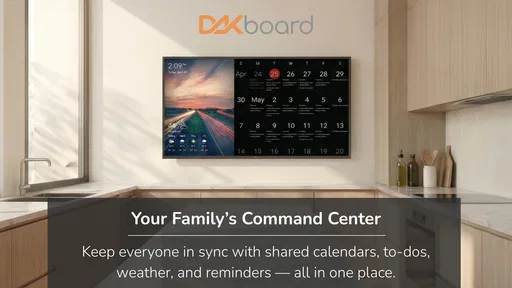
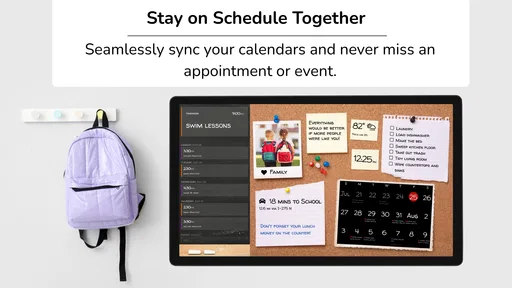
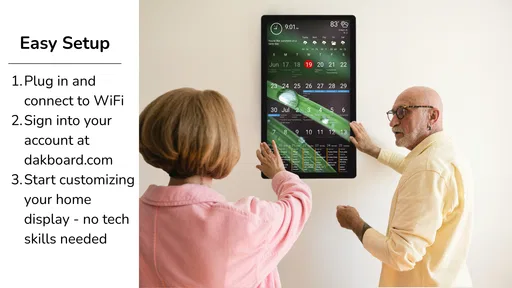
I like family dashboards that solve a visible household problem rather than adding another notification to an already crowded phone. DAKboard: Smart Wall Calendar takes that approach by turning shared planning into something meant to be seen in the home. It is an Android app in the House & Home category from DAKboard, and its purpose is easy to understand: bring a family calendar, chore tracking, and smart-home information together in one place.
That sounds simple, but the useful question is not whether a wall display looks attractive. The real question is whether your household needs a shared visual reference point. If everyone already checks the same calendar willingly, a wall dashboard may feel unnecessary. If appointments, chores, and home information are scattered between phones, paper notes, and verbal reminders, this app has a more convincing reason to exist.
I approached it as a decision rather than a sales pitch. A shared dashboard has to earn its place in a kitchen, hallway, office, or living area. It needs to be readable at a glance, useful to more than one person, and simple enough that family members do not need a tutorial every time they walk past it. DAKboard is most interesting when treated as a household habit, not merely as another calendar application.
What I would decide before installing it
My first decision criterion is visibility. A personal calendar is designed for the person holding the phone. A wall calendar is designed for everyone passing through a room. That difference changes how information should be chosen. The best dashboard is not the one showing everything; it is the one showing the details that help a household make decisions quickly.
For me, that means checking whether the family would genuinely benefit from seeing appointments, responsibilities, and home-related information together. A busy household with school activities, work shifts, errands, and rotating chores has a stronger use case than a single user who only needs occasional reminders. DAKboard makes more sense when the home itself is the place where plans are discussed.
The second criterion is participation. A shared display cannot fix a family habit if only one person maintains it. Before relying on it, I would agree on who adds events, who updates chores, and which information belongs on the dashboard. This is one of the less obvious trade-offs: the app can make household coordination clearer, but it cannot remove the small amount of cooperation required to keep shared information current.
The third criterion is the role of the display. I would not judge it only as a replacement for a phone calendar. Its value comes from combining several household signals in one glance. The calendar answers where people need to be; the chore tracker answers what needs doing; the smart-home dashboard gives the display a broader role inside the home. That combination is more useful than any one element considered alone.
More From Our News Desk

 Gmail
GmailGmail in a Busy Inbox: Who Benefits Most?
From first account to crowded workday, Gmail earns its place through dependable search and flexible sorting—but its best fit depends on how much inbox maintenance you can tolerate.

 Prime Video
Switching to Prime Video: What Changes in Your Viewing Routine
Prime Video can make a compelling second home for streaming, but switching means learning a different catalog, rental layer, and route from browsing to playback.

 Universal TV Remote Control
Universal TV Remote Control Works Best as a Reliable Backup
A phone remote earns its place through quick setup and reliable habits. Here is how to get more from Universal TV Remote Control—and where its limits show.

 Weather - By Xiaomi
Weather by Xiaomi Review: Clear at a Glance, Less Clear Up Close
Xiaomi’s weather app makes everyday forecasts quick to scan, but its calm surface can leave useful details and recovery paths harder to find than they should be.

 X
XX Under Pressure: Can It Recover When Posting Goes Wrong?
A resilience-focused review of X, examining setup, mistaken posts, interruptions, weak connections, and the gaps that matter when recovery needs to be dependable.

 Clash of Clans
Clash of Clans Is Won Between the Battles
Its raids are quick; its community is a long-term project of coordination, teaching, rivalry, and shared responsibility—with all the friction that entails.
Latest News



There is also a practical question about attention. A wall screen can reduce repeated questions such as “What is happening today?” but it can also become background decoration if it shows too much or changes too often. I would begin with a deliberately narrow setup: the current day, the next important commitments, and a short list of responsibilities. Once the family actually looks at it, I would add more information carefully.
On the software side, the app is free, carries an Everyone content rating, and runs on Android starting with version 8.0. Those details make trying it relatively approachable for households with an older compatible device. DAKboard released it on January 5, 2026, and the current version is 2.07, so I would still treat it as a product worth evaluating through everyday use rather than assuming that a short setup session tells the whole story.
A realistic morning routine
Imagine a weekday morning in a home where one parent is preparing breakfast, another is leaving for work, and children are trying to remember what they need. Instead of opening separate phones, the family can use the wall display as a shared checkpoint. The calendar shows the day’s commitments, the chore area highlights the responsibilities that matter now, and the home dashboard keeps household information in the same visual space.
The important benefit is not that the display magically organizes the family. It is that the information becomes part of the route people already take through the home. Someone can notice a task while walking past, rather than waiting for a private reminder. A parent can spot a scheduling conflict before leaving. A child can check the routine without asking the same question again.
I would use the display differently at different times of day. In the morning, I would keep it focused on today’s events and immediate chores. Later, it could become a planning surface for the next day or a quick reference for home information. This time-based approach is more effective than trying to show the entire household at once.
Where DAKboard feels stronger than a normal calendar
The clearest strength is its shared physical presence. A phone calendar is private by default, while a wall dashboard invites common awareness. That distinction matters for chores especially. A task assigned to a family member is easier to discuss when it is visible in the same place where the family already gathers.
The combination of calendar and chore tracking is also more meaningful than it first appears. Household plans often fail at the handoff between “where we need to be” and “what needs to be done.” A calendar may show a school event, but it does not automatically make the related preparation visible. A chore list may show cleaning, but it does not explain how that task fits around appointments. Bringing both categories together lets the household make those connections manually and clearly.
The smart-home dashboard angle gives the app an additional advantage over a paper planner. Paper is excellent for quick notes and does not need charging, but it cannot serve as a broader information surface. DAKboard is better suited to a home where the wall display is expected to do more than list dates. It can become a central point for household awareness rather than a decorative digital calendar.
One useful workflow is to separate planning from accountability. I would use the calendar for commitments that affect several people, while using the chore tracker for repeatable responsibilities and short-term tasks. That prevents the calendar from becoming a messy list of every small job. It also makes the chore area easier to scan, because appointments and duties retain different purposes even though they appear in the same household system.
Another practical insight is to keep the display socially neutral. If the chore tracker is treated as a public scoreboard, it may create arguments instead of cooperation. I would use it to clarify ownership and timing, not to shame anyone when a task is late. The app can make responsibilities visible, but the family still decides how visibility should be used.
How to make the dashboard useful instead of noisy
I would start with a short trial period and observe what people actually look at. If the family repeatedly ignores a section, that section probably does not belong on the main view. This is a better test than adding every possible detail during setup. A dashboard earns attention through relevance, not through density.
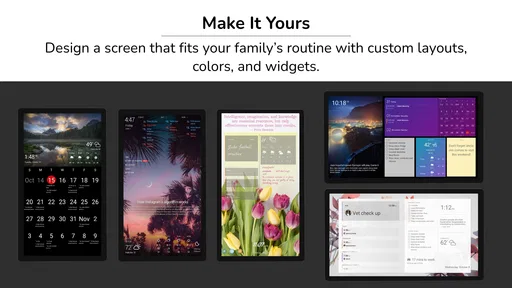
Color and grouping should support recognition rather than decoration. Calendar items, chores, and home information need to feel distinct at a glance. If everything has equal visual weight, urgent appointments can disappear among routine tasks. The strongest setup is usually the one that lets a person understand the day without stopping to interpret the screen.
I would also avoid using the wall display as the only place where important information exists. People may be away from home, the display may be unavailable, and family plans can change while someone is out. DAKboard works best as a shared layer over household organization, not as a reason to abandon personal reminders or direct communication.
That is a genuine limitation of the category. A wall dashboard improves awareness at home, but it cannot follow every family member everywhere. A phone remains better for private appointments, travel, and individual alerts. DAKboard’s strength is communal visibility, so expecting it to replace every personal planning tool would lead to disappointment.
Where another type of tool may fit better
A traditional paper calendar may be the better choice for a household that values simplicity, handwriting, and zero screen time. Paper also makes spontaneous changes feel effortless. If the family only needs a monthly overview and a few notes, a digital wall dashboard could be more infrastructure than the problem requires.
A standard phone calendar is a better fit when privacy and mobility matter most. It follows each person, handles individual schedules naturally, and does not require the family to gather around a shared display. I would choose that approach for a household where members have very different routines and rarely need to coordinate in a common room.
A dedicated chore list may also be preferable when chores are the central problem and calendar information is secondary. A focused task tool can feel more direct for assigning, checking, and completing responsibilities. DAKboard becomes more compelling when chores are only one part of a larger household picture that includes events and smart-home awareness.
There is a further trade-off with smart-home information. Some homes want a dashboard because they already think of the house as a connected environment. Other homes do not want household technology concentrated on a visible screen. In the latter case, DAKboard may feel like an unnecessary layer, even if its organization is appealing.
I would also be cautious if your family expects a highly specialized planning system. A household with complex project management needs, detailed task dependencies, or extensive private scheduling may need a more focused tool. DAKboard is strongest as a readable shared overview, not as a replacement for every advanced planning workflow.
The real cost of changing your household routine
Because the app is free, the main cost is not an entry fee. It is the effort of changing behavior. Someone must decide what appears, keep responsibilities accurate, and teach the household to look at the display. That effort is manageable, but it should be acknowledged before installation. A free dashboard can still fail if nobody owns its upkeep.
I would reduce that friction by assigning one person to maintain the structure while allowing everyone to contribute corrections. The maintainer should not become the family’s permanent secretary, though. The system works better when each person understands what belongs in the calendar and how chore information should be updated.
The best migration path is gradual. I would not transfer every paper note or personal event immediately. I would begin with the shared commitments that cause the most confusion, then add chores that are easy to define. Once the display proves useful, the household can decide whether smart-home information deserves a prominent place or a quieter supporting role.
Another hidden cost is visual commitment. A wall display becomes part of the room, which means its usefulness depends on placement and household movement. A screen positioned where nobody naturally passes will not create the same habit as one placed near a kitchen, entryway, or other shared route. The app may be excellent, but the physical setup still determines whether people notice it.
There is also a maintenance trade-off compared with paper. Digital information can be more flexible and more connected to a broader dashboard, but it depends on a working device and an up-to-date setup. Paper is slower to change but easier to understand at a glance and less vulnerable to technical interruptions. I would choose based on which kind of friction your household tolerates better.
Who should use it, and who should skip it
I would recommend DAKboard to families that repeatedly coordinate around a shared home schedule and want chores to be visible without sending constant messages. It is especially suitable for homes where people pass through the same central space and where a wall display can become part of a daily routine.
It also fits households that want a bridge between ordinary family planning and smart-home information. The appeal is not any single feature in isolation; it is the decision to put several kinds of household awareness together. That makes the app more distinctive than a basic digital calendar while keeping its purpose understandable.
I would skip it if your household dislikes visible technology, rarely shares a schedule, or already has a paper system that everyone uses consistently. I would also skip it as a first choice if you need a private, mobile, highly detailed personal organizer. In those situations, a phone calendar or specialized task app is likely to be more natural.
For Android users, the compatibility range makes it practical to test on an existing device rather than immediately treating the project as a hardware upgrade. Still, I would evaluate the whole experience in the intended room. A dashboard that works during a quick app test may not work as a daily household tool if the screen is poorly placed or the information is too crowded.
My recommendation after weighing the trade-offs
My recommendation is positive, but specific: choose DAKboard if your problem is shared household awareness, not simply a lack of another calendar. Its strongest idea is making plans, chores, and home information visible together. That can reduce repeated questions, expose conflicts earlier, and give responsibilities a place in the family’s normal movement through the home.
I would introduce it with a small, deliberate setup. Put shared events first, add only the chores that need common visibility, and keep the main view calm enough to understand in a few seconds. After the family develops the habit of checking it, expand the dashboard only when the added information solves a real problem.
DAKboard is not a universal replacement for paper planners, personal calendars, or focused task managers. Its value depends on a shared room, shared routines, and a willingness to maintain a common view. But when those conditions exist, the app offers a sensible way to turn household organization from a private phone activity into a visible family practice.
With over 10K installs, it remains a relatively small app rather than an unavoidable mainstream tool, which makes the decision more personal than trend-driven. I would try it because the free price lowers the risk, the Everyone rating keeps it broadly approachable, and the current version gives Android users a clear starting point. Just remember that the real test is not whether the dashboard can display information; it is whether your family actually uses that information to make the day easier.
In my view, that is where DAKboard: Smart Wall Calendar earns its place. It is best understood as a shared household surface: useful for families that need one visible rhythm, less useful for people who prefer private mobile planning. If your home has a genuine coordination gap and a natural place for a common screen, I would give it a fair trial.
DAKboard: Smart Wall Calendar Frequently Asked Questions
Can I use DAKboard on a phone, or is it mainly for a wall display?
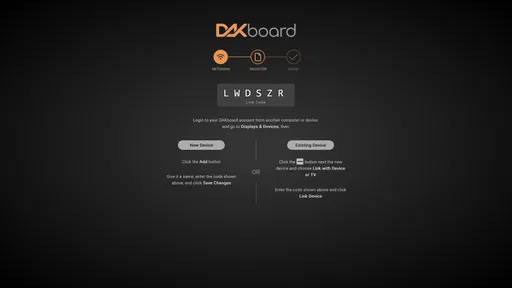
DAKboard is an app in the House & Home category, and its central idea is a digital dashboard that can be viewed on a screen around the home. It may also be useful from a mobile device for account access or setup, while a tablet, monitor, or wall-mounted screen is better suited to displaying household information at a glance. The best experience depends on the device and layout you choose.
What devices and operating systems are compatible with the DAKboard app?
The app is available for Android and is rated for Everyone. Its current version is 2.07, and it requires Android 8.0 or later. Before installing, check that your device meets that minimum requirement and has enough space for the app. DAKboard’s dashboard can also be displayed on a suitable screen, such as a tablet or monitor, depending on your setup.
What is DAKboard: Smart Wall Calendar and what can it do?
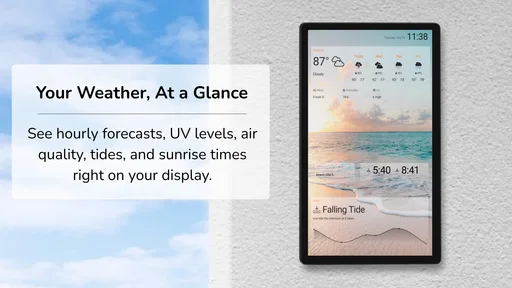
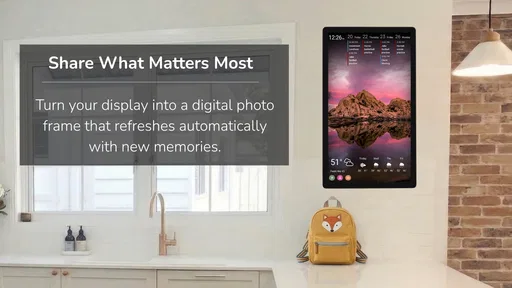
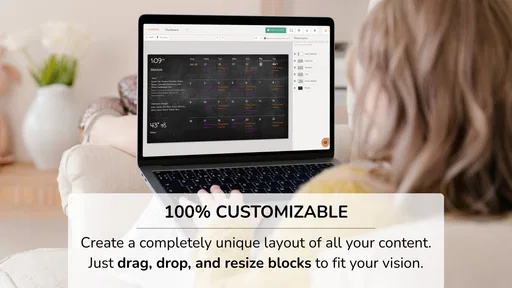
DAKboard: Smart Wall Calendar is a digital dashboard designed to display useful information in one place, such as calendars, weather forecasts, photos, reminders, news, and other connected services. It is particularly useful on a tablet, monitor, or wall-mounted screen at home or in an office. The exact features available may depend on your DAKboard account, selected layout, connected calendars, and subscription plan.
Can DAKboard connect to Google Calendar, Apple Calendar, or other services?
DAKboard is built around integrations with popular calendars and online services, allowing users to create a shared visual schedule. Depending on the current supported integrations, you may be able to connect services such as Google Calendar, iCloud, Microsoft calendars, weather providers, photo platforms, and task or reminder tools. Before downloading, check the latest compatibility list because available integrations and setup requirements can change over time.
Is DAKboard: Smart Wall Calendar free to use?
DAKboard is free to download, but some advanced layouts, integrations, customization options, and device-management features can require a paid subscription. The app itself may be free to download while certain features remain restricted behind a plan. Review the current pricing, trial terms, and renewal conditions in the official store or DAKboard account page before committing to a subscription.
Pros
- Clean
- glanceable calendar layout for wall-mounted displays
- Supports multiple calendar services in one unified view
- Useful weather
- photo
- task
- and news widgets
- Works well on tablets
- monitors
- and dedicated screens
- Remote dashboard updates reduce the need for manual adjustments
Cons
- Many advanced layouts and features require a paid subscription
- Initial setup can take time
- especially with several integrations
- Some widgets have limited customization options
- Always-on displays may increase electricity usage
- Requires a stable internet connection for current information







