DailyBible Lite - KJV Version
- 2.45K
- 4.9
- Installs
- 1.00M
- Price
- Free

Screenshots

Analysis by Reviewed
My first useful moment with DailyBible Lite - KJV Version was not a dramatic one: I opened it looking for a short passage I could read without turning the task into a project. That low-pressure approach suits this Books & Reference app. It is made by LINKAMEN PTE. LTD., and its focus is clear: a straightforward way to spend time with the King James Bible on a phone. I’d suggest it to someone who wants a simple place to read, while being clear that its KJV-only approach will not suit every reader.
First Impressions and Usability
From the moment I opened the app, I was greeted by a clean and straightforward interface. Simplicity is key here, and DailyBible Lite nails it. You don't have to be tech-savvy to navigate through the menu, which is a massive plus for anyone not keen on spending ages figuring out how a new app works. The app loads quickly, and everything is just a few taps away.
Getting Started Without Overthinking It
For a first-time user, I’d begin with one small action: open a passage you already know, read a few lines, and see whether the KJV wording feels comfortable on your screen. That is a better test than trying to configure everything at once. If the text feels too small or visually tiring, adjust the font size before settling into a longer session. Background choices can help too, but I would treat them as comfort settings rather than a reason to spend time decorating the app.
The app is free to install and is rated for Everyone. It has a 4.9 average from around 26,000 ratings, with over a million installs, so it has found a sizable audience among Bible readers. There are in-app purchases, priced from $4.99 to $14.99 per item, so I’d check what an optional purchase covers before deciding whether it adds anything I personally need. The current version is 1.3.9 and it requires Android 6.0 or later.
Features that Stand Out
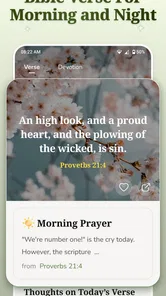
One of the features I absolutely love is the daily verse notification. Every morning, I get a new verse delivered right to my phone, which is a wonderful way to start the day. The app also offers a verse of the day widget, so you can get inspired without even opening the app.
Another neat feature is the reading plan. Whether you want to read the Bible in a year or focus on specific books, the app has got you covered. I’ve been following a plan to read through the Psalms, and having this structure has helped keep me on track.
Making a Routine That Actually Fits
A reading plan works best when it matches the time you genuinely have. Rather than treating a missed day as a failure, I’d use the plan as a gentle prompt and return to the next reading when convenient. For a busy morning, a verse notification can be the whole practice; on a quieter evening, the plan can give a longer session some direction. These are different levels of commitment, and it helps not to confuse a quick daily touchpoint with a full study routine.
More From Our News Desk

Weather by Xiaomi Review: Clear at a Glance, Less Clear Up Close

X Under Pressure: Can It Recover When Posting Goes Wrong?

Clash of Clans Is Won Between the Battles

Android Auto Makes the Case for Quieter Car Software

MobiOffice: Transforming Mobile Productivity with Seamless Integration

EA SPORTS FC™ Mobile Soccer: Redefining Mobile Sports Gaming
One practical trade-off is that reminders and widgets bring scripture into the phone’s everyday space, but they also add another prompt to a screen that may already be busy. If notifications distract you, keep the reading plan as the main habit and rely on opening the app when it suits you. A widget is useful when you want a glanceable verse; it is less useful if you prefer to choose a passage deliberately and read without a preview.
Customization and Personalization
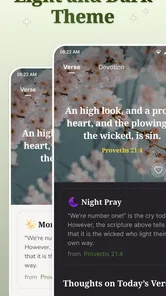
I was pleasantly surprised by the level of customization available. You can choose from a variety of background themes and font sizes, which is perfect for tailoring the reading experience to your preferences. It’s these little touches that make the app feel personal and user-friendly.
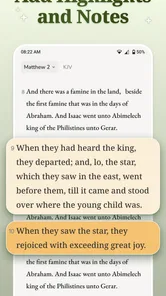
For longer reading, I’d make a quick comfort check before starting: choose a font size that lets you read naturally without repeatedly zooming or leaning toward the phone, then keep the appearance consistent for a few sessions. That small adjustment can matter more than changing themes every day. The app’s simplicity is a strength for casual reading, but readers who want a heavily organized study workspace may prefer an alternative built around detailed notes, cross-references, or comparing several translations.
Community and Sharing
What’s also cool is that you can share verses with friends and family via social media directly from the app. It’s a great way to spread positivity and start conversations around your favorite passages. Plus, the app has a built-in community feature where you can join discussions and engage with other users on daily topics.
I’d use sharing selectively: a passage sent with a sentence about why it stood out to you is more likely to start a real conversation than a verse posted without context. The community option may appeal if you enjoy exchanging thoughts around daily reading, while someone who wants a private, quiet devotional routine can simply focus on reading and leave the social side aside. Neither approach needs to be part of the other.
In terms of language, the app is limited to the King James Version, which might not be everyone’s cup of tea if you prefer a more modern translation. But if you’re a fan of the KJV, you’ll appreciate the accuracy and poetic cadence that it offers.
Who It Suits—and Where Another Bible App May Work Better
I can see this being a good fit for a reader who already likes the KJV, wants a simple mobile reading habit, and appreciates prompts or a plan for maintaining momentum. Imagine having a few quiet minutes before work: you can check the verse, read a short section, and return to the rest of your morning without first setting up a complicated study session. The same lightweight approach can work during a lunch break or while waiting for an appointment.
On the other hand, if you are new to the Bible and find the KJV’s older style difficult, a Bible app with contemporary translations may be a better starting point. Likewise, someone preparing lessons or doing close study may want tools for comparing translations and organizing extensive notes. This app’s appeal is its approachable reading experience, not a promise to replace every specialist reference tool.
Choosing a First Reading That Feels Manageable
If you are opening a Bible app for the first time, it can be hard to know where to begin. I would pick a short passage whose subject already interests you, rather than aiming immediately for a large reading target. The point is to learn how the text looks and how the app’s basic navigation feels. Once you have found a comfortable reading rhythm, a plan can help you decide what to read next without requiring you to map out a whole schedule yourself.
That distinction also helps when deciding whether the app is right for a particular purpose. For a personal pause, a short reading and a moment to think may be enough. For a group discussion or a lesson, you may want to note questions, compare wording, and gather background material. DailyBible Lite can be a convenient reading companion in the first situation, but I would not make it my only tool for the second.
Keeping the App Useful Rather Than Noisy
There is a small but meaningful choice between letting a verse arrive as a notification and opening the Bible with a question in mind. The first can make a routine easier to remember; the second gives you more control over what you read and when. I would try one approach at a time for a few days. If the alert becomes something you dismiss automatically, it is not helping your habit, and a deliberate visit may work better.
The same goes for sharing and community. These options can make a reading feel more social, but they are not prerequisites for getting value from the app. If you are trying to build a quiet practice, start with the text and leave the extra activity aside. If you enjoy discussing a passage, sharing a thought after reading it gives the social features a clearer purpose than browsing them before you have settled on what you want from the session.
What to Expect From the KJV Focus
The King James wording is both the app’s defining strength and its main limitation. Readers who already know the translation can move straight into familiar language and phrasing. Someone encountering it for the first time may need to slow down over older expressions, especially when reading quickly on a phone. I would not assume that a simple interface makes the language itself immediately simple; the app can make access easier, but it cannot remove the interpretive work that some passages require.
That is why I would compare it with a contemporary-translation Bible app based on the reading experience you want, not on which one has the longest feature list. DailyBible Lite is appealing when KJV text, a lightweight routine, and easy access matter most. A broader Bible reference app is likely a better fit when you regularly need multiple translations, study aids, or a more developed note-taking workflow. It is perfectly reasonable to use different tools for casual reading and deeper research.
Final Thoughts
Overall, DailyBible Lite - KJV Version is a fantastic companion for anyone looking to incorporate more scripture into their daily life. Its intuitive design, combined with practical features, makes it a must-have for both seasoned Bible readers and newcomers alike. So, if you’re looking for an easy-to-use, no-fuss Bible app, I’d definitely recommend giving this one a go. Trust me, it’s worth the download!
My main advice is to decide what you want from it before you begin: a brief daily verse, a guided reading habit, or a place to revisit familiar passages. Start with one of those, then add notifications, plans, or sharing only if they support that purpose. With that simple approach, the app feels less like another feature-filled phone tool and more like a convenient way to make reading the KJV part of an ordinary day.
A Practical First-Day Routine
For a first session, I would keep the sequence simple: open a familiar passage, adjust the text until it is comfortable, and read a section without trying to explore every menu. If that goes well, choose either a reminder or a reading plan as the next step, not both at once. This gives you a clear way to tell whether the app is helping: after a few days, are you reading more regularly, or are you spending more time managing settings and prompts?
That approach is especially useful if you are setting up the app for a relative who wants access to the KJV but is not interested in learning a complicated interface. A comfortable font and one familiar starting point can make the first visit reassuring. I would let them decide later whether notifications, the widget, or community discussions belong in their routine rather than presenting every option as something they need to use.
For readers who already use a printed Bible, the phone version can serve a different role instead of replacing it. I might use the app during a short break or while away from home, then return to a paper copy when I want a longer, screen-free reading session. Keeping those roles separate can reduce the temptation to turn a quiet reading moment into more phone browsing.
Deciding Whether to Stay With It
After the first week, I would judge the app by whether its particular strengths match your habits. If the KJV is the translation you want and a light prompt helps you return to reading, its compact approach makes sense. If you find yourself wishing for parallel translations, detailed study references, or a more substantial system for recording insights, that is a useful sign to try a different Bible tool rather than forcing this one to do a job it was not designed for.
Its free starting point makes it easy to see whether the reading experience suits you, while optional purchases mean it is worth checking the item details before paying for anything. I would not buy an add-on simply because it appears during setup; first use the reading features that already fit your routine, then decide whether a specific extra solves a real problem. That keeps the choice practical and avoids paying for tools you may never open.
For me, the strongest recommendation is a qualified one: choose DailyBible Lite when you want the KJV close at hand and prefer a simple route from opening the app to reading. Choose another option if translation choice or research tools are central to your day-to-day use. Knowing that difference before installing makes the first session more reassuring—and gives this app the best chance to be useful for the reason you downloaded it.
DailyBible Lite - KJV Version Frequently Asked Questions
Is DailyBible Lite - KJV Version focused on a particular Bible translation?
Yes. The app is centered on the King James Version, so it may suit readers who want to spend time with that translation in a mobile format. If you usually read a different Bible translation, consider whether the KJV is the experience you want before downloading. Its daily verses and devotional tools are intended to make regular Bible reading easier to fit into your routine.
Who develops DailyBible Lite - KJV Version, and is it suitable for all ages?
DailyBible Lite - KJV Version is developed by LINKAMEN PTE. LTD. It is a Bible-focused app in the Books & Reference category, intended for a broad audience. Its Everyone age rating makes it suitable for users of all ages, though parents may still want to guide younger readers as they explore Bible passages and devotional material.
What is DailyBible Lite - KJV Version, and what features does it offer?
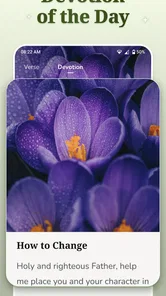
DailyBible Lite - KJV Version is a mobile application designed to provide users with daily Bible verses from the King James Version. The app includes features like verse of the day, daily devotions, reading plans, and the ability to share verses via social media. It's a compact, user-friendly app aimed at helping users integrate Bible study into their daily routine.
Is DailyBible Lite - KJV Version free to use?
Yes, DailyBible Lite - KJV Version is free to download and use. It offers a range of features at no cost, making it accessible for anyone interested in daily Bible readings. However, users should be aware that there might be in-app advertisements that help support the app's development and maintenance. In-app purchases are also available, with items priced from $4.99 to $14.99.
Can I customize the notifications in DailyBible Lite - KJV Version?
Yes, the app allows users to customize their notifications. You can set reminders for when you want to receive the daily verse or devotion. This feature ensures that you can incorporate Bible study into your schedule in a way that best fits your daily routine, making it a convenient tool for spiritual growth.
Pros
- Easy navigation through verses
- Offline access to daily scriptures
- Customizable reading plans
- Audio version available
- Lightweight and fast
Cons
- Limited to KJV version only
- No advanced search options
- Ads can be intrusive
- Basic user interface
- No community or social features













