

D-ID: AI Video Generator
- 338.00
- 4.6
- Installs
- 1.00M
- Price
- Free

Screenshots
Analysis by Reviewed
On a shared tablet, a talking-photo app can quickly turn into a group activity: one person supplies a picture, another comes up with the line, and everyone waits to see how it sounds. That playful appeal is where D-ID: AI Video Generator makes sense in a household. I’d treat it as a creative tool for short experiments and messages, rather than a general video editor or an app for managing family media.
One device, several people, clear boundaries
If more than one person uses the same device, decide who is choosing the image and text before starting. A portrait can make a convincing talking clip, so it is worth getting permission from the person pictured and being thoughtful about where the result will be shared. I would avoid using a family photo to make a message that could be mistaken for something the person actually said.
The app is free to install, but it includes in-app purchases ranging from $5.99 to $799.99 per item. That makes it sensible to check the purchase flow before handing a shared device to a child or another casual user. I would also keep account access under the household member responsible for any spending, rather than assuming a shared device means everyone should use one account in the same way.
Make a clip that has a purpose
A useful household test is a birthday greeting: choose a photo the subject is happy to use, write one short sentence, and listen to the result before sending it. Brief scripts are easier to review and less likely to feel awkward than a long monologue. For a school project, a talking portrait might introduce a topic, but I would pair it with ordinary slides or recorded narration when accuracy and clear explanations matter more than novelty.
Compared with a conventional mobile video editor, D-ID’s appeal is the talking face rather than a timeline for trimming footage, arranging scenes, and controlling every edit. A camera app or voice recorder is the better choice when you want a real person’s authentic delivery. A standard editor is more suitable for stitching together family clips. This app is most useful when the image itself is the starting point and a short spoken performance is the intended result.
Getting to Know D-ID: AI Video Generator
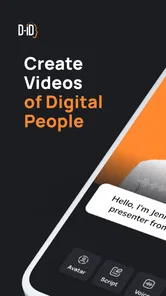
So, what’s all the fuss about? The D-ID: AI Video Generator app is designed to transform static images into dynamic video clips using advanced AI technology. Imagine taking a simple selfie and turning it into a talking, moving persona. Cool, right? The app uses cutting-edge deep learning algorithms to animate faces in photos, making them appear as if they’re speaking or expressing emotions. It’s like giving your images a whole new dimension!
Features That Make It Stand Out
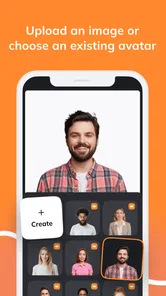
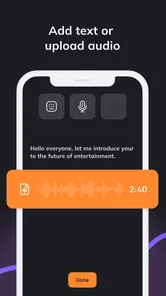
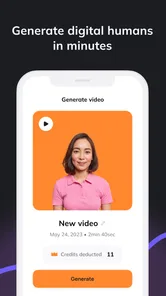
First off, the app's user interface is super intuitive. You don’t need to be a tech wizard to navigate through it. The process is straightforward: upload an image, select a voice or type in text for the AI to vocalize, and watch the magic happen. Within seconds, you have a video ready to be shared on social media or sent to friends for a good laugh.
More From Our News Desk

 Instagram
Instagram’s Power Comes From Its Place in Your Phone
A close look at how Instagram turns Meta’s reach, recommendation systems and everyday camera habits into durable platform power—and what that costs users.

 Gmail
GmailGmail in a Busy Inbox: Who Benefits Most?
From first account to crowded workday, Gmail earns its place through dependable search and flexible sorting—but its best fit depends on how much inbox maintenance you can tolerate.

 Prime Video
Switching to Prime Video: What Changes in Your Viewing Routine
Prime Video can make a compelling second home for streaming, but switching means learning a different catalog, rental layer, and route from browsing to playback.

 Universal TV Remote Control
Universal TV Remote Control Works Best as a Reliable Backup
A phone remote earns its place through quick setup and reliable habits. Here is how to get more from Universal TV Remote Control—and where its limits show.

 Weather - By Xiaomi
Weather by Xiaomi Review: Clear at a Glance, Less Clear Up Close
Xiaomi’s weather app makes everyday forecasts quick to scan, but its calm surface can leave useful details and recovery paths harder to find than they should be.

 X
XX Under Pressure: Can It Recover When Posting Goes Wrong?
A resilience-focused review of X, examining setup, mistaken posts, interruptions, weak connections, and the gaps that matter when recovery needs to be dependable.
Latest News



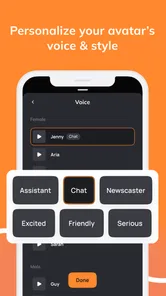
Another highlight is the variety of languages and voices available. Whether you want your photo to speak in English, Spanish, or even Mandarin, the app has got you covered. The voice quality is surprisingly natural, adding a realistic touch to your animations. Plus, the app supports both male and female voices, giving you plenty of options to choose from.
Why You’ll Love It
Aside from the fun factor, D-ID: AI Video Generator is a powerful tool for content creators and marketers. It’s perfect for creating personalized video messages, engaging social media content, or even educational materials. The app allows you to create unique content that stands out, capturing the attention of your audience effortlessly.
For a smoother result, I’d write the line first and keep its wording simple, then choose a portrait with a clearly visible face. That gives you a chance to check whether the voice, language, and delivery suit the person and the message before sharing. For work or classroom use, I’d review the clip as carefully as any other published material: a polished-looking talking face can draw attention, but it does not make the information more reliable.
The app is made by D-ID and sits in the video-player and editing space, though its focus is much narrower than a full editor. It has a 4.4 average from around 44,000 ratings, with over a million installs. It is free to download and rated for Everyone; the current version is 1.2.39, and it runs on Android 7.0 or later. Those details make it easy to try, but the purchase range is worth considering if several people will share the device.
Age, trust, and practical limits
An Everyone age rating is useful context, but it is not a substitute for adult judgment about photos, generated speech, or purchases. I would show younger users how to choose an appropriate image and explain that an animated face is generated content, not proof that the person spoke those words. For family coordination, agree on who can approve a clip before it leaves the device; there is no need to assume the app provides household-specific supervision or shared permissions.
One trade-off is that a talking portrait can feel personal while still being a synthetic performance. That can be entertaining for a greeting, but it is a poor fit for sensitive conversations, consent-dependent impersonation, or messages where the recipient needs to hear someone’s real voice. I would also avoid treating the result as a replacement for accessibility support or a dependable way to communicate important instructions.
There are practical reasons to skip it, too. If your goal is precise editing, background music, a sequence of family videos, or natural on-camera expression, a conventional editor or direct recording will give you more control. If you mainly want to animate a face and make it speak a short script, this is the more focused experiment. The distinction matters: the app’s novelty is strongest when you have a specific image and a concise line, not when you expect a complete production studio.
Moreover, privacy is a top priority with this app. All processing is done locally on your device, ensuring that your images and data remain secure. This is a significant plus in today’s digital age, where data privacy is a growing concern.
A sensible household verdict
In a nutshell, if you’re looking to inject some creativity into your digital content, D-ID: AI Video Generator is the app to try. It’s easy to use, packed with features, and offers endless possibilities for creativity. Whether you’re a content creator or just someone who enjoys playing around with photos, this app provides a fun and innovative way to make your images come alive.
So go ahead, give it a whirl, and let your imagination run wild. Who knew turning photos into lively videos could be this easy and entertaining?
For a shared household device, my recommendation comes with a simple boundary: keep the experiment light, use images with permission, and check the finished clip before anyone forwards it. The app is a good fit for families who enjoy making short, playful greetings together and for creators who need a talking portrait without building a full edit. I’d choose another tool when authenticity, detailed editing, or tighter control over the whole production matters more.
Planning the handoff and the finished clip
In a busy home, the useful question is not just who gets to make the video, but who checks it before it is shared. I’d make one person responsible for the final review, especially if several people contributed the image, wording, and voice choice. That simple handoff prevents an amusing draft from being treated as an approved message, and it gives the person pictured a clear chance to say whether they are comfortable with it.
A practical workflow is to settle the purpose first, then choose the portrait and write a line that fits the occasion. For a family announcement, for instance, the generated clip can be a light opener, while the essential details remain in a normal text message. That way, nobody has to rely on a synthetic performance for dates, directions, or anything easy to misunderstand. I find this a better use of the format than trying to make one animated face carry a whole conversation.
It also helps to separate creation from forwarding. A clip that feels funny when everyone is watching together may land differently in a group chat, where viewers lack that context. I would add a short note that the speech is generated, rather than letting a realistic-looking portrait create confusion. If the subject is a child or someone who cannot give meaningful permission, I would choose a different image or skip the idea.
Where the focused format helps—and where it doesn’t
The app’s narrow premise can be an advantage for someone who does not want to learn a multitrack editor just to make a single talking portrait. A small shop owner could use a short welcome or product introduction, while a hobby creator could test a character voice for a social post. In both cases, I’d keep the script modest and review the result on the same screen where it will be watched. A sentence that reads well on paper may feel overly formal once it is delivered by an animated face.
There is a trade-off between convenience and control. The talking image is the centrepiece, so the result depends heavily on whether that format suits the message. You do not get the same creative freedom as you would from recording a person, selecting multiple takes, and editing the pacing yourself. If timing, gestures, facial nuance, or a distinct personal voice are central to the story, filming someone directly is the more convincing option.
For classroom or workplace explainers, I would use the app as an attention-grabbing introduction rather than as the whole lesson. Follow it with clear written material, a live explanation, or conventional visuals that can carry detail. The same principle applies to accessibility: an animated speaker may add personality, but it should not be the only route to information that people need to understand.
Deciding whether it belongs on a shared device
Because the app is free to download but offers paid items, I would distinguish between trying it and authorizing spending. Before another household member uses the device, make sure the person responsible for purchases understands the checkout steps and account arrangements. This is especially relevant when a tablet is passed around casually: convenience can blur who is making a purchase or who owns a draft. I would not assume that a shared device automatically creates separate profiles or household approval tools.
People who mainly want a quick creative novelty may enjoy the low barrier to experimenting, while those making frequent professional content should think about whether the output fits a repeatable workflow. A focused portrait generator is not automatically the best value for someone who needs to edit long footage, maintain consistent branding, or revise every detail of a finished video. In that situation, a dedicated editor gives more room to shape the result and organize the production.
My household verdict remains positive but specific: this is worth trying when the group has a clear, harmless idea, a willing subject, and someone prepared to check the final clip. It is less suitable when a message needs to be unquestionably authentic, when detailed editing is the main goal, or when shared-device spending and account responsibility have not been agreed. Used with those boundaries, it can turn a single portrait and a short line into a memorable little project without pretending to replace ordinary video-making.
D-ID: AI Video Generator Frequently Asked Questions
Can I use D-ID: AI Video Generator without video-editing experience?
D-ID: AI Video Generator is aimed at turning ideas into videos with talking avatars, so it may be approachable if you want to create a spoken presentation without building a conventional video from scratch. The basic concept is to work with an avatar-led message rather than a full timeline-based editing project. Consider whether that format suits what you want to make before downloading.
What kinds of projects might D-ID: AI Video Generator suit?
The app’s talking-avatar approach can be useful when you want to present an idea as a spoken video. It may fit personal creative projects, presentations, or business communication where an avatar can deliver a message. Its focus is more specific than a general-purpose video editor, so it is worth considering whether you want an AI-generated presenter rather than conventional footage and editing tools.
Can I create a video from a photo or a written script?
D-ID: AI Video Generator is intended to turn ideas into videos featuring talking avatars with generative AI. That can make it appealing if you want to present a message in a more visual, spoken format rather than producing a video from scratch. Before downloading, consider what you want to create and whether an avatar-led video suits your project; the app is focused on this kind of AI video creation.
What is D-ID: AI Video Generator and how does it work?
D-ID: AI Video Generator is an innovative application that leverages artificial intelligence to create dynamic and engaging video content. By using advanced AI algorithms, the app allows users to generate videos from still images, text, or even existing video clips. The app's AI technology enhances and animates these inputs, creating a seamless and professional-looking video. Users can benefit from a range of customization options to tailor the video to their specific needs, making it a versatile tool for content creators and businesses alike.
Is D-ID: AI Video Generator free to use?
D-ID: AI Video Generator offers both free and premium options. The free version provides basic features and a limited number of video creations per month. For users who require advanced features or wish to create videos without limitations, a subscription to the premium version is available. This paid version offers additional capabilities such as higher video quality, more templates, and priority customer support. It's recommended to review the pricing details on the official website or app store to choose the option that best suits your needs.
Pros
- Intuitive user interface for easy navigation.
- Quick video processing with high-quality output.
- Wide range of customization features.
- Supports multiple languages for voiceovers.
- Regular updates with new templates and features.
Cons
- Subscription-based model can be expensive.
- Occasional app crashes on older devices.
- Limited free version features.
- Requires internet connection to function.
- Can be resource-intensive on some devices.











