Cvent Events
- 276.00
- 4.7
- Installs
- 1.00M
- Price
- Free

Screenshots


Analysis by Reviewed
I find Cvent Events most useful when an organizer has made it the central guide for a conference or business gathering. Instead of juggling a printed agenda, scattered announcements, and handwritten notes, I can use one event-specific app to follow what is happening. The key qualification is that the event itself needs to be set up for Cvent Events; it is not a general-purpose calendar or a directory of every event near me.
Where the first snags tend to happen
The main point of friction is usually getting from installing the app to the right event. If an event does not appear as expected, I would first check that I am looking for the correct event name and following the organizer’s instructions for accessing its guide. An event app can only be useful when the relevant organizer has made its information available there, so downloading it well before arrival is a sensible move.
I also would not assume every event uses every feature. The agenda, attendee interaction, maps, polls, and other options can depend on how the organizer has configured that particular event. I treat the app as a flexible event toolkit, not a promise that each conference will offer the same set of tools.
Small setup checks that save time onsite
Before leaving, I would open the event guide and check the schedule, session details, and venue information that are available. If I have chosen sessions, I would review those choices again rather than relying on memory when rooms are busy and plans change. Keeping the app ready before arriving also gives me time to resolve a sign-in or event-access issue without standing in a crowded lobby.
For a full day of sessions, I use the agenda as a planning aid, but I leave some breathing room between activities. A calendar entry can remind me of a time; an event guide can place that session in the context of the conference. The practical trade-off is that I still need to pay attention to announcements and recheck the schedule if the organizer posts a change.
Recovering a disrupted event-day workflow
If a page seems out of date or a feature is not responding, I first check whether I have opened the correct event and whether the organizer has shared the relevant information. Then I try a straightforward reset: return to the event’s main screen, reopen the section, and check for an updated notice. I avoid making a second meeting or session plan until I have confirmed what the app currently shows, since duplicate plans can create more confusion than they solve.
For networking, a useful approach is to decide in advance what I want from the interaction: a follow-up conversation, a shared contact, or simply a quick introduction. Messaging and meeting tools can make that exchange easier when an event enables them, but they do not remove the need to ask clearly and respect someone else’s time.
More From Our News Desk

Weather by Xiaomi Review: Clear at a Glance, Less Clear Up Close

X Under Pressure: Can It Recover When Posting Goes Wrong?

Clash of Clans Is Won Between the Battles

Android Auto Makes the Case for Quieter Car Software

MobiOffice: Transforming Mobile Productivity with Seamless Integration

EA SPORTS FC™ Mobile Soccer: Redefining Mobile Sports Gaming
The Event Companion You Didn't Know You Needed
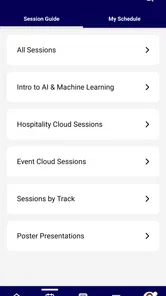
Let’s dive into what makes this app a game-changer. First off, it's super intuitive. The app is designed to make navigating events a breeze. With a few taps, you can view sessions, find speakers, and even mark the ones you want to attend. It’s like having an event roadmap, and trust me, you’ll wonder how you ever managed without it.
Networking Made Effortless
We all know networking is a huge part of any event, and this app makes it seamless. Cvent Events lets you connect with other attendees through its built-in messaging feature. You can set up meetings and even share your contact details with just a tap. It’s the perfect way to expand your professional circle without the awkwardness of introducing yourself cold.
Stay in the Loop
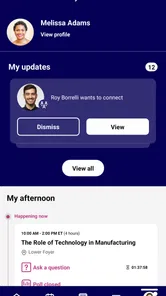
One of the coolest features is the real-time updates. Whether there’s a last-minute change in session timings or an impromptu meet-up, the app keeps you updated. You’ll receive notifications straight to your phone, ensuring you don’t miss out on anything important.
Interactive and Engaging
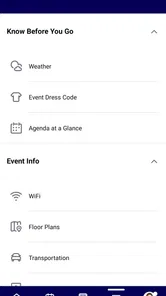
Another thing I love about this app is the interactive maps. No more wandering around looking for your next session. The maps guide you precisely where you need to go. Plus, the surveys and polls during sessions are a neat touch. They keep things engaging and allow you to give feedback instantly.
And for those who love a bit of gamification, Cvent Events often includes challenges and leaderboards to make attending sessions even more fun. Who knew learning could be so competitive?
Who will get the most from it?
As a business app developed by Cvent, it is best suited to people attending conferences, meetings, and trade shows that use Cvent’s event tools. Picture arriving at a busy conference with several sessions you want to catch: I can check the agenda, keep track of my selections, and use the event’s own updates rather than searching through separate messages. That focused workflow is its advantage over a generic calendar, which can hold appointments but does not serve as the event’s shared guide.
It is less compelling if I only need a personal schedule, or if the organizer is not using the app for the event. In those cases, a normal calendar or the organizer’s chosen communication channel may be simpler. I would also avoid relying on networking, maps, polls, or game-like activities as guaranteed parts of every experience; their usefulness depends on what the particular event offers.
Making a packed day manageable
One useful way I would handle a conference with overlapping sessions is to decide on priorities before I start moving between rooms. I would mark the sessions that matter most, then identify one or two alternatives in case a talk fills up or an appointment runs long. That small bit of planning makes the agenda more useful than treating it as a rigid itinerary: it gives me a fallback without forcing me to rebuild the day from scratch.
For example, if I arrive between morning sessions and have a meeting later, I can use the event guide to check what is next, where it is, and whether an organizer has posted a change. I would still leave time to find the room and get settled rather than scheduling every minute. The app can organize event information, but it cannot judge how long a crowded corridor or an unexpectedly long conversation will take.
This is where the event-specific format has a practical edge over a notes app. Notes are flexible, but they depend on me copying details correctly and remembering which announcement is current. A printed agenda is easy to glance at, yet it can become stale if the schedule changes. I see the app as the working reference and a short personal note as a backup for my own priorities, not as a replacement for the organizer’s latest information.
What to know before relying on it
The app is free and intended for everyone. It has a 4.8 average from around 3,600 ratings, with more than a million installs, which suggests it has reached a broad audience; those figures do not guarantee that every event guide will be equally complete. The current version is 1.127.0, and the app was released on March 26, 2020. I would still check the event information itself before making travel or session plans around it.
For a practical backup, I keep essential timing or venue details somewhere I can refer to if I am distracted or cannot quickly reach the right screen. That is not a substitute for event updates, but it helps prevent a small navigation snag from derailing the day. If something looks wrong, checking the event’s main page and the organizer’s instructions is a better first step than assuming the entire app is at fault.
When the problem may be elsewhere
There is an important distinction between a technical problem and an information gap. If a session is missing, a room is unclear, or a networking option is absent, the organizer may not have added that information or enabled that activity for the event. I would compare what I see with the organizer’s latest communication before repeatedly reopening screens or rebuilding my schedule. That check saves time and helps me ask a precise question if I need assistance.
Similarly, an event guide is only one part of attending a conference. It can help me navigate what the organizer has placed in it, but it cannot resolve a late venue change that has not been communicated or decide which of two valuable sessions matters more to me. If a detail affects a train, hotel, or meeting outside the event, I would keep that information in my usual planning tools as well. The sensible approach is to use the app for the event’s shared information and a personal calendar for commitments that extend beyond it.
Who may prefer a different tool
I would skip this as a daily planner if I rarely attend organized business events. A standard calendar is simpler for appointments, recurring reminders, and personal tasks, while a general event-discovery service is a better fit for finding things to attend. This app is most worthwhile when the organizer’s event is actually represented in it; otherwise, installing it adds another place to check without solving a real problem.
It is also not the right choice for someone who wants every attendee interaction to happen digitally. The messaging and meeting options can help when they are available, but I would not treat them as a substitute for direct conversation or as a guarantee that another participant will respond. For a quieter attendee, the schedule and venue details may be the main value, and there is no need to use every interactive feature to benefit from the guide.
Final Thoughts
If you’re someone who attends events regularly, this app is a must-have. It takes the stress out of event planning and lets you focus on what matters - making connections and gaining knowledge. So next time you’re gearing up for a conference, make sure Cvent Events is downloaded and ready to go on your phone. You won’t regret it!
My recommendation comes with one practical condition: confirm that the event you plan to attend is using it, then look through the guide before you arrive. For that situation, it can bring the agenda and event-specific resources into one place. If you want a universal event finder or a simple personal planner, another option will fit better; for a Cvent-powered gathering, this is a sensible companion to have ready.
Cvent Events Frequently Asked Questions
Do I need an event invitation or access details to use Cvent Events?
Cvent Events is a mobile event guide powered by Cvent, so its usefulness depends on the event you plan to attend and the information made available for it. Before downloading, check whether your organizer has shared an event name, invitation, or access instructions. Once you have the relevant details, the app can serve as a place to follow event information and stay oriented around your plans.
Is Cvent Events free to download, and what devices is it for?
Cvent Events is a free business app for mobile users on Android and iOS. It is intended for people who want an event guide on their phone, rather than a general-purpose social or entertainment app. As with any mobile app, make sure your device is compatible and has enough available storage before installing, then use the relevant app store to download it.
What is Cvent Events?
Cvent Events is a comprehensive event management platform designed to streamline the planning and execution of events of any size. Whether you're organizing a small corporate meeting or a large conference, Cvent Events offers a suite of tools to help manage registration, check-ins, event marketing, and attendee engagement. Its user-friendly interface makes it accessible for event planners of all experience levels.
How does Cvent Events help in managing event registrations?
Cvent Events simplifies the registration process by offering customizable registration forms, automated email confirmations, and secure payment processing. Planners can easily track attendee information and manage changes in real-time, ensuring a smooth registration experience for both the organizer and the attendees. The platform also integrates with CRM systems, enabling better data management and follow-up.
Can Cvent Events handle virtual events?
Yes, Cvent Events is fully equipped to manage virtual and hybrid events. The platform supports live streaming, virtual networking, and interactive sessions, providing a seamless experience for remote attendees. Additionally, it offers tools for virtual exhibitor booths and sponsor management, making it a versatile choice for modern event needs.
Pros
- Intuitive user interface
- Extensive event customization options
- Seamless integration with other tools
- Real-time analytics and reporting
- Excellent customer support
Cons
- Steep learning curve for beginners
- Expensive pricing for small events
- Limited offline functionality
- Occasional app crashes
- Customization can be overwhelming











