

Cute Blue Koala Wallpaper HD
- 556.00
- 4.7
- Installs
- 10.00M
- Price
- Free
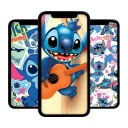
Screenshots
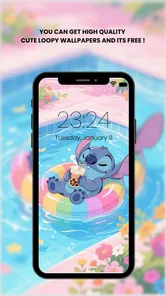

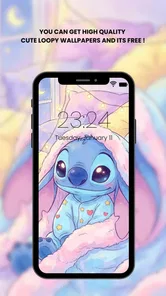
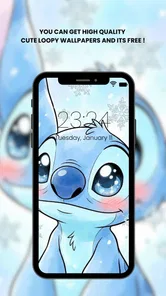
Analysis by Reviewed
I tend to notice my phone wallpaper most when I pick up the device between tasks, so I like changing it when a plain background starts to feel dull. Cute Blue Koala Wallpaper HD is aimed at that small, everyday pleasure: adding a gentle, character-led look rather than turning your phone into a full customization project. It is a free personalization app from HighFive Studio, and its blue koala theme gives it a clear identity from the start.
What free access means here
There is no purchase price to weigh against the wallpapers: the app is free to use. That makes it easy to try if you already know you enjoy cute animal art, without treating the download as a major commitment. I would still judge its value by whether the images suit your taste and screen, not by assuming that free automatically means a perfect fit.
It has an Everyone content rating, and it is listed for Android devices running version 6.0 or later. The app’s current version is 1.1.5. Those details make it easier to decide whether it is relevant to your device, though the main question is simpler: do you want a screen with a distinctly soft, koala-centered style?
The Cutest Koalas on Your Screen
First things first, the app is all about bringing those charming little blue koalas right to your fingertips. With a wide variety of high-definition wallpapers, Cute Blue Koala Wallpaper HD offers something for everyone. Whether you're into minimalist designs or more intricate patterns featuring our furry friends, this app has you covered.
Easy Peasy Installation
Setting up the wallpapers is a breeze. Once you download the app, you're greeted with a user-friendly interface that makes browsing through the collection super simple. Just tap on the wallpaper you like, and voila – your screen is transformed into a koala paradise. I found it really intuitive, and honestly, it took me less than a minute to get my favorite koala on display.
For a more deliberate choice, I’d preview a few designs against the icons and widgets I actually use before settling on one. A detailed picture can look lovely by itself but feel busy once app labels sit on top of it; a simpler image may keep the home screen easier to scan. If you mainly want a calm lock screen, the same artwork can work differently there, where you see it without navigating around icons.
Variety is the Spice of Life
What I really love about this app is the sheer variety of wallpapers available. From cute cartoonish koalas to realistic ones lounging in eucalyptus trees, there's something to suit every mood. Plus, they keep updating the collection, so there's always something new to check out. It's like having a little surprise every time you open the app.
More From Our News Desk

 Gmail
GmailGmail in a Busy Inbox: Who Benefits Most?
From first account to crowded workday, Gmail earns its place through dependable search and flexible sorting—but its best fit depends on how much inbox maintenance you can tolerate.

 Prime Video
Switching to Prime Video: What Changes in Your Viewing Routine
Prime Video can make a compelling second home for streaming, but switching means learning a different catalog, rental layer, and route from browsing to playback.

 Universal TV Remote Control
Universal TV Remote Control Works Best as a Reliable Backup
A phone remote earns its place through quick setup and reliable habits. Here is how to get more from Universal TV Remote Control—and where its limits show.

 Weather - By Xiaomi
Weather by Xiaomi Review: Clear at a Glance, Less Clear Up Close
Xiaomi’s weather app makes everyday forecasts quick to scan, but its calm surface can leave useful details and recovery paths harder to find than they should be.

 X
XX Under Pressure: Can It Recover When Posting Goes Wrong?
A resilience-focused review of X, examining setup, mistaken posts, interruptions, weak connections, and the gaps that matter when recovery needs to be dependable.

 Clash of Clans
Clash of Clans Is Won Between the Battles
Its raids are quick; its community is a long-term project of coordination, teaching, rivalry, and shared responsibility—with all the friction that entails.
Latest News



That range is useful when your taste shifts with the season or your mood: a playful image can make a personal phone feel more cheerful, while a quieter design is easier to live with throughout a busy day. I would browse with a purpose rather than change images constantly. Save the choice that feels right for your usual screen, then revisit the collection when you genuinely want a different look.
The app has a 4.7 average from around 49,000 ratings, and it has passed 10 million installs. Those figures suggest that plenty of people are drawn to its focused theme, but popularity cannot tell you whether the blue koala artwork is your style. If you usually choose landscapes, abstract gradients, or plain colors, a general wallpaper app will likely give you more room to match a particular color scheme.
Quality That Pops
Now, let's talk about the quality of these wallpapers. The HD part of Cute Blue Koala Wallpaper HD isn't just for show. The images are crisp, vibrant, and look absolutely stunning on both my phone and tablet. It's the kind of quality that makes you want to show off your screen to everyone around. I mean, who wouldn't want to flaunt these adorable creatures?
One practical trade-off with vivid artwork is that it can compete with small text or bright app icons. I’d check the wallpaper in the places I use most, not just in a preview, and switch to a less detailed design if the home screen starts feeling cluttered. That little check matters more than choosing the most elaborate picture: a wallpaper is part of the interface you look at all day, not just an image to admire once.
Where this app fits among wallpaper choices
Compared with a broad wallpaper catalog, this app’s appeal is its narrow, recognizable subject: blue koalas rather than a mix of unrelated themes. That focus is a plus if you want a coordinated cute look without searching through landscapes, patterns, and photography. It is less suitable if you regularly build a precise palette around changing icons or prefer wallpapers that fade quietly into the background.
A realistic use for it is a quick refresh before a busy week: choose a koala image for the lock screen, keep the home screen simpler if readability matters, and leave the rest of your phone setup alone. You get a visible change without needing to reorganize apps or learn a complicated customization system. Since this is a wallpaper app, I would not choose it expecting broader phone-personalization tools.
HighFive Studio’s app was released on February 6, 2021, and its focused concept remains easy to understand: it is for people who want this particular cozy animal style. The 556 written reviews add another sign of an active audience, though I would still make the decision based on the look you want rather than review volume alone.
A small routine that makes the choice easier
I’d treat the first browse as a quick screen-design exercise, not just a hunt for the cutest picture. Start by deciding whether the wallpaper is mainly for the lock screen, where a character can sit on an uncluttered image, or for the home screen, where icons and widgets need room. Then compare a few options with the actual layout visible. This simple order helps avoid picking a striking image that becomes distracting as soon as you return to your normal apps.
If you use a phone for work, school, or quick errands, a restrained koala design can make the device feel more personal without changing how it works. For example, I might choose a cheerful lock-screen image on Sunday evening as a small reset for the week, but use a calmer picture behind my home-screen icons. It is an easy way to enjoy the theme while keeping the screen practical during rushed moments.
Another useful check is to look at the wallpaper in different lighting. A blue image that feels soft in a bright room can seem more intense when you check your phone at night, while fine details may disappear at a glance. I would judge it at the brightness I normally use rather than deciding from one close-up preview. The best choice is the one that still feels pleasant when seen briefly, not only when studied full-screen.
What the focused theme gives up
The same narrow identity that makes the collection easy to understand also sets a limit. If you want a new look every few days and move between nature, abstract art, photography, and seasonal designs, a general wallpaper library is the more practical place to start. This app makes more sense when blue koalas are the destination, not one possibility among many.
I would also separate image quality from day-to-day usability. A crisp, colorful picture is appealing, but it cannot make a crowded home screen easier to read. If your phone has many widgets or you depend on small labels, a low-detail background may suit you better than the most decorative option here. That is not a defect unique to this app; it is the trade-off of putting character artwork behind interface elements.
There is a similar distinction between wallpaper and deeper personalization. Someone looking to coordinate icons, adjust system colors, or redesign several parts of a device should compare it with tools built for broader customization. I would not download this expecting a theme editor or a complete makeover. Its value is simpler: a collection centered on one cute visual idea, ready for a user who wants that idea on the screen.
Who is likely to enjoy it?
I can see this fitting people who like animal illustrations, want a friendly look on a personal phone, or are choosing a simple visual refresh for a family device. The Everyone rating makes its intended audience broad, while the distinctive koala subject gives it more personality than a plain color background. It is also a low-commitment option for anyone who wants to try a different mood without paying for the app.
On the other hand, I would skip it if you are indifferent to koalas, prefer understated monochrome screens, or need a single wallpaper that precisely matches a particular icon palette. People who enjoy browsing across unrelated styles may also feel boxed in by the theme. In those cases, a broad wallpaper app, a simple built-in background, or a carefully chosen photo is likely to be a better match.
Before installing, I’d ask myself one practical question: do I want a koala to be a recurring part of how my phone looks, or am I only curious because the idea sounds cute today? If the answer is the former, a focused app can save browsing time. If the interest is fleeting, your device’s existing wallpaper choices may be enough. Free access makes trying it straightforward, but it does not make a mismatched style worthwhile.
My take on its value
In conclusion, if you're a fan of koalas or just looking to add some charm to your device, this app is a must-try. With its easy installation, diverse collection, and top-notch quality, Cute Blue Koala Wallpaper HD is sure to win your heart. Just a little heads up – you might find yourself changing your wallpaper more often than you thought!
My recommendation is straightforward: give it a try if you want a cheerful koala-centered screen and prefer a free, simple way to change your wallpaper. Skip it if you need a wide mix of themes, a restrained background for dense home-screen layouts, or customization beyond wallpapers. For the right person, its specific style is the point; for everyone else, a broader wallpaper collection is the more useful choice.
Cute Blue Koala Wallpaper HD Frequently Asked Questions
Can I use Cute Blue Koala Wallpaper HD to customize both my home screen and lock screen?
Cute Blue Koala Wallpaper HD is made for personalizing a phone’s appearance with blue koala images. After selecting a wallpaper, follow the options shown on your device to apply it to the screen you want to customize. The available choices can depend on your phone’s operating system, so review the on-screen prompts when setting an image.
What kind of images can I expect from Cute Blue Koala Wallpaper HD?
The app focuses on blue kawaii koala wallpapers, with images described as available in HD and 4K. Its style is intended to give a phone a soft, cozy look, rather than offer a broad mix of unrelated themes. If you enjoy cute koala artwork and want a coordinated appearance for your screen, that focused visual identity is the main reason to try it.
Who develops Cute Blue Koala Wallpaper HD, and what is it designed for?
Cute Blue Koala Wallpaper HD is a personalization app developed by HighFive Studio. It offers blue kawaii koala wallpapers in HD and 4K, giving users a soft, cozy look for their phone. The app is focused on changing the appearance of a device’s screen with cute koala imagery rather than providing a general photo-editing or social experience.
What is Cute Blue Koala Wallpaper HD?
Cute Blue Koala Wallpaper HD is a mobile application designed to provide users with a collection of high-definition wallpapers featuring adorable blue koalas. These wallpapers are specifically tailored for enhancing the aesthetics of your smartphone or tablet display, offering a charming and visually appealing experience for koala lovers.
Is Cute Blue Koala Wallpaper HD free to use?
Yes, Cute Blue Koala Wallpaper HD is a free application available for download. Its listed price is free, so you can explore its koala wallpaper collection without paying an upfront purchase price. As with any app, check the download page and the app’s own screens for current details about its features and any optional offers before installing.
Pros
- High-quality HD images
- Wide variety of wallpapers
- Easy to navigate interface
- Frequent updates with new wallpapers
- Lightweight and fast
Cons
- Contains ads
- No offline mode
- Limited customization options
- Requires internet connection
- No live wallpapers











