

Cursa - Online courses
- 1.28K
- 4.7
- Installs
- 5.00M
- Price
- Free

Screenshots
Analysis by Reviewed
I like that Cursa - Online courses is designed for learning in small pockets of time rather than demanding a formal study setup. If I have a few minutes between errands, I can browse for a subject that interests me and decide whether it deserves a longer session later. That flexibility is the app’s strongest everyday appeal: it lowers the effort needed to get started, though it still takes personal discipline to turn browsing into steady progress.
Choosing a goal before choosing a course
With a large catalog, the challenge is not only finding something interesting; it is deciding what to do next. I get more out of an education app when I enter with a question such as “What do I want to be able to do after studying?” rather than a vague intention to learn. That makes it easier to compare course outlines and pass over topics that sound appealing but do not serve my immediate purpose.
For a first session, I would sample an early lesson and notice whether the explanations make sense to me without extra research. If they do, I can set a modest target—one lesson followed by its exercise, for instance—and return to the same course later. If the teaching style feels too fast or the material assumes knowledge I do not have, switching early is sensible. A wide library is valuable partly because it gives me room to find a better match, not because I need to finish the first thing I open.
What its current version tells me
Cursa is an education app from Cursa Educação, and its current version is 2.9.3. It first appeared on February 13, 2017, so it has had time to become an established learning option rather than a brand-new experiment. The app is free, suitable for everyone, and has a 4.7 average from around 216,000 ratings. More than 5 million people have installed it, which suggests it has found a sizable audience for informal, app-based study.
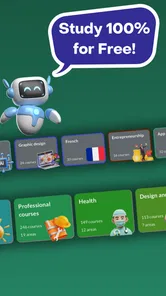
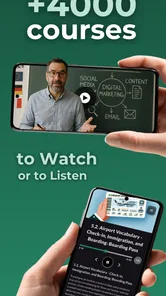
The headline promise is breadth: the catalog spans over 5,000 online courses, alongside more than 48,000 exercises. That combination matters because a course library is most useful when it gives you more to do than simply choose another video. I would treat those figures as an invitation to explore, not a reason to assume every course will match my level or preferred teaching style. With a broad catalog, choosing carefully is part of the learning process.
Discover a World of Knowledge
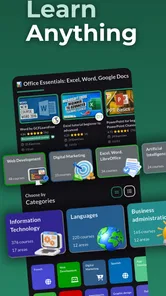
The first thing that struck me about Cursa - Online courses is its vast library of courses. From technology and business to arts and personal development, there's something for everyone. The courses are well-structured and easy to follow, making the learning process enjoyable and engaging. Plus, the app is regularly updated with new content, so there's always something fresh to explore.
User-Friendly Interface
Navigating through the app is a breeze, thanks to its intuitive and user-friendly interface. You don't have to be a tech wizard to find your way around. The courses are neatly categorized, and the search function is pretty robust, allowing you to find exactly what you're looking for without any hassle. It's like having a personal library that you can carry around wherever you go.
More From Our News Desk

 Instagram
Instagram’s Power Comes From Its Place in Your Phone
A close look at how Instagram turns Meta’s reach, recommendation systems and everyday camera habits into durable platform power—and what that costs users.

 Gmail
GmailGmail in a Busy Inbox: Who Benefits Most?
From first account to crowded workday, Gmail earns its place through dependable search and flexible sorting—but its best fit depends on how much inbox maintenance you can tolerate.

 Prime Video
Switching to Prime Video: What Changes in Your Viewing Routine
Prime Video can make a compelling second home for streaming, but switching means learning a different catalog, rental layer, and route from browsing to playback.

 Universal TV Remote Control
Universal TV Remote Control Works Best as a Reliable Backup
A phone remote earns its place through quick setup and reliable habits. Here is how to get more from Universal TV Remote Control—and where its limits show.

 Weather - By Xiaomi
Weather by Xiaomi Review: Clear at a Glance, Less Clear Up Close
Xiaomi’s weather app makes everyday forecasts quick to scan, but its calm surface can leave useful details and recovery paths harder to find than they should be.

 X
XX Under Pressure: Can It Recover When Posting Goes Wrong?
A resilience-focused review of X, examining setup, mistaken posts, interruptions, weak connections, and the gaps that matter when recovery needs to be dependable.
Latest News



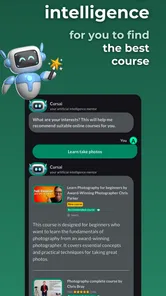
That convenience works best when I use search with a specific subject or skill in mind, then narrow my choices by checking what a course actually covers. Broad category labels can be a useful starting point, but they do not tell me whether a lesson is introductory or assumes prior experience. I try not to judge a course by its title alone: a quick look at its structure and a sample of the teaching can save time later.
Another feature worth mentioning is the offline mode. Yes, you heard that right! You can download courses and learn even when you're off the grid. It's perfect for those long flights or when you're in a place with spotty internet connection. Just download your desired course beforehand and learn at your own pace, anytime, anywhere.
Making a course fit real life
For a practical routine, I would pick one course tied to a specific goal instead of saving a long list of interesting options. For example, someone brushing up on a work skill could use a short session during a lunch break, then use the exercises to check what actually stuck before moving on. A commuter could download study material ahead of time, but should choose a manageable section before losing signal; offline access is helpful, not a substitute for planning what to study.
A realistic week might look like this: I choose a course related to a task I expect to do at work, study one small section during a quiet lunch, and use the next available break to revisit the part I found difficult. On the weekend, I try a related exercise without looking at the lesson. That rhythm is more useful than opening the app whenever I happen to remember it, because it gives each short session a purpose and a natural next step.
There is also a practical trade-off to downloading material. It makes study possible when a connection is unreliable, but it requires a little preparation and a decision about what I actually intend to study. I would download only the course I am currently working through rather than treating offline access as a reason to collect a pile of material. Keeping the plan small makes it easier to continue where I left off instead of spending the next session choosing again.
The exercises also suggest a useful way to avoid passive learning: pause after a lesson and try answering without looking back at the material. If I get something wrong, I know what to revisit rather than simply replaying everything. Certificates can mark completion, but I would not treat a certificate alone as proof of job readiness. For a portfolio or a role that requires demonstrable skill, I would pair a course with a small project that shows what I can do.
Interactive Learning Experience
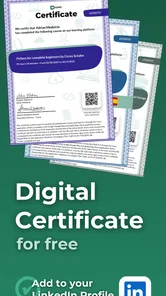
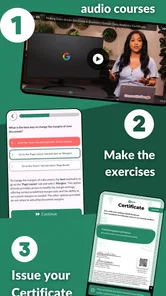
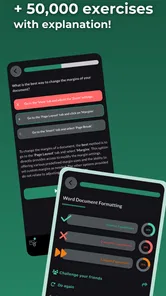
Learning with Cursa is not just about watching videos or reading text. The app offers an interactive experience with quizzes and exercises that test your knowledge and help reinforce what you've learned. It's a great way to ensure that the information sticks and you're not just passively absorbing content. The app also provides certificates upon completion of a course, which is a nice touch for those who want to showcase their new skills.
I would use the exercises as checkpoints, not as a score to chase. Getting an answer wrong can be more useful than getting several right if it shows me exactly which idea I misunderstood. A good habit is to explain the answer to myself in plain language before moving on. If I cannot do that, I probably need another pass through the lesson rather than a new course. That turns practice into a guide for what to study next.
Moreover, Cursa has a vibrant community of learners. You can join discussions, share insights, and even seek help from fellow learners. It's like being part of a global classroom where everyone is eager to learn and help each other out. This sense of community adds an extra layer of motivation and makes the learning experience more enriching.
Who is likely to get the most from it
I can see Cursa working especially well for someone who wants a low-cost way to explore subjects, refresh familiar knowledge, or build a first layer of understanding before taking on a larger project. It is also a reasonable fit for learners who do not have a fixed study schedule. A free, flexible catalog lowers the barrier to trying a topic, while practice gives me a way to check whether I am absorbing more than just the general idea.
It may be a poor match for someone who needs a tutor to diagnose mistakes, a class with deadlines, or a carefully supervised route to a regulated qualification. Those needs call for more than self-directed lessons and exercises. If I am studying for a high-stakes exam or a role where an employer expects a specific credential, I would first check whether the course serves that exact purpose, and I would use a specialist provider or formal program when recognition and structured feedback matter more than convenience.
Where it fits among learning options
Compared with a single-subject course service, Cursa’s wide range is more convenient when I want to explore different topics without switching apps. That breadth is also a trade-off: a specialist platform may be a better fit if I need a tightly sequenced curriculum, close instructor feedback, or a particular professional credential. For structured classroom study, a teacher or formal program can provide accountability that a self-paced app cannot. I see Cursa as a useful starting point and practice companion, not a replacement for every kind of education.
Compared with a search engine or a collection of unrelated videos, a course-based app can make it easier to stay within one topic and follow a planned sequence. The other side is that a curated sequence is not the same as tailored instruction: it may not adapt to my gaps or explain a confusing point in the way a teacher could. If I am only looking for a quick answer to one narrow question, a direct reference or tutorial may be faster. If I want a guided path with exercises, Cursa is the more natural place to start.
It suits curious learners, people building a basic skill, and anyone who prefers flexible study without an upfront purchase. It is less suitable if you need a guaranteed course standard across every subject, personal tutoring, or a qualification whose recognition matters to an employer. Before committing hours to a course, I would check its outline and try an early lesson; that small test helps reveal whether the pace and teaching approach work for me.
What to keep in mind as you learn
The app’s release history and current version show that it has continued beyond its initial launch, but the version number by itself does not tell me which individual improvements arrived when. For someone already using it, the sensible approach is to judge the current experience directly: see whether the courses relevant to your goals are available, whether the exercises suit your level, and whether the app fits your routine. I would also keep expectations realistic about how much progress a large catalog can deliver without a clear plan.
That is also the right way to think about future changes: a newer version may be encouraging, but I would judge any improvement by whether it makes a real task easier, such as finding a suitable course or continuing study consistently. I would not assume that a version number promises a particular feature or teaching approach. For existing users, the useful question is simpler: does the current course selection still serve the goal I am working on, and do the exercises help me notice progress?
A few questions are worth answering before making it part of a routine. Can I learn without a connection? Yes, by downloading course material ahead of time. Does it cost anything to get started? The app is free. Is a certificate the same as a recognized professional qualification? I would not assume so; its value depends on the purpose and the person evaluating it. And if I only have brief study windows, can it still help? Yes, provided I choose a focused course and return to it consistently instead of hopping between topics.
One more useful question is how to tell whether I am ready to move beyond a course. I would look for evidence that I can explain the main ideas and apply them to a small task without relying on the lesson throughout. If I cannot, I can revisit the relevant material or use another learning resource to fill the gap. If I can, the next step might be a more advanced course, a personal project, or practice in a real setting. That keeps the app connected to a concrete outcome rather than making completion the only goal.
In conclusion, if you're looking for a flexible and comprehensive learning platform, Cursa is definitely worth checking out. It's an app that not only makes learning accessible but also enjoyable. So, why not give it a try and embark on a new learning journey today? Who knows, you might just discover a new passion or skill that you've always wanted to explore!
Cursa - Online courses Frequently Asked Questions
Does Cursa work on my Android device?
Cursa is an education app for Android devices running Android 9 or later. Before downloading, check your phone or tablet’s operating system version to make sure it meets that requirement. The app is free and is developed by Cursa Educação, so you can consider whether its learning format and course selection suit what you want to study.
Is Cursa - Online Courses free to download?
Cursa is free to download and is an education app for learners who want to explore online courses. The app’s description highlights a large course collection, certificates, and exercises, which can make it appealing for independent study. Before choosing a course, review its details in the app so you understand what it offers and whether it fits your goals.
Is Cursa - Online Courses suitable for beginners?
Cursa is an education app for people who want to learn across a range of subjects, so it can be a useful place to explore a topic or build skills at your own pace. Before downloading, consider what you want to study and browse the available courses to see whether their subjects and formats fit your current experience and learning goals.
What is Cursa - Online Courses?
Cursa - Online Courses is a mobile application designed to provide users with access to a wide range of online courses across various subjects. Whether you're looking to enhance your professional skills, learn a new hobby, or explore academic topics, Cursa offers a diverse selection of courses to choose from, making learning accessible and convenient directly from your smartphone.
How does the course structure work on Cursa?
Courses on Cursa are structured into modules and lessons that users can complete at their own pace. Each course includes video lectures, reading materials, and assessments to test your understanding. The app's interface is user-friendly, allowing easy navigation through different sections, and progress tracking helps you stay on top of your learning journey.
Pros
- Wide variety of courses available
- User-friendly interface
- Affordable course pricing
- Courses available in multiple languages
- Offline access for courses
Cons
- Limited advanced level courses
- Some courses lack depth
- Occasional app crashes
- No certification provided
- Limited interaction with instructors











