Curri Driver
- 895.00
- 4.5
- Installs
- 500.00K
- Price
- Free

Screenshots

Analysis by Reviewed
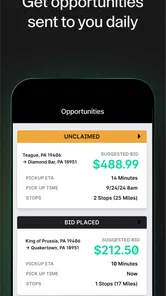
I approached Curri Driver as a working tool rather than a typical delivery marketplace. Its purpose is straightforward: it helps drivers find delivery opportunities near their current location. That focus makes it especially interesting for people who already spend time on the road and want to decide for themselves when a nearby job is worth considering.
In my experience, the app makes the most sense when it is treated as one part of a driver’s routine, not as a guaranteed source of continuous work. You still need to judge distance, timing, vehicle space, fuel, traffic, and the practical effort involved in completing a delivery. The useful question is not simply “Is there a delivery?” but “Does this delivery fit what I am already doing today?”
Curri is a free business app from Curri, available for users aged Everyone. It has passed half a million installs and holds an average rating of 4.5 from roughly 4.6 thousand ratings, which suggests that many drivers find its basic purpose worthwhile. I would recommend giving it a serious look if you want location-based delivery opportunities, but I would not treat the install count or rating as a promise that every driver will have the same experience.
How Curri Driver fits into a shared household routine
A realistic use case is a household with one person who drives for delivery work while another person uses the same phone or tablet for everyday tasks. In that situation, the app is not just about accepting work. It also affects how the device is shared, when notifications appear, and who is responsible for the account currently open on the screen.
For example, imagine that I use a phone during the afternoon to look for nearby delivery opportunities, while a partner uses the same device in the evening for navigation, messages, or shopping. The cleanest arrangement is to keep the driver’s session clearly separate from ordinary household use. I would avoid leaving the app open where another person might accidentally interact with a delivery-related screen or change the active account context.
This is an important distinction from general navigation apps. A mapping app can often be opened casually by anyone in the household. A driver-focused business app deserves more deliberate handling because its information relates to work decisions and delivery responsibilities. Even if the phone is shared only occasionally, I would make it obvious whose work session is active before using it.
Curri Driver is also better suited to an adult household member who understands the consequences of taking a job. A child borrowing the phone may be perfectly able to open the application, but that does not mean they should manage a driver account or make decisions about deliveries. The Everyone age rating describes the app’s broad content suitability; it should not be confused with permission for every member of a family to operate a delivery account.
More From Our News Desk

Weather by Xiaomi Review: Clear at a Glance, Less Clear Up Close

X Under Pressure: Can It Recover When Posting Goes Wrong?

Clash of Clans Is Won Between the Battles

Android Auto Makes the Case for Quieter Car Software

MobiOffice: Transforming Mobile Productivity with Seamless Integration

EA SPORTS FC™ Mobile Soccer: Redefining Mobile Sports Gaming
Starting with the right account boundary
The first practical step is deciding whether the device belongs to one driver or is genuinely shared. If it is a personal work phone, I would keep the application tied to that driver’s normal routine and avoid casual account switching. If it is a family device, I would create a simple household rule: only the approved driver opens the app for work, and everyone else leaves delivery screens untouched.
That boundary matters because the app’s value depends on the driver seeing relevant opportunities close to the current location. If another person moves the device, changes its context, or uses it while the driver is not present, the information on screen may no longer match the driver’s plans. Even without assuming any particular account-management feature, the safest habit is to treat the active session as personal work information.
I would also keep the phone charged before beginning a driving period. This is not a special Curri feature; it is simply good practice for any app used around vehicles and location-based work. A low battery can turn a convenient opportunity into a stressful decision, especially when the same device is needed for maps or communication.
Another useful boundary is time. Before opening the app, I would decide whether I am actively looking for work or merely checking what might be available. Those are different activities. A quick glance can lead to a delivery that disrupts an appointment, a school pickup, or another household commitment. The app can help surface nearby opportunities, but I still need to protect the schedule around them.
What the nearby-delivery approach does well
The strongest idea here is proximity. Instead of beginning with a broad search and then discovering that a job is inconveniently far away, the driver can focus attention on opportunities connected to the current location. For someone already near a commercial area, that can make the decision process faster and reduce unnecessary repositioning.
I find this approach particularly useful during flexible gaps in the day. If I have finished one task and have time before the next commitment, nearby availability gives me something concrete to evaluate. It is more practical than planning an entire day around vague expectations, because the decision begins with where I actually am rather than where I hoped to be.
There is a trade-off, though. Proximity does not automatically mean profitability or convenience. A delivery that looks close may still involve waiting, awkward loading, limited vehicle space, or a destination that leaves me far from home. I would never judge an opportunity by distance alone. Curri Driver can narrow the search, but it does not remove the need for personal judgment.
This is where the app differs from relying on phone calls, informal messages, or a general gig-work platform. Those alternatives may involve broader job discovery or more varied work, while Curri’s appeal is its direct connection to nearby delivery opportunities. If my priority is finding a delivery close to where I already am, that focus is valuable. If I want a wide range of unrelated tasks, another service may suit me better.
Coordinating work with the rest of the household
Shared-device use becomes easier when the driver communicates a simple plan before starting. I would tell the people at home whether I am checking for a single nearby delivery, working for a set part of the day, or staying available only until a particular appointment. That conversation prevents the app from silently changing everyone else’s expectations.
A practical routine is to check the application before leaving a familiar area, then make a clear decision rather than repeatedly refreshing it while handling other responsibilities. If I am driving, I would not interact with the phone in a way that distracts me from the road. The app is useful only when it fits safely into the larger driving routine.
For a household with two adults who both drive, I would keep their work routines visibly separate. Each person should know which device or session belongs to whom, and neither should assume that an opportunity seen by one driver is automatically available to the other. This is less about technical controls and more about avoiding confusion when schedules overlap.
Coordination is also important when a delivery could affect shared transport. If the only family vehicle is being used, I would agree in advance on when it is available for delivery work. A nearby opportunity may look attractive, but it is not a good choice if another household member needs the vehicle immediately afterward. The app helps with discovery; the family still has to agree on priorities.
Age, trust, and responsible use
Because the content rating is Everyone, the application is presented as suitable for a broad audience from a content perspective. I would still keep the actual driver account under the control of the adult who is responsible for the work. Age suitability and work authorization are separate questions, and a household should not blur them.
For teenagers who share a parent’s phone, the sensible role is limited to ordinary device use while the driver account remains closed or supervised. I would not let a young family member accept or evaluate delivery opportunities simply because they can navigate the screen. The important issue is not whether the interface seems easy; it is whether the person understands the responsibility attached to the decision.
Trust also applies between adults. If someone else uses the device, I would make sure they know not to alter the driver’s routine or make decisions on the driver’s behalf. A family member may be trying to help by checking the screen, but a delivery decision can depend on timing, vehicle capacity, location, and personal availability. The driver should remain the final decision-maker.
This makes Curri Driver a better fit for households that communicate clearly than for households that casually share every account and device. If privacy, account separation, or work boundaries are already difficult in the home, I would choose a dedicated device or avoid shared use altogether. The app itself cannot replace a household agreement.
Everyday workflow: from a free hour to a sensible decision
Here is how I would use it during an ordinary day. First, I would check where I am and how much time I genuinely have. Next, I would look for a nearby opportunity and compare it with my planned route, vehicle, and next obligation. If the delivery fits naturally, I would continue with the app’s work process. If it creates a long detour or threatens a household commitment, I would skip it rather than forcing the day around it.
The non-obvious benefit is that this workflow encourages selective driving. I am not treating every available delivery as equally valuable. I am using location as a filter, then adding my own filters for time and practicality. That can be more sustainable than constantly chasing the next job, especially for someone who already has errands or other work.
The limitation is that this approach requires discipline. Drivers who expect the app to make every decision for them may be disappointed. It is not a substitute for route planning, vehicle judgment, or calendar awareness. I would pair it with whatever navigation and scheduling tools I already trust, while keeping the Curri session focused on delivery opportunities rather than trying to make it the household’s all-purpose organizer.
Where it stands beside common alternatives
Compared with contacting delivery companies directly, the app offers a more immediate way to look for work connected to the driver’s current position. That can save time when I am already out and available. Direct arrangements may still be preferable for someone who values a fixed relationship, predictable assignments, or a schedule agreed in advance.
Compared with broad gig platforms, Curri Driver has a narrower identity. Its strength is not being everything to everyone; it is being centered on delivery work and nearby opportunities. That focus may feel refreshingly simple to a driver who does not want unrelated task categories. On the other hand, someone seeking passenger trips, food orders, errands, or a larger variety of gigs may find a general platform more flexible.
Compared with using maps alone, Curri adds a work-oriented purpose to the search. A map can show where I am and how to get somewhere, but it does not by itself organize the question of which delivery opportunity is worth considering. I would still use navigation separately when needed, because discovering a nearby job and executing the route are different parts of the day.
My main trade-off is specialization. I like that the app does not need to pretend to be a complete lifestyle platform. I would skip it if my goal were simply to earn from any available category or if I needed a highly structured schedule supplied by another service. Curri’s model is most appealing to drivers who value local opportunity and personal choice.
Installation details and long-term expectations
Curri Driver is free to install, and its current version is 3.1.1. It was released on November 25, 2019, and supports Android 7.0 or later. That makes it accessible to people who are not using the newest phone, although the quality of the overall experience will still depend on the device, connectivity, battery condition, and the driver’s surroundings.
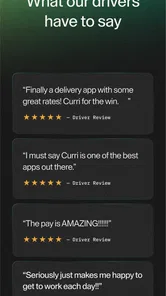
The rating of 4.5, based on about 4.6 thousand ratings and 892 written reviews, is encouraging without being a reason to skip personal testing. Ratings can tell me that the basic concept works for many people, but they cannot decide whether nearby opportunities match my area, vehicle, schedule, or household responsibilities. I would install it, establish clear account boundaries, and judge it after using it within my actual routine.
The app has also reached more than 500 thousand installs, which gives it a meaningful user base. I see that as a sign that the service is not an obscure experiment, but I would still keep expectations realistic. A large install figure does not guarantee that every location will feel equally active or that every driver will have the same number of suitable opportunities.
My household verdict
I would recommend Curri Driver to an adult driver who wants to look for delivery work near the place they already are. Its best quality is the way it supports selective decisions: check nearby possibilities, compare them with the day’s plan, and accept only what genuinely fits. That makes it more useful to a flexible driver than to someone who wants the app to dictate an entire working schedule.
For shared households, I would use it with clear boundaries. Keep the driver’s account under the responsible adult’s control, avoid casual use by children, communicate when the vehicle is available, and do not let a shared phone turn a work decision into an accidental household action. Those habits matter as much as the app’s location-based premise.
My final recommendation is simple: choose Curri Driver when nearby delivery discovery is your priority, and choose a broader alternative when variety or fixed scheduling matters more. I like the focused design idea and the practical fit for flexible gaps in the day, but I would never confuse convenience with certainty. Used thoughtfully, it can become a useful part of a driver’s routine; used without planning, it can easily compete with the very household commitments it was meant to fit around.
Curri Driver Frequently Asked Questions
Is Curri Driver free to download, and what devices can run it?
Curri Driver is a free business app from Curri for people interested in delivery work. It supports devices running Android 7.0 or later, so checking your phone’s operating system before downloading is a sensible first step. The app is focused on helping drivers find delivery opportunities near their current location, and its suitability also depends on whether its driver services are available where you live.
How does Curri Driver help drivers find nearby delivery opportunities?
Curri Driver is built to show delivery opportunities closest to your current location, giving drivers a way to review work that may be nearby. The jobs available to you can depend on your market and circumstances, so proximity does not necessarily mean that a suitable delivery will always be waiting. Review each opportunity’s details in the app before deciding whether it fits your route and vehicle.
What is Curri Driver, and who is the app designed for?
Curri Driver is a delivery app designed for independent drivers who want to accept and complete delivery jobs through the Curri logistics platform. It is generally intended for people with a suitable vehicle, a valid driver’s license, and the ability to transport items safely and on time. Available work, vehicle requirements, and driver eligibility can vary by location.
What types of deliveries can drivers complete with Curri Driver?
The app may offer different kinds of delivery requests depending on your market, including construction materials, equipment, supplies, and other commercial goods. Delivery size and vehicle requirements can vary considerably, so drivers should carefully review the order details before accepting a job. Some deliveries may require extra space, special handling, or assistance with loading and unloading.
What are the requirements to become a Curri Driver?
Applicants typically need to meet Curri’s driver and vehicle standards, which may include being legally authorized to drive, having a valid license, providing appropriate insurance, passing identity or background checks, and using a reliable vehicle. Requirements are not necessarily identical in every city or for every vehicle type. The application process will show the documents and verification steps required for your location.
Pros
- Flexible delivery work with the option to choose available routes.
- Clear pickup and drop-off details help organize each delivery.
- Useful navigation support for reaching unfamiliar business locations.
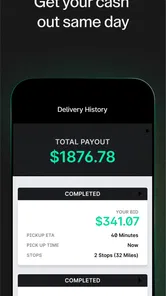
- Earnings and delivery information are easy to review in the app.
- Designed specifically for commercial and construction-related deliveries.
Cons
- Route availability may vary significantly by city and time of day.
- Large or unusual loads can make some deliveries physically demanding.
- Drivers may need to manage loading and unloading at certain stops.
- Fuel
- vehicle maintenance
- and other operating costs reduce net earnings.
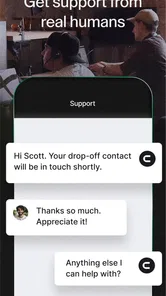
- App performance and support quality may depend on location and demand.











