CubeSmart Self Storage
- 521.00
- 3.3
- Installs
- 100.00K
- Price
- Free

Screenshots
Analysis by Reviewed
I found CubeSmart Self Storage most useful when I treated it as a focused account-management tool rather than a complete replacement for every conversation I might have with a storage facility. It is a free business app from CubeSmart, L.P., built around the practical task of managing a CubeSmart storage space from a phone. That narrow purpose is also its main strength: when I only need to check my account or handle a storage-related task, I do not have to search through a general website or keep old paperwork nearby.
My overall impression is mixed but positive. The app has a clear reason to exist, and its straightforward approach can help people who want fewer steps between opening their phone and dealing with their storage unit. At the same time, the experience is not equally comfortable for everyone. A person who needs highly adjustable text, especially strong accessibility controls, or a broad set of self-service options may still find themselves relying on the website or contacting the facility directly.
How CubeSmart Self Storage works in everyday use
The first thing I noticed is that this is not a general moving planner, inventory manager, or household organization app. It is tied to the CubeSmart storage experience. That distinction matters because it sets realistic expectations. I would install it if I already use CubeSmart and want a more direct way to manage my space, not if I am comparing storage companies or looking for an app to catalog boxes.
The developer is CubeSmart, L.P., and the app sits in the business category. Its store summary presents it as a simple way to manage a space, which matches the focused nature of the product without telling the whole story. In practice, the value comes from having storage-related account activity available on a mobile device, particularly when I am away from a computer or standing near the facility.
One realistic scenario is a move that has become more complicated than expected. I might be between homes, carrying boxes in a car, and suddenly realize that I need to check something connected with my storage arrangement. Opening a dedicated app is more convenient than looking through email threads, trying to remember a browser bookmark, or finding a printed document in a packed vehicle. That small reduction in friction is exactly where the app makes sense.
I also see a benefit for people who manage storage as part of work. A small business owner, property manager, or independent contractor may use a unit for supplies, records, seasonal equipment, or tools. In that setting, a mobile account tool can keep storage tasks separate from personal apps. It does not turn the unit into a fully documented asset system, but it can make the storage relationship easier to reach during a busy day.
Readability and navigation in a small-screen setting
For me, the app’s strongest accessibility quality is its limited scope. There are fewer reasons to wander through unrelated screens, and the purpose is easy to understand before I begin. A person who is already familiar with CubeSmart should not need to learn a complicated workflow just to reach storage-related information. That simplicity is more valuable on a phone than it might sound, especially when I am carrying something, standing outside, or trying to finish a task quickly.
More From Our News Desk

Weather by Xiaomi Review: Clear at a Glance, Less Clear Up Close

X Under Pressure: Can It Recover When Posting Goes Wrong?

Clash of Clans Is Won Between the Battles

Android Auto Makes the Case for Quieter Car Software

MobiOffice: Transforming Mobile Productivity with Seamless Integration

EA SPORTS FC™ Mobile Soccer: Redefining Mobile Sports Gaming
Still, simple does not automatically mean accessible. Readability depends on the phone, system settings, lighting, and the user’s vision. Someone with reduced vision may need larger text or stronger contrast than the app’s own interface comfortably provides. I would test the app with the device’s text-size and display settings before depending on it for urgent account work. If labels become cramped, cut off, or difficult to distinguish, the mobile browser version may be easier to read on a larger screen.
I prefer interfaces that make the current location obvious and keep actions visually distinct. In a storage app, that is especially important because an account may involve a unit, payment-related information, contact details, or facility information. Confusing a status screen with an action screen can create unnecessary hesitation. My practical advice is to slow down before confirming anything important, particularly when using the app in a hurry or with one hand.
The average rating is 3.3 from around 980 ratings, with about 521 written reviews. I read that as a sign that the app is useful for a meaningful group of customers but does not deliver a uniformly smooth experience. For an app this task-specific, the rating matters less as a verdict on the entire company and more as a reminder to keep a backup route available. If the interface does not behave well on a particular phone, the account website or facility staff may be the better option.
Motor and sensory considerations
A phone-based storage tool can be helpful for users who find a computer mouse, keyboard, or desk setup tiring. Touch interaction may feel more natural when I am already at the facility, and the app keeps the task close to the situation where it matters. That can reduce the need to move between devices or ask another person to handle a basic account check.
However, touchscreens also create their own barriers. A user with tremors, limited dexterity, joint pain, or difficulty making precise taps may struggle with small controls or closely placed actions. I would avoid trying to complete an important task while walking through a parking area or holding boxes. Setting the phone down, using both hands, and increasing the system’s touch response options where available can make the process less stressful, although those adjustments belong to the phone rather than the app itself.
Temporary conditions matter too. Glare, dim corridors, loud surroundings, cold weather, wet hands, and a low battery can all change how usable a mobile interface feels. A person with migraines or light sensitivity may prefer a quieter, dimmer environment and a larger screen. Someone who is hard of hearing should not have to depend on an audio cue to understand what happened; I would look for visible confirmation on screen and keep written account details accessible.
One useful habit is to complete routine account work before arriving at the facility. If I already know I will need to review something, doing it at home gives me better lighting, a stable connection, and more time to read. Then I can use the app at the location only for the final check I actually need. This is a small workflow change, but it helps users whose vision, dexterity, attention, or energy varies during the day.
People who use screen readers or other assistive technologies should judge the app by actual interaction rather than by its short description. Labels, reading order, focus behavior, and the way buttons announce themselves can determine whether a task is independent or requires assistance. I would install it and try the complete path I expect to use, rather than assuming that a clean visual layout will translate perfectly to spoken navigation.
Situational access beyond the ideal connection
Storage facilities are unusual app environments. I might be outside in bright sun, underground, in a concrete building, or moving between areas with different signal quality. A mobile app can be convenient in those places, but convenience depends on the phone being able to load the necessary information at the moment I need it. I would not assume that every important detail is available offline, so I would prepare before leaving home if the task is time-sensitive.
This is where the app compares interestingly with the usual alternatives. A desktop browser gives me more room to read and may be easier for careful account review. A mobile browser can be better if I prefer adjustable browser zoom or do not want another installed app. Calling the facility is more suitable when the issue is unusual, urgent, or dependent on a staff decision. The dedicated app wins when I want a compact, familiar entry point, but it is not automatically the best choice for every situation.
For users with limited data, older devices, or little storage space, the decision is also practical. The current version is 3.2.7, and the minimum operating system is Android 7.0. That makes the app available to a reasonably broad range of Android phones, although compatibility on paper does not guarantee a comfortable experience on every older device. If a phone is already slow or crowded with essential apps, using the browser may be a sensible way to avoid adding another installation.
The app has passed the scale test of a real customer base, with over 100,000 installs, but popularity does not remove the need for personal testing. I would check whether my phone displays the screens clearly, whether navigation works with my preferred accessibility settings, and whether the app remains comfortable when used in the actual places where I manage storage. Those checks take little time and are more useful than judging it only by the install count.
The age rating is Everyone, which fits the ordinary account-management purpose. That does not mean every person will find the interface equally easy to use. Age suitability and accessibility are different questions: a family member helping with storage may be allowed to use the app, yet still need larger text, clearer instructions, or another person nearby for confirmation.
Where the experience can still create barriers
The biggest limitation is the app’s dependence on a specific storage relationship. If I am only researching units, comparing locations, or trying to understand a complicated rental question, the app is unlikely to be my first choice. A website or direct conversation can provide broader context. This is a management companion, not a complete storage decision-making guide.
I also would not use it as my only record-keeping system. Storage users often need to remember what is inside a unit, when items were placed there, and which documents relate to them. The app’s focused purpose does not replace a separate inventory, photo archive, or reminder system. A simple folder of dated photos and notes can be more valuable than expecting the account app to explain the contents of the space.
Another barrier is the difference between a standard workflow and an exception. If my account is straightforward, a self-service app is appealing. If there is a disputed charge, a change involving another person, a problem at the facility, or a question that depends on local circumstances, I would move quickly to human support rather than repeatedly trying the same screen. In those cases, the app may still help me locate account information, but it should not become a substitute for a conversation.
Privacy and shared-device habits deserve attention as well. I would avoid leaving the account open on a phone that other people regularly use, and I would review what appears on screen before handing the device to someone helping me. This is not a criticism unique to CubeSmart; it is a sensible precaution whenever a mobile app gives access to personal or payment-related account information.
Users who need extensive customization should be especially cautious. I did not come away viewing this as an accessibility-first product with a large collection of user-controlled display options. People who depend on very large text, unusual color combinations, keyboard navigation, magnification, or fully predictable screen-reader behavior should test their essential task immediately. If one step is inaccessible, the browser or phone support route may be more reliable than trying to force the app into a role it was not designed to fill.
Who should install it, and who should choose another route
I would recommend CubeSmart Self Storage to an existing CubeSmart customer who wants a direct mobile way to stay connected with their storage account. It is particularly sensible for people who manage a unit while moving, work away from a desk, or prefer a dedicated app over searching for the right webpage. The free price removes the financial risk of trying it, and the Everyone rating makes it suitable for ordinary household use.
I would be more careful recommending it to someone who rarely uses apps, has an older or heavily restricted phone, or needs large-scale accessibility customization. That person may find a browser on a tablet or computer easier to read. Someone dealing with a complicated account issue should contact the facility rather than assuming an app can resolve every exception. And anyone looking for box inventory, moving checklists, expense tracking, or comparisons between storage providers should choose a separate tool designed for those jobs.
My best practical workflow is to use the app for quick account access, keep important records in a separate place, and treat the website or staff as equally legitimate alternatives. I would test the most important task first, adjust the phone’s display settings, and avoid waiting until I am outside the facility to discover that a screen is difficult to read. Those steps make the app more inclusive without pretending that one interface can meet every need.
My inclusive verdict
CubeSmart Self Storage succeeds when the goal is narrow and immediate: I want a mobile doorway into my CubeSmart storage relationship instead of a general-purpose tool. Its focused design can reduce searching and make routine management feel less cumbersome. For many customers, that is enough to justify keeping it installed.
My recommendation is qualified because accessibility is shaped by context. A clear idea, a compatible phone, good lighting, reliable connectivity, and a familiar account can make the experience comfortable. Reduced vision, limited dexterity, sensory overload, assistive-technology needs, or an unusual account problem can expose gaps quickly. The app should therefore be viewed as one useful route, not the only route.
With a 3.3 average and a free download, I see little reason for an existing CubeSmart customer to avoid trying it, provided the first test is low pressure. I would keep the mobile browser and facility contact option in mind, especially for important or unusual requests. The fairest way to judge this app is not whether it replaces every storage interaction, but whether it gives you an easier and more comfortable path to the routine ones.
In my experience, that makes it a practical business app with a clear audience rather than a universally complete solution. If your needs match its focused purpose, it can save time. If your needs center on advanced accessibility controls, detailed organization, or personal assistance, another route may serve you better.
CubeSmart Self Storage Frequently Asked Questions
Who is the CubeSmart Self Storage app for?
CubeSmart Self Storage is intended for people who rent storage from CubeSmart and want to manage their space from a mobile device. It is a business app developed by CubeSmart, L.P., and its simple premise is reflected in the store summary: a convenient way to manage your space. If you are considering a rental, the app may also be useful during the search and booking process.
Will CubeSmart Self Storage work on my phone, and is it suitable for all ages?
The app requires Android 7.0 or later, so check your device’s operating system before downloading. Its content rating is Everyone, which describes the app’s age suitability rather than the requirements for renting a storage unit. The current version is 3.2.7, and the app was released on August 29, 2020. It is free to download.
What is CubeSmart Self Storage, and what can I do with the app?
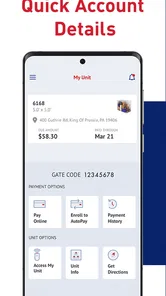
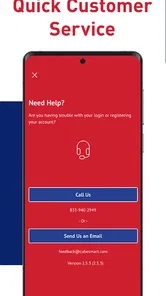
CubeSmart Self Storage is the mobile companion for managing a CubeSmart storage rental. After signing in, users can typically review account details, check rental information, make or schedule payments, view facility details, and contact the property or customer support. Depending on the location and account setup, the app may also provide access-related features, but available tools can vary between facilities.
Can I rent a storage unit through CubeSmart Self Storage?
The app may help you search for CubeSmart locations, compare available unit sizes, review pricing, and begin the rental process. However, the exact booking experience can differ by facility, availability, and local requirements. Before confirming a unit, check the monthly rate, administrative charges, insurance or protection options, access hours, payment terms, and any promotional conditions that may apply.
Can I pay my storage bill using the CubeSmart app?
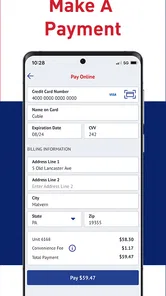
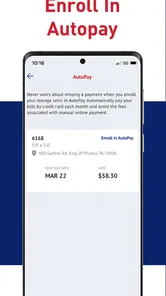
CubeSmart Self Storage is designed to make account payments more convenient, allowing eligible customers to review charges and submit payments from a mobile device. You should verify that your payment method and account information are correct before completing a transaction. Automatic payments, payment history, late fees, and available billing options may depend on your rental agreement and facility.
Pros
- Manage reservations and payments directly from your phone.
- Find CubeSmart locations using the built-in facility search.
- Digital access features may reduce the need for physical keys.
- Account details and storage information are available in one place.
- Useful option for customers who already rent a CubeSmart unit.
Cons
- Features are mainly useful to existing CubeSmart customers.
- Digital entry depends on compatible facilities and a reliable phone connection.
- Availability and functionality may vary between storage locations.
- Payment or access issues can be difficult if the app or network is unavailable.
- The app offers limited value when searching for storage outside CubeSmart.











