

Cruce Directo Garitas
- 52.00
- 2.7
- Installs
- 10.00K
- Price
- Free

Screenshots

Analysis by Reviewed
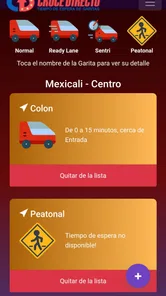
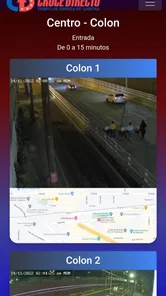
Crossing between Mexico and the United States can turn into a guessing game when traffic changes faster than you can plan. Cruce Directo Garitas is a free Travel & Local app from Cruce Directo that focuses on two practical pieces of information: updated images and waiting times for the border crossings. I see its purpose as simple rather than ambitious: help you decide when and where to cross before you commit to a long line.
That narrow focus is also the reason to look at it carefully. This is not an all-purpose travel planner, a navigation replacement, or an app I would install for sightseeing. Its usefulness depends on how current and understandable the crossing information is at the moment you need it. After using it as a border-planning tool, I think it can be worthwhile for people who cross regularly, but it deserves realistic expectations because the overall store rating is only around 2.7 from roughly 160 ratings.
What the app is really for
The app’s short store description is “Cruce Directo Garitas,” and that tells you more about its audience than a broad travel label would. It is built around garitas, the border ports of entry, rather than general trip planning. The central idea is to check a crossing visually and compare waiting information before choosing your route or departure time.
That makes it especially relevant to commuters, families visiting relatives, shoppers returning home, and anyone whose journey includes a predictable Mexico–USA crossing. If you already know the roads on both sides of the border, the app can serve as a focused decision tool. You open it to answer a specific question: does this crossing look manageable right now, or should I consider another option?
I would not treat it as a substitute for a map application. A map is better for turn-by-turn guidance, alternate-road planning, fuel stops, and estimating the full journey. Cruce Directo Garitas has a more limited job. Its value begins close to the border, where a route that looks short on a map can still become inconvenient because of the queue at the port of entry.
The developer is listed as Cruce Directo, and the app is available for Android users running version 7.0 or later. It is marked for Everyone, which fits the straightforward subject matter and makes it suitable for a household device shared by different age groups. The current version is 1.2.10, so users should keep the app updated when possible, particularly because image and waiting-time tools benefit from maintenance.
How I would use it before leaving
My preferred workflow is to check the app before starting the final part of a trip, not only after arriving near the border. First, I would review the available images to understand whether the approach appears unusually crowded. Then I would compare the displayed waiting information with my intended crossing. Finally, I would use a separate navigation app to judge whether changing crossings is sensible once road distance and traffic are included.
More From Our News Desk

 Weather - By Xiaomi
Weather by Xiaomi Review: Clear at a Glance, Less Clear Up Close
Xiaomi’s weather app makes everyday forecasts quick to scan, but its calm surface can leave useful details and recovery paths harder to find than they should be.

 X
XX Under Pressure: Can It Recover When Posting Goes Wrong?
A resilience-focused review of X, examining setup, mistaken posts, interruptions, weak connections, and the gaps that matter when recovery needs to be dependable.

 Clash of Clans
Clash of Clans Is Won Between the Battles
Its raids are quick; its community is a long-term project of coordination, teaching, rivalry, and shared responsibility—with all the friction that entails.

 Android Auto
Android Auto Makes the Case for Quieter Car Software
The car interface is no longer judged by how much it can do, but by how quietly it helps. Android Auto shows what drivers now expect—and what still gets in the way.

 MobiOffice: Word, Sheets, PDF
MobiOffice: Transforming Mobile Productivity with Seamless Integration
MobiOffice: Word, Sheets, PDF is redefining mobile productivity with a surprising blend of functionality and innovation.

 EA SPORTS FC Soccer Mobile 26
EA SPORTS FC™ Mobile Soccer: Redefining Mobile Sports Gaming
Dive into EA SPORTS FC™ Mobile Soccer, where immersive gameplay and strategic depth transform mobile sports gaming.
Latest News



That last step matters. A shorter queue is not automatically the better choice if reaching it requires a long detour, a congested local road, or an unfamiliar approach. The app can inform the decision, but it should not make the entire decision for you. I found the most sensible use to be as a quick “check before committing” layer on top of the tools I already use for directions.
A realistic example would be a weekday trip to visit family. You are ready to leave, but you have flexibility about which crossing to use. Instead of relying on yesterday’s experience, you check the current images and waiting information, notice that your usual option looks less favorable, and compare the alternative in your navigation app. Even if the displayed information is not perfectly synchronized with your arrival, it gives you a more current starting point than memory alone.
For a traveler crossing only once, the benefit is different. You may appreciate the visual context because a photograph can be easier to interpret than a vague traffic color or a single time estimate. However, a first-time visitor may still need a map and official travel information to understand lanes, operating arrangements, documentation, and the roads beyond the crossing. This app is useful for the queue question, not for every border question.
Cost, value, and the practical tradeoffs
I look at the cost question through the frequency of your crossings: free access makes it easy to test whether the images and waiting information fit your routine, while the listed in-app purchases call for a closer look before spending. I would first identify the exact decision an upgrade would improve, then compare that benefit with how often you make the trip.
What is free and what may cost extra
Cruce Directo Garitas is free to install, which lowers the barrier to trying it before a trip. That is important for occasional users: you can see whether its presentation and coverage fit your needs without paying simply to test the concept. The app also lists in-app purchases ranging from about four dollars to eighteen dollars per item, so not every possible part of the experience should be assumed to be included at no cost.
I would separate the free access from the value of any paid option. The free download is easy to justify when a single better-informed crossing decision could save time and stress. Paid value is more personal. A regular commuter may see a reason to pay if an upgrade provides information they check repeatedly, while an occasional traveler should be cautious and first determine whether the free experience already answers the essential question.
Because purchase value depends on what each item unlocks in the version you are using, I would not buy anything automatically. Read the purchase description inside the app and ask whether it improves the specific task you care about: checking images, understanding waiting information, or making repeated comparisons. If your need is only an occasional glance before a trip, a recurring or premium feature may not earn its place in your travel budget.
This distinction is easy to miss with a focused utility. The app may save time without being worth every available add-on. I prefer to judge it by the cost of the decision it helps with, not by the number of screens or options it offers. A commuter who crosses often has a different calculation from someone making one family visit every few months.
Where the value is strongest
The strongest value comes from reducing uncertainty at the exact point where small differences matter. A waiting-time display gives you a quick estimate, while images can add context that a number cannot. For example, two crossings might show similar times, but one image may reveal a visibly denser approach or a queue pattern that makes you want to verify the situation before leaving.
The visual element is also useful when you do not fully trust your own memory. Border traffic can vary by day, hour, holidays, local events, and unexpected disruptions. I would rather look at a recent image and then make a cautious judgment than assume that a crossing is behaving as it did on my last visit. This is a modest benefit, but it is exactly the kind of modest benefit that can make a travel utility worth keeping.
Another useful habit is to check twice: once while deciding when to leave and again shortly before reaching the final approach. The first check helps with planning; the second protects you from acting on an earlier snapshot. I would not interpret this as proof that every update is live or exact. It is simply a practical way to reduce the risk of basing a route choice on stale information.
The app’s focused design can be an advantage here. A general travel service often surrounds a border decision with maps, recommendations, alerts, and unrelated trip details. Cruce Directo Garitas is easier to understand if all you want is a quick look at crossing conditions. That simplicity is valuable when you are already in a hurry, although it also means you must use another app for the rest of the journey.
Limitations I would take seriously
The first limitation is that waiting information is guidance, not a promise. Conditions can change between the moment you check and the moment you arrive. An image can also be informative without explaining why the line looks the way it does. A visible queue may move quickly, while a shorter-looking approach may be slowed by an issue that is not obvious in a picture.
For that reason, I would avoid planning a tight appointment around the displayed time alone. If missing a flight, work shift, medical appointment, or scheduled pickup would create a serious problem, build in a generous buffer and confirm conditions through other appropriate sources. This app can improve preparation, but it cannot remove the uncertainty inherent in a busy international crossing.
The second limitation is the need for interpretation. The app may show the information you need, but you still have to decide whether a different crossing is worth the extra road distance. A user who expects one tap to produce the perfect route may find the experience incomplete. I see that as a normal tradeoff for a specialized tool rather than a reason to dismiss it, provided you understand its role before relying on it.
The third is its mixed reception. An average of about 2.7 suggests that the experience has not worked equally well for everyone. I would take that as a reason to test the app personally before depending on it for an important trip. The audience size is also relatively modest, with more than ten thousand installs, so I would not assume that every crossing, device, or usage pattern has been equally well represented by other users.
Those figures do not tell me exactly what caused individual dissatisfaction, and I would not turn them into a verdict by themselves. They do tell me to keep a backup plan. Install it ahead of time, open it on a normal day, and see whether the crossings relevant to you are presented clearly enough to support a decision. Discovering a confusing screen at the border is the wrong time to evaluate any travel app.
Small habits that make it more useful
Compare the image with the waiting estimate instead of treating either one as complete on its own. If they seem out of step, use the discrepancy as a prompt to wait, recheck, or consult another source.
Check your usual crossing and one realistic alternative before leaving. This creates a decision pair rather than a single number that can make you feel falsely certain.
Use a navigation app after reviewing the border information. A crossing with a better queue may still be a poor choice if getting there adds too much time or places you on unfamiliar roads.
Take a screenshot or note the time of your check when coordinating with other people. That will not make the information permanent, but it helps everyone understand when the decision was made.
Test the app on your own phone and connection before a high-pressure trip. A focused tool is only useful if you can quickly recognize the relevant crossing and interpret what is shown.
Who should use it
I think the best audience is someone who crosses often enough for small improvements in timing to matter. Daily or weekly commuters can build it into a routine: check before leaving, compare the usual option with a practical alternative, and then confirm the road situation elsewhere. Families who make frequent visits may also appreciate having a dedicated place to look rather than searching from scratch each time.
It can also help people who prefer visual confirmation. If you find a line image easier to understand than a traffic label, the app’s emphasis on updated images may suit your decision-making style. That is particularly useful when you are traveling with children, carrying luggage, or coordinating several passengers and want to avoid an avoidable surprise at the crossing.
Occasional users can still benefit, but I would keep the expectations narrower. Install it before the trip, learn how the relevant crossing is displayed, and use it alongside navigation and official travel guidance. The app is most helpful when it answers one concrete question; it is less helpful if you expect it to organize your entire international journey.
I would skip it if you never cross the Mexico–USA border, if you need a full itinerary planner, or if you are unwilling to verify time-sensitive information with another source. I would also avoid paying for an in-app item until you know exactly what it adds to your own routine. Free access makes experimentation sensible, but it does not turn every paid option into good value.
My final buying decision
My recommendation is cautious but positive for the right user. Cruce Directo Garitas offers a clear, useful idea: combine crossing images and waiting information so you can make a better-informed choice before reaching the border. As a free Travel & Local app, it is worth trying if you regularly travel between Mexico and the United States and want a dedicated way to check conditions.
I would not call it an essential replacement for maps, official information, or common sense. The rating of around 2.7 makes me especially unwilling to recommend blind reliance, and the changing nature of border traffic means that no displayed estimate should be treated as guaranteed. Its best role is as one part of a short preparation routine, not as the sole authority for a time-critical journey.
For me, the deciding factor is frequency. A regular border traveler can gain repeated value from a quick visual check and a comparison with a second crossing. An occasional traveler should try the free experience, keep a backup plan, and decline paid extras unless they clearly solve a recurring problem. Use it to reduce uncertainty, not to pretend uncertainty has disappeared.
That is where this app earns its place: not through a long list of travel features, but through a focused attempt to make the final border decision less dependent on guesswork. If that is the problem you actually have, it deserves a trial. If your needs extend beyond crossing conditions, pair it with stronger general travel tools or skip it altogether.
Cruce Directo Garitas Frequently Asked Questions
Is Cruce Directo Garitas free to download, and are there in-app purchases?
Cruce Directo Garitas is free to download, so you can install it without paying an upfront purchase price. The app also offers in-app purchases, with items priced from around four to eighteen dollars. Check the purchase details shown on your device before confirming anything, especially if you plan to use the app with a child or have purchases restricted on your account.
What devices and age groups is the app intended for?
Cruce Directo Garitas is a travel and local app for checking Mexico–USA crossing information, and its content rating is Everyone. It runs on Android devices using version 7.0 or later. The developer is Cruce Directo. Before downloading, make sure your device meets the operating-system requirement and has enough space for the installation and subsequent updates.
What is Cruce Directo Garitas and what can I use it for?
Cruce Directo Garitas is designed to help travelers check border-crossing conditions at selected Mexican and United States ports of entry. After reviewing the app, its main purpose is to provide practical information such as estimated waiting times, lane availability, and crossing details, helping users compare options before leaving. It is especially useful for people who cross the border regularly, although information should always be confirmed with official authorities.
Does Cruce Directo Garitas provide live border wait times?
The app may display updated or near-real-time information for participating border crossings, but users should not assume that every figure is perfectly live or guaranteed. Wait times can change quickly because of traffic, inspections, staffing, weather, and unexpected incidents. During testing, the app is most useful as a reference for comparing crossings and planning a departure, rather than as an exact prediction of how long the complete trip will take.
Which border crossings and locations are supported?
Coverage depends on the version of Cruce Directo Garitas and the locations included by its data sources. The app focuses on commonly used border crossings, but availability may differ by city, lane type, and direction of travel. Before downloading, users should check whether their intended port of entry appears in the app and whether it includes the information they need, such as pedestrian, passenger vehicle, commercial, or ready-lane details.
Pros
- Provides current border-crossing information for planning trips.
- Useful for comparing wait times at nearby garitas.
- Simple interface makes key details easy to find.
- Helps travelers choose less busy crossing points.
- Convenient for frequent commuters and border residents.
Cons
- Information accuracy depends on timely user or official updates.
- Coverage may be limited to selected border crossings.
- Wait times can change before reaching the checkpoint.
- Requires an internet connection for the latest information.
- Some features may vary depending on your location or device.











