

CrispTone: Offline Music
- 33.00
- 4.2
- Installs
- 1.00M
- Price
- Free

Screenshots
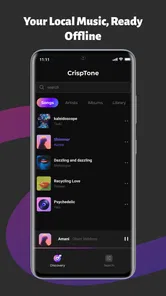
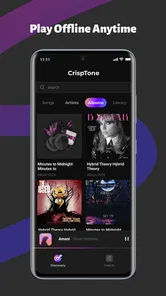
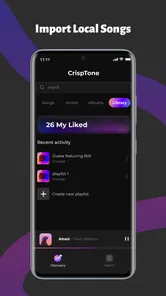
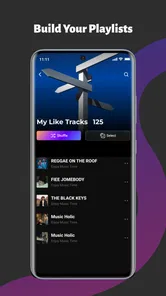
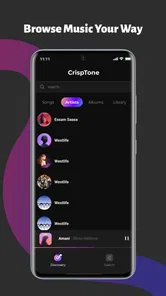
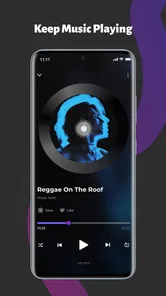
Analysis by Reviewed
When I help someone troubleshoot a music player, I start with a simple question: is the song available as a file on the phone, and can the phone play it? That check matters with CrispTone: Offline Music because its usefulness depends on the music you already have, not on searching a streaming catalog. I find that focus refreshing when I want a familiar playlist without an internet connection, but it also creates a little setup work before the app feels effortless.
Technology Hub Pro’s app is free, rated for Everyone, and has passed a million installs. Its average rating is 4.2 from roughly 1,900 ratings, so it has found a broad audience, though that alone does not say whether it suits your particular music habits. I’d think of it as a dedicated local player: a good candidate for personal audio files, not a substitute for streaming discovery or subscription downloads.
Who gets the most from a local player
I’d consider it for someone who keeps albums, purchased tracks, recordings, or other audio files on an Android phone and wants a more intentional way to listen. It can also make sense if you prefer choosing a small playlist in advance rather than browsing a large catalog whenever you have a spare moment. The appeal is less about finding something new and more about making music you already have convenient to reach.
There is a useful distinction between “downloaded” music and music stored as an accessible audio file. Tracks saved within a streaming subscription are often managed by that service and may not be available to a separate local player. Before installing another app to solve a missing-track problem, I’d check where the file actually lives and whether another player on the phone can open it.
For a mixed collection, I’d avoid importing the whole lot as the first task. Pick a handful of dependable tracks from different albums or folders, make a short playlist, and listen through enough of it to see whether the collection is organized the way you expect. This small trial helps reveal whether the real obstacle is file placement, inconsistent naming, or simply a preference for a streaming app that already manages everything.
Getting past the first listening hurdle
I start by separating a missing-song problem from a playback problem: a local player can only work with audio files the phone can access. In this section, I’ll focus on the small checks that make a first session less frustrating, then move on to a simple way to recover when a track or listening session doesn’t behave as expected.
Start with the files, not the equalizer
The first thing I’d check is whether the music is actually stored on the device. An offline player can only help with tracks that are available locally; a playlist saved inside a streaming service is not automatically the same thing as an audio file that another player can use. If a song is missing from CrispTone, I’d first confirm that it exists in the phone’s music collection and can be opened from the device, rather than assuming the player has lost it.
More From Our News Desk

 Gmail
GmailGmail in a Busy Inbox: Who Benefits Most?
From first account to crowded workday, Gmail earns its place through dependable search and flexible sorting—but its best fit depends on how much inbox maintenance you can tolerate.

 Prime Video
Switching to Prime Video: What Changes in Your Viewing Routine
Prime Video can make a compelling second home for streaming, but switching means learning a different catalog, rental layer, and route from browsing to playback.

 Universal TV Remote Control
Universal TV Remote Control Works Best as a Reliable Backup
A phone remote earns its place through quick setup and reliable habits. Here is how to get more from Universal TV Remote Control—and where its limits show.

 Weather - By Xiaomi
Weather by Xiaomi Review: Clear at a Glance, Less Clear Up Close
Xiaomi’s weather app makes everyday forecasts quick to scan, but its calm surface can leave useful details and recovery paths harder to find than they should be.

 X
XX Under Pressure: Can It Recover When Posting Goes Wrong?
A resilience-focused review of X, examining setup, mistaken posts, interruptions, weak connections, and the gaps that matter when recovery needs to be dependable.

 Clash of Clans
Clash of Clans Is Won Between the Battles
Its raids are quick; its community is a long-term project of coordination, teaching, rivalry, and shared responsibility—with all the friction that entails.
Latest News



This distinction matters most for people moving from streaming. A collection of downloaded tracks inside a subscription app may be protected or confined to that service. CrispTone is aimed at local music, so the useful preparation is to have your own accessible audio files on the phone. If your listening habits are almost entirely based on online catalogs, radio, recommendations, and subscription downloads, a streaming app will probably fit better.
For someone with a collection already copied to a phone, the first session is best kept simple: open the player, locate a familiar track, and make sure it plays before building playlists or adjusting sound. That small check separates a file-location problem from a playback-setting problem. It also gives you a reference point for judging whether later changes to the equalizer improve the sound or merely make it louder.
Make the library easier to use
Local collections can be untidy. The same album may have tracks split between folders, filenames may be inconsistent, and old downloads can sit beside music you still listen to. I’d begin with a short, dependable set of tracks rather than trying to organize every file at once. A playlist for a commute, workout, or quiet evening is more useful immediately than a perfect library structure that takes an afternoon to assemble.
One practical habit is to test a playlist while you still have time to fix it. Play a few tracks from different parts of the list, including one near the end. That helps catch a missing or misplaced file before you rely on the playlist away from home. It is especially worthwhile for a long trip, where a playlist that appears complete at a glance may not be as reliable as one you have actually sampled.
If the player does not show a track, check the file’s location and whether it can be played elsewhere on the phone. Then close and reopen the player and look again. These are ordinary troubleshooting steps, not a guarantee that every file will be recognized; they simply help identify whether the issue is with the particular file, its location, or the app’s current view of the collection.
Use sound adjustments with a light touch
The equalizer is a reason to try this app, but I wouldn’t start by pushing every control to an extreme. Make one small adjustment, replay the same section of a familiar track, and compare it at a similar volume. If several bands are changed at once, it becomes hard to tell what improved the sound and what made it harsher or less balanced.
A useful workflow is to keep a neutral setting as your reference, then make a modest change for a specific listening situation. A quiet room, a noisy bus, and a pair of different headphones can all make the same track feel different. Rather than chasing one setting that supposedly works everywhere, I’d prioritize a sound that stays comfortable over a full song. If a change makes vocals or instruments tiring, back it off.
There is a trade-off here: an equalizer can shape playback, but it cannot repair a poor-quality recording or make every headphone sound identical. If a track already sounds distorted in another player, changing settings in CrispTone is unlikely to solve the underlying issue. Treat the controls as a way to tailor listening, not as a substitute for a good source file.
Recover a session without rebuilding everything
If playback stops unexpectedly, I’d first return to the app and check whether the current track can be started again. If it can, try another known-good local file before rebuilding a playlist or changing several settings. This makes the diagnosis clearer: one troublesome track points toward that file, while several tracks failing in the same way suggests a broader playback or device issue.
Background playback is particularly useful when you want music while using another app, but it depends on the phone allowing the player to continue running. If music stops after you switch apps or lock the screen, reopen CrispTone and test again with a familiar track. Also check the phone’s own battery and background-activity controls; aggressive power management can interrupt audio apps regardless of which player you use. I would change one device setting at a time and retest, rather than making a collection of adjustments without knowing which one mattered.
For a session that matters, such as a workout or a drive, prepare before leaving: start the playlist, confirm that it advances to another track, and lock the screen to see whether playback continues. This is a low-effort check that catches many avoidable surprises. It also gives you time to switch to another player if the phone itself is limiting background activity.
Know when the phone or file is the real problem
Not every playback hiccup is caused by CrispTone. A damaged or incomplete audio file may fail in more than one app, while a device-wide audio interruption can affect any player. When something sounds wrong, compare the same file in another local player if one is already installed. If both behave alike, the file or phone is a more likely place to investigate than the app’s playlist controls.
It is also worth distinguishing offline playback from uninterrupted playback. Music stored locally does not need a network connection to be available, but other phone conditions can still affect listening. A connected accessory, a change in audio output, or a battery-saving setting may alter what happens during playback. I’d test with the phone’s usual headphones or speaker first, then try another output only if the problem continues.
Version 1.1.2 is the current release, and the app supports Android 8.0 and later. If you are considering it for an older phone, that minimum requirement is an important first check. If the app behaves inconsistently, making sure both the operating system and app are in a workable state is a sensible basic step; it is better than assuming an equalizer or playlist is responsible for a problem that occurs across the whole device.
Where it fits among music apps
Compared with a streaming service, CrispTone’s strength is control over a personal offline collection. You are not depending on a catalog search to find a track you already own, and a locally stored playlist can be useful where you do not want to rely on a connection. The other side of that bargain is that you must bring the music yourself. There is no reason to choose a local player if what you really want is a large on-demand catalog and automatic suggestions.
Compared with a basic built-in music player, the combination of playlists, an equalizer, and background controls gives CrispTone a more focused set of tools for people who want to shape how they listen. Still, a built-in player may be the better choice if it already handles your files reliably and you do not need additional sound adjustment. Installing another app is only worthwhile if its workflow solves a real annoyance, such as wanting a dedicated playlist or a more deliberate way to tune playback.
The app is also not the right fit for someone whose music is scattered across inaccessible downloads, cloud accounts, and streaming libraries. In that situation, fixing the collection or choosing a service that manages those sources is more useful than expecting a local player to join them together. I’d choose CrispTone when the phone already contains the music and the goal is dependable, uncomplicated listening—not library discovery or cross-service organization.
A practical verdict for local listening
I’d recommend CrispTone: Offline Music to a friend who keeps audio files on an Android phone and wants playlists, sound adjustment, and the option to leave the app running while doing something else. A realistic use is preparing a small set of saved tracks before a commute, checking that the list plays through, and then listening without needing to search a streaming catalog. The key is to verify the files and background behavior before relying on it in a situation where troubleshooting would be inconvenient.
It is less compelling if you expect music discovery, online radio, or a streaming library to be built into the experience. Its free price removes one barrier to trying it, but the best reason to install it is still specific: you want a dedicated player for music already on your device. I’d start with a few familiar songs, keep equalizer changes conservative, and add playlists only after confirming the files play as expected.
Overall, I see it as a practical option rather than an all-in-one music destination. Its usefulness comes from keeping offline listening simple, while its limitations follow naturally from that focus: a local player cannot organize music you cannot access, fix a faulty recording, or replace a streaming catalog. If those boundaries match what you need, CrispTone is worth a try; if they do not, another kind of music app will serve you better.
CrispTone: Offline Music Frequently Asked Questions
What is CrispTone: Offline Music?
CrispTone: Offline Music is presented as a music player for listening to audio stored on your device without relying on an internet connection. Its usefulness depends on the music files you already have and the features offered in the version available for your device. Check the app listing for supported file types, playback tools, and any requirements before downloading, since these details can vary by platform and release.
Can I listen to music offline with CrispTone?
Offline playback is the main appeal suggested by CrispTone’s name: you can play locally stored tracks without using mobile data or Wi-Fi. The app does not necessarily provide songs to download or stream, so you may need to transfer or save compatible audio files on your device first. Review the app’s permissions and description to understand how it finds music and which folders or formats it can access.
Does CrispTone: Offline Music require a subscription or include in-app purchases?
Pricing and optional purchases can differ between the Android and iOS versions and may change over time. Before installing, check the relevant app-store listing for the upfront price, subscriptions, in-app purchases, advertising, and any feature restrictions. If you see a trial or recurring plan, read its renewal and cancellation terms carefully. Avoid assuming that every feature is free simply because the app can be downloaded at no cost.
Is CrispTone: Offline Music safe, and what permissions might it need?
A music player may need permission to access audio files or media libraries so it can find and play tracks stored on your device. The exact permissions depend on your operating system and the app version. Check the developer information, privacy policy, recent reviews, and permissions shown in the store before installing. Grant only access that makes sense for local playback, and revisit your device’s privacy settings if you change your mind.
Will CrispTone work on my phone, and what music files can it play?
Compatibility and supported audio formats depend on your phone’s operating system, hardware, and the current app release. Check the store listing for minimum Android or iOS requirements, device compatibility, and any stated format support before downloading. If a particular track does not appear or play, it may be stored in an unsupported format or folder. Keeping the app and operating system updated can also help address playback or library issues.
Pros
- Plays music without an internet connection.
- Keeps playback available when you're traveling or offline.
- Offers a dedicated option for listening to music locally.
- Can help avoid mobile data use during playback.
- Useful as a simple alternative to streaming apps.
Cons
- Requires music files to be stored on your device.
- Offline playback won't provide access to a streaming catalog.
- Available features may depend on your device and audio files.
- Local music can take up significant storage space.
- The app's name alone doesn't confirm support for every audio format.












