CreArt - AI Image Generator
- 2.20K
- 4.3
- Installs
- 1.00M
- Price
- Free

Screenshots
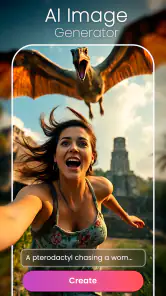
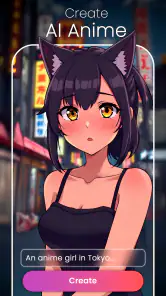
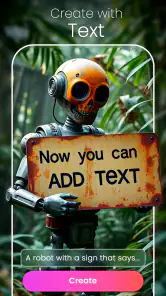

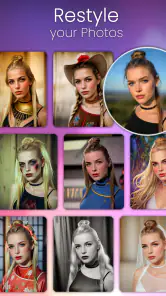
Analysis by Reviewed
I like the idea of an AI art app best when it gives me room to experiment without making me feel I need to be an artist first. CreArt - AI Image Generator is aimed at that kind of quick, playful creativity: I can start with a written idea or a photo and explore what an AI-made image might look like. It is an Art & Design app from Waitos AI, and its approachable pitch suits people who want a visual starting point rather than a complicated editing workspace.
What trust looks like in everyday use
AI image tools can involve personal material, especially when a prompt describes a private situation or the starting point is a photo. I would treat that choice thoughtfully: use a non-sensitive image while getting familiar with the app, and avoid putting identifying details into a prompt unless they are genuinely needed. That is a sensible habit for any creative service, not a claim about how this one handles data.
Before sharing anything, I also pause to consider whether the image is something I would be comfortable showing beyond my own screen. A playful portrait or a made-up scene is low-stakes; a family photo or an image with personal context deserves more care. That small check helps me enjoy the creative side without treating every upload as automatically consequence-free.
Choosing a useful first experiment
For a first try, I would keep the idea simple and change just one element at a time: the subject, the mood, or the visual direction. If I rewrite the whole prompt after every result, it becomes hard to tell what caused the difference. A short, specific description gives me a clearer way to judge whether the output is moving toward what I had in mind.
That approach is especially handy for everyday tasks such as making a playful image for a group chat, testing a visual mood for a personal project, or finding inspiration before drawing by hand. I would not rely on an AI-generated image as a precise illustration of a real person, product, or event; the result is better treated as an interpretation than as a faithful record.
Ever fancied creating art without getting your hands messy? Well, let me introduce you to CreArt - AI Image Generator. This app is like having your very own art studio right in your pocket, and guess what? You don’t need any prior artistic skills to create something stunning!
The Magic of AI-Powered Art
When I first stumbled upon CreArt, I was curious about how artificial intelligence could dabble in the world of art. I mean, how does an app know what looks good? Turns out, this app is equipped with some pretty nifty algorithms that analyze countless artworks to understand styles, colors, and compositions. It’s like having an art professor whispering tips in your ear as you create!
More From Our News Desk

Clash of Clans Is Won Between the Battles

Android Auto Makes the Case for Quieter Car Software

MobiOffice: Transforming Mobile Productivity with Seamless Integration

EA SPORTS FC™ Mobile Soccer: Redefining Mobile Sports Gaming

How Microsoft OneDrive Became a Mobile Productivity Giant

How Google Translate Breaks Language Barriers Effortlessly
Getting Started
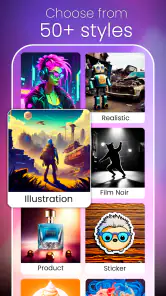
Jumping into the app was a breeze. The interface is super intuitive, making it easy for anyone to navigate through the options. You start by selecting a style you fancy - whether it’s Van Gogh’s swirls or Picasso’s abstract chaos, there’s something for everyone. Then, you can upload a photo or just start from scratch. I tried both and was amazed at how the app transformed my simple selfies into pieces that looked ready to hang in a gallery.
Features That Stand Out
One of the coolest features is the real-time preview. As you tweak and adjust your creation, you can see the changes happening instantly. This makes it super easy to experiment with different styles and techniques without any commitment. Plus, the app offers a plethora of tools to adjust the brightness, contrast, and even the texture of your artwork. It’s like having a digital canvas that responds to your creative whims!
Making the result work for you
A practical way to get more value from the preview is to decide on the image’s purpose before adjusting it. For a small avatar, I would prioritize a clear subject and strong contrast; subtle texture can disappear when an image is cropped or displayed at a small size. For a mood-board reference, I would do the opposite and pay closer attention to color and surface, since those qualities are what I am collecting.
This is also where the app differs from a conventional photo editor. A standard editor is usually the better choice when I need exact control over a real photograph, such as removing a distracting object or making a careful correction. CreArt is more useful when I want to reinterpret a picture or explore an idea. The trade-off is that creative transformation can be surprising: if accuracy matters more than novelty, I would stick with a traditional editing tool.
Using it as part of a creative routine
I find AI art most useful when it acts as a first draft rather than a finished deliverable. For example, if I were planning a handmade invitation, I could try a few prompt variations to explore a color mood, then use the strongest result as a reference while laying out the final design elsewhere. That keeps the app’s spontaneity in the part of the process where it helps, while leaving typography, spacing, and final corrections to tools built for those jobs.
A small workflow improvement is to save the wording of prompts that produce a direction I like, then alter only one detail in the next attempt. That makes it easier to learn what the prompt is doing and avoids losing a useful idea in a string of unrelated rewrites. I would also decide early whether I am making something to share, to use as inspiration, or simply to experiment; those goals call for different standards, and not every interesting result needs to become a polished image.
Why You'll Love It
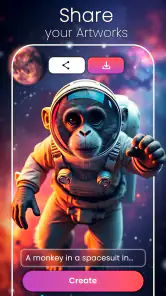
What really won me over was the community aspect. CreArt lets you share your creations with a global community of art lovers. Seeing other users’ artwork not only inspired me but also gave me new ideas to try out. And let’s not forget the satisfaction of seeing those likes and comments roll in!
Another thing I appreciated was the app’s ability to cater to both casual users and those looking for more advanced features. While beginners can enjoy the simplicity of just a few taps to create art, seasoned artists can delve deeper into the more intricate tools and settings.
Making a thoughtful choice about sharing
The social side can be motivating, but I would separate the decision to create from the decision to publish. I might be happy to experiment with a photo privately and still decide that the result is not something I want to put before a community. Before sharing, I would check the image for faces, names, or background details that reveal more than I intend, and consider whether the prompt itself contains personal context. That is a practical boundary I can control even when I do not know every detail of a service’s data practices.
When I am unsure, I would begin with an invented scene rather than a personal photograph. It gives me a way to learn the creative controls while keeping the experiment low-stakes. If I later choose to work from a photo, I can select one that I am comfortable using and review the on-screen choices and requested device permissions instead of granting access automatically. Those habits are useful for creative apps generally, but they matter especially when the workflow can start from personal images.
Who should give it a try
I would recommend it to curious beginners, people who enjoy making images for social sharing, and anyone who wants a low-pressure way to explore AI-generated art. A realistic everyday use might be turning a quick photo into a more imaginative image for a friend’s birthday message, then comparing a couple of visual directions before choosing one. The value is in the exploration, not in expecting a perfect result on the first attempt.
It can also suit someone who has an idea but cannot yet translate it into a drawing. A short prompt can help make that idea visible enough to discuss with a friend or use as a reference for a later project. I would keep expectations flexible: AI-generated images can take a description in an unexpected direction, so the process is closer to brainstorming with a visual tool than giving exact instructions to an illustrator.
If you need dependable, precise artwork for a professional brief, or want detailed manual control over every part of an image, a dedicated illustration or editing app is likely a better fit. I would also skip the social side if I do not want to share work or see other people’s creations; the app’s creative tools may still appeal, but community interaction is not a reason to install it unless that sounds enjoyable.
How it compares with familiar alternatives
Compared with a manual drawing app, CreArt asks less of my drawing skill but gives me less direct control over each line and shape. That makes it appealing for quick concepts and playful transformations, but less suitable when I need a specific character design, a consistent set of assets, or careful revisions from one version to the next. A drawing app is slower at the start, yet it gives an artist more predictable control over the finished work.
Compared with a photo editor, the difference is the goal. Editing software is the safer pick for faithful retouching, cropping, or correcting a real image; an AI art generator is for exploring a new interpretation. If I only want to brighten a portrait or make a precise crop, I would not add an AI step that could change the image’s character. If I want a surprising visual direction, the generative approach makes more sense.
For someone who simply wants a ready-made illustration, a stock image or a commissioned artist may be a better option, depending on the use. Those routes can be more appropriate when exact subject details, consistency, or a clear brief matter. CreArt’s strength is quick exploration, not a promise that every output will match a detailed specification or be ready for professional use without further work.
Price, expectations, and a cautious verdict
CreArt is free to install, with in-app purchases listed from $4.49 to $89.99 per item, so I would explore the free experience before deciding whether any paid option is worthwhile. Its Teen rating is another useful point for families to consider when deciding who should use it. The app has a 4.3 average from around 91,000 ratings, and more than a million installs; those figures suggest broad interest, but they cannot tell me whether a particular output or workflow will suit my needs.
Because purchases are available, I would take a moment to understand the cost shown for any option before confirming it, especially if a younger person is using the app. I would treat a free download as a chance to assess the experience, not as a reason to assume that every creative choice or tool will be included at no cost. The best test is whether the available workflow already helps with the kind of image I want to make.
The app was released on August 8, 2023, and its current version is 2.7.0, with a minimum OS requirement of 7.1. Those details are practical checks before installing, especially on an older device. I would also take a moment to review the choices shown inside the app and the device permissions it requests, then grant only what makes sense for the task I want to do. I cannot infer privacy practices from a creative result or a community screen, so I prefer to make deliberate choices rather than assume.
If a permission or choice does not seem relevant to what I am trying to do, I would pause and check the explanation presented on the device or in the app before proceeding. Likewise, I would avoid using a personal image until I had considered where I am comfortable sharing it. This does not require treating the app with suspicion; it is simply a way to keep my own boundaries clear while trying a tool that can work with images and prompts.
Final Thoughts
In a world where technology and creativity often seem at odds, CreArt bridges the gap beautifully. It empowers anyone to create art, regardless of their background or skill level. Whether you’re looking to kill some time, impress your friends, or genuinely explore your creative side, this app is a must-try.
So go ahead, unleash your inner artist and see what masterpieces you can create with just a few taps. Who knew art could be this fun and accessible?
CreArt - AI Image Generator Frequently Asked Questions
Can CreArt turn a written idea into an image?
Yes. CreArt is presented as an AI image generator for creating artwork from text prompts, so you can describe the scene or concept you have in mind and let the app produce a visual interpretation. It also supports using an existing image as input. Results depend on how you express your idea, making prompt wording an important part of the creative process.
Can I use my own photos as a starting point in CreArt?
CreArt can work with existing photos as well as text descriptions, offering another way to explore an idea visually. You can use an image as input and have the app transform it into a new piece of artwork. This may suit users who want to experiment with a personal picture rather than begin with a prompt alone; consider what images you choose to upload.
Who develops CreArt, and what kind of app is it?
CreArt - AI Image Generator is an app from Waitos AI in the Art & Design category. Its focus is creating AI-generated images, including artwork and pictures, from creative prompts or existing photos. If you are looking for a mobile tool for visual experimentation rather than a general-purpose photo editor, its image-generation focus is the key distinction to keep in mind.
What devices and operating systems can run CreArt - AI Image Generator?
CreArt - AI Image Generator is a mobile app in the Art & Design category, developed by Waitos AI. It is available for Android and iOS, and the Android version requires at least Android 7.1. If you are checking compatibility before downloading, make sure your device meets that minimum requirement and has enough room for an app that creates and handles images.
Is CreArt suitable for teens?
CreArt has a Teen content rating, so it is intended for a teen audience and older users. As with any creative app, it is sensible for parents or guardians to consider how a young person will use AI-generated images and what they may choose to create or share. The app focuses on generating artwork from creative prompts and images.
Pros
- Generates high-quality images quickly.
- Easy-to-use interface for all skill levels.
- Offers diverse styles and templates.
- Frequent updates with new features.
- No prior design experience needed.
Cons
- Requires internet connection to function.
- In-app purchases for premium features.
- Limited free version capabilities.
- Occasional app crashes reported.
- High battery consumption on devices.

- Category
- Art & Design
- Version
- 2.7.0











