

CR Mobile App
- 85.00
- 4.2
- Installs
- 50.00K
- Price
- Free

Screenshots
Analysis by Reviewed
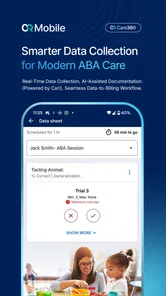
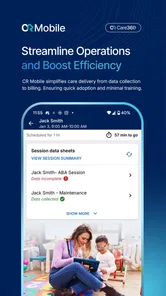
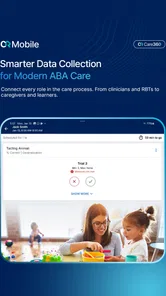
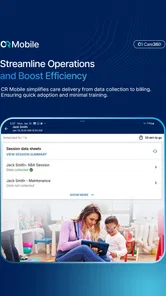
When I look at CR Mobile App, the most useful way to understand it is not as a general medical app, but as a mobile companion for ABA care. Its purpose is to make parts of that work available away from a desk, which can matter when a therapist, caregiver, or supervisor needs to stay connected to a care routine while moving between rooms, appointments, or everyday activities. I found that focus more valuable than a long list of loosely related tools.
CR Mobile App is developed by CentralReach, LLC. and is available free of charge for Everyone. It belongs to the medical category, has reached over fifty thousand installs, and holds a 4.2 average from more than two hundred ratings. Those figures suggest a real user base, though I would still treat the rating as a starting point rather than proof that it will fit every ABA workflow.
The app’s central promise is captured in its short store summary, “Reimagine ABA care with CR Mobile,” but my practical interpretation is simpler: it brings a mobile layer to an ABA-care process that can otherwise feel tied to a computer. That distinction is important. I would not choose it as a replacement for every clinical system or as a general-purpose health tracker. I would consider it when mobile access is itself the problem to solve.
Why mobile access changes ABA care
The capability that stands out is the ability to interact with ABA-care work from a mobile device rather than waiting until someone returns to a workstation. In a real care setting, that can reduce the gap between an activity and the moment when the relevant work is completed. A therapist may be working directly with a learner, a supervisor may need to stay aware of the session workflow, and a caregiver may be supporting routines outside a clinic. A mobile-first option is relevant because those situations do not happen at a desk.
I see the benefit less as convenience for its own sake and more as continuity. When information is handled closer to the point of care, there is less temptation to rely on memory, loose notes, or a delayed update. That does not automatically make documentation better, but it gives the user a more practical place to handle it while the situation is still fresh.
This is also where expectations need to stay realistic. CR Mobile App is a medical tool connected to ABA care, not a substitute for clinical judgment. It cannot decide whether a behavior intervention is appropriate, explain a learner’s needs without context, or replace communication among the people responsible for care. Its value depends on the surrounding process: the quality of the plan, the training of the staff, and the way the organization uses its CentralReach setup.
For that reason, I would judge the app by a specific question: does it remove a meaningful mobile obstacle from an existing ABA workflow? If the answer is yes, its focused design can be useful. If the real need is a broad personal health journal, medication reminder, or patient-facing wellness app, this is probably the wrong category entirely.
More From Our News Desk

 Gmail
GmailGmail in a Busy Inbox: Who Benefits Most?
From first account to crowded workday, Gmail earns its place through dependable search and flexible sorting—but its best fit depends on how much inbox maintenance you can tolerate.

 Prime Video
Switching to Prime Video: What Changes in Your Viewing Routine
Prime Video can make a compelling second home for streaming, but switching means learning a different catalog, rental layer, and route from browsing to playback.

 Universal TV Remote Control
Universal TV Remote Control Works Best as a Reliable Backup
A phone remote earns its place through quick setup and reliable habits. Here is how to get more from Universal TV Remote Control—and where its limits show.

 Weather - By Xiaomi
Weather by Xiaomi Review: Clear at a Glance, Less Clear Up Close
Xiaomi’s weather app makes everyday forecasts quick to scan, but its calm surface can leave useful details and recovery paths harder to find than they should be.

 X
XX Under Pressure: Can It Recover When Posting Goes Wrong?
A resilience-focused review of X, examining setup, mistaken posts, interruptions, weak connections, and the gaps that matter when recovery needs to be dependable.

 Clash of Clans
Clash of Clans Is Won Between the Battles
Its raids are quick; its community is a long-term project of coordination, teaching, rivalry, and shared responsibility—with all the friction that entails.
Latest News



What the capability feels like in practice
Using a mobile care tool changes the rhythm of work. Instead of treating the phone as something separate from the session, the user can make it part of the working environment. That can be helpful when the day involves transitions, changing locations, or short periods in which opening a full computer would interrupt the interaction.
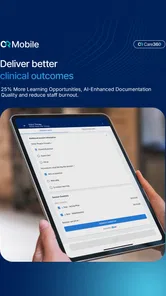
I especially appreciate the potential for reducing end-of-session reconstruction. Anyone who has tried to recreate a sequence of events later knows how easily small details become vague. A mobile workflow can encourage more timely handling of session-related tasks. The important word is “encourage”: the app can make immediate work easier, but it cannot force careful observation or accurate entry.
There is a trade-off here that is easy to overlook. A phone is portable, but it is also smaller and more distracting than a desktop screen. If a user is expected to watch a learner closely, interact naturally, and handle documentation at the same time, the workflow must be used with judgment. I would rather see the app support brief, purposeful interactions than become a reason to stare at a screen throughout a session.
That leads to one of my practical tips: decide before a session which mobile tasks genuinely need attention in the moment. Use the phone for those tasks, then return attention to the learner. Trying to make every part of an administrative process happen during active care may create more friction than the app removes.
Another useful habit is to treat mobile work as part of a handoff routine. After a session or transition, the person using the app can review what was entered and make sure the next person has the context needed to continue. This is not a flashy feature claim; it is a workflow advantage that comes from placing the tool closer to the people doing the work. It can be especially helpful when several people share responsibility and the day does not follow a neat office schedule.
A realistic day with CR Mobile App
Imagine a therapist supporting a learner during a home-based routine. The session moves from one activity to another, and there is no convenient desk nearby. With a mobile ABA-care tool available, the therapist can keep the relevant workflow within reach instead of collecting mental notes and postponing everything until later. Between activities, or at a suitable pause, the therapist can handle the mobile part of the process and then continue the session.
The advantage in this scenario is not that the phone magically improves the intervention. It is that the administrative distance between the session and the record becomes smaller. That can make the end of the day less dependent on memory and reduce the feeling that documentation is an entirely separate job.
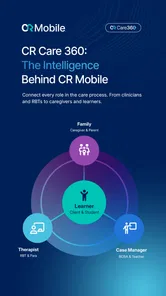
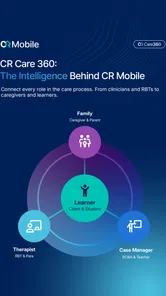
Now consider the same situation with a caregiver involved. A caregiver may not need the same depth of clinical responsibility as a trained provider, but may still be part of the daily routine around the learner. A mobile app can make participation more practical when the person is not sitting at a computer. The organization still needs to define who should do what, but mobile access can lower a logistical barrier.
For a supervisor moving between appointments, the value is different. Portability can make it easier to stay connected to work that is distributed across locations. The supervisor may not want to carry a laptop into every situation, and a phone-based option can be more suitable for quick checks or workflow steps. I would still reserve detailed review and complex planning for a larger screen when that is more comfortable and less error-prone.
These examples show why the app’s capability matters most in context. The same mobile access that helps a field-based therapist may feel unnecessary to a small practice that performs all documentation at a fixed workstation. The app is strongest when movement and timing are real parts of the job.
Where the app saves effort—and where it does not
The clearest gain is reduced dependence on a desktop. That can mean fewer delayed entries, less carrying of paper notes, and a more direct connection between care activity and the associated workflow. I would describe this as operational efficiency rather than clinical automation. The app can help people work through a process; it does not remove the thinking that makes the process meaningful.
A less obvious benefit is consistency during transitions. ABA care often involves more than one person, and transitions are where context can be lost. A mobile tool gives the person finishing one part of the work a practical way to leave information within the established system instead of relying on a verbal reminder or an informal message. The benefit depends heavily on disciplined use, but the opportunity is important.
There is also a potential emotional benefit for staff. When small administrative tasks accumulate, they can make a session feel unfinished long after the learner has gone. A mobile workflow may let the user close those loops sooner. That does not mean every task should be completed immediately, but it can make the day feel more manageable when the app fits the organization’s process.
On the other hand, mobile access can expose weaknesses in a process that was already unclear. If responsibilities are not defined, users may duplicate work, assume someone else handled an update, or enter information inconsistently. I would not introduce the app and expect it alone to solve coordination problems. Before adoption, a team should agree on who uses it, at what point in the session, and how mobile work connects with the broader CentralReach workflow.
The trade-offs I would consider first
The first trade-off is screen size. A phone is easier to carry than a laptop, but it is not the ideal place for every review or planning task. If you regularly need to compare substantial amounts of information, write long notes, or make detailed decisions, a desktop or tablet may remain more comfortable. The mobile app is most convincing for access and continuity, not for turning a small screen into a full office.
The second is attention. ABA care is human work, and a device can become intrusive if used without boundaries. I would establish moments for mobile interaction rather than checking constantly. That approach protects the quality of the interaction while still taking advantage of the app’s portability.
The third is onboarding. A free app can remove a purchase barrier, but it does not remove the need for an organization to train users. Someone unfamiliar with ABA documentation may need guidance on what belongs in the workflow and how to avoid entering information simply because the field is available. The best results will come from a clear process, not from installation alone.
The fourth is fit with existing systems. CR Mobile App makes the most sense for people already working within a CentralReach-based environment or an organization evaluating that mobile workflow. If you only want a private app for tracking personal habits, symptoms, or appointments, its ABA-care focus is likely to feel too specialized. A general health app would be a better match for that purpose.
I would also be careful about treating the rating as a guarantee. A 4.2 average from 254 ratings is encouraging, but different users may be judging different parts of the experience, from field work to administrative use. The right question is whether the app supports your role, device habits, and organization’s procedures. A positive overall score cannot answer that on its own.
Who will gain the most from it?
CR Mobile App should appeal most to ABA professionals who spend meaningful time away from a workstation. Therapists working in homes, schools, community settings, or multiple rooms can benefit from having a mobile route into their established care workflow. Supervisors and coordinators may also appreciate the ability to stay connected while moving through a busy day.
It may also help organizations trying to make documentation more timely without asking staff to carry a laptop everywhere. The strongest case is not simply “everyone should have the app.” It is “the people whose work is mobile should have a tool designed for that reality.” That narrower recommendation is more credible and more useful.
Caregivers could find value when they are included in an ABA-care process and need something more practical than a desktop-only routine. However, I would want clear instructions from the care team before asking a caregiver to use any medical app. The app should support an agreed role, not create uncertainty about who is responsible for observation, entry, or follow-up.
People who should skip it are those looking for a broad consumer health application. It is also not my first recommendation for someone who rarely leaves a desk and is already comfortable with a larger-screen workflow. In that case, the mobile advantage may be too small to justify changing habits.
Version, compatibility, and the everyday decision
The current version is 26.5.3, and the app requires Android 9 or later. That makes device compatibility something to check before planning a rollout, particularly in organizations that keep older phones in circulation. I would test it on the actual devices staff use rather than assuming that a technically compatible phone will feel equally practical in daily work.
Because the app is free and rated for Everyone, trying it is relatively approachable from a cost and age-label perspective. Still, a medical workflow deserves a more careful evaluation than a casual download. I would begin with a small group, choose one concrete use case, and ask whether mobile access actually improves timeliness and handoffs. That kind of trial is more informative than judging the app after a quick launch.
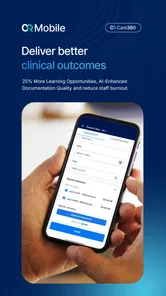
My overall view is favorable but focused. CR Mobile App is most valuable when mobility is the missing link in ABA care. It can bring session-related work closer to the people and situations where care happens, reduce reliance on memory after transitions, and make a desktop-centered process easier to carry into the real world. Those are meaningful benefits, but they depend on thoughtful use.
I would recommend it to ABA teams that already need a mobile extension of their workflow, especially therapists and supervisors working across locations. I would not recommend it as a generic medical tracker or as a cure for unclear procedures. If your day is mobile and your care process is connected to CentralReach, this app deserves a practical trial. If your needs are broader, simpler, or entirely personal, another kind of health app will probably serve you better.
In short, my recommendation is to judge CR Mobile App by the moments when work normally gets postponed: between activities, during transitions, and after leaving the desk. If those moments are causing lost context or unnecessary paperwork, the app’s mobile focus can make a genuine difference. If they are not, its specialized purpose may offer little reason to change what already works.
CR Mobile App Frequently Asked Questions
Which devices can run CR Mobile App?
CR Mobile App is a medical app for Android and iOS users. On Android, the device needs to run version 9 or later. Before downloading, check your device’s operating system and make sure you are choosing the official app from CentralReach, LLC. Keeping your device’s software current can also help with compatibility and app performance.
Who is CR Mobile App intended for?
CR Mobile App is associated with CentralReach and ABA care, as reflected in its description, “Reimagine ABA care with CR Mobile.” It is an app rather than a general medical reference, so its usefulness depends on whether you have a reason to access CR-related services. The app is rated for Everyone, but that age rating does not mean every feature is intended for every user.
What is the CR Mobile App used for?
CR Mobile App is designed to give users convenient access to CR-related services and information from a mobile device. Depending on the version and region, it may allow you to view account details, manage available services, receive notifications, submit requests, or access important resources without visiting the official website. The exact tools can vary, so check the app description before downloading.
Is CR Mobile App free to download and use?
The CR Mobile App is free to download from the official Android or iOS store. However, some services accessed through the app may require an existing account, paid subscription, transaction fees, or other charges determined by the service provider. Downloading the application does not necessarily mean that every feature or service inside it is free.
What information or permissions does CR Mobile App require?
During installation or first use, CR Mobile App may request permissions such as internet access, notifications, camera access, storage, or location, depending on the features enabled in your version. Some permissions are needed for specific functions rather than basic browsing. Review the permission prompts carefully and grant only the access you consider necessary for the features you intend to use.
Pros
- Quick access to account information and key services on mobile.
- Convenient notifications help users stay updated on important activity.
- Clean interface makes common tasks easy to find and complete.
- Useful for managing services while away from a desktop computer.
- Mobile access can save time compared with visiting a branch or website.
Cons
- Some features may depend on account type
- region
- or eligibility.
- An internet connection is required for most functions.
- Security checks can make login slower on unfamiliar devices.
- The app may use considerable battery during frequent notifications.
- Occasional updates may change the layout or require renewed permissions.











