

Copa Airlines
- 649.00
- 3.8
- Installs
- 1.00M
- Price
- Free

Screenshots
Analysis by Reviewed
When I travel with Copa Airlines, I want the airline app to reduce small decisions rather than add another layer of work. A flight day already involves schedules, airport signs, boarding announcements, documents, and changing plans, so a mobile companion is most useful when I can understand it quickly and use it without unnecessary effort. My experience with Copa Airlines is that it is most valuable as a focused travel tool for passengers already flying with Copa, especially when they want airline information in one place instead of moving between a browser, email messages, and airport screens.
This is a free Travel & Local app from Copa Airlines for Everyone, and it has been available since June 20, 2016. Its presence on Android is substantial, with more than a million installs, while its average rating sits at 3.8 from roughly nine thousand ratings. Those numbers suggest a useful but not universally smooth experience: many travelers find a reason to keep it, yet it is not the kind of app I would install without a specific Copa journey in mind.
How clearly the app supports different travelers
I look at this section through a practical question: can travelers with different needs use the app in a way that suits their trip, rather than being expected to follow one fixed routine? I’ll focus on how preparation, shared use, and a backup plan can make the experience more manageable, then consider where a different tool or a helping hand is the wiser choice.
Readability and navigation during a busy trip
The most important test for an airline app is not whether it looks polished in a quiet room. It is whether I can use it while carrying a bag, walking through an unfamiliar terminal, or trying to confirm a detail with limited attention. Copa Airlines works best when I approach it with one clear task, such as checking a reservation, reviewing a flight detail, or preparing for departure. That focused use makes more sense than treating it as a general travel planner for every airline and every leg of a trip.
I also appreciate the difference between information I need before leaving home and information I need at the airport. Before travel, I can take time to check what the app presents and make sure my booking details are correct. At the airport, I need short paths and recognizable labels. If I have to explore several screens to locate the relevant flight information, the app becomes less helpful precisely when the pressure is highest. My practical advice is to open it before travel, sign in or retrieve the relevant trip while calm, and avoid making the first attempt beside the gate.
For readers who rely on larger text, stronger contrast, or screen magnification, the sensible approach is to test the key journey rather than judge the interface from its opening screen. Airline apps can contain compact flight details, date fields, buttons, and status information that become harder to scan when text is enlarged. I would check whether the actions I personally need remain understandable with the phone’s usual display settings. That is more useful than assuming that a clean visual design automatically means comfortable reading for everyone.
The current version is 17.2.16, so keeping the app updated is a reasonable part of preparation. Updates can matter more for a travel app than for a casual utility because an outdated build may behave differently from the version currently supported by the airline. I would update it while connected to a reliable network, then open it once afterward instead of waiting until boarding time. That simple routine also gives me a chance to notice whether I need to authenticate again or review a trip.
More From Our News Desk

 Weather - By Xiaomi
Weather by Xiaomi Review: Clear at a Glance, Less Clear Up Close
Xiaomi’s weather app makes everyday forecasts quick to scan, but its calm surface can leave useful details and recovery paths harder to find than they should be.

 X
XX Under Pressure: Can It Recover When Posting Goes Wrong?
A resilience-focused review of X, examining setup, mistaken posts, interruptions, weak connections, and the gaps that matter when recovery needs to be dependable.

 Clash of Clans
Clash of Clans Is Won Between the Battles
Its raids are quick; its community is a long-term project of coordination, teaching, rivalry, and shared responsibility—with all the friction that entails.

 Android Auto
Android Auto Makes the Case for Quieter Car Software
The car interface is no longer judged by how much it can do, but by how quietly it helps. Android Auto shows what drivers now expect—and what still gets in the way.

 MobiOffice: Word, Sheets, PDF
MobiOffice: Transforming Mobile Productivity with Seamless Integration
MobiOffice: Word, Sheets, PDF is redefining mobile productivity with a surprising blend of functionality and innovation.

 EA SPORTS FC Soccer Mobile 26
EA SPORTS FC™ Mobile Soccer: Redefining Mobile Sports Gaming
Dive into EA SPORTS FC™ Mobile Soccer, where immersive gameplay and strategic depth transform mobile sports gaming.
Latest News



Motor, visual, hearing, and cognitive considerations
Airline travel places unusual demands on motor control. I may be holding a passport, pulling luggage, wearing gloves, or using the phone with one hand. A useful airline app should therefore minimize precise tapping and avoid forcing me to type more than necessary. In my use, the app is easiest when I prepare the trip in advance and keep the number of last-minute interactions low. I would not want to depend on entering long booking details while standing in a crowded queue.
People with limited dexterity may also need more time between actions. A button that is easy to tap at home can be awkward when the device is moving or when the user is trying to operate it with an alternative input method. I cannot treat the app as automatically accessible simply because it is intended for broad use. Instead, I would test the exact functions needed for the journey and keep a second way to retrieve essential travel information, such as the airline’s normal web channels or the booking message already received.
For travelers with low vision, the practical question is whether important information can be distinguished without relying only on color, small type, or tightly packed layouts. Flight details are especially sensitive because a missed digit or misunderstood status can cause real stress. I recommend checking the flight information in a quiet place, enlarging the display if needed, and taking a moment to confirm the date and route rather than reading while rushing between signs.
Hearing differences create another travel challenge. An app can help by giving me a visual place to review flight information, but it does not replace the need to pay attention to airport procedures. Gate changes, boarding instructions, and staff announcements may still happen outside the app. For a traveler who does not reliably hear public announcements, the app is best used as one layer of awareness alongside airport displays and direct confirmation with staff. I would never assume that an app alone covers every spoken instruction during a journey.
Cognitive load matters just as much. Travel involves unfamiliar names, multiple time references, and decisions made under pressure. I find the app more manageable when I use it in a fixed order: identify the trip, verify the date and route, review the next action, and close the app only after I know what I need. This is a small workflow, but it prevents the common mistake of opening several screens without remembering which detail was confirmed.
What it is like in realistic travel situations
Imagine I am leaving for the airport early in the morning. I have one suitcase, a phone battery that I do not want to waste, and a family member asking whether the flight is still on schedule. Instead of searching through old messages, I open Copa Airlines and use it as my first reference for the trip. If the relevant information is easy to reach, I can answer quickly and keep moving. If the app requires repeated sign-ins or makes me reconstruct the booking, the benefit disappears, which is why I prepare before departure.
A second situation is a traveler with limited English confidence or someone who finds airline terminology confusing. The app may be more comfortable than asking a stranger to interpret every step, but I would still compare the wording with the booking confirmation and airport signs. The safest habit is to focus on concrete details—flight number, date, destination, and next action—rather than trying to understand every travel term at once.
For a person traveling with an older relative, the app can serve as a shared reference rather than something the older traveler must operate alone. I might review the trip on my own phone, enlarge the relevant information, and explain one item at a time. This is a better use than handing over the device and expecting someone unfamiliar with airline apps to navigate under pressure. The app can support cooperation, but it does not remove the need for human assistance.
It is also useful to think about connectivity and battery as accessibility issues. A traveler may have an inconsistent connection, limited data, or a device that is nearly empty. I would not make the app my only record of the journey. Before leaving, I would keep the essential booking information available through the original confirmation and carry a charging option if possible. This is not a criticism unique to Copa; it is a practical limit of relying on any airline app at the exact moment a network or battery problem occurs.
Where the app fits beside usual alternatives
The main alternative is the mobile website, and that may be the better choice for someone who flies Copa only once or dislikes adding airline apps. A browser avoids installation and can be easier for a user who already has a familiar text-size or assistive setup there. The trade-off is that a browser session may feel less direct when I need to return to the same trip repeatedly. I would choose the website for a one-off task and the app when I expect to check Copa travel information more than once.
Email and booking confirmations remain important alternatives because they provide a record I can search, save, or share. They are often better for preserving the original details of a reservation, while the app is more convenient for active trip checking. I treat the two as complementary rather than competing: the confirmation is my backup record, and the app is my quick travel workspace.
Airport information screens and staff are still essential. Screens may be easier for some passengers because they are large and visible to a group, while staff can clarify a confusing situation or adapt their explanation to a traveler’s needs. The app is strongest when it reduces routine checking, not when it tries to replace every human or physical source of information at the airport.
Travel aggregation apps are another option for people comparing several airlines or managing a complex itinerary. They can be more convenient when one trip includes different carriers. Copa Airlines is a narrower tool: its value is tied to a Copa journey, so I would not use it as my only travel organizer if my plans regularly combine airlines, trains, hotels, and local transport. That narrower focus is a strength for a Copa passenger and a limitation for a traveler seeking one universal dashboard.
Remaining barriers and sensible workarounds
The rating of 3.8 indicates that the experience is not frictionless for everyone. I would interpret that as a reason to prepare, not as a reason to dismiss the app. Airline software is judged in stressful moments, and a small login issue, unclear status, or slow screen can feel much more serious at an airport than it would in everyday use. My workaround is to complete the important checks before leaving and avoid depending on a single screen for a time-critical detail.
Another barrier is the difference between being able to open an app and being able to complete a full travel task independently. A traveler may be able to read the first screen but struggle with date selection, dense booking information, or a process that requires several steps. I would test the entire route from opening the app to reaching the information I need. If that route is difficult, I would ask a trusted companion to help before travel rather than waiting until the terminal.
Language, anxiety, and unfamiliar airport routines can combine into a larger problem. I find it helpful to write down the few questions I need answered before opening the app: Where is my flight information? What detail must I show? What should I check next? This turns the app into a tool for a known purpose and reduces wandering through menus. It is a simple but non-obvious improvement for anyone who becomes overwhelmed by too much information.
Privacy and device sharing deserve attention as well. If I use a family member’s phone or help another traveler with their booking, I would make sure the session is closed afterward and avoid leaving personal travel details visible. I would also be cautious when using a public or borrowed device. The convenience of having the app available should not lead me to forget that reservations contain personal information.
Finally, the app is not the right choice for every Copa passenger. Someone who rarely flies, has limited storage, prefers browser-based tools, or needs a highly customized accessibility workflow may be better served by the website plus a saved confirmation. Someone managing several airlines may prefer a broader organizer. I would recommend the app most strongly to passengers who want a direct Copa-specific reference and are willing to prepare their trip in advance.
My inclusive verdict
After using it as a travel companion rather than expecting it to solve every airport problem, I see Copa Airlines as a practical, free app with a clear audience. It can make routine checking easier for Copa passengers, especially when the trip is prepared before the rush begins. Its broad Everyone age classification and large install base make it approachable, but neither label guarantees that every traveler will find every screen equally comfortable.
My strongest recommendation is to use it as part of a layered plan: update it, open it before departure, verify the important details, keep the original confirmation available, and use airport displays or staff when the situation changes. Travelers with visual, motor, hearing, or cognitive needs should test the complete journey on their own device settings rather than relying on assumptions about accessibility. That approach respects what the app can do while protecting against the moments when it may not be enough.
For me, the deciding question is simple: am I flying Copa and do I want a dedicated place to manage that airline’s travel information? If yes, the app is worth trying. If I need a universal itinerary manager, a browser-first experience, or guaranteed independence across every airport situation, I would choose an alternative or combine tools. The best use of Copa Airlines is as one dependable layer in a prepared journey, not as the only source of truth when travel becomes complicated.
Developed by Copa Airlines, the app continues to make sense for passengers who prefer having a dedicated mobile option at no cost. I would install it before a Copa trip, test the functions I expect to use, and decide from that real workflow whether it fits my needs. That short trial is more revealing than the store summary: it shows whether the app’s navigation, readability, and pace work for me under the conditions in which I will actually travel.
Copa Airlines Frequently Asked Questions
Is the Copa Airlines app available in English and other languages?
The app is intended to help passengers manage their Copa Airlines travel, and the language displayed may depend on your device settings or the options available within the app. Before relying on it for a trip, check that you can comfortably understand the booking and travel information shown on your device. You can also keep your reservation details available in case you need to review them through another channel.
What devices and operating systems can run the Copa Airlines app?
The Copa Airlines app is available for Android and iPhone, with compatibility depending on your device and operating system. On Android, the minimum supported operating system is version 10. Keeping your device’s software up to date can help with compatibility and security, while the app itself is currently version 17.2.16. Check your device’s app store before downloading to confirm it can install the current release.
What is the Copa Airlines app used for?
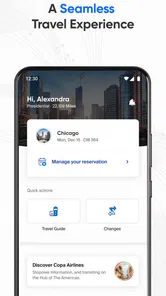
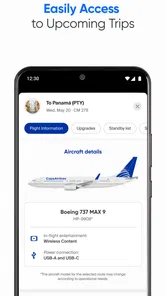
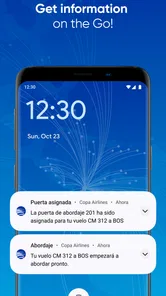
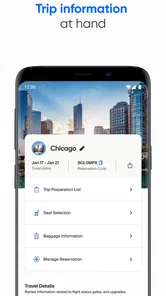
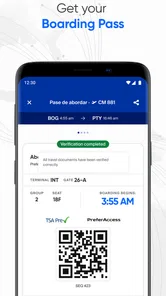
The Copa Airlines app is designed to help passengers manage most parts of their journey from a mobile device. After signing in or entering a reservation code, you can check flight details, review schedules, manage bookings, select available seats, access your mobile boarding pass, and receive travel updates. It is particularly useful at the airport, although some services may depend on your route and ticket type.
Can I check in for my Copa Airlines flight through the app?
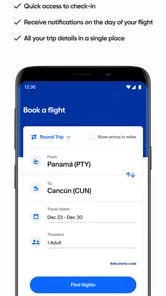
Yes, the app generally allows eligible passengers to complete online check-in before departure. You can confirm your itinerary, provide or review passenger information, choose a seat when available, and obtain a digital boarding pass. Check-in availability may vary according to the airport, destination, travel documents, and special requirements. Passengers traveling with certain services or documentation may still need assistance at the airport.
Can I manage my reservation and select seats in the Copa Airlines app?
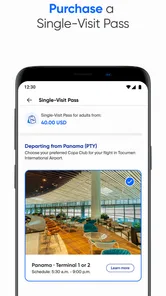
The application can be used to review and manage many Copa Airlines reservations, including viewing flight segments, checking fare information, and selecting or changing seats when the booking permits it. Seat availability and possible charges depend on the fare purchased, route, aircraft, and timing. If your reservation was made through a travel agency or includes special circumstances, some changes may require contacting Copa Airlines directly.
Pros
- Mobile check-in and digital boarding passes save time at the airport.
- Flight status updates help travelers monitor delays and gate changes.
- Manage bookings
- select seats
- and purchase extras directly in the app.
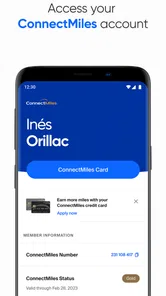
- ConnectMiles integration makes it easy to view and use loyalty benefits.
- Useful travel information and airport details are available in one place.
Cons
- Some features may require a stable internet connection while traveling.
- App performance can vary after updates or on older devices.
- Customer support response times may be slower during disruptions.
- Certain booking changes or services may incur additional airline fees.
- Availability of seats and extras can differ by route and fare type.











