

CoolRead- Enchanting Reads
- 40.00
- 4.3
- Installs
- 10.00K
- Price
- Free

Screenshots
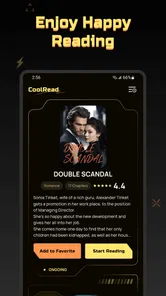
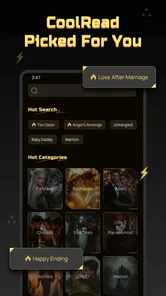
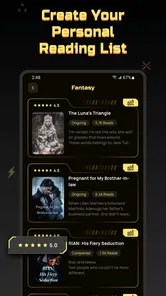
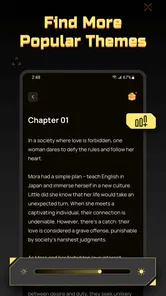
Analysis by Reviewed
CoolRead is a free personalization app from Apps and Live Wallpapers by Juu that takes a simple idea—helping me discover and read stories comfortably—and gives it a more focused place on my phone. After spending time with it, my overall impression is positive but specific: it works best for someone who wants casual reading to feel more immediate and less scattered, not for a reader looking for a full-featured library, advanced annotation system, or replacement for every dedicated reading service.
The app’s store summary points toward discovering a next favorite story and reading whenever it suits you. In practice, that promise makes the most sense when I treat CoolRead as a lightweight reading companion rather than a complete literary ecosystem. It is easy to imagine opening it during a commute, before bed, or during a short break when I want something more engaging than endlessly scrolling through social feeds.
What using CoolRead feels like in everyday reading
The strongest part of the experience is its low-pressure nature. I do not need to prepare a long reading session to get value from it. The app fits those small moments when I have enough attention for a story but not enough time or energy to search through several unrelated services. That makes the personalization angle important: the less effort it takes to reach something appealing, the more likely I am to return.
I found the concept especially suitable for readers who enjoy exploring unfamiliar fiction. Someone who already knows exactly which title they want may prefer a conventional bookstore, library app, or reading platform with a large, clearly organized catalog. CoolRead is more interesting when the question is, “What should I read next?” rather than, “Where can I find this exact book?”
That distinction also explains why the app belongs in the personalization category. Its value is not only in displaying text. It is in shaping the discovery experience around a user’s next reading choice. The app’s name, CoolRead - Enchanting Reads, sets an inviting tone, and the presentation feels aimed at making reading feel like a pleasant habit instead of a task I keep postponing.
One practical routine worked particularly well for me: I would open the app when I had roughly ten minutes available, choose a story that matched my mood, and stop at a natural point rather than trying to finish a large section. This kind of use avoids the pressure that can come with longer reading apps. It also makes the app a reasonable option for people trying to replace a few minutes of passive phone use with something more memorable.
Discovery is the real reason to try it
CoolRead is most convincing when it acts as a doorway to new reading material. The useful question is not whether it can compete with every established reading platform, but whether it can reduce the friction between unlocking the phone and beginning a story. For a reader who often spends more time choosing than reading, that can be a meaningful advantage.
More From Our News Desk

 Gmail
GmailGmail in a Busy Inbox: Who Benefits Most?
From first account to crowded workday, Gmail earns its place through dependable search and flexible sorting—but its best fit depends on how much inbox maintenance you can tolerate.

 Prime Video
Switching to Prime Video: What Changes in Your Viewing Routine
Prime Video can make a compelling second home for streaming, but switching means learning a different catalog, rental layer, and route from browsing to playback.

 Universal TV Remote Control
Universal TV Remote Control Works Best as a Reliable Backup
A phone remote earns its place through quick setup and reliable habits. Here is how to get more from Universal TV Remote Control—and where its limits show.

 Weather - By Xiaomi
Weather by Xiaomi Review: Clear at a Glance, Less Clear Up Close
Xiaomi’s weather app makes everyday forecasts quick to scan, but its calm surface can leave useful details and recovery paths harder to find than they should be.

 X
XX Under Pressure: Can It Recover When Posting Goes Wrong?
A resilience-focused review of X, examining setup, mistaken posts, interruptions, weak connections, and the gaps that matter when recovery needs to be dependable.

 Clash of Clans
Clash of Clans Is Won Between the Battles
Its raids are quick; its community is a long-term project of coordination, teaching, rivalry, and shared responsibility—with all the friction that entails.
Latest News



I also like the possibility of using it according to mood rather than a fixed reading plan. A story-discovery app can work differently in the morning, during a lunch break, and late at night. That flexibility matters because reading habits are rarely consistent. A rigid system may be excellent for organizing a personal library, while a lighter discovery tool can be better when I want to browse without committing to a purchase or a long-term list.
There is a useful trade-off here. The more an app emphasizes quick discovery, the less control some serious readers may feel they have over catalog organization. I would not choose CoolRead as my only tool if I needed detailed shelves, a carefully maintained collection, or a powerful system for tracking every finished title. I would choose it as the place where I look for the next possibility.
How I would build it into a reading habit
My advice is to give the app a defined role instead of expecting it to handle every reading need. I would use it as a daily or occasional discovery stop, then decide whether a selected story deserves a longer session. This prevents the common problem of installing a reading app, browsing enthusiastically for one evening, and abandoning it because the app was expected to replace an entire reading workflow.
A second useful approach is to open it at a consistent transition point, such as after dinner or before putting the phone away for the night. That creates a simple cue. The app does not need to become a formal productivity system; it only needs to be easier to start than the distractions competing for the same screen.
For readers who share a device with family members or use a phone in public, I would also pay attention to the mature age classification. CoolRead is marked Mature 17+, so it is not an app I would casually hand to a younger reader without first considering whether its available material suits them. That rating is an important part of deciding who should use it, especially in households where several people may access the same device.
Where the app earns trust and where it asks for patience
The app is free to install, which makes trying it straightforward. That is helpful for a discovery-focused product: I can explore the basic experience before deciding whether it deserves a regular place on my phone. At the same time, in-app purchases range from $0.99 to $99.99 per item, so I would approach any optional purchase carefully and check what it unlocks before confirming it.
That wide purchase range is not automatically a problem, but it does change how I evaluate the app. A free starting point is appealing, yet readers should distinguish between enjoying the initial experience and committing money to additional content or options. My practical rule would be to use the free layer long enough to understand whether the discovery flow actually fits my habits. If I am still browsing without reading, paying will not solve the underlying mismatch.
The current version is 1.4.1, and the app runs on Android 7.0 or later. That broad compatibility is useful for people who keep an older phone as a backup or do not upgrade frequently. It also means the app is not limited to the newest devices. Still, compatibility alone does not guarantee that every phone will feel equally comfortable for reading, so screen size and personal preferences remain relevant.
CoolRead has an average rating of 4.3 from around 190 ratings, with roughly 40 written reviews. I see that as encouraging early feedback rather than definitive proof that it will suit every reader. The app has passed the first stage of attracting interest, but its relatively modest review volume means I would judge it by my own reading routine instead of treating the rating as a guarantee.
The meaningful weakness: discovery can become another form of browsing
My main criticism is connected to the app’s central strength. A discovery-oriented reading experience can make choosing a story feel easy, but it can also encourage endless sampling. If I keep looking for the perfect next read, I may spend the same time browsing that I hoped to reclaim from social media. The solution is to set a small limit: choose one story, read for a few minutes, and only return to browsing if the selection genuinely does not work.
This is also why I would not recommend CoolRead to someone who wants a highly controlled reading environment. A person who needs extensive organization, deep study tools, or a carefully managed personal archive may be happier with a specialized ebook reader or library manager. Those alternatives usually make ownership, sorting, and long-term reference the main priorities. CoolRead’s appeal is more immediate and atmospheric: it encourages the next reading moment.
Another limitation is that the app’s usefulness depends on whether its available reading choices match my tastes. Discovery is only valuable when the recommendations or presented stories feel relevant enough to hold attention. I would give it a fair trial across several moods before deciding. One unappealing session is not enough to dismiss it, but repeated mismatches would be a clear signal to return to a service with a catalog I can search more directly.
I would also be cautious about making it a substitute for a dedicated accessibility-focused reader. If I need very specific text controls, specialized display settings, or a workflow designed around long academic reading, a purpose-built reading app is likely the safer choice. CoolRead makes more sense for relaxed story discovery than for demanding, technical reading.
Who will get the most from it
I think CoolRead is a good match for casual fiction readers, people rebuilding a reading habit, and anyone who regularly asks friends for recommendations but rarely knows where to begin. It is also suitable for readers who like the feeling of finding something unexpected. The free entry point lowers the risk of experimenting, while the personalization focus gives the app a clearer purpose than a generic text viewer.
It may be particularly useful for someone who has a busy schedule but still wants reading to appear in the day. A parent waiting during an activity, a commuter with a short journey, or a student taking a break between tasks could use it for compact reading sessions. The important point is that the app does not need to control the entire day. It only needs to make one small reading decision easier.
I would hesitate to recommend it to a younger audience because of the Mature 17+ classification. I would also steer highly organized readers toward a platform built around personal libraries, detailed metadata, or serious study. If your priority is buying a particular bestseller, borrowing a known title, or keeping every book in one carefully arranged collection, another category of app will probably serve you better.
For someone deciding whether to spend money inside the app, I would recommend a cautious sequence. First, test whether the free experience leads to actual reading rather than repeated browsing. Next, notice whether the app fits your preferred session length and story preferences. Only then should you consider an in-app purchase, and even then I would review the individual item rather than assuming every paid option has the same value.
How it compares with familiar alternatives
Compared with a conventional ebook reader, CoolRead feels less focused on managing books I already own and more focused on helping me discover what might hold my attention next. A standard reader is usually the better choice when I have a specific title, want reliable long-form progress tracking, or need a permanent home for a personal collection.
Compared with a library app, CoolRead is less naturally associated with borrowing and returning known titles. Library services are excellent when access to a local collection is the priority. CoolRead is more appealing when I want a relaxed recommendation path and do not want the process to begin with a catalog search.
Compared with social reading platforms, it appears less dependent on the noise of public discussion. That can be a benefit if I want to read without following reactions, comments, or popularity cycles. On the other hand, readers who choose books mainly through friends, communities, or detailed user discussion may find a social platform more persuasive.
Those comparisons leave CoolRead with a distinct but narrower role. It is not trying to be every kind of reading tool at once. In my view, that is healthy, provided users understand the role before installing it. The app is strongest as a gentle starting point for story discovery and weaker as a complete replacement for specialized reading software.
My final recommendation
CoolRead - Enchanting Reads is worth trying if you want a free, approachable way to find stories and turn spare minutes into reading time. I like its clear focus on discovery, its suitability for informal sessions, and the fact that it can fit into a routine without demanding a large commitment. The developer, Apps and Live Wallpapers by Juu, has positioned it in a space where simplicity is part of the appeal.
My recommendation comes with two conditions. First, remember that the Mature 17+ classification makes it unsuitable as an automatic choice for children. Second, treat the in-app purchases thoughtfully, especially because individual items can range from small amounts to substantially larger ones. The free starting point is a reason to explore, not a reason to buy without checking what you are getting.
For me, the best description is this: CoolRead is a useful reading doorway, not a complete library replacement. If you want a little inspiration and a convenient way to begin a story, it deserves a place on your shortlist. If you need deep organization, formal study features, or guaranteed access to a particular title, I would choose a more specialized alternative. Used for the job it handles best, it can make the next reading choice feel pleasantly simple.
CoolRead- Enchanting Reads Frequently Asked Questions
What devices and operating systems can run CoolRead- Enchanting Reads?
CoolRead- Enchanting Reads is an app for mobile devices, and its minimum operating system requirement is version 7.0. Before installing, check that your phone or tablet meets this requirement and has enough available storage for the app. Keeping your operating system and the app updated can also help you avoid compatibility issues and enjoy a smoother reading experience.
What is CoolRead- Enchanting Reads?
CoolRead- Enchanting Reads is a reading-focused mobile app designed for users who enjoy discovering and reading digital stories. It typically brings together a selection of novels, serialized fiction, and other literary content in a convenient format. Before downloading, readers should check the current catalog, supported genres, language options, and whether all books are freely accessible or if some require in-app purchases or a subscription.
Is CoolRead- Enchanting Reads free to download and use?
CoolRead- Enchanting Reads is free to download, but that does not necessarily mean every feature or story is available without cost. It offers in-app purchases, with individual items priced from $0.99 to $99.99. Depending on the title, there may be premium chapters or other optional purchases. Check the app’s payment terms before unlocking content so you know what you are choosing to buy.
What kind of books or stories can I read in CoolRead- Enchanting Reads?
CoolRead- Enchanting Reads is intended for readers looking for entertaining digital fiction, although the exact selection can change over time. The available library may include romance, fantasy, mystery, drama, adventure, or serialized stories, depending on the current catalog. Users should browse the description and screenshots before installing to confirm that the available genres, writing languages, and story formats match their personal preferences.
Does CoolRead- Enchanting Reads work offline?
Offline reading depends on the app’s download and content-access features. Some reading platforms allow chapters or books to be saved for later use, while others require an active internet connection to load content, synchronize progress, display advertisements, or validate access to premium chapters. After installation, check each title’s options and the app settings to determine whether downloaded stories remain available when traveling or using limited mobile data.
Pros
- Large selection of enchanting stories for different reading moods.
- Clean
- distraction-free interface makes browsing and reading comfortable.
- Useful category filters help readers discover new titles quickly.
- Regular content updates can keep the library feeling fresh.
- Suitable for relaxing offline reading during commutes or travel.
Cons
- Some stories or features may require an in-app purchase.
- The quality and editing of individual stories can vary.
- Limited personalization may make recommendations feel generic.
- Offline access may not be available for every title.
- Frequent notifications could become distracting for some readers.











