

Cool Ringtones 2025
- 55.00
- 4.1
- Installs
- 500.00K
- Price
- Free

Screenshots
Analysis by Reviewed
When I choose a ringtone app, I care less about a grand promise of endless choice and more about whether I can find a sound that suits my phone, hear it clearly before committing, and make the change without turning a small task into an afternoon project. Cool Ringtones 2025 is a free sound-customization app from ringtones apps Pro, aimed at people who want a ready-made tone rather than the extra steps involved in editing audio or building a personal library from scratch. It has a 4.1 average from around 8,400 ratings and more than 500,000 installs, which suggests it has found an audience among people browsing for quick ways to change their phone’s alerts.
Decide what you want the sound to do
Before installing, I’d ask myself whether I want a new call sound, a less intrusive notification, or a more recognizable alarm. Those needs are easy to blur together while browsing, but they have different practical demands. Calls need to cut through everyday background noise; short alerts should get attention without becoming irritating; an alarm needs to be noticeable enough to wake me. Choosing the job first makes a big collection easier to navigate and lowers the chance that I will pick a catchy sound that does not work in real life.
I would also consider where I use my phone most. Someone who takes calls in shared spaces may prefer a tone that is clear but not theatrical, while a person whose phone stays in a bag might need a stronger opening. If I often keep notifications quiet, changing the ringtone alone may be all I need. This app is most useful when I have a real reason to change a sound, rather than when I am browsing without any idea what I want the phone to do differently.
Start with the sound you actually need
Before browsing, I’d decide whether I want a distinctive incoming-call sound, a calmer alert for everyday notifications, or something that works as an alarm. Those jobs call for different kinds of audio: a ringtone needs to stand out in a noisy room, while a notification is usually better when it is brief and not startling. The app’s appeal is that it brings several kinds of sounds together, so I can explore without first collecting audio files elsewhere.
That convenience matters most when I have a rough idea of the mood but not a specific track in mind. I can browse for something light, familiar, natural, or deliberately silly, then judge whether it fits the way I use my phone. I would still listen with the phone’s usual volume in mind; a sound that seems pleasant during a quiet preview may feel intrusive when it rings repeatedly during a busy day.
Finding and choosing sounds
Upon diving into Cool Ringtones 2025, the first thing you'll notice is the sheer variety of options available. From soothing melodies to upbeat pop tracks, the app offers an extensive collection that caters to diverse musical tastes. I personally enjoyed exploring the different categories which include classics, nature sounds, and even some quirky, humorous options that are bound to make you smile every time your phone rings.
User-Friendly Interface
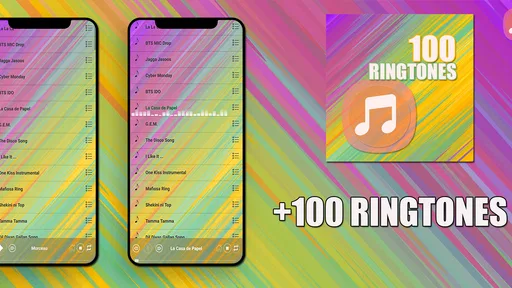
One of the standout features of this app is its user-friendly interface. Navigating through the app is a breeze, with intuitive menus and a clean layout that makes finding your perfect ringtone a seamless experience. The app also offers a handy search function, allowing you to quickly locate specific tunes or genres. It's perfect for those moments when you know exactly what you want but need a little help finding it among the myriad options.
More From Our News Desk

 Gmail
GmailGmail in a Busy Inbox: Who Benefits Most?
From first account to crowded workday, Gmail earns its place through dependable search and flexible sorting—but its best fit depends on how much inbox maintenance you can tolerate.

 Prime Video
Switching to Prime Video: What Changes in Your Viewing Routine
Prime Video can make a compelling second home for streaming, but switching means learning a different catalog, rental layer, and route from browsing to playback.

 Universal TV Remote Control
Universal TV Remote Control Works Best as a Reliable Backup
A phone remote earns its place through quick setup and reliable habits. Here is how to get more from Universal TV Remote Control—and where its limits show.

 Weather - By Xiaomi
Weather by Xiaomi Review: Clear at a Glance, Less Clear Up Close
Xiaomi’s weather app makes everyday forecasts quick to scan, but its calm surface can leave useful details and recovery paths harder to find than they should be.

 X
XX Under Pressure: Can It Recover When Posting Goes Wrong?
A resilience-focused review of X, examining setup, mistaken posts, interruptions, weak connections, and the gaps that matter when recovery needs to be dependable.

 Clash of Clans
Clash of Clans Is Won Between the Battles
Its raids are quick; its community is a long-term project of coordination, teaching, rivalry, and shared responsibility—with all the friction that entails.
Latest News



Even with search, I’d treat browsing as a short, focused task instead of trying to inspect the whole catalogue in one sitting. A useful approach is to search for a mood or broad sound type, listen to a few candidates, and stop once one works in the role I need. If I keep comparing options indefinitely, tiny differences become harder to judge and the choice can take longer than the phone setting is worth. A small shortlist keeps the experience practical.
Make a choice you will still like next week
A practical way to browse is to shortlist a few contrasting sounds rather than setting the first catchy option you hear. A playful tone can be fun at home but distracting in a quiet office; a softer choice may be better for routine alerts, while a more noticeable one can help with calls when the phone is in a bag. I’d also keep the roles distinct: using one sound for calls and another for alarms makes it easier to tell what needs attention without checking the screen.
This is where a dedicated ringtone collection differs from the usual alternatives. A phone’s built-in sounds are convenient and predictable, but they offer less of a discovery experience. Editing an audio file gives more control over a particular clip, though it asks for extra effort and a source file. If you simply want to browse ready-made choices, this app is the more direct route; if you need a precise excerpt or a fully original sound, an audio editor is likely a better fit.
There is also a middle ground: keep the phone’s standard sound for most situations and use a downloaded choice only for the role where it adds value. That avoids turning every alert into another decision and makes a special sound more meaningful. I find this especially sensible for alarms, since an unusual sound can be useful in the morning but may not improve every notification throughout the day.
Customization at Your Fingertips
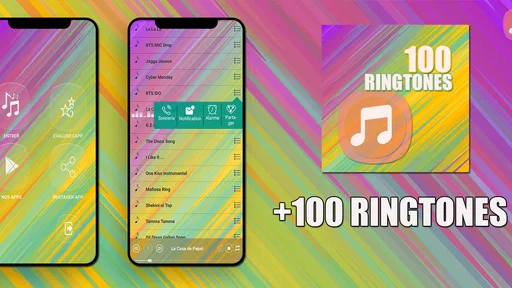
If you love personalizing your phone, this app will be your new best friend. Beyond just picking ringtones, Cool Ringtones 2025 offers customization features that let you assign different tones to different contacts, ensuring that you always know who's calling without even looking at your screen. You can also set your favorite tunes as alarm sounds or notification alerts, adding a personal touch to every aspect of your phone’s auditory alerts.
For contact-specific tones, I’d use the feature selectively rather than assigning a unique sound to everyone. A few distinct choices for the people whose calls I most need to recognize are easier to remember than a long catalogue of personal assignments. It is also worth checking the phone’s own sound settings after making a change, especially if I later switch devices or adjust alert preferences; the useful habit is to confirm that the tone still serves the right purpose, not just that it was selected once.
A practical tip is to make a quick test before relying on a new assignment. I’d ask one of those important contacts to call when it is convenient, then check that I can recognize the sound at the volume and distance I usually use. That is more informative than replaying a preview: it tests the whole everyday situation, including whether the sound is distinct enough from other alerts and comfortable at normal listening distance.
Everyday fit, and where I would look elsewhere
Picture getting ready for work and realizing that calls blend into every other phone nearby. I’d browse for a tone with a clear opening, try it at a realistic volume, and use a separate, gentler sound for notifications so each alert has a purpose. Someone who enjoys changing their phone’s personality now and then will get more from this kind of browsing than a person who sets one default tone and never revisits it.
The trade-off is that a large collection can take time to sift through, and personal taste is a real filter: a sound that feels fresh today may become irritating after repeated calls. People who want only a discreet, dependable system sound may be happier staying with their phone’s built-in choices. Those who expect detailed audio trimming or a carefully curated music library should consider tools designed for those jobs instead of treating a ringtone collection as an editor.
For a shared household or a busy workplace, I would be cautious about selecting a loud or comic sound just because it is memorable. A tone that is funny once may draw attention every time it rings, and a distinctive sound can still be a poor fit if it embarrasses me in a meeting. The better test is whether I would be comfortable hearing it repeatedly in the places I actually go, not whether it makes me smile during a quick preview.
People deciding between this app and a dedicated audio editor should think about how much control they need. A collection is convenient when I want to audition ready-made sounds and move on; an editor makes more sense when I already have a particular recording and want a chosen section of it. Neither approach is automatically better. The deciding point is whether discovery or precise customization matters more to me.
High-Quality Audio
Let’s talk about quality for a moment. There’s nothing more annoying than a ringtone that sounds like it's playing through a tin can. Thankfully, that’s not an issue here. The app boasts high-quality audio for all its tunes, so you can enjoy crisp and clear sounds every time your phone rings. This attention to quality makes a significant difference, especially when compared to some other ringtone apps that offer subpar audio.
In practice, I’d judge any candidate on the phone and in the place where I expect to hear it, not only through headphones. A tone can sound polished on a quiet preview but be difficult to notice outdoors, or seem too sharp when heard repeatedly at home. Trying a short list in the intended role is a simple way to avoid swapping sounds repeatedly and settling for one that is technically clear but tiring.
Another useful check is how the opening behaves. If I need to recognize a call quickly, a sound that starts distinctly may work better than one whose most noticeable part arrives later. For alarms, a gradual or gentle sound may suit some people, but anyone who sleeps through soft alerts should choose for audibility rather than mood. I would make that decision with the phone’s normal volume and listening conditions in mind, since a preview alone cannot tell me whether a tone suits every room.
What to expect before switching
The app is free, rated for Everyone, and its current version is 22.5; it runs on Android 5.0 or later. Those details make it accessible to a broad range of Android users, while the actual changeover is best treated as a small settings task: choose a sound, assign it to the role you want, then make a test call or alert when convenient. If you rely on a particular contact tone or alarm, check that assignment after changing your general ringtone so an unrelated setting does not catch you by surprise.
Switching back is worth thinking about too. I would note which default sound I used before experimenting, especially if I am testing several options for work and personal use. That gives me an easy return path if a new tone turns out to be too loud, too familiar, or simply not right after a few days. The app is best approached as a source of choices, not a commitment to keep changing every alert.
Because the app is free, trying it is a low-cost way to see whether its style of browsing suits me, but free does not mean every user will find the time worthwhile. If I only want to restore a standard tone, going straight to the phone’s sound settings is simpler. If I want a fresh sound and am prepared to audition a few options, the app offers a more direct place to explore. That distinction helps set expectations: it is a discovery tool, not a required layer of phone setup.
Who will get the most from it
I’d recommend it most to Android users who enjoy changing their phone’s sound, have not settled on a suitable call or alarm tone, or want a few contact-specific alerts without editing audio themselves. It is also a reasonable fit for someone choosing a sound for a particular routine, such as making work calls easier to recognize while keeping general notifications subdued. The developer is ringtones apps Pro, and the app sits in the libraries and demo space rather than serving as a full audio-production tool.
By contrast, someone who is happy with built-in tones, rarely changes settings, or needs a specific cut from a personal recording may be better served elsewhere. The same goes for anyone who finds browsing collections tiring: a larger menu is only an advantage when I enjoy comparing sounds. The app’s 4.1 average and around 8,400 ratings show that plenty of people have evaluated it, but I would still base my decision on whether its simple purpose matches my own.
My recommendation
In conclusion, Cool Ringtones 2025 is a must-have for anyone looking to refresh their phone's sound profile with ease. The vast selection, combined with the app’s user-friendly interface and customization options, makes it a top choice for ringtone enthusiasts. Whether you want to wake up to the sound of gentle waves or set a catchy pop song as your ringtone, this app has you covered. So why not give it a try and let your phone’s sound reflect your unique style?
My recommendation is more specific: I’d try it if I enjoy browsing sounds, want a quick alternative to the phone’s standard tones, or like using different alerts for a few important contacts. I would skip it if I am already happy with the built-in sounds, need fine-grained audio editing, or dislike spending time auditioning options. For an easy, low-stakes refresh, it is a sensible place to start; the best result comes from choosing sounds for how and where I use my phone, rather than picking the most attention-grabbing one in the list.
Cool Ringtones 2025 Frequently Asked Questions
Is Cool Ringtones 2025 compatible with my phone?
Cool Ringtones 2025 is available for Android devices running version 5.0 or later. If your phone meets that requirement, you can consider downloading it and exploring the ringtone collection. The app is listed as a Libraries & Demo app and is free to install, so checking your Android version first is a practical way to see whether it suits your device.
What is Cool Ringtones 2025 and how does it work?
Cool Ringtones 2025 is an app designed to provide users with a vast collection of ringtones, notification sounds, and alarm tones. The app allows you to browse through different categories, preview tones, and easily set them as your default ringtone or notification sound with just a few taps. It's user-friendly and perfect for customizing your phone's sound profile.
Is Cool Ringtones 2025 free to use, or are there in-app purchases?
Cool Ringtones 2025 is free to download. It offers a free version with access to a wide range of ringtones. However, it also includes optional in-app purchases that allow users to unlock premium ringtones and remove ads for a more seamless experience. This model ensures that basic features are available to everyone while offering enhanced options to those who choose to upgrade.
How can I set a ringtone from Cool Ringtones 2025 as my phone's default ringtone?
Setting a ringtone from Cool Ringtones 2025 as your default is straightforward. Once you find a ringtone you like, simply tap the 'Set as Ringtone' button within the app. The app will guide you through the process, ensuring that your selected tone is applied as your phone's main ringtone without needing to navigate through complicated settings menus.
Does Cool Ringtones 2025 require an internet connection to function?
Cool Ringtones 2025 requires an internet connection primarily for downloading new ringtones and accessing online content. Once you've downloaded the tones you like, they are stored locally on your device, allowing you to use them offline. This hybrid approach ensures you have access to a vast library without consuming unnecessary data once your favorites are downloaded.
Pros
- Extensive library of unique ringtones.
- Regular updates with new sounds.
- User-friendly interface.
- High-quality audio files.
- Customizable ringtone settings.
Cons
- Contains ads that can be intrusive.
- Limited free options.
- In-app purchases required for premium.
- Occasional bugs in app performance.
- Not all genres are covered.










