Control Center - Panel Plus
- 30.00
- 3.7
- Installs
- 5.00M
- Price
- Free

Screenshots

Analysis by Reviewed
I like the idea behind Control Center - Panel Plus: putting frequently used phone controls within easy reach instead of making me hunt through menus. It’s an Android personalization app from Tap into Apps, and its appeal is practical rather than complicated. If you want a panel you can bring up as part of your everyday routine, it may be worth trying; if you’re already happy with your phone’s built-in quick settings, the extra layer may not earn a place on your screen.
Make the panel part of a repeatable routine
The useful way to approach a control panel is to think about when you reach for it, not just how it looks. I’d start with the controls I use most often, then try opening the panel at a familiar moment—when I’m about to leave home, for example, or when I need to change connectivity without abandoning the app I’m using. A consistent gesture and a small set of familiar actions are easier to remember than a crowded panel full of things I rarely touch.
That routine also helps reveal whether the overlay suits your phone. Try it while reading a message or following directions, where jumping into a separate settings screen can interrupt what you’re doing. If accessing a control feels quicker and more natural, the panel is doing its job. If you find yourself reaching for Android’s standard controls out of habit, there’s little reason to force a change.
Check the setup before settling in
Before personalizing the panel, I’d confirm which controls are genuinely useful on your device and see how the panel feels in the position you choose. A placement that looks balanced on an empty home screen may be awkward when you’re holding the phone one-handed or using an app with buttons near the edge. Make one adjustment at a time, then use the phone normally for a while; that makes it easier to tell whether the change improved access or simply added another thing to manage.
The app is free to install, though it offers in-app purchases priced from $9.99 to $49.99 per item. I’d explore the basic experience before paying for anything, and consider whether the customization you actually want is available in the version you’re using. The app is rated for Everyone, has a 3.7 average from around 6,400 ratings, and has passed 5 million installs. Those figures suggest a sizable audience, but they don’t guarantee that its panel will fit every Android setup.
Getting Started with Control Center
Right off the bat, installing Control Center - Panel Plus was a breeze. The app is lightweight, so it doesn't hog your phone's resources, which is always a win in my book. Once you fire it up, you're greeted with a sleek interface that immediately feels intuitive. It's like the developers knew exactly what we Android users were missing.
Design and User Interface
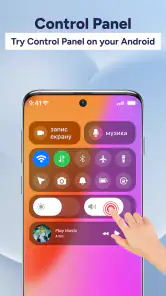
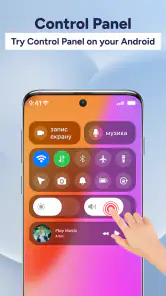
The design is clean and minimalist, which I absolutely love. No unnecessary clutter, just straight to the point. You can easily customize the panel to suit your preferences. Whether it's toggling Wi-Fi, adjusting brightness, or checking your battery life, everything is just a swipe away. The best part? You can do all this without having to dig through your settings menu.
More From Our News Desk

Weather by Xiaomi Review: Clear at a Glance, Less Clear Up Close

X Under Pressure: Can It Recover When Posting Goes Wrong?

Clash of Clans Is Won Between the Battles

Android Auto Makes the Case for Quieter Car Software

MobiOffice: Transforming Mobile Productivity with Seamless Integration

EA SPORTS FC™ Mobile Soccer: Redefining Mobile Sports Gaming
Customization Galore
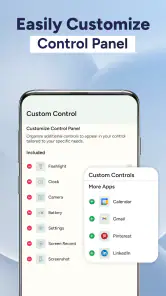
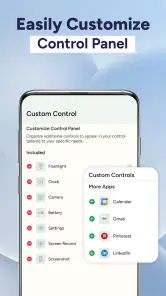
One of the standout features is the level of customization available. You can tweak the size, color, and position of the control center to fit your style. Want it on the left side of your screen instead of the bottom? No problem. Prefer a darker theme for those late-night sessions? It's got you covered. This flexibility ensures that the app doesn't just feel like an add-on, but rather a seamless part of your device.
Performance and Efficiency
Now, let's talk about performance. I was pleasantly surprised by how smoothly Control Center - Panel Plus runs. It doesn't lag or stutter, even when I've got multiple apps running in the background. It's efficient, which means you won't have to worry about it draining your battery. In my experience, it feels like the app was designed with the user's convenience in mind.
Where the extra panel earns its space
For me, the clearest use case is a quick change during another task: I might be reading, then need Wi-Fi or Bluetooth, and want to avoid leaving the screen I’m on. That small interruption matters more when I’m juggling directions, a conversation, or a task I want to finish without losing my place. The trade-off is that a custom panel adds another interaction to learn, so it pays off most when I use those controls repeatedly rather than once in a while.
Compared with Android’s built-in quick settings, this app’s draw is the option to tailor the panel’s appearance and placement. The native panel is the simpler choice if you want fewer layers and a familiar system feature; Panel Plus makes more sense if its presentation and access style feel better to you. I wouldn’t install it expecting a completely different phone or a replacement for every setting. It’s a shortcut layer, and its value depends on whether that layer suits your habits.
Know the boundaries before relying on it
Although the app presents controls such as Wi-Fi and Bluetooth, Android’s own system behavior still matters. A shortcut can make a setting easier to reach, but it doesn’t change what your device or operating-system version allows. If a control behaves differently than expected, check the phone’s regular settings to see whether the same action works there; that’s a useful way to separate an app-panel issue from a device limitation.
The current version is 1.2.45, and the minimum operating-system requirement is Android 8.0. I’d check compatibility before installing on an older phone, and after an update I’d take a moment to confirm that the panel still opens and sits comfortably where I expect it. That quick check is especially sensible if you depend on it for a routine, rather than treating it as a visual extra.
Who should keep it in the routine?
I’d recommend trying it if you often adjust common controls and enjoy shaping how your Android screen works. It’s less compelling if you rarely change those settings, prefer the built-in panel, or don’t want an overlay to become part of your muscle memory. Tap into Apps released it on October 23, 2024, and the app remains a free download, with optional purchases. My practical advice is to begin with the simplest setup, live with it through ordinary tasks, and only then decide whether extra customization is worth exploring.
A practical test for everyday use
One useful way to judge the app is to give it a single, repeatable job for a few days instead of trying to make it the center of every interaction. For instance, I might use the panel only when switching between Wi-Fi and Bluetooth while moving from home to a café, then notice whether the gesture saves enough effort to become automatic. That test is more revealing than rearranging colors and positions for an hour: it shows whether the panel helps during a real transition or merely looks appealing while I’m setting it up.
For someone who often changes settings while reading, messaging, or following a route, that focused trial can also expose accidental friction. If the chosen edge overlaps controls in a particular app, try another position rather than changing several options at once. If the panel is still awkward after a simple placement adjustment, that is a reasonable sign that the phone’s built-in shade is the better fit. Convenience only counts when the shortcut is easier than the habit it replaces.
Small habits that make shortcuts useful
Experienced users tend to get more from a control panel by keeping its purpose narrow. I’d associate it with a few decisions I make repeatedly—connectivity when I arrive somewhere, brightness when lighting changes, or a quick glance at battery status—rather than treating every available control as equally important. A compact mental checklist makes the panel easier to scan and reduces the chance that I open it, pause to search, and then close it without doing anything.
There is also a useful distinction between a control I need often and one I only need occasionally. Frequently used actions deserve a convenient position; less familiar options can stay in the phone’s regular settings, where I’m less likely to trigger them by mistake. This approach keeps the panel from becoming a second settings menu. It is a practical trade-off: less apparent completeness in exchange for faster recognition and fewer taps spent looking for the right item.
How it fits different Android users
I can see the appeal most clearly for people who like tuning their phone’s feel and want common controls presented in a way that suits their grip or visual preferences. The ability to adjust the panel’s size, color, and placement gives those users a reason to try it beyond simple access. It may also suit someone who moves between apps often and dislikes repeatedly leaving the current screen just to make a small settings change.
On the other hand, people who rarely touch Wi-Fi, Bluetooth, or brightness settings may not gain much from adding a separate panel. The same goes for anyone who prioritizes the fewest possible overlays or already reaches Android’s quick settings without thinking. If your main goal is changing a deeper system option, opening the normal Settings app is still the more direct route. Panel Plus works best as a convenience layer for familiar, frequent actions, not as a substitute for understanding where Android keeps its settings.
Costs, expectations, and a sensible trial
Because the download is free but purchases are available, I’d treat payment as a decision about personalization rather than assume it is necessary for basic usefulness. First, use the panel with the appearance and controls you already have access to. Then decide whether a specific customization would solve a problem you actually noticed, such as awkward placement or a look you find distracting. The listed purchase range runs from $9.99 to $49.99 per item, so checking the exact item and price in the app before confirming matters; a broad price range is not a reason to buy something without knowing what it provides.
That approach also answers a common practical question: do you need to pay to see whether the app suits you? You can begin with the free download and assess your basic routine before considering an optional purchase. Another question is whether it replaces Android’s own controls. I’d think of it as an alternative way to reach selected actions, while keeping the system settings available for anything the panel does not handle or anything that behaves differently on your device.
What to check when something feels off
If a gesture becomes unreliable or a control does not behave as expected, I wouldn’t immediately rebuild the whole setup. First try the same setting from Android’s regular quick settings or Settings screen. If it works there, the issue is likely tied to using the panel or its placement; if it does not, the phone’s own behavior is the more relevant place to troubleshoot. This simple comparison avoids blaming the app for a system-level restriction and helps narrow down whether keeping the extra layer is worthwhile.
I’d also recheck the panel after changing its size or position, because a layout that feels comfortable in one situation can be harder to reach while holding the phone differently. For everyday reliability, leave enough space around the active edge and keep the arrangement familiar. These are modest adjustments, but they matter more than adding visual changes that do not improve access. A control panel should reduce small interruptions, not create a new reason to stop and fiddle with the screen.
Getting a fair comparison with the built-in panel
The fairest comparison is not which panel has more visual personality; it is which one gets you to the action with less thought. Android’s built-in quick settings have the advantage of already being part of the phone, so they require no extra routine to learn. Panel Plus offers a different presentation and customization, which can be valuable if the standard layout feels inconvenient or does not suit how you hold your device. I would keep whichever one I reach for naturally, rather than using both just because both are available.
That distinction helps set realistic expectations. A customized panel can make common controls feel closer, but it does not turn a phone into a new device or guarantee that every system action will work identically across Android versions. If you want a deep overhaul of the interface, this is a focused tool rather than a complete launcher or system redesign. If you simply want a more personal route to familiar controls, its narrower scope is a strength.
Overall, Control Center - Panel Plus is a fantastic utility app for Android users who crave the convenience of a centralized control panel. It's user-friendly, highly customizable, and performs like a champ. If you're looking to enhance your Android experience, I highly recommend giving this app a shot. It's like having your very own control hub, and once you try it, you'll wonder how you ever lived without it!
Control Center - Panel Plus Frequently Asked Questions
Is Control Center - Panel Plus free to download, and are there purchases in the app?
Control Center - Panel Plus is free to download, so you can try its quick-access panel without paying upfront. The app also offers in-app purchases, with items priced from $9.99 to $49.99. Consider whether the free experience meets your needs before choosing any paid option, and review the purchase details shown in the app before confirming a transaction.
What is Control Center - Panel Plus and how does it enhance my smartphone experience?
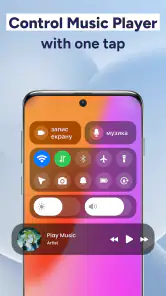
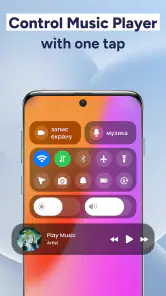
Control Center - Panel Plus is an app designed to improve your smartphone's accessibility and efficiency by offering quick access to essential settings and apps. It provides a customizable control panel similar to iOS, allowing you to toggle Wi-Fi, Bluetooth, adjust brightness, and more, all from one convenient location. This app streamlines your navigation experience by bringing important controls to your fingertips, enhancing overall usability.
How customizable is Control Center - Panel Plus?
Control Center - Panel Plus offers a highly customizable interface, allowing users to tailor the panel to suit their specific needs. You can add or remove shortcuts, rearrange icons, and choose from different themes and layouts. This means you can prioritize the controls and apps you use most frequently, ensuring the panel is both functional and visually appealing for your personal use.
Is Control Center - Panel Plus compatible with all Android devices?
While Control Center - Panel Plus is designed to be compatible with a wide range of Android devices, there may be some exceptions due to specific manufacturer restrictions or Android versions. It is recommended to check the app’s compatibility with your device in the Google Play Store before downloading. This ensures that all features work optimally on your particular smartphone model.
Does Control Center - Panel Plus consume a lot of battery or system resources?
Control Center - Panel Plus is engineered to be lightweight and efficient, minimizing its impact on your device's battery life and system resources. It runs seamlessly in the background, ensuring that you have quick access to controls without significant battery drain or slow performance. Users have reported minimal impact on their device's overall efficiency, making it an excellent choice for everyday use.
Pros
- Intuitive user interface design.
- Highly customizable settings.
- Quick access to settings.
- Low battery consumption.
- Supports multiple languages.
Cons
- Contains ads in free version.
- Limited features without premium.
- Occasional lag on older devices.
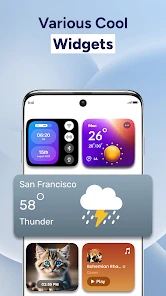
- No widget support.
- In-app purchases are expensive.
- Category
- Personalization
- Version
- 1.2.45











