Contractor Estimate & Invoice
- 326.00
- 4.6
- Installs
- 100.00K
- Price
- Free

Screenshots

Analysis by Reviewed
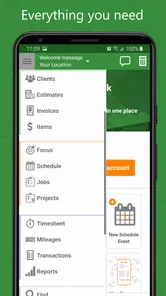
When I first opened Contractor Estimate & Invoice, I understood its appeal quickly: it brings estimates, invoices, payments, timesheets, and scheduling into one business-focused app instead of scattering those jobs across notes, spreadsheets, messages, and separate billing tools. I would recommend it most to independent contractors and small service teams that need a practical record of work without building a complicated office system.
The app is developed by GetCost and sits in the Business category. It is free to download, with optional in-app purchases ranging from $9.99 to $599.99 per item, so I would treat the free starting point as a way to test the workflow rather than assume every useful capability will remain free. Its age rating is Everyone, and it runs on Android devices using version 5.0 or later. The current release is 1.827, which makes checking compatibility straightforward before installing it on an older phone.
How the everyday contractor workflow fits together
The most sensible way to use this app is to make it the place where a job moves from early estimate to completed payment. I would begin by setting up the business information and the people involved in the work, then create an estimate before sending a price to a customer. Once the customer accepts, the same job can become the reference point for scheduling, recording time, preparing an invoice, and tracking whether payment has arrived.
That sequence matters more than any individual screen. A contractor who only uses the invoicing part may still benefit, but the real advantage appears when the estimate, work record, and final charge stay connected in one routine. It reduces the familiar problem of remembering which version of a quote was sent, which hours belong to which customer, or whether a completed job has actually been billed.
I found the concept particularly suitable for tradespeople who work away from a desk. A plumber, painter, electrician, cleaner, landscaper, or repair technician can check a scheduled job, record time, and handle paperwork from a phone rather than waiting until the evening to reconstruct the day. That does not remove the need for careful bookkeeping, but it can make the first capture of information much more reliable.
A realistic example would be a small two-person maintenance team handling several visits in one week. One person can use the schedule to keep the appointments visible, while the other records time against the correct customer instead of writing hours on paper. At the end of the visit, the team can prepare the invoice while the details are still fresh. The benefit is not flashy automation; it is the reduction of small omissions that later become awkward calls or unpaid work.
I would not treat it as a replacement for professional accounting software in every business. If you need deep tax handling, formal financial reporting, inventory management, payroll, or extensive integrations, a dedicated accounting platform may be the better foundation. This app makes more sense as a focused operational tool for getting estimates, work records, schedules, and invoices under control.
More From Our News Desk

Weather by Xiaomi Review: Clear at a Glance, Less Clear Up Close

X Under Pressure: Can It Recover When Posting Goes Wrong?

Clash of Clans Is Won Between the Battles

Android Auto Makes the Case for Quieter Car Software

MobiOffice: Transforming Mobile Productivity with Seamless Integration

EA SPORTS FC™ Mobile Soccer: Redefining Mobile Sports Gaming
Starting with a clean job record
My first practical tip is to create a consistent naming habit for customers and jobs. Use the same customer spelling every time, and distinguish recurring work by location or project rather than relying on memory. That small discipline makes later searching and invoice review much easier. It also prevents a common mobile-app problem: creating several nearly identical customer entries because the first one was difficult to recognize.
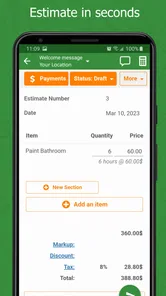
I would also enter the scope of work before adding the price. A short, clear description gives the estimate a useful purpose and makes the eventual invoice easier to understand. “Repair work” is less helpful than a description that identifies the room, equipment, or agreed task. The app can organize the paperwork, but the quality of the wording still depends on the person using it.
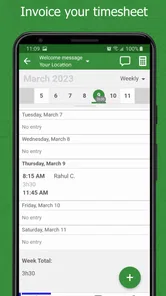
For time-based jobs, I would record time as close to the visit as possible. Reconstructing a week from memory is fast only until a customer questions a charge. A quick entry after each appointment creates a stronger trail than a large batch of vague entries on Friday afternoon. This is one of the app’s most useful habits for teams: use the phone at the point of work, not merely as a place to type everything later.
Settings and details worth checking early
Before sending a real estimate, I would review the business identity, customer details, pricing structure, and the way work hours are represented. These are not exciting settings, but they determine whether a document looks trustworthy and whether the final amount reflects the agreement. A contractor should also check how scheduling information is entered, especially when several people share responsibility for the same job.
The payment side deserves a deliberate routine too. An invoice should not be considered finished simply because it was created. I would mark payment activity promptly and keep the status of each job current. That makes the app more useful as a lightweight receivables tracker and reduces the chance of asking a customer to pay twice or forgetting to follow up on an overdue balance.
Because optional purchases can be substantial, I would inspect the available plan or purchase details before moving an entire business into the app. The listed range reaches from $9.99 to $599.99 per item, which is a broad spread. I would start with a small sample of real jobs, confirm that the workflow suits the team, and only then decide whether a paid option is justified. This is especially important for a solo contractor who may need only estimates and invoices, not every part of the broader workflow.
Another useful check is device readiness. The app supports Android from version 5.0 onward, so it is accessible on many older devices, but an older phone may still make data entry less comfortable. A larger screen can help when reviewing a detailed estimate or schedule. If several workers use different phones, agree on a shared process rather than assuming everyone will interpret fields in the same way.
Faster patterns that save time without creating confusion
Experienced use of this app is less about rushing through screens and more about repeating the same order every time. I would keep a simple pattern: customer first, job description second, estimate next, schedule after agreement, time during the work, invoice at completion, and payment status immediately afterward. Repetition turns the app into a checklist and makes missing information easier to spot.
For recurring customers, I would avoid copying old details blindly. Reusing a familiar structure can save time, but the scope, date, location, and price should still be checked manually. This is a useful trade-off: speed is valuable, yet a copied estimate with an outdated amount or old job description can damage trust more quickly than a slower, fresh entry.
A team can also agree on who owns each stage. One person may prepare estimates, another may record field time, and the business owner may review invoices and payments. Even without sophisticated internal controls, assigning responsibility prevents the “everyone thought someone else did it” problem. The app becomes more dependable when it reflects a clear habit rather than a collection of individual preferences.
I would use scheduling as a daily dispatch view, not as a substitute for every calendar or project-management system. Put the appointments that directly affect the work into the app, then keep descriptions specific enough for another team member to understand the visit. If a job requires extensive notes, photos, documents, or long conversations, the app may need to work alongside other tools rather than carry all that information alone.
One non-obvious advantage of this workflow is the way it exposes weak pricing habits. After several jobs, comparing estimates with recorded time can show whether certain types of work are regularly underquoted. The app does not need to make that decision for you; simply keeping the estimate, time, and invoice close together gives a contractor better material for improving future quotes.
Where the app is strong, and where it reaches its limits
The strongest part of Contractor Estimate & Invoice is its focus. It speaks to the practical chain of running a service job: agree on the work, arrange it, record it, charge for it, and watch the payment. A general notes app can store more varied information, and a spreadsheet can be shaped in almost any way, but both require more manual discipline to connect these stages.
Compared with writing estimates in a document editor, this app should feel more purposeful for repeat business. A document can look polished, but it does not naturally encourage a contractor to maintain a job schedule, timesheet, and payment record beside it. Compared with a spreadsheet, the app is likely to be more comfortable for mobile-first work, while the spreadsheet remains stronger for custom calculations, broad analysis, and unusual business models.
The compromise is flexibility. A focused contractor app may not suit a company with complex approval chains, multiple departments, detailed stock control, or highly customized billing rules. I would also be cautious if the business requires a full audit trail or specialized accounting treatment. Those needs are not reasons to dismiss the app; they are signals that it should be paired with, or replaced by, a more comprehensive system.
Another limitation is the risk of incomplete adoption. If one worker records time in the app, another keeps notes in a vehicle, and the owner maintains a separate invoice list, the promised simplicity disappears. The best results require a shared rule about where the official record lives. For a solo operator, that is easy. For a growing team, it becomes a management decision rather than a technical feature.
The purchase structure is also worth considering carefully. The app is free to start, but the optional items span a wide price range. I would not buy based only on the promise of having every tool in one place. First identify the specific bottleneck: estimates, scheduling, time capture, invoices, or payment follow-up. Then test whether the relevant workflow is genuinely saving time. Paying for features that the team never uses is not efficiency.
Who should use it, and who should choose something else?
I think it is a good match for a self-employed contractor who wants more structure than paper or messaging apps provide. It is also promising for a small field team that needs a shared view of appointments and job charges without starting with a large business-management suite. The Everyone rating and older Android compatibility make it approachable for mixed-age teams and older devices, although comfort will still depend on the phone itself.
I would recommend trying it when the main pain is administrative fragmentation. If estimates live in one place, working hours in another, and payment reminders in a third, bringing those steps into a single routine can be worthwhile. The app is especially useful for businesses with repeatable service visits rather than highly complex projects.
I would skip it as the primary system if you run a larger operation with demanding accounting requirements, extensive inventory, payroll, or elaborate customer support needs. I would also look elsewhere if your work depends heavily on desktop reporting or deep connections to other business platforms. A specialized accounting or project-management product may cost more, but the extra structure can be justified when the business has outgrown a focused mobile workflow.
My final view after using the workflow
Contractor Estimate & Invoice earns its place by connecting everyday contractor tasks instead of trying to become an all-purpose business suite. Its average rating of 4.6 from around three thousand ratings, together with more than one hundred thousand installs, suggests that the approach has found an audience. I see why: the app addresses the unglamorous but expensive gaps between agreeing to work, completing it, and getting paid.
My recommendation is to begin with a few real jobs and establish one repeatable routine before adding more people or paying for optional items. Keep customer records tidy, write estimates clearly, record time promptly, and update payment status as soon as money changes hands. Those habits will matter more than simply installing the app.
The app works best when it becomes the team’s shared job notebook, not just a place to produce an invoice. If that matches the way you work, Contractor Estimate & Invoice is a sensible free starting point for organizing field-service administration. If your business needs deep accounting, complex reporting, or broad integrations, I would use a more powerful alternative and consider this app only as a companion for estimates, scheduling, and mobile job capture.
Contractor Estimate & Invoice Frequently Asked Questions
Is Contractor Estimate & Invoice free to download, and are there in-app purchases?
Contractor Estimate & Invoice is free to download, so you can try the app before deciding whether it fits your workflow. It also offers in-app purchases, with listed options ranging from around ten dollars to about six hundred dollars per item. Check the purchase details in the app before confirming anything, particularly if you plan to use paid features for a business account.
What devices and age groups is the app intended for?
The app is rated for Everyone and runs on Android devices using Android 5.0 or later. That makes it accessible on a range of Android phones and tablets, though the experience can still depend on your device and screen size. If you use an iPhone or iPad, check the relevant app store for availability and compatibility before downloading.
What is Contractor Estimate & Invoice used for?
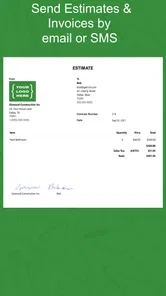
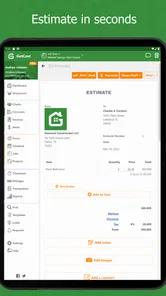
Contractor Estimate & Invoice is designed to help contractors, tradespeople, and small service businesses prepare professional estimates and invoices from a mobile device. You can organize customer details, describe labor and materials, calculate totals, and present a clearer breakdown of expected or completed work. It can be useful for managing everyday paperwork without relying entirely on handwritten documents or a desktop computer.
Can I customize estimates and invoices for my business?
The app generally allows users to enter business information, customer details, project descriptions, line items, prices, taxes, discounts, and payment terms. Depending on the version and device, you may also be able to add a logo or adjust document details before sharing. It is worth reviewing the available templates and settings after installation, since customization options and branding features may vary.
Can I send or share documents with customers?
Yes, the main purpose of creating digital estimates and invoices is to share them conveniently with clients. After completing a document, users can typically use their phone’s sharing options to send it through email, messaging apps, or other supported services. Before sending, carefully check quantities, tax calculations, customer contact information, and payment instructions so the final document is accurate and professional.
Pros
- Creates professional estimates and invoices from a phone or tablet.
- Helps contractors organize client
- project
- and payment details in one place.
- Templates can save time compared with preparing documents manually.
- Useful for tracking outstanding balances and completed transactions.
- Mobile access makes it convenient to work from job sites or client meetings.
Cons
- Some advanced features may require a paid subscription or in-app purchase.
- Entering detailed project information can take time for first-time users.
- Customization options may be limited compared with full accounting software.
- Requires reliable device access for convenient on-site use.
- May not replace dedicated tools for taxes
- payroll
- or complex bookkeeping.











