Connecteam Team Management App
- 1.22K
- 4.8
- Installs
- 1.00M
- Price
- Free

Screenshots

Analysis by Reviewed
When a household shares devices but not responsibilities, confusion can creep in quickly: one person sees a message, another assumes a shift is covered, and a task gets missed. I’d look at Connecteam in that situation not as a family organizer, but as a work-focused way for a small team to keep schedules, tasks, and communication together. That distinction matters: it can help coordinate household-related work, such as a team of caregivers or a small property crew, but it isn’t a substitute for a shared family calendar or a private household chat.
Where a shared device fits—and where it doesn’t
For a household business with several people helping out, such as a cleaning service run by relatives, a central team app can be more orderly than passing around one phone or relying on scattered texts. A manager can share work information with the team, while each person uses the app for their own assigned responsibilities. I would avoid treating one logged-in device as a common family account: work messages, time records, and task updates are tied to team coordination, so people should know whose account is open and who is responsible for responding.
A practical example is a small care team covering visits across a day. The person coordinating can use schedules and tasks to make handoffs clearer, while staff can use chat to flag a delay or ask about an instruction. That is more useful than a group text when the conversation needs to connect to work, but it still depends on people checking the app and keeping assignments current. If your main goal is simply to tell relatives who is buying groceries, a basic shared notes app or calendar will probably feel lighter.
Set boundaries before inviting everyone
I’d decide first who should manage the workspace, who needs access to work details, and which notifications are worth receiving. A useful habit is to keep work updates in the team app and personal household conversations elsewhere. That reduces the chance that a private family message gets mixed into a work thread, and it helps people understand when they are expected to act. For a shared tablet or phone, signing out or switching accounts deliberately is safer than assuming the next person will notice whose profile is active.
Connecteam is a business app from Connecteam Inc., and its focus is employee management rather than household administration. The free price makes it approachable to try, but I would still think about whether the team will use enough of its work-oriented tools to justify setting it up. People who only need occasional reminders may find the setup and account boundaries more effort than the task itself. Its Everyone content rating is about the app’s age suitability, not a reason to give children access to employee information.
Keep personal and work access distinct
Shared-device convenience has a practical limit: a phone that is passed between relatives can blur who received an instruction, who marked a task complete, and whose work time is being recorded. I’d give each person who needs to act their own account and use the shared device only as a carefully managed fallback, not as the default team identity. If several people must use one tablet at a work site, agree on a sign-out routine and make the person currently using it clear to everyone.
That boundary is especially useful when a household business involves relatives who also discuss personal matters on the same device. A work assignment should not become a proxy for a family conversation, and personal disagreements should not spill into team communication. Keeping the app focused on duties makes its records easier to understand later and reduces the chance that someone mistakes a casual message for a confirmed change to a shift.
More From Our News Desk

Weather by Xiaomi Review: Clear at a Glance, Less Clear Up Close

X Under Pressure: Can It Recover When Posting Goes Wrong?

Clash of Clans Is Won Between the Battles

Android Auto Makes the Case for Quieter Car Software

MobiOffice: Transforming Mobile Productivity with Seamless Integration

EA SPORTS FC™ Mobile Soccer: Redefining Mobile Sports Gaming
Easy Setup and User-Friendly Interface
First things first, getting started with Connecteam is a breeze. Whether you're tech-savvy or just getting by, setting up your team is as simple as pie. The app’s interface is intuitive and designed to minimize the learning curve. You can easily navigate through various features without getting overwhelmed. I found myself zipping through setup in no time, ready to tackle my first task.
Features That Pack a Punch
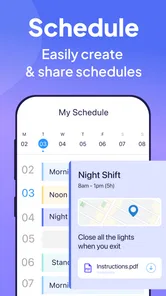
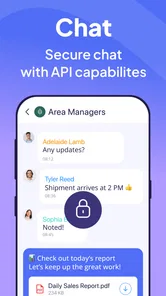
One of the standout features of this app is its versatility. From scheduling shifts to managing tasks and even keeping track of time, Connecteam covers all bases. You can assign tasks, monitor progress, and even send out reminders to your team, ensuring that everyone is on the same page. The app also offers a chat function, making communication seamless and efficient. I’ve used this feature to quickly resolve issues and foster a collaborative environment.
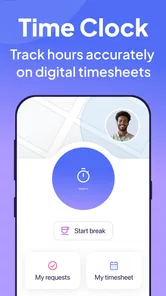
But that's not all! The app includes a comprehensive time tracking feature that lets you keep tabs on your team’s working hours. This is especially useful for remote teams where tracking productivity can be a bit of a challenge. Plus, with GPS tracking, you can verify clock-ins and outs, making payroll management a whole lot easier.
Coordination that survives a busy day
The most useful way to approach scheduling and tasks is to make each assignment specific enough that someone can act without needing a second conversation. For example, a shift handoff can include the task that remains unfinished and who is taking it next; chat can handle a quick clarification, while the task list remains the place to check what is still open. This division keeps a busy thread from becoming the only record of work. It also gives managers a chance to spot recurring gaps rather than repeatedly solving the same last-minute problem.
Time tracking and location checks deserve a clear team agreement. GPS verification may help a manager confirm a clock-in or clock-out for field work, but it can feel intrusive if staff do not understand when it is relevant. I’d explain the purpose before relying on it, and use it for attendance verification rather than treating a location signal as a measure of effort. For desk-based teams or people who rarely work away from a fixed site, this part may add little value.
A workable routine for real handoffs
Imagine a property crew starting the morning with one person delayed and a repair still unfinished from the previous day. The coordinator can update the schedule, assign the remaining work to the person taking over, and use chat for a short clarification about the site or task. The useful detail is not merely that everyone can message one another; it is that the team can keep the assignment itself distinct from the conversation around it. That makes it easier for the next worker to identify what is still expected instead of searching through a long thread.
I’d also avoid using chat as the sole place to announce a schedule change. A quick message can draw attention to a change, but the schedule should remain the place people check to understand their assigned shift. This small habit can prevent a familiar failure: one person reads the message, another misses it, and the team assumes the update reached everyone. The app can organize the workflow, but the manager still needs a consistent rule for where a confirmed assignment lives.
Feedback, recognition, and the human side
Connecteam isn't just about task management; it's also a fantastic tool for boosting team morale. The app allows you to create polls and surveys to gather feedback, ensuring that every team member feels heard and valued. I’ve used this to gauge team satisfaction and it’s been incredibly insightful in making necessary adjustments to improve the work environment.
Moreover, there’s a recognition feature that lets you acknowledge team members for their hard work and achievements. This little gesture goes a long way in motivating the team and enhancing overall performance. Trust me, a little praise can do wonders!
Who benefits most from its all-in-one approach?
This is a stronger fit for teams with rotating shifts, field duties, or several small operational chores that otherwise live in separate chats and spreadsheets. Bringing scheduling, tasks, timekeeping, and team messages into one work setting can reduce context switching, especially when managers need to coordinate people who are not sitting at desks. I would also consider it for a small organization that wants staff to have one place to check work instructions and communicate about assignments.
By contrast, a team already comfortable with a shared calendar, a messaging app, and a dedicated timekeeping system may not gain enough from moving everything. The all-in-one approach is convenient when the pieces are used together, but it can feel like extra administration if only one feature matters. Before inviting the whole team, I’d test a real workflow: publish a schedule, assign a task, handle a change, and see whether staff can follow the process without a manager explaining every tap.
Choosing between one hub and familiar tools
Compared with the usual mix of a calendar, group chat, and spreadsheet, this app’s main advantage is having work scheduling, task assignments, communication, and timekeeping in one business-oriented place. That can be a meaningful improvement when a manager is repeatedly copying the same information between tools. The trade-off is that a team has to adopt a shared way of working rather than simply keep using whatever each person already knows.
If you only need a rota, a calendar may be easier to maintain. If the main challenge is informal conversation, a standard messaging app is likely more familiar and less structured. If you need staff to coordinate shifts and field work while keeping attendance processes close to the schedule, Connecteam makes more sense. I’d judge it by the number of handoffs and duplicated updates it removes, not by how many tools it can replace in theory.
Customization without losing the plot
One of the things I absolutely love about this app is its customization options. You can tailor the app’s features to match your team’s specific needs. Whether you need to adjust permissions or tweak notifications, Connecteam has got you covered. Plus, it integrates seamlessly with other tools you might already be using, making the transition smooth and painless.
In practice, I’d keep the first setup modest. Decide who can post team-wide updates, which notifications need immediate attention, and what belongs in a task rather than a chat. Too many alerts can train people to ignore all of them, while overly broad access can make a work space feel noisy or expose details to people who do not need them. The best customization is often a small set of clear roles and notification habits, reviewed after the team has used the app for a while.
Age, trust, and practical expectations
The Everyone content rating describes the app’s general age suitability; it does not change its purpose as a tool for organizing employees. For a household with children, I would keep access to the work workspace limited to adults or staff who genuinely need it. There is no reason to turn a family device into an open invitation to view work assignments or time records just because the app can be installed there.
Trust also depends on explaining what the team is expected to do in the app. Staff should know whether a message is only an update, whether a task needs to be marked complete, and when time or location checks apply. When those expectations are unclear, a manager may interpret silence as agreement while a worker assumes someone else has responded. A short team routine matters more than adding every available tool at once.
Version, fit, and the final call
The app is free, has a 4.8 average from around 21 thousand ratings, and has been installed over a million times. It was released in 2016, and version 9.1.4 supports Android 7.0 and later. Those details make it a well-established option to consider, though popularity alone won’t tell you whether its workflow suits your team. I’d check that the device you plan to use meets the minimum system requirement and then judge the experience by how easily your actual team can keep schedules and responsibilities up to date.
Overall, Connecteam is a robust solution for anyone looking to enhance their team management capabilities. Its user-friendly interface, comprehensive features, and focus on team engagement make it a standout choice among management apps. So, if you're ready to take your team to the next level, give Connecteam a try. You won’t regret it!
My household verdict
I’d recommend it to a family-run service business, a small care team, or a property crew that needs reliable work handoffs and wants schedules, tasks, chat, and time tracking to sit together. I would skip it for a household that only wants to coordinate meals, errands, or social plans; a shared calendar and notes app are simpler for those jobs and do not bring employee-style processes along.
Before committing, try one ordinary workday rather than building an elaborate setup. Give the team a schedule, assign a real task, make one change, and check whether each person knows where to look and how to respond. If that routine cuts down on missed handoffs without creating notification fatigue or account confusion, the app is serving a clear purpose. If the team keeps falling back to texts and the extra workspace becomes another place to check, the simpler alternative may be the better fit.
Connecteam Team Management App Frequently Asked Questions
Is Connecteam free to download, and what should I know about its cost?
Connecteam is free to download, so you can install the app without an upfront purchase. However, downloading it for free does not necessarily mean that every feature or business use is free. Before adopting it across a team, review the available options in the app and consider which tools your organization needs. This helps avoid assuming that all functionality is included at no cost.
What kind of app is Connecteam, and who makes it?
Connecteam is a business app developed by Connecteam Inc. Its store summary describes it as “Employee Management Made Easy,” which reflects its focus on helping organizations manage work and teams. The app may be relevant to businesses looking for a mobile way to bring team-related activities together. Whether it suits your organization depends on the workflows you want to handle through an app.
What devices and operating systems can I use with Connecteam?
Connecteam is a business app from Connecteam Inc. for managing teams, and it is available on Android and iOS. The Android version requires Android 7.0 or later, so it is worth checking your device’s software before downloading. Employees using different platforms can still use the app as part of the same team, making it suitable for organizations with a mix of phones.
Is Connecteam suitable for businesses with employees who work away from a desk?
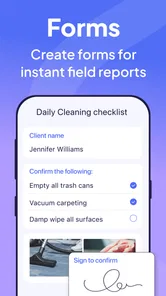
Connecteam is designed to help businesses manage team communication and work activities through an app, which can be useful for employees who do not spend their day at a computer. Its tools include scheduling, time tracking, task management, and team communication. These features bring common work information together, although the best fit depends on the processes a business wants to manage.
What is Connecteam Team Management App?
Connecteam is a comprehensive team management app designed to streamline communication, enhance productivity, and manage tasks efficiently within a company. It offers features like time tracking, employee scheduling, task management, and team communication. It’s perfect for businesses of all sizes looking to improve internal operations and ensure seamless workflow.
Pros
- Intuitive user interface
- Comprehensive task management
- Real-time communication tools
- Customizable workflows
- Seamless integration with other tools
Cons
- Limited offline functionality
- Occasional sync issues
- Learning curve for new users
- Limited customization options
- Premium features are pricey











