Connect SMS Home Screen
- 515.00
- 4.5
- Installs
- 500.00K
- Price
- Free

Screenshots
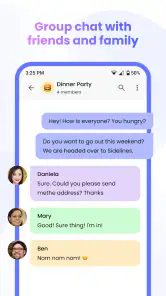
Analysis by Reviewed
I tend to judge a home-screen app by what happens after the first burst of enthusiasm: does it still make daily tasks easier once the novelty wears off? Connect SMS Home Screen has a clear appeal for people who text often and want conversations close at hand, but its lasting value depends on whether that shortcut fits the way you already use your phone. I’d treat it as a practical change to a familiar routine, not a reason to rebuild the entire screen.
The first-week appeal: fewer steps to a conversation
In the first few days, the benefit is easy to understand. If you often check a family chat, reply to a delivery update, or send a quick note between errands, putting SMS access on the home screen can make those interactions feel more direct. A useful test is to notice how often you currently open your messaging app just to check whether someone has replied. If that happens repeatedly, bringing conversations closer may save small interruptions throughout the day.
The shortcut is most compelling for people whose communication still centers on SMS and group texting. If most of your conversations happen in a separate chat service, the home-screen emphasis may matter less. I’d keep the layout focused at first rather than trying to make every part of the phone fit into one space. A home screen is useful when it answers a few common needs quickly; it becomes clutter when it tries to answer all of them.
Month-to-month value: a habit, not a makeover
The longer-term question is whether you keep reaching for the messaging entry point without thinking about it. That kind of habit is a better measure than how attractive the screen looks on day one. For example, if I regularly coordinate school pickups or check in with relatives, having the relevant SMS conversations within easy reach could become a small but dependable convenience. If I only send an occasional text, the change may not earn permanent space.
Connect SMS Home Screen is a free personalization app from Avalon Solutions LLC. It has a 4.5 average from around 6.9 thousand ratings, with over 500 thousand installs, which gives a prospective user some context about its audience. It was released in April 2024, and version 1.01.21 is listed for Android 10 and newer. The age rating is Everyone. Those details make it straightforward to assess basic fit, but my own decision would still come down to whether SMS is central to my daily routine.
Maintenance, friction, and realistic expectations
Any home-screen setup asks for a little upkeep. Contacts and conversations change, and a layout that once felt handy can become crowded as priorities shift. I’d review it after a week: keep the messaging access I actually use, remove anything that competes for attention, and resist adding shortcuts just because they are available. That simple check helps the screen stay useful instead of turning into another surface to manage.
I would also compare the experience with the phone’s usual messaging app and launcher before committing to a new routine. A standard messaging app may be the better choice if you prefer a full conversation view, while a familiar launcher can suit someone who values a clean, stable layout over messaging access on the home screen. Before switching, check whether the SMS conversations you rely on are easy to reach and whether the new arrangement feels natural to your hands. The best option is the one that reduces friction without making ordinary texting feel unfamiliar.
More From Our News Desk

Clash of Clans Is Won Between the Battles

Android Auto Makes the Case for Quieter Car Software

MobiOffice: Transforming Mobile Productivity with Seamless Integration

EA SPORTS FC™ Mobile Soccer: Redefining Mobile Sports Gaming

How Microsoft OneDrive Became a Mobile Productivity Giant

How Google Translate Breaks Language Barriers Effortlessly
Effortless Messaging at Your Fingertips
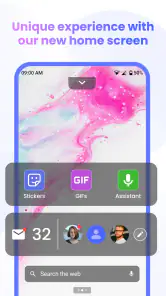
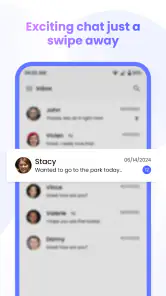
The first thing that caught my eye with the Connect SMS Home Screen app was how effortlessly it blends messaging into the home screen. Imagine not having to dive into your messaging app every time you want to send a quick text or reply. With this app, your recent conversations are right there, ready to be accessed with a simple tap. It’s like having your own personal assistant managing your texts, ensuring you never miss an important message.
Customization is Key
One of the standout features is the level of customization it offers. You can personalize the layout, adjust color schemes, and even select which widgets you want to prioritize. Whether you’re a minimalist who prefers a clean look or someone who loves a vibrant, widget-heavy home screen, this app caters to all styles. The flexibility is truly refreshing, and it feels like I’m in complete control of my device’s interface.
Moreover, the app supports an array of widgets beyond just messaging. From weather updates to quick access to your favorite apps, it’s all about making your phone work better for you. I found the interface intuitive, and within minutes, my home screen was transformed into a hub of efficiency and style.
Seamless Performance and User Experience
Performance-wise, the app runs smoothly, with no noticeable lag or glitches, which is crucial for an app that integrates so deeply with your device’s core functionalities. It’s designed to be lightweight, ensuring it doesn’t drain your battery or hog precious resources. I appreciate how it maintains a balance between functionality and performance, delivering a seamless user experience.
Another aspect that deserves a mention is the app’s security features. With privacy being a significant concern these days, having a home screen app that ensures your messages are encrypted and secure is a huge plus. It gave me peace of mind knowing my communications are safe from prying eyes.
Keeping the screen useful after the novelty
There is one practical trade-off I would keep in mind: a home-screen shortcut is only valuable if I can identify the conversation I need at a glance. During a busy morning, for instance, I might want to answer a family message while packing lunch, then return to the same conversation later without searching through several screens. I’d make that routine the test, rather than judging the app by how many widgets I can fit into the layout.
For a shared household, the appeal is less about decorating the phone and more about reducing the steps between seeing a message and acting on it. Someone coordinating plans with a partner or checking in with an older relative may appreciate that immediacy. On the other hand, a person who keeps the phone face down, silences most notifications, or uses another service for nearly all conversations may find the home-screen placement adds little. In that case, the phone’s existing messaging app is probably the simpler choice.
Where the convenience can wear thin
The main risk is visual and mental clutter. A conversation shortcut can be helpful, but a home screen packed with messaging, weather, and app access can compete with the very message you wanted to notice. I’d begin with the SMS element that solves a real annoyance, then add other items only if they replace steps I actually take. That approach makes it easier to tell whether the setup is earning its space after a few weeks.
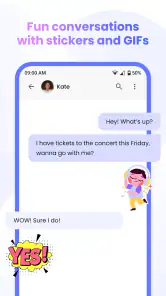
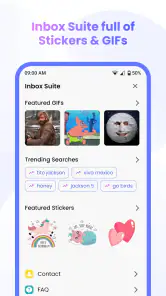
GIFs and emojis can also make group messages more expressive, but they are not automatically an improvement for every exchange. If I’m sending a quick practical update, plain text may be faster; if the group enjoys a more playful tone, visual replies can be a welcome option. The useful distinction is to treat these as communication choices rather than reasons to keep opening the app. A personalization tool should adapt to a habit, not create a new obligation to curate the screen.
Who should make room for it
I’d recommend trying it if SMS remains a regular part of your day and you like having a small number of useful actions visible without first opening a full app. It may suit someone who checks group conversations often, wants a more personal home-screen arrangement, and is willing to adjust that arrangement as routines change. Connect SMS Home Screen is in the personalization category, and its focus makes most sense when the home screen is a tool you actively use rather than a page you rarely visit.
I’d skip it if you prefer a fixed, uncluttered launcher, rely mainly on non-SMS messaging services, or want every text interaction to happen inside the same familiar inbox. A conventional messaging app is better for people who value a dedicated conversation view above a home-screen shortcut, while a basic launcher is often a better fit for someone who wants visual simplicity and no new setup to maintain. Neither alternative is universally superior; the deciding question is whether bringing SMS forward saves you enough effort to justify changing a screen you already know.
Making the setup work in an ordinary week
A useful way to judge the change is to give it a job rather than a decorative theme. I’d choose one recurring conversation—perhaps the group arranging a weekend visit—and see whether the home-screen placement helps me check in and reply without derailing what I was doing. If it saves a few deliberate trips into the inbox, that is meaningful. If I still open the same messaging app out of habit, the new placement may be more visual than practical.
For people who send texts while moving between tasks, the best workflow is to keep the interaction short: glance, open the relevant exchange, answer, and return to the task. The app’s home-screen focus can support that pattern, but it cannot decide which messages deserve attention. I’d avoid treating a prominent conversation as a reason to respond instantly; keeping the screen convenient should not turn every incoming text into an interruption.
Questions worth settling before switching
One practical question is whether the app replaces the way you currently open conversations or simply adds another route. I’d try the same everyday action both ways—checking a reply, then sending a brief response—and keep whichever route feels clearer. If the home-screen option leaves you unsure where a conversation lives or makes you repeat steps, there is little reason to force the change. Familiarity is a real advantage, especially for texting that needs to be quick and reliable.
Another consideration is whether GIFs and emojis suit the groups you actually message. They can add warmth to informal exchanges, but they may feel out of place in a work-related or purely logistical thread. I’d use them selectively and keep plain text as the default when clarity matters most. That small choice helps the app support the tone of a conversation instead of making every message feel like an invitation to embellish it.
People who share a phone or rely on a highly controlled home-screen arrangement should also think about who sees the screen and how they prefer to manage it. A more visible messaging entry point can be convenient, but it may not suit someone who wants a neutral, consistent layout that other household members already know. In those cases, keeping the usual launcher and opening the standard inbox is a reasonable choice, not a failure to get value from personalization.
Final Thoughts
In conclusion, the Connect SMS Home Screen app is a game-changer for those looking to enhance their smartphone experience. It’s not just about making your screen look good; it’s about making it work smarter. The app’s ability to integrate messaging seamlessly, coupled with its customizable features and robust performance, makes it a must-have for anyone keen on optimizing their device’s functionality. If you’re like me and love having everything you need just a tap away, give this app a try. You might find it’s exactly what you’ve been missing in your digital life.
Connect SMS Home Screen Frequently Asked Questions
Is Connect SMS Home Screen free to download?
Connect SMS Home Screen is free, so you can try its home-screen messaging approach without paying to download it. The app is listed for everyone and is a personalization app by Avalon Solutions LLC. Before installing, check that your device meets the minimum operating-system requirement and that you are comfortable using a messaging app integrated with your home screen.
What is Connect SMS Home Screen and how does it work?
Connect SMS Home Screen is an innovative app designed to enhance your mobile communication experience. It integrates SMS functionalities directly onto your home screen, allowing you to send, receive, and manage messages effortlessly without opening a separate app. This seamless integration not only saves time but also keeps your conversations readily accessible, ensuring you never miss an important message.
Is Connect SMS Home Screen compatible with all devices?
Connect SMS Home Screen is compatible with most Android and iOS devices. However, it's important to check the app's specifications in the app store to ensure it supports your device's operating system version. Compatibility might vary based on the device model and OS updates, so keeping your phone updated ensures optimal performance.
Does Connect SMS Home Screen have privacy features?
Yes, Connect SMS Home Screen prioritizes user privacy. It includes features such as end-to-end encryption for secure messaging. Additionally, users can customize who can view messages on the home screen and set privacy levels to protect sensitive information, ensuring a safe and private messaging experience.
Can I customize the appearance of my home screen with Connect SMS Home Screen?
Absolutely! Connect SMS Home Screen offers a variety of customization options to personalize your home screen experience. Users can choose from different themes, colors, and widget sizes to match their style. This level of customization allows for a unique and visually appealing interface that enhances user interaction with the app.
Pros
- Easy customization options available.
- Supports multiple messaging apps.
- User-friendly interface design.
- Stable and fast performance.
- Regular updates with new features.
Cons
- Limited theme options.
- Ads can be intrusive at times.
- Occasional app crashes.
- Requires access to many permissions.
- Some features require in-app purchases.
- Category
- Personalization
- Version
- 1.01.21











