

Concert Archives
- 100.00
- 4.8
- Installs
- 50.00K
- Price
- Free

Screenshots
Analysis by Reviewed
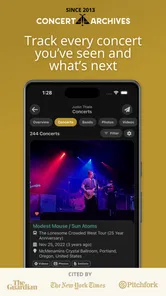
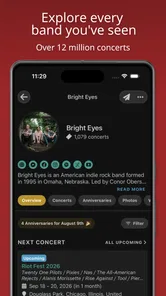
I use Concert Archives as a personal record of the shows I have attended, but its value goes beyond keeping a private list. It is an events app built around live music, with social and database elements that make old concert memories easier to organize and explore. Instead of treating a gig as something that disappears from my calendar after one night, it gives that experience a lasting place in my music history.
That focus makes it quite different from a general events calendar. The app is free, comes from Concert Archives LLC, and is aimed at concert lovers rather than people looking for every kind of local activity. Its Teen content rating also makes sense for a community centered on live entertainment, where the experience can include user-submitted information and conversations around venues, artists, and past events.
After spending time with it, my impression is that Concert Archives works best when I use it deliberately: I add shows, check an artist’s history before buying tickets, and return to older entries when I want to remember who played and where. It is not a replacement for every ticketing or discovery service, but it fills a useful gap between a diary, a music reference tool, and a small social network.
How Concert Archives feels in everyday use
I find the best way to judge Concert Archives is to start with what I’m asking it to hold: a record of nights out, artist research, or social activity. Those can overlap, but they do not have to, and choosing one purpose first helps me make thoughtful decisions about what I add. That question leads naturally to the controls and choices worth checking before building a concert history.
Quick enough for checking a show or adding a memory
The app’s strongest performance moments are the short ones. I can open it with a clear task in mind, look up an artist, inspect concert information, or record an event without feeling that I am entering a complicated music-management system. That matters because most people will not use a concert diary continuously throughout the day. They will reach for it after a show, while planning a night out, or when a friend asks about a past performance.
The interface is more useful when I approach it as a collection of focused actions rather than as a feed to browse endlessly. Searching for a performer, checking related event information, and maintaining my own history each have a clear purpose. This keeps the experience feeling lighter than many social platforms, where a simple lookup can lead through several layers of recommendations, advertisements, and unrelated posts.
My practical advice is to add a concert soon after leaving the venue, while the date, supporting acts, and location are still fresh. Waiting several months makes the diary less accurate, especially for festivals or multi-artist bills. Recording the event at the right moment also turns the app into a more dependable personal archive instead of a list that needs detective work later.
More From Our News Desk

 Gmail
GmailGmail in a Busy Inbox: Who Benefits Most?
From first account to crowded workday, Gmail earns its place through dependable search and flexible sorting—but its best fit depends on how much inbox maintenance you can tolerate.

 Prime Video
Switching to Prime Video: What Changes in Your Viewing Routine
Prime Video can make a compelling second home for streaming, but switching means learning a different catalog, rental layer, and route from browsing to playback.

 Universal TV Remote Control
Universal TV Remote Control Works Best as a Reliable Backup
A phone remote earns its place through quick setup and reliable habits. Here is how to get more from Universal TV Remote Control—and where its limits show.

 Weather - By Xiaomi
Weather by Xiaomi Review: Clear at a Glance, Less Clear Up Close
Xiaomi’s weather app makes everyday forecasts quick to scan, but its calm surface can leave useful details and recovery paths harder to find than they should be.

 X
XX Under Pressure: Can It Recover When Posting Goes Wrong?
A resilience-focused review of X, examining setup, mistaken posts, interruptions, weak connections, and the gaps that matter when recovery needs to be dependable.

 Clash of Clans
Clash of Clans Is Won Between the Battles
Its raids are quick; its community is a long-term project of coordination, teaching, rivalry, and shared responsibility—with all the friction that entails.
Latest News



What happens during heavier use
Concert Archives becomes more demanding when I move from one lookup to a long browsing session. Exploring an artist’s past performances, comparing venues, and jumping between event pages creates more work than simply checking one upcoming show. The experience is still centered on information rather than visual effects, so it does not feel like a resource-heavy game, but the amount of content I ask it to display can affect how smoothly a session feels.
This is where I prefer a focused workflow. If I am researching a band before a concert, I first open the artist page, then review the relevant event details, and only afterward add anything to my own history. That order reduces unnecessary back-and-forth. It also helps me separate research from personal record keeping, which is useful when I am looking at shows I did not attend.
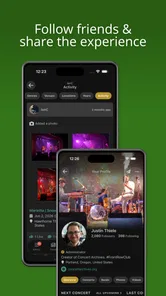
A second useful habit is to treat the social side as an optional layer. I do not need to follow every discussion or browse every contribution to benefit from the database. For someone with a large concert history, this can make the app feel more manageable. I can use it quietly as a diary, then participate socially when I have something meaningful to add.
The trade-off is that an app built around a broad concert database can feel less immediate than a simple notes application. A note takes seconds to create and can contain anything. Concert Archives asks me to think in terms of artists, events, dates, and music history. That structure takes a little more effort, but it gives the information more value later.
Reliability and recovering from interruptions
For this kind of app, reliability is not only about opening quickly. It is also about whether I can trust my concert history to remain coherent after repeated use. The diary concept encourages careful entries, so I pay attention to whether I can return to earlier records and understand them without having to reconstruct the whole evening from memory.
I recommend checking an entry before moving on when I am adding several shows at once. This is especially important after a festival or a short tour, where multiple dates and performers can blur together. A quick review of the artist, venue, and event details helps prevent small mistakes from spreading through my personal archive.
Recovery matters most when I am using the app in a busy environment. At a venue, my connection may be inconsistent, my battery may be low, and I may be switching between the app, messages, and the camera. I would not rely on any online concert database as my only record during that moment. If the information is important, I keep a temporary note and complete the archive entry afterward. That is not a criticism unique to this app; it is a sensible backup for any service used in crowded venues.
When I return after a break, the app is easier to use if I remember what role I want it to play. It can be a historical reference, a personal diary, or a social place for fans. Trying to make it do all three at once can feel busy. Choosing one main purpose first makes recovery from an interrupted session much less frustrating.
Older devices and practical constraints
The app supports Android devices running version 7.0 or later, which gives it a broad reach across older phones. That is helpful for users who keep a reliable older handset rather than replacing it every year. At the same time, support for an older operating system does not guarantee that every device will feel equally quick, particularly when storage is tight, background activity is heavy, or the phone has limited memory.
My expectation would be modest and realistic: this is an information and community app, not a demanding 3D title, so the main strain should come from browsing and connectivity rather than graphics. On an older phone, I would use it for planned lookups and diary updates instead of leaving it open while moving between several other apps at a venue.
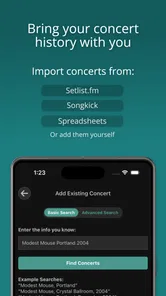
There is also a human constraint: concert information is only as useful as the care taken when entering it. A user with hundreds of memories may need a consistent naming habit for venues and events. I find it helpful to use the app’s existing event structure whenever possible instead of creating loosely described notes. Consistency pays off when I later search for a particular tour or try to remember where I saw an artist.
The current version is 10.2.2, so users should keep the app reasonably current through their normal app-store routine. Updates are particularly relevant for a service that depends on account activity, shared information, and compatibility with changing mobile operating systems. I would not install it on a very old device without first checking that the phone still handles other modern online apps comfortably.
Where it beats ordinary alternatives
A standard calendar is excellent for reminding me that a concert is coming, but it is not designed to become a detailed history after the event has ended. I can put a date in a calendar, yet that entry usually remains isolated from the artist’s wider performance history. Concert Archives feels more appropriate when my interest continues after the show.
A notes app offers more freedom. I can write a full review, attach personal impressions, or record who I attended with in any format I like. That flexibility is its advantage, and people who want a completely private journal may prefer it. The weakness is organization: free-form notes become harder to search and compare as the years pass. Concert Archives gives my memories a music-specific framework, even if that framework is less open-ended.
Ticketing apps are better for purchasing, managing entry details, and handling the immediate logistics of an upcoming event. I would continue using those tools for tickets and venue instructions. Concert Archives serves a different stage of the concert journey: discovering performance history, documenting attendance, and connecting the event to a longer relationship with an artist.
Social media can produce faster conversation around a show, but it is also noisy and temporary. Posts disappear into timelines, while a concert archive is more intentional. I like that distinction. If I want instant reactions, I use a social platform; if I want to remember the show years later, a dedicated archive is the better place.
Useful workflows beyond simply listing concerts
One of the less obvious ways I use the app is as a decision-making aid before buying a ticket. When an artist announces a new date, I can look back at related performances and use that context to decide whether the event is likely to fit what I enjoy. It does not replace listening to the artist or reading current venue information, but it adds historical perspective that a ticket page normally does not provide.
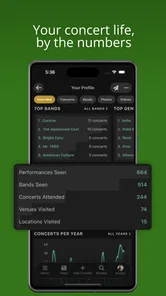
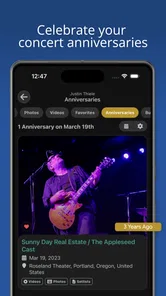
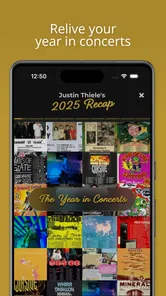
I also find it useful for rebuilding a personal music timeline. Instead of asking myself which concerts I attended in a particular period, I can work backward from artists and venues. This is more reliable than memory alone, especially when my listening habits changed over time. The result is not just a list of nights out; it becomes a map of how my taste developed.
Another practical workflow is preparing for conversations with other fans. Before meeting someone who follows the same performer, I can refresh my memory about earlier shows and identify the events I actually shared with them. That makes the social feature more meaningful than random interaction, because it is connected to real attendance and shared music experiences.
For festival regulars, I would use the app in two passes. First, I would record the overall event and the performers I remember immediately. Later, when I have time and a better connection, I would tidy the details and fill in anything missed. This avoids trying to perform careful database work while standing in a crowded field, yet still preserves the memory before it fades.
Who will enjoy it, and who should skip it
Concert Archives is a strong fit for people who attend shows regularly, follow particular artists across multiple tours, or enjoy looking back at their live-music history. It is also a good choice for someone who wants a social layer without using a general-purpose network for every concert conversation. The free price removes the biggest barrier to trying it, and the community scale is already substantial, with over fifty thousand installs.
The audience response is encouraging as well: the app holds a 4.8 average from around seven hundred ratings, alongside roughly one hundred written reviews. I would treat that as a useful signal of satisfaction, not a guarantee that every user will enjoy the same workflow. People who dislike structured logging may still find it more work than a quick note.
I would skip it if my only goal is buying tickets, receiving entry reminders, or finding broad local events across many categories. A ticketing service or general events app will be more direct for those tasks. I would also choose a private notes app instead if I want long personal essays about each night and do not care about connecting those memories to an organized concert database.
Privacy-minded users should decide how social they want their activity to be before building a large public-facing history. I prefer to think carefully about what I record and share, particularly when an entry includes details about friends or a specific evening. The app’s social identity is useful, but it should not pressure me into turning every private memory into a public post.
Final performance verdict
My overall view is that Concert Archives feels most successful when it stays in its lane: a specialized home for concert history, artist research, and fan interaction. Its speed expectations are reasonable for an information-focused app, its heavier moments come from extended browsing rather than demanding graphics, and its usefulness improves when I follow a simple routine for recording and checking events.
The main friction is not the concept but the discipline it asks from me. A diary only becomes valuable when I keep it accurate, and a database is more useful when I take the time to search and organize rather than treating it as a one-time lookup. Users who want instant, unstructured notes may find that effort unnecessary. For me, the structure is precisely what makes old concert memories easier to use.
Concert Archives was released on February 15, 2021, and its continued presence in the events category gives it the feel of an established specialist rather than a temporary concert tracker. I would recommend it to a friend who regularly attends live music and wants more than a calendar reminder. If your concerts are part of your personal music story, this app is worth keeping close. Just use a ticketing service for transactions, a calendar for alerts, and a backup note when you are standing in a crowded venue with an unreliable connection.
Concert Archives Frequently Asked Questions
Who is Concert Archives designed for?
Concert Archives is best suited to people who enjoy live music and want a place to keep track of the shows they attend. It can also appeal to fans who like browsing artist histories, venues, and other concertgoers’ experiences. If you mainly need a ticket-buying service, this app is more focused on concert discovery and documenting live-music memories than on purchasing tickets.
What is Concert Archives, and what can I use it for?
Concert Archives is a music community and concert-tracking platform designed for people who want to document and explore live music experiences. You can create a personal concert history, browse artist tour dates and past performances, check venue information, and discover shows attended by other fans. It is especially useful for building a searchable record of the concerts you have seen over the years.
Can I use Concert Archives to find upcoming concerts and tour dates?
Yes. Concert Archives includes listings for upcoming events, artist tours, and performances at different venues. You can search by artist, location, or venue to see available information, although the completeness and accuracy of listings may vary depending on community contributions and external event data. It is a helpful discovery tool, but you should still confirm ticket availability, times, and venue details with the official organizer.
Can I keep a personal list of concerts I have attended?
One of the main features of Concert Archives is the ability to record your concert history. You can add artists, dates, venues, and other details connected with shows you attended. This makes the service valuable for frequent concertgoers who want to preserve memories or review their live-music history. Depending on the platform version, some editing or account features may require signing in.
Does Concert Archives provide concert photos, setlists, and reviews?
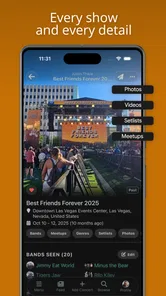
Concert Archives may include user-submitted photos, comments, reviews, setlist information, and other details about particular performances. The amount of content differs significantly from one artist or event to another, because it depends on contributions from fans and available records. Treat these entries as community information rather than guaranteed official documentation, and check multiple sources when precise setlist or event details matter.
Pros
- Tracks concerts attended with dates
- venues
- artists
- and personal notes.
- Large artist and event database helps reconstruct your live-music history.
- Setlist details and photos make entries more memorable and useful.
- Artist pages reveal upcoming events and related concert activity.
- Simple interface makes adding and browsing past shows straightforward.
Cons
- Some artist or concert records may be incomplete or user-submitted.
- Advanced discovery features can feel limited compared with dedicated music apps.
- Requires an account to fully save and manage your concert history.
- Setlist information may vary in accuracy between different events.
- Less useful for users who rarely attend concerts or prefer other music genres.











