Compress Video Size Compressor
- 2.99K
- 4.6
- Installs
- 5.00M
- Price
- Free

Screenshots
Analysis by Reviewed
When a video is too large to send or keep, I want a straightforward way to make it smaller without turning it into a blurry mess. Compress Video Size Compressor is built for that practical job: it lets you compress and convert videos, adjust resolution and bitrate, and decide how much space to trade for picture quality. I see it as a focused utility rather than an editor for people who want to build polished videos from scratch.
When a smaller file is the real goal
Video compression is most useful when the original clip is perfectly good but inconveniently large. Maybe I want to share a recording without making someone wait for a huge transfer, or keep a few everyday clips on my phone without letting them crowd out everything else. In those situations, a dedicated compressor can save time because its main controls are aimed at changing the file, rather than trimming scenes, adding titles, or building a finished edit.
There is a useful distinction between making a video easier to handle and preserving it as an archive. A compressed copy can be convenient for routine viewing or sharing, but it should not automatically replace the original if the footage matters to me. I would treat the app as a way to create a practical second version, especially for clips I may want to send or watch casually, and keep the untouched file when future editing or maximum detail matters.
Where it fits in a video workflow
The app comes from Inverse AI and sits in the crowded world of video players and editors, though its appeal is more about file management than creative editing. It is free to install, rated for Everyone, and has a 4.6 average from around 173,000 ratings. That level of adoption makes it a familiar option to consider, but the useful question is whether its controls match the way you handle video.
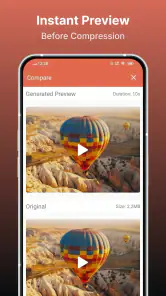
For a quick share, I would start by thinking about the destination. A clip meant for a messaging app or an email does not need the same resolution as footage I plan to watch on a large screen. Lowering resolution can reduce file size substantially, while changing bitrate offers another way to balance detail against storage. My advice is to keep the original until you have checked the compressed copy; that simple habit makes experimenting much less risky.
Why You Need It
If you've ever found yourself deleting precious memories just to make room for more, you're not alone. Compress Video Size Compressor is here to rescue you from this digital dilemma. This app shrinks your videos without sacrificing quality, allowing you to store more without breaking the bank on storage upgrades. In practice, I would treat “without sacrificing quality” as a goal, not a guarantee for every clip: a strong reduction in bitrate or resolution can be visible, especially in fast motion or detailed scenes.
User Experience
Upon launching the app, you're greeted with a clean, intuitive interface. The design is straightforward, with clear instructions guiding you through the compression process. You don’t need to be tech-savvy to navigate through the app; it’s pretty much a plug-and-play experience. That simplicity suits occasional users who want to make one clip smaller without learning a full editing suite. The trade-off is that people who need fine-grained editing or a detailed production workflow may prefer a dedicated video editor.
More From Our News Desk

Weather by Xiaomi Review: Clear at a Glance, Less Clear Up Close

X Under Pressure: Can It Recover When Posting Goes Wrong?

Clash of Clans Is Won Between the Battles

Android Auto Makes the Case for Quieter Car Software

MobiOffice: Transforming Mobile Productivity with Seamless Integration

EA SPORTS FC™ Mobile Soccer: Redefining Mobile Sports Gaming
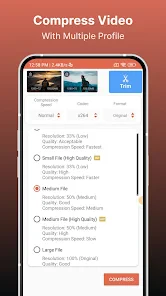
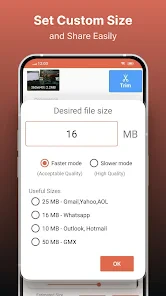
One of the standout features is the ability to choose the level of compression. Whether you want to slightly reduce the size or significantly shrink it, the app gives you control over the final product. I found this especially handy when trying to maintain the quality of high-resolution videos. A sensible workflow is to make a moderate change first, inspect the result on the screen where it will be viewed, and only then try a stronger reduction if the file is still too large. This avoids compressing a personal recording more aggressively than necessary.
Getting a better result from each conversion
I would make compression decisions in the order that matters most for the clip: first decide where it will be watched, then choose how much visual detail that destination really needs. A quick phone-screen share may tolerate a smaller resolution better than a clip intended for a large display. If the image still looks soft after a resolution change, I would avoid pushing the reduction further just to chase a smaller number; a usable picture is often worth more than squeezing out the last bit of space.
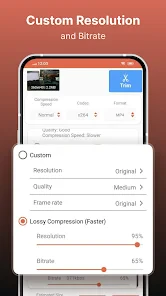
Bitrate is another control worth approaching gradually. It affects how much visual information is retained, so cutting it aggressively can make movement or fine textures look less clean. For footage with lots of motion, I would test a short or representative clip before applying a setting across several important videos. A calm indoor recording and a fast-moving outdoor scene may not respond equally well, even if they start at similar sizes.
Conversion also has a practical role beyond shrinking a file: it can help when a video needs to be in a different format for a particular playback or sharing situation. I would make a separate converted copy rather than overwrite an original, then check that it opens and looks right in the place I plan to use it. That extra check is especially worthwhile when I am preparing a clip for someone else, since a smaller file is not helpful if the recipient cannot play it.
Performance and Features
The app doesn’t just stop at compressing; it also boasts quick processing times. I was impressed by how swiftly it handled large files, making it a practical tool for those who need to compress multiple videos in a hurry. Processing speed can still depend on the video and device, so I would avoid starting a large batch when I need the phone immediately. For a single short clip, the direct controls are more useful than opening a broader editor and searching through unrelated tools.
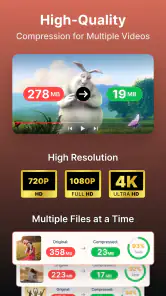
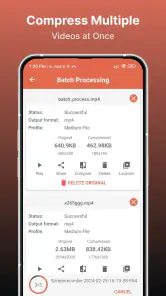
Additionally, the app supports a wide range of video formats, making it versatile enough for different needs. Whether you’re working with MP4, AVI, or MOV files, this app has got you covered. The batch compression feature is a game-changer, especially if you’re dealing with a library of videos. For several clips, I would first sort out which ones actually need shrinking and test one representative file. Different footage can react differently to compression, and checking a sample helps avoid repeating a setting that makes an important clip look worse than expected.
A realistic example is coming home with several long clips from an outing and discovering that there is not enough room to keep them all on the phone. I would use compression on the clips I mainly want to share or keep for casual viewing, then compare each output with its original before deleting anything. For footage that I might edit later, I would keep the original and compress only a copy. The app is most useful when the goal is a smaller, convenient file—not when preserving every bit of source detail is the priority.
For a more careful batch workflow, I would group clips by purpose instead of treating every file alike. Copies meant for quick sharing can use a more space-conscious approach, while clips I expect to revisit deserve a gentler reduction or no compression at all. I would also check the output folder or file names before starting another run, so it is clear which version is the compressed copy. Keeping that simple separation helps prevent the easy mistake of sharing or editing the wrong version later.
It also offers conversion and controls for resolution and bitrate, which can help when a clip needs to suit a particular sharing or playback situation. That makes it more flexible than relying only on a phone’s built-in share sheet, which may not give the same direct control over these choices. On the other hand, people who already use a full editor may find its compression tools sufficient and prefer to keep their work in one place. I would choose this app when I want a quick file-size adjustment, not as a replacement for editing, trimming, or assembling a finished project.
Compared with a general-purpose editor, the appeal here is focus: I do not need to enter a creative timeline just to make a clip smaller. Compared with the basic options built into a phone or sharing service, the value is having direct access to resolution and bitrate choices. The compromise is that this is not a complete media-management solution. If my main task is cutting out unwanted moments, adding captions, or assembling several shots, I would reach for an editor first and compress the finished video afterward.
The app is free to install, with in-app purchases ranging from $0.99 to $209.99 per item. I would check the purchase details in the app before committing, especially if I only need an occasional compression. It has over 5 million installs and was released on January 30, 2020; version 18.3.0 requires Android 8.0 or later. Those details make it relevant to Android users, while anyone choosing a tool for another platform should check availability for their device before planning a workflow around it.
For someone who only compresses a video now and then, I would begin with the free installation and see whether the available workflow already solves the problem. The listed purchase range is broad, so I would not assume every paid option is necessary for a basic one-off task. Before buying anything, I would identify what extra capability I actually need and read the purchase screen carefully. If I only want to reduce a few clips for sharing, a recurring payment or expensive add-on would be difficult to justify unless it clearly fits my use.
Who will appreciate it, and who may not
I think this is a good fit for people who regularly record videos on a phone, share clips with family or friends, or need to manage a crowded collection without opening a full editing suite. It is also useful for someone who wants to make a smaller copy for everyday playback while keeping a higher-quality original elsewhere. Its focused controls make most sense when the problem is file size, not the content of the video itself.
I would be more cautious if I were a creator who needs dependable source quality for later edits, or if I had a strict delivery requirement that specifies exact output settings. Compression always involves trade-offs, and the right result depends on the footage and how it will be viewed. Someone who needs precise, repeatable export presets or a complete editing pipeline may be better served by a dedicated editor whose broader workflow they already know.
It may also be the wrong choice when storage is not the real problem. If I have access to a better place to keep originals and do not need smaller copies for sharing, leaving the video alone avoids unnecessary quality loss. Likewise, a person who only wants to trim a few seconds might find a basic editor more direct. I would install this when I expect to compress or convert, rather than expecting it to solve every video task on my phone.
Final Thoughts
In a nutshell, Compress Video Size Compressor is a must-have for anyone juggling large video files. It's simple, efficient, and most importantly, effective. Whether you're freeing up space on your device or prepping videos for sharing, this app makes the process hassle-free. I would recommend it to people who regularly run into oversized clips and want more say over compression than a basic share option provides. I would skip it if I need a full editing workspace or cannot accept any reduction in quality.
Overall, it’s a solid investment for your digital toolkit, ensuring you never have to compromise on quality while managing video sizes. So, give it a try and experience the convenience for yourself! I would still keep an original copy of valuable footage and judge the compressed result before sending or deleting anything. Used with that small precaution, it is a practical choice for everyday space-saving and sharing, while users who prioritize maximum source quality should leave their videos untouched.
My recommendation is to think of it as a practical tool for making a second, more manageable version—not as a magic way to make every video smaller with no visible cost. Start with a moderate adjustment, check the result on the screen and in the app where it will be shared, and keep the original if the recording matters. For Android users on version 8.0 or later who face this problem often, it is an approachable option; for occasional trimming or professional editing, another kind of app may be a better fit.
Compress Video Size Compressor Frequently Asked Questions
What should I check before installing Compress Video Size Compressor on Android?
Check that your device meets the app’s Android requirement before downloading: it needs Android 8.0 or later. Compress Video Size Compressor is a video editing app for reducing video file sizes, and it is listed as free to download. If your device runs an older version of Android, you may need to update it before you can install the app.
Can Compress Video Size Compressor help prepare videos for sharing or storage?
Yes. The app is designed to compress videos and also provides video conversion, resolution, and bitrate controls. These options can be useful when you want a smaller file for sharing or need to adjust a video before keeping it on your device. You can choose settings to suit your needs, while considering the balance between file size and the result you want.
Is Compress Video Size Compressor available for free, and what might cost extra?
Compress Video Size Compressor is free to download, so you can try its core video-compression tools without paying upfront. In-app purchases are also available, with listed prices ranging from $0.99 to $209.99 per item. Check the purchase options in the app before confirming anything, and consider whether the free features meet your needs before choosing an extra.
Who is Compress Video Size Compressor intended for, and is it suitable for all ages?
This app is a video editing utility for people who want to make videos smaller or adjust how they are converted. Its content rating is Everyone, so it is marked as suitable for a broad audience. As with any app, parents can decide whether its tools and any optional purchases are appropriate for children using a shared device.
What features does Compress Video Size Compressor offer?
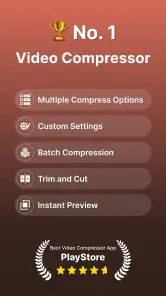
Compress Video Size Compressor provides a range of features designed to reduce the file size of your videos without compromising quality. The app offers various compression options, allowing you to select the level of compression suitable for your needs. Additionally, it supports batch processing, enabling users to compress multiple videos simultaneously. You can also choose between different output formats, ensuring compatibility with various devices and platforms. Its stated tools also include video conversion and controls for changing resolution and bitrate, giving you options when preparing a file for sharing or storage.
Pros
- Efficiently reduces video file size.
- Supports various video formats.
- User-friendly interface.
- Quick processing time.
- Maintains good video quality.
Cons
- Limited editing features.
- Ads can be intrusive.
- Premium features require purchase.
- Occasional app crashes.
- Some formats not supported.
- Category
- Video Players & Editors
- Version
- 18.3.0











