

Comfort by Mitsubishi Electric
- 1.37K
- 4.3
- Installs
- 50.00K
- Price
- Free

Screenshots

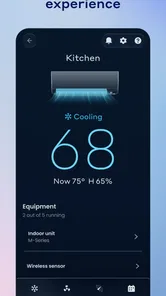
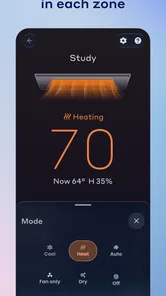
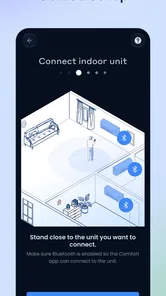
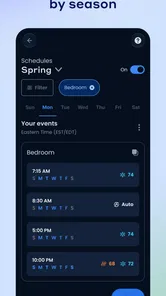


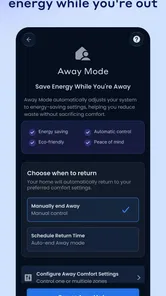
Analysis by Reviewed
When I first looked at Comfort, I approached it as a practical home-control tool rather than another app I would open for entertainment. Its purpose is narrow but useful: it lets a smartphone or tablet communicate with compatible Mitsubishi Electric HVAC systems. That focus immediately tells you who it is for. If your home already uses Mitsubishi Electric equipment, Comfort can put everyday climate adjustments in a more convenient place. If you do not own compatible equipment, there is little reason to install it.
The app sits in the House & Home category and is developed by Mitsubishi Electric US. It is free to download, carries an Everyone age rating, and has been available since August 25, 2015. The current release is version 3.5.0, with support beginning at Android 7.0. Those details make it accessible to many older Android devices, although compatibility with the HVAC system itself matters more than the phone requirement.
My overall impression is that Comfort works best as the final link in a simple routine: I notice that the room is too warm or too cool, open the app, make an adjustment, and get back to what I was doing. It is not a replacement for a complete smart-home platform, and I would not choose it for broad device automation. Its value comes from giving Mitsubishi Electric owners a direct way to manage their heating and cooling without walking to the wall controller.
From an uncomfortable room to a useful adjustment
I find the most useful way to judge Comfort is to start with the moment that prompts me to open it: a room feels wrong, and I want to make a considered adjustment without going to the wall controller. That everyday need sets a realistic bar for speed and ease. From there, I look at how the routine holds up when several people or rooms are involved.
The starting condition matters more than the download
The first question I would ask before installing Comfort is not whether the interface looks appealing. It is whether the HVAC equipment in the home is supported. The app is designed around Mitsubishi Electric systems, so it is not a universal remote for any air conditioner or heat pump. This is the most important decision point, because a free app is still wasted time if the household system cannot work with it.
For a compatible setup, the starting problem is familiar. I might be leaving work and want the house comfortable when I arrive, or I might be upstairs and not want to cross the house simply to change the temperature. A phone is already close at hand, so using it as the control surface feels natural. That is especially helpful when the HVAC unit is in another room, on another floor, or positioned where the physical controller is inconvenient to reach.
Comfort has a 4.3 average from around 2.8 thousand ratings, with roughly 1.4 thousand written reviews. I read that level of response as a sign that the app solves a real need for a meaningful group of owners, while still leaving room for device-specific frustrations. The rating is encouraging, but it should not be treated as a guarantee that every Mitsubishi Electric installation will behave identically.
More From Our News Desk

 Gmail
GmailGmail in a Busy Inbox: Who Benefits Most?
From first account to crowded workday, Gmail earns its place through dependable search and flexible sorting—but its best fit depends on how much inbox maintenance you can tolerate.

 Prime Video
Switching to Prime Video: What Changes in Your Viewing Routine
Prime Video can make a compelling second home for streaming, but switching means learning a different catalog, rental layer, and route from browsing to playback.

 Universal TV Remote Control
Universal TV Remote Control Works Best as a Reliable Backup
A phone remote earns its place through quick setup and reliable habits. Here is how to get more from Universal TV Remote Control—and where its limits show.

 Weather - By Xiaomi
Weather by Xiaomi Review: Clear at a Glance, Less Clear Up Close
Xiaomi’s weather app makes everyday forecasts quick to scan, but its calm surface can leave useful details and recovery paths harder to find than they should be.

 X
XX Under Pressure: Can It Recover When Posting Goes Wrong?
A resilience-focused review of X, examining setup, mistaken posts, interruptions, weak connections, and the gaps that matter when recovery needs to be dependable.

 Clash of Clans
Clash of Clans Is Won Between the Battles
Its raids are quick; its community is a long-term project of coordination, teaching, rivalry, and shared responsibility—with all the friction that entails.
Latest News



Preparing the household workflow
Before relying on the app, I would make sure the HVAC system is already installed and functioning normally through its usual control method. That gives me a reliable fallback while I establish the phone-based workflow. I would also keep the physical controller available during the first few uses, because it is much easier to tell whether a problem comes from the app connection or from the HVAC system itself when I can compare both control methods.
A useful habit is to decide what I actually want to change before opening the app. If the room feels uncomfortable, the goal might be a temperature adjustment, a change in operating mode, or simply checking the current state. Thinking about the desired outcome first prevents random tapping and makes it easier to notice whether the command produced the expected result.
This preparation is one of the less obvious advantages of a dedicated manufacturer app. The control experience is tied to the equipment it is meant to operate, rather than trying to present a generic collection of controls for unrelated brands. The trade-off is equally clear: the app is more relevant to Mitsubishi Electric owners, but much less useful to anyone looking for a broad, brand-neutral home-control solution.
Moving through the control step by step
In normal use, I begin by opening Comfort and selecting the relevant HVAC system or room when the installation includes more than one controllable area. From there, I look for the current operating state before making a change. That small pause matters. It helps avoid switching the wrong unit or changing a setting that was already doing what I wanted.
I then make one adjustment at a time and give the system a moment to respond. I prefer this approach to quickly changing several controls together, because it makes the outcome easier to understand. If the room needs cooling, I can request the appropriate change and then check whether the system reflects it. If I am preparing the home before leaving, I can make the change while I am still away from the wall controller and verify the result when I return.
The app’s main strength here is convenience rather than complexity. Comfort turns a phone or tablet into a familiar control point for Mitsubishi Electric HVAC equipment. That can remove small interruptions from the day: no searching for a remote, no walking to a separate room, and no need to remember a complicated sequence of buttons on a physical controller.
One practical tip is to use the app for deliberate adjustments instead of repeatedly checking it every few minutes. HVAC systems do not always produce an instant change in the room, and repeatedly sending new commands can make it harder to judge what the system is doing. I find the workflow more dependable when I set the intended condition once, wait, and then evaluate the room rather than chasing every short-term sensation.
Handoffs between phone, tablet, and wall control
The real workflow is not only app to HVAC system. It also includes handoffs between people and controllers. Someone may adjust the system from a tablet at home while another person changes it from a phone later. A family member may use the traditional controller without knowing what was last selected in Comfort. These handoffs are where a simple control app can become confusing if nobody checks the current state before changing it.
For that reason, I would treat the displayed condition as the starting point for every new adjustment. Before changing a setting, I would check which equipment I am controlling and what it appears to be doing. This is particularly important in a home with multiple indoor units, where a command intended for one room can be unhelpful if applied to another.
Another useful handoff happens between the person making a change and the person experiencing the result. If I adjust the home before a family member arrives, I should think of the app as a way to prepare the environment, not as proof that every room will immediately feel identical. Room size, doors, sunlight, and the HVAC system’s own operating behavior still affect the final comfort level.
Comfort also fits a shared-device scenario. A tablet left in the kitchen can be more approachable for some household members than a phone-based control screen. On the other hand, a phone is more convenient when I am away from home. This flexibility is helpful, but it means the household should avoid treating one screen as the unquestioned source of truth. The physical controller and the app remain part of the same system, and a later manual change can alter the result.
A realistic everyday example
Imagine that I leave home on a cool morning and expect the afternoon to feel much warmer. Before heading back, I open Comfort on my phone and check the HVAC system associated with the main living area. I make the needed adjustment, then leave the app rather than repeatedly reopening it. When I arrive, I assess the room and make a smaller correction if necessary.
What makes this useful is not a dramatic transformation. It is the removal of a small but recurring inconvenience. I can prepare the space without entering it first, and I can use the same phone I already carry. If the house has separate areas, I need to pay attention to the selected unit rather than assuming one change affects every room. That awareness is the difference between a smooth routine and an unexpectedly warm bedroom or unnecessarily cooled hallway.
A second scenario is nighttime. If I am already in bed and the room becomes uncomfortable, using the phone can be less disruptive than getting up to find a controller. In that situation, the best workflow is conservative: identify the unit, make the smallest sensible change, and stop. The app is most helpful when it reduces movement and mental effort, not when it encourages constant fine-tuning.
What the result feels like in practice
The successful outcome is straightforward: the Mitsubishi Electric HVAC system receives the intended command, and the room gradually moves toward a more comfortable condition. Comfort is therefore best judged by how reliably it supports that complete loop from noticing a problem to making a correction. A polished interface is nice, but the real test is whether the app helps me finish the job without unnecessary steps.
I also appreciate that the app is free. There is no purchase decision standing between a compatible equipment owner and trying the phone-based control experience. Its install base is over 50 thousand, which gives it a level of practical visibility beyond a niche experiment. Still, adoption numbers do not replace checking whether a particular HVAC configuration is supported.
The app is especially appealing to people who already prefer managing household tasks from a phone. It can reduce dependence on a dedicated controller and make adjustments feel more familiar. It is also a reasonable choice for households where the HVAC equipment is installed in a hard-to-reach location or where different people need access to the same basic control workflow.
On the other hand, I would not recommend it as the first choice for someone who wants one dashboard for lighting, security, appliances, and climate. Comfort is focused on Mitsubishi Electric HVAC control. A broader smart-home platform may be better for someone who values cross-brand scenes and centralized automation, provided that platform supports the specific HVAC equipment. The dedicated app remains preferable when direct manufacturer-focused control is the priority.
Where the flow breaks down
The first point of friction is compatibility. The app cannot make unsupported equipment behave like a supported system, so checking the HVAC model and installation arrangement is essential before building a routine around it. This is not a flaw unique to Comfort, but it is a limitation that matters more here because the app has a narrow purpose.
The second issue is that phone control does not eliminate the need to understand the home’s HVAC layout. In a multi-room installation, choosing the wrong indoor unit can produce a perfectly valid command for the wrong place. I would slow down at that selection step, especially when using the app while distracted or in a hurry.
There is also a difference between sending a command and immediately feeling the result. A room may take time to become comfortable, and the app cannot change the physical behavior of the building. If the expectation is instant temperature change, the experience may feel disappointing even when the control action worked correctly. I find it better to use Comfort for planned adjustments and verification rather than treating it like an instant room-temperature switch.
Another possible weakness is reliance on the phone or tablet as an intermediary. A dead battery, an unavailable device, or a household member who prefers physical buttons can interrupt the routine. That is why I would keep the standard controller usable and make sure other residents know how to operate the system without the app. Convenience is strongest when it adds an option rather than becoming the only option.
Finally, the app’s age and focused design may not satisfy users expecting the breadth of a modern general-purpose smart-home hub. It has been around since 2015, and the current version is 3.5.0, but those facts alone do not make it a full automation platform. I would choose it for direct HVAC management, not for elaborate routines, extensive device integrations, or a single control center for an entire home.
Who should install it
I would point Comfort toward a Mitsubishi Electric owner who wants practical control from an Android phone or tablet and who is comfortable keeping the physical controller as a backup. It makes the most sense when the equipment is already installed, the user regularly adjusts comfort while moving around the home, or the HVAC unit is inconvenient to reach.
I would be more cautious recommending it to renters or shoppers who have not confirmed the equipment’s compatibility. I would also steer away from it for anyone whose main goal is controlling many different smart-home products from one app. In that case, a broader platform may offer a better overall workflow, while Comfort remains the more direct option for Mitsubishi Electric HVAC control.
For me, the final verdict is positive but specific. Comfort is useful when the problem is “I need to manage my Mitsubishi Electric HVAC system more conveniently,” not “I need a complete smart home.” Its free access, approachable device requirements, and focused purpose make it worth trying for compatible owners. The best results come from checking the selected unit, making measured changes, allowing time for the room to respond, and treating the app as one part of a dependable household routine.
If that matches your situation, Comfort can turn an ordinary phone or tablet into a handy extension of the HVAC controls you already use. I would not expect it to replace every other control method or solve the physical limits of heating and cooling, but within its intended role, it can make small daily adjustments noticeably easier.
Comfort by Mitsubishi Electric Frequently Asked Questions
Is Comfort by Mitsubishi Electric available for both Android and iOS?
Comfort by Mitsubishi Electric is a smartphone and tablet app for controlling compatible Mitsubishi Electric HVAC systems. Before downloading, check that your device’s operating system meets the app’s requirements and that the app is available in your device’s app store. The listed minimum operating-system requirement is version 7.0, so devices running older software may not be able to install it.
What is Comfort by Mitsubishi Electric?
Comfort by Mitsubishi Electric is a companion app designed to help users monitor and control compatible Mitsubishi Electric heating and cooling systems from a smartphone or tablet. Depending on the installed equipment and connected Wi-Fi interface, it may allow you to adjust temperature, change operating modes, manage fan settings, and check the system remotely. Available functions can vary by product, region, and installation.
Which Mitsubishi Electric systems are compatible with the app?
Compatibility depends on the exact Mitsubishi Electric air-conditioning or heating model, the installed Wi-Fi adapter, and the country where the equipment is being used. Not every indoor unit supports app control, and some systems require a specific interface or professional installation. Before downloading, check the official compatibility list or consult an authorized Mitsubishi Electric installer to confirm that your equipment can connect.
What can I control remotely with Comfort by Mitsubishi Electric?
For supported systems, the app can provide remote access to common comfort settings such as turning the unit on or off, adjusting the target temperature, selecting cooling, heating, fan, or automatic operation, and changing fan speed. Some compatible products may also offer scheduling, energy information, status notifications, or multi-room control. The exact tools depend on your model and region.
Does Comfort by Mitsubishi Electric require an internet connection?
Yes, remote operation generally requires the air-conditioning system to be connected to a compatible home Wi-Fi network and linked with the app. Your phone also needs internet access when controlling the unit away from home. If the Wi-Fi connection is interrupted, local controls on the air conditioner may continue working, but remote commands, notifications, and status updates may be unavailable until the connection is restored.
Pros
- Official support for Mitsubishi Electric air-conditioning systems
- Remote temperature and mode adjustments from your phone
- Scheduling helps automate daily cooling and heating routines
- Useful status information for connected indoor units
- Clean interface with straightforward controls
Cons
- Requires a compatible Mitsubishi Electric system and Wi-Fi setup
- Some features may vary by model
- region
- or controller hardware
- Initial pairing can be confusing for less technical users
- Remote access depends on a stable internet connection
- May offer limited value if you only use basic manual controls







